giriiş
Thank you for choosing the Opal Selfie Stick OP-Sel-BT-01. This manual provides essential information for the safe and effective use of your device. Please read it thoroughly before operation and retain it for future reference.
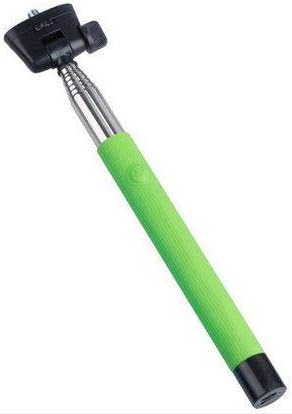
Şekil 1: The Opal Selfie Stick OP-Sel-BT-01 in green, showing its extendable arm, phone holder, and comfortable grip.
Ürün Özellikleri
- Renk: Yeşil
- Ana Malzeme: Çelik
- Maksimum Yük Kapasitesi: 500 gr
- Bağlantı: Kablosuz (Bluetooth)
- Uyumlu Sistemler: Android 3.0 ve üzeri, iOS 4.0 ve üzeri
Kurmak
- Unfold the Selfie Stick: Gently pull the phone holder section upwards to extend the stick.
- Adjust Phone Holder: Telefonun cl'sini açamp and securely place your smartphone within it. Ensure the phone is centered and stable. The clamp is designed to hold various phone sizes.
- Güç Açık: Locate the power button (if applicable, usually on the handle) and press it to turn on the selfie stick. An indicator light may illuminate.
Kullanım Talimatları
Bluetooth Eşleştirme
- Ensure the selfie stick is powered on and in pairing mode (indicator light may flash rapidly).
- Akıllı telefonunuzda şuraya gidin: Ayarlar > Bluetooth.
- Bluetooth’u açın ve kullanılabilir cihazları arayın.
- Select "Opal OP-Sel-BT-01" or a similar name from the list of devices.
- Once paired, the indicator light on the selfie stick may turn solid or turn off, indicating a successful connection.
Fotoğraf/Video Çekme
- Akıllı telefonunuzun kamera uygulamasını açın.
- Selfie çubuğunu istediğiniz uzunluğa kadar uzatın.
- Position your phone for the desired shot.
- Press the shutter button on the selfie stick handle to capture a photo or start/stop video recording.
Bakım
- Temizlik: Selfie çubuğunu yumuşak, kuru bir bezle silin. Aşındırıcı temizleyiciler veya çözücüler kullanmayın.
- Depolamak: Store the device in a cool, dry place away from direct sunlight and extreme temperatures. Retract the stick fully before storage.
- Pil Bakım: If the selfie stick has a rechargeable battery, ensure it is charged periodically even when not in use to maintain battery health.
Sorun giderme
| Sorun | Olası Neden | Çözüm |
|---|---|---|
| Telefonla eşleştirilemiyor | Selfie stick not in pairing mode; Bluetooth off on phone; battery low. | Ensure stick is on and in pairing mode. Turn phone's Bluetooth off/on. Charge the selfie stick. |
| Deklanşör düğmesi çalışmıyor. | Not paired; camera app settings. | Verify successful Bluetooth pairing. Check camera app settings for volume button shutter control. |
| Phone not stable in clamp | Phone not centered; clamp not fully secured. | Re-position phone to be centered. Ensure clamp is firmly gripping the phone. |
Özellikler
- Modeli: OP-Sel-BT-01
- Marka: Opal
- Renk: Yeşil
- Ana Malzeme: Çelik
- Maksimum Yük Kapasitesi: 500 gr
- Bağlantı: Kablosuz (Bluetooth)
- Desteklenen İşletim Sistemleri: Android 3.0 +, iOS 4.0 +
- ASIN: B091DBB122
- İlk Kullanılabilirlik Tarihi: 30 Mart 2021
Garanti ve Destek
For information regarding warranty coverage or technical support, please refer to the documentation included with your purchase or visit the official Opal webSite. Belirli garanti koşulları bölgeye ve perakendeciye göre değişiklik gösterebilir.
Güvenlik Bilgileri
- Cihazı aşırı sıcaklıklara, neme veya uzun süre doğrudan güneş ışığına maruz bırakmayın.
- Çocukların erişemeyeceği yerde saklayınız.
- Cihazı sökmeye veya değiştirmeye çalışmayın. Bu, garantiyi geçersiz kılabilir ve hasara neden olabilir.
- Ensure your phone is securely fastened in the clamp before extending the stick.


