giriiş
This user manual provides comprehensive instructions for the installation, operation, and maintenance of your wansview W9 Outdoor Security Camera. Please read this manual carefully before using the product to ensure proper functionality and safety. Keep this manual for future reference.
Kutuda Neler Var?
Paketin tüm bileşenlerinin mevcut olduğunu doğrulayın:
- istiyorview W9 Dış Mekan Güvenlik Kamerası
- 5dBi WiFi Antenna
- USB Güç Kaynağı
- Montaj Braketi Seti
Ürün Bittiview
Familiarize yourself with the key components of your wansview W9 camera.

Figure 1: wansview W9 Outdoor Security Camera and Live View on Smartphone.
This image shows the wansview W9 outdoor security camera mounted on a wall, alongside a smartphone displaying a live feed from the camera. The camera is white with a black lens area, and the phone screen shows a dog in a grassy yard, illustrating the live monitoring capability.
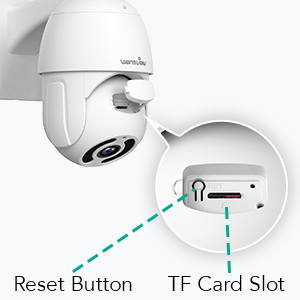
Figure 2: Reset Button and TF Card Slot Location.
This diagram highlights the location of the reset button and the TF (microSD) card slot on the wansview W9 camera, essential for initial setup and local storage.
Kurulum Kılavuzu
1. Kamerayı Açma
Connect the USB power supply to the camera and plug it into a power outlet. The camera will power on and initiate its self-test sequence.
2. Uygulama Kurulumu
Download the "Wansview Cloud" app from your smartphone's app store (available on iOS and Android). Register for a new account or log in if you already have one.
3. Ağ Bağlantısı
wansview W9 camera supports both Wi-Fi (2.4GHz only) and Ethernet connections.
Wi-Fi Bağlantısı:
- Wans'ı açview Cloud app and tap the "+" icon to add a new device.
- Select your camera model (W9) and follow the on-screen instructions.
- Telefonunuzun 2.4 GHz Wi-Fi ağına bağlı olduğundan emin olun. Kamera 5 GHz Wi-Fi'yi desteklemiyor.
- Telefonunuzda görüntülenen QR kodunu kamera merceğiyle tarayın.
- Wait for the camera to connect to your Wi-Fi network.

Figure 3: Wi-Fi Compatibility (2.4GHz only).
This image illustrates the wansview W9 camera with its upgraded 5dBi antenna, emphasizing its compatibility with 2.4GHz Wi-Fi networks for extended signal range and faster connection speeds. It explicitly shows that 5GHz Wi-Fi is not supported.
Ethernet Bağlantısı:
- Yönlendiricinizden kameranın RJ45 portuna bir Ethernet kablosu bağlayın.
- The camera will automatically connect to the network.
- Kamerayı hesabınıza eklemek için uygulama talimatlarını izleyin.
4. Kameranın Montajı
wansview W9 camera is designed for wall mounting and outdoor use (IP65 waterproof).
- Kurulum için uygun bir yer seçin ve görüş alanının açık olduğundan emin olun. view and stable mounting surface.
- Use the provided mounting bracket set to securely attach the camera to the wall.
- Montajdan sonra kameranın açısını gerektiği gibi ayarlayın.
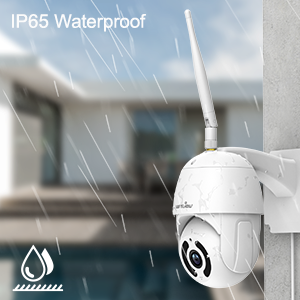
Şekil 4: IP65 Su Geçirmezlik Özelliği.
This image depicts the wansview W9 camera outdoors with rain falling on it, visually confirming its IP65 waterproof rating, making it suitable for various weather conditions.
Kullanım Talimatları
1. Pan-Tilt Kontrolü
The camera features a 350° horizontal pan and 90° vertical tilt range, allowing you to monitor a wide area.
- Wans'taview Cloud app, access the live view kameranızın.
- Use the directional controls on the screen to remotely adjust the camera's pan and tilt angles.

Figure 5: 2K FHD PTZ Coverage.
This image demonstrates the wansview W9 camera's 2K FHD resolution and its Pan-Tilt-Zoom (PTZ) capabilities, showing a 350° pan and 95° tilt range for comprehensive area coverage, with a house in the background to illustrate its outdoor application.
2. Gece Görüşü
The camera is equipped with 12pcs 850nm infrared LED lights, providing clear night vision up to 50 feet.
- Kamera, düşük ışık koşullarında otomatik olarak gece görüş moduna geçiyor.
- Yapabilirsiniz view the night vision feed in real-time through the Wansview Bulut uygulaması.

Figure 6: Excellent Night Vision Capability.
Bu görüntü bir bölünmeyi göstermektedir. view comparing the daytime and night vision performance of the wansview W9 camera. The night vision segment clearly shows objects up to 50 feet away in darkness, highlighting the camera's effective infrared capabilities.
3. Çift Yönlü Ses
Dahili mikrofon ve hoparlörü kullanarak ziyaretçilerle iletişim kurun veya davetsiz misafirleri caydırın.
- canlı yayından view in the Wansview Cloud app, tap the microphone icon to speak.
- Kameranın bulunduğu konumdan gelen sesi dinlemek için hoparlör simgesine dokunun.

Figure 7: Two-Way Audio in Action.
This image illustrates the two-way audio feature of the wansview W9 camera, showing a person communicating with a delivery driver through the camera via a smartphone app. Speech bubbles indicate the conversation, demonstrating real-time interaction.

Figure 8: Deterring Intruders with Two-Way Audio.
This image shows the wansview W9 camera being used to deter an intruder. Speech bubbles indicate a command from the camera ("Move away from my house") and the intruder's response ("arrgg, no, I'm off"), demonstrating the camera's ability to act as a deterrent.
4. Hareket Algılama ve Uyarılar
The camera uses motion sensors to detect activity and sends instant alerts to your phone.
- Customize sensor sensitivity and detection areas within the Wansview Bulut uygulaması.
- Receive 10-second video alerts when motion is detected.

Figure 9: Instant Detection and Alerts.
This image shows a smartphone displaying a "Motion alarm" notification from the Wansview Cloud app, indicating that the wansview W9 camera has detected activity and sent an immediate alert to the user's phone.
5. Storage Options (SD Card & Cloud)
wansview W9 camera offers flexible storage solutions for recorded footage.
- SD Kart Depolama: Supports up to 128GB microSD cards. Insert the card into the TF card slot (refer to Figure 2). Recorded video and images can be stored locally for preview.
- Bulut Depolama: Subscribe to the paid Cloud service via the Wansview Cloud app to save and upload videos securely to the cloud. This provides an additional layer of security against camera theft or damage.

Figure 10: Dual Storage Choices.
This image highlights the dual storage options for the wansview W9 camera: secure TF (microSD) card storage and encrypted cloud storage, providing users with flexible ways to back up recorded footage.
6. Alexa Entegrasyonu
Control your wansview W9 camera and view live feeds using Amazon Alexa.
- Wans'ı etkinleştirview skill in the Alexa app.
- Link your Wansview Cloud account with Alexa.
- Use voice commands such as "Alexa, show me the [camera name]" to display the live video on compatible Alexa devices (e.g., Echo Show).
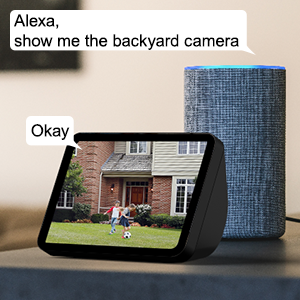
Figure 11: Alexa Integration.
This image shows an Amazon Echo Show displaying a live video feed from a wansview camera, with speech bubbles indicating a user's voice command ("Alexa, show me the backyard camera") and Alexa's response ("Okay"), demonstrating seamless integration with Alexa for voice control.
7. Multiple Family Members Sharing
Share access to your camera's live feed with up to 4 users simultaneously.
- Generate an invitation link within the Wansview Bulut uygulaması.
- Share the link with family members to grant them access.
Bakım
- Temizlik: Kamera lensini ve gövdesini yumuşak ve kuru bir bezle nazikçe silin. Sert kimyasallar veya aşındırıcı temizleyiciler kullanmayın.
- Donanım Yazılımı Güncellemeleri: Regularly check for and install firmware updates via the Wansview Cloud app to ensure optimal performance and security.
- Güç Kaynağı: Güç kaynağının güvenli bir şekilde bağlı olduğundan ve hasar görmediğinden emin olun.
- Ağ bağlantısı: Verify a stable Wi-Fi or Ethernet connection for uninterrupted monitoring.
Sorun giderme
| Sorun | Olası Neden | Çözüm |
|---|---|---|
| Kamera çevrimdışı | No power; Wi-Fi signal weak/disconnected; Router issue. | Check power connection; Move camera closer to router or use Ethernet; Restart router. |
| Wi-Fi'ye bağlanılamıyor | Incorrect Wi-Fi password; Connecting to 5GHz network; Too far from router. | Double-check password; Ensure connection to 2.4GHz Wi-Fi; Relocate camera or router. |
| Hareket uyarıları alınmadı | Motion detection disabled; App notifications off; Sensitivity too low. | Uygulamada hareket algılamayı etkinleştirin; Telefon bildirim ayarlarını kontrol edin; Hassasiyeti ayarlayın. |
| Zayıf gece görüş kalitesi | Obstruction in front of lens; Infrared LEDs blocked. | Clear any obstructions; Ensure lens is clean. |
| Çift yönlü ses sorunları | Microphone/speaker blocked; App permissions. | Ensure clear path for audio; Check app permissions for microphone. |
Özellikler
| Model Numarası | W9-B |
| Video Yakalama Çözünürlüğü | 1080p (2K HD) |
| Pan/Tilt Aralığı | 350° Döndürme, 90° Eğme |
| Bağlantı Teknolojisi | Kablosuz (Wi-Fi 2.4GHz), Ethernet |
| Kablosuz İletişim Teknolojisi | Wifi |
| Güç Kaynağı | Kablolu Elektrik |
| Gece Görüş Aralığı | 50 Ayak |
| Uluslararası Koruma Derecelendirmesi | IP65 (Su geçirmez) |
| Depolama Seçenekleri | SD Kart (128 GB'a kadar), Bulut Depolama |
| Ses | Çift Yönlü Ses (Dahili Mikrofon ve Hoparlör) |
| Uyumlu Cihazlar | Smartphone (iOS, Android), Alexa Echo Show |
| Montaj Tipi | Duvara Montaj |
| Boyutlar (U x G x Y) | 6.3 x 6.1 x 3.94 inç |
| Ürün Ağırlığı | 1.6 Pound |
Garanti ve Destek
For warranty information and technical support, please refer to the wansview resmi website or contact their customer service directly. Details are typically available on the product packaging or the wansview Amazon'da marka mağazası.
Ziyaret edin istiyorview Mağaza Daha fazla bilgi için.


