1. Giriş
This user manual provides essential information for the safe and efficient operation of your Redmi Smart LED TV X55. Please read this manual thoroughly before using the product and retain it for future reference.
The Redmi Smart LED TV X55 offers a 55-inch 4K Ultra HD display, powered by Android TV, and features advanced audio and visual technologies for an immersive entertainment experience.
2. Önemli Güvenlik Bilgileri
Yangın, elektrik çarpması ve yaralanma riskini azaltmak için bu ürünü kullanırken her zaman temel güvenlik önlemlerine uyun.
- TV'yi yağmura veya neme maruz bırakmayın.
- Televizyonun kapağını açmayınasing; tüm servis işlemlerini kalifiye personele yaptırın.
- TV'nin etrafında uygun havalandırma olduğundan emin olun.
- Use only the power cord and accessories supplied by the manufacturer.
- Televizyonunuzu doğrudan güneş ışığından, ısı kaynaklarından ve güçlü manyetik alanlardan uzak tutun.
- Televizyonu yumuşak, kuru bir bezle temizleyin. Sıvı veya aerosol temizleyiciler kullanmayın.
3. Paket İçeriği
Paketi açtığınızda aşağıda listelenen tüm öğelerin mevcut ve iyi durumda olduğunu doğrulayın:
- 1 x Redmi Smart LED TV X55
- 2 x Masa Sehpası Tabanı
- 1 x Uzaktan Kumanda
- Stand montajı için 4 adet vida
- 1 x Kullanım Kılavuzu (bu belge)
- 1 x Güç Kablosu
4. Ürün Bittiview
The Redmi Smart LED TV X55 is designed to deliver a premium viewing and audio experience. Below are its key features and components.
4.1. Visual Features
Experience stunning clarity and vibrant colors with the 55-inch 4K LED panel. Advanced technologies enhance your viewTürkçe:
- 4K LED Panel: Delivers ultra-high-definition resolution for sharp images.
- Dolby Vision ve HDR10: Provides superior contrast, brightness, and color depth.
- HLG (Hybrid Log-Gamma): Supports broadcast HDR content.
- Reality Flow ve Vivid Picture Engine: Enhances motion smoothness and picture quality.
- MEMC (Hareket Tahmini, Hareket Telafisi): Reduces motion blur for fast-paced scenes.

Şekil 1: Ön view of the Redmi Smart LED TV X55.

Şekil 2: Üzeriview of key visual features including Dolby Vision, 4K HDR, and Vivid Picture Engine.
4.2. Ses Özellikleri
Immerse yourself in rich, powerful sound with the integrated audio system:
- 30W Output Speakers: Net ve güçlü bir ses sunar.
- Dolby Ses: Provides enhanced sound quality for movies and music.
- DTS Sanal:X: Çok boyutlu bir ses deneyimi yaratır.
- Dolby Atmos Pass-through via eARC: Allows for advanced audio formats to be sent to compatible sound systems.
- DTS-HD: High-definition audio decoding for a cinematic sound.
4.3. Smart Features & Performance
The Redmi Smart LED TV X55 runs on Android TV 10, offering a user-friendly interface and access to a vast ecosystem of apps.
- Android TV 10: Provides a smooth and intuitive smart TV experience.
- IMDb Entegrasyonlu PatchWall 4: A curated content platform with smart recommendations and IMDb ratings.
- Dört Çekirdekli İşlemci: Ensures seamless performance and quick app loading.
- 2GB RAM + 16GB Storage: Ample memory and storage for apps and system operations.
- Built-in Wi-Fi (2x2 Dual Band) & Chromecast: Easy wireless connectivity and content casting from mobile devices.
- Tamam Google: Voice control for searching content, controlling smart home devices, and more.
- Otomatik Düşük Gecikme Modu (ALLM): Oyun ayarlarını optimize ederek giriş gecikmesini azaltır.
- Miracast: Wireless display mirroring from compatible devices.
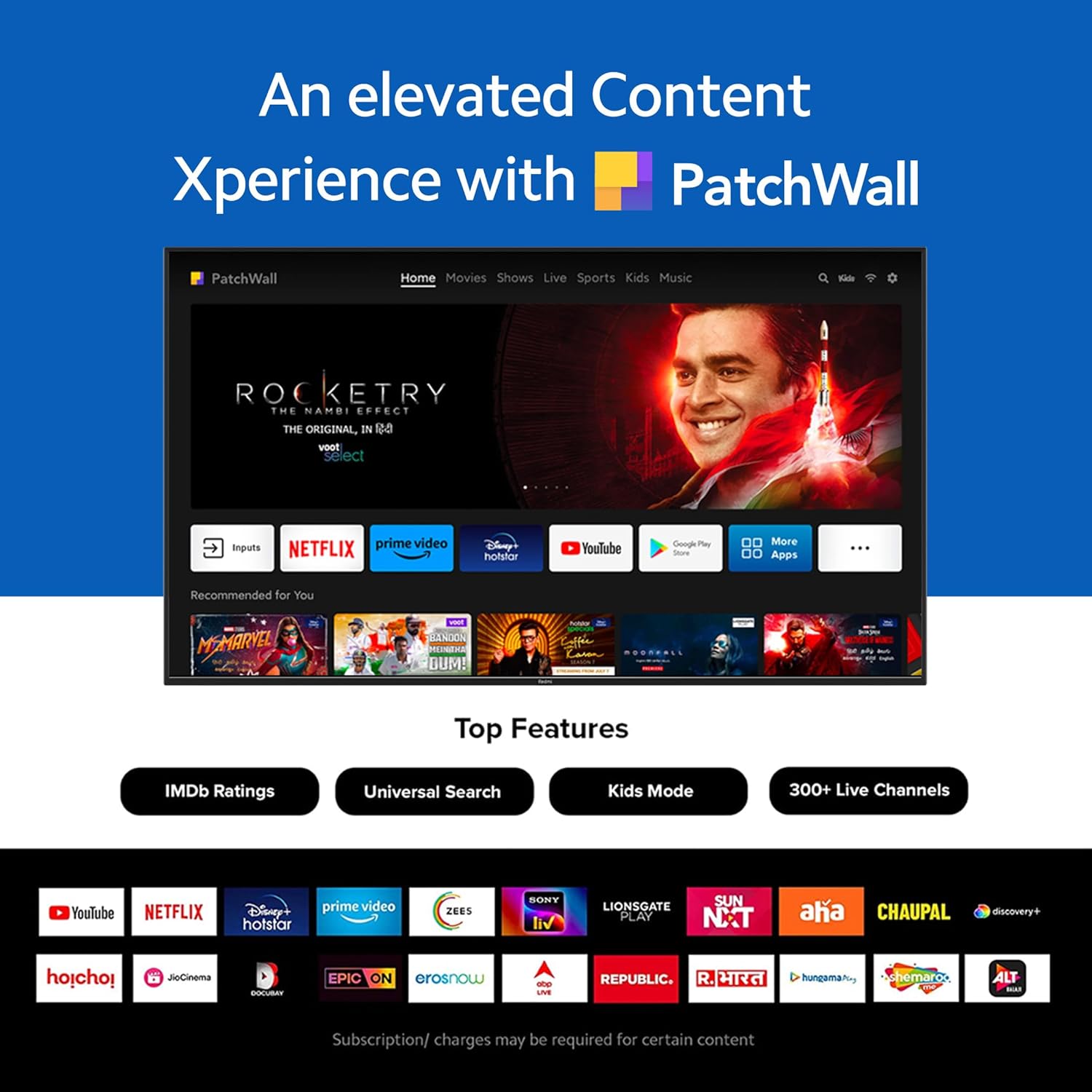
Figure 3: The PatchWall interface displaying various streaming apps and content.

Figure 4: Details on the TV's performance, including 2GB RAM, 16GB Storage, and Quad-core A55 processor.

Figure 5: Android TV 10 interface with Google Play, Ok Google, and Chromecast built-in.
4.4. Bağlantı
The TV offers multiple connectivity options for various devices:
- HDMI2.1: Multiple ports for high-definition audio and video input, supporting eARC.
- USB 2.0: Harici depolama aygıtlarını bağlamak için.
- Ethernet: Kablolu ağ bağlantısı.
- Optik Bağlantı Noktası: Dijital ses çıkışı.
- 3.5mm Ses Bağlantı Noktası: Kulaklık veya harici hoparlörler için.
- Bluetooth 5.0 with BLE: Wireless connectivity for audio devices and accessories.

Şekil 6: Arka view of the Redmi Smart TV X55 highlighting various input/output ports.

Figure 7: Close-up of the TV's ports, including HDMI 2.1, USB 2.0, Ethernet, Optical, and Headphone Jack.
5. Kurulum Kılavuzu
5.1. Fiziksel Kurulum
Your Redmi Smart LED TV X55 can be installed on a table stand or wall-mounted.
- Masa Standı Kurulumu: Attach the two provided table stand bases to the bottom of the TV using the included screws. Ensure the TV is placed on a stable, flat surface.
- Duvara Montaj Kurulumu: For wall mounting, use a compatible VESA wall mount kit (sold separately). Follow the instructions provided with the wall mount kit and ensure professional installation for safety.

Figure 8: Dimensions of the Redmi Smart TV X55 for planning installation.
5.2. İlk Güç Açma ve Ağ Bağlantısı
- Güç kablosunu TV'ye ve bir elektrik prizine bağlayın.
- Uzaktan kumanda veya televizyon üzerindeki güç düğmesine basın.
- Follow the on-screen instructions to select your language, country, and connect to your Wi-Fi network or plug in an Ethernet cable.
- Sign in with your Google account to access Android TV features and the Play Store.
5.3. Setting Up Alexa Control
You can control your Redmi TV hands-free with Alexa devices. Follow these steps to set up Alexa:
Video 1: Instructions on how to set up Alexa control for your Redmi Smart TV.
To enable advanced settings for Alexa control, refer to the following video guide:
Video 2: Guide to enabling advanced settings on Redmi TV for Alexa control.
6. Kullanım Talimatları
6.1. Uzaktan Kumanda
The sleek remote control provides quick access to essential functions:
- Hızlı Uyandırma: Televizyonu 5 saniyeden kısa sürede açın.
- Hızlı Sessiz: Double-tap the volume down button to mute.
- Hızlı Ayarlar: PatchWall düğmesine uzun süre basarak hızlı ayarlar menüsüne girin.

Figure 9: The sleek remote control for the Redmi Smart TV X55, highlighting quick access features.
6.2. Navigating the Smart TV Interface
Use the remote's directional pad and OK button to navigate through the Android TV and PatchWall interfaces. Access apps, settings, and content recommendations easily.
6.3. Sesli Kontrol Kullanımı
Press the dedicated voice assistant button on your remote and speak commands to control your TV, search for content, or interact with connected smart home devices via Ok Google or Alexa.
6.4. App Usage and Casting
The TV supports popular streaming services like Prime Video, Netflix, Disney+ Hotstar, YouTube, and Apple TV. You can also cast content from your mobile devices using Chromecast built-in or Miracast.
7. Bakım
- Temizlik: Gently wipe the screen and TV body with a soft, dry, lint-free cloth. Do not use abrasive cleaners or solvents.
- Yazılım Güncellemeleri: Ensure your TV's software is up to date for optimal performance and security. Navigate to Settings > Device Preferences > About > System update to check for updates.
- Güç yönetimi: Şimşekli fırtınalar sırasında veya uzun süre kullanılmayacaksa televizyonun fişini çekin.
8. Sorun Giderme
If you encounter issues with your Redmi Smart LED TV X55, refer to the following common problems and solutions:
| Sorun | Olası Çözüm |
|---|---|
| Güç yok | Güç kablosunun sağlam bir şekilde bağlı olup olmadığını ve prizin çalışır durumda olup olmadığını kontrol edin. Farklı bir priz deneyin. |
| Görüntü yok, ancak ses mevcut | Ensure the correct input source is selected. Check HDMI cable connections. |
| Ses yok ama görüntü var | Check volume levels and mute status. Verify audio output settings (e.g., internal speakers, external soundbar). |
| Uzaktan kumanda çalışmıyor | Replace batteries. Ensure no obstructions between the remote and the TV. Re-pair the remote if necessary. |
| Ağ bağlantı sorunları | Restart your router and modem. Check Wi-Fi password. Try connecting via Ethernet. |
9. Özellikler
Detailed technical specifications for the Redmi Smart LED TV X55:
| Özellik | Şartname |
|---|---|
| Marka | Kırmızı mi |
| Model Adı | X55 |
| Ekran Boyutu | 55 inç |
| Ekran Teknolojisi | LED-LCD |
| Çözünürlük | 3840 x 2160 piksel (4K) |
| Yenileme Hızı | 60 Hz |
| İşletim Sistemi | Android TV 10 |
| İşlemci | Dört Çekirdekli A55 |
| Veri deposu | 2 GB |
| Depolamak | 16 GB |
| Ses Çıkışı | 30 Watt |
| Bağlantı Teknolojisi | HDMI, USB, Wi-Fi (2x2 Dual Band), Ethernet, Bluetooth 5.0 |
| HDMI Bağlantı Noktaları | 3 (HDMI 2.1, eARC compatible) |
| USB Bağlantı Noktaları | 2 (USB 2.0) |
| ViewAçı | 178 Derece |
| En Boy Oranı | 16:9 |
| Ürün Ağırlığı | 15 kilo 300 gr |
| Montaj Tipi | Wall Mount; Table Mount |
10. Garanti ve Destek
Your Redmi Smart LED TV X55 comes with a standard brand warranty. For specific warranty terms, duration, and service procedures, please refer to the warranty card included in your package or visit the official Redmi support webalan.

Figure 10: Information regarding Mi Extended Warranty, offering benefits like zero documentation, genuine spare parts, cashless repairs, authorized service centers, and on-site support.
For installation services, Amazon will coordinate with the brand within 48 hours of delivery. Scheduled delivery options are available in select cities. Installation charges may apply.


