1. Güvenlik Bilgileri
Please read and understand all safety information before operating the Triplett CM650 Clamp Sayaç. Bu talimatlara uyulmaması elektrik çarpmasına, yangına veya ciddi yaralanmaya neden olabilir.
- Daima yerel ve ulusal güvenlik kurallarına uyun.
- Cihaz hasarlı görünüyorsa veya test uçları hasarlıysa ölçüm cihazını kullanmayın.
- Ölçüm yapmadan önce ölçüm cihazının doğru fonksiyona ve aralığa ayarlandığından emin olun.
- Do not exceed the maximum input limits for any function. The CM650 is rated CAT III-600V.
- Vol ile çalışırken dikkatli oluntag30V AC RMS, 42V tepe veya 60V DC'nin üzerindeki akımlarda elektrik çarpması tehlikesi vardır.
- Keep fingers behind the finger guards on the test leads during use.
- Doğru okumalar sağlamak için düşük pil göstergesi göründüğünde pilleri hemen değiştirin.
- Ölçüm cihazını patlayıcı gaz, buhar veya toz ortamlarında çalıştırmayın.
2. Ürün Bittiview
The Triplett CM650 is a True RMS 6000-count AC/DC clamp meter designed for accurate electrical measurements. It features a large backlit LCD, inrush current measurement, and a non-contact voltage dedektörü.
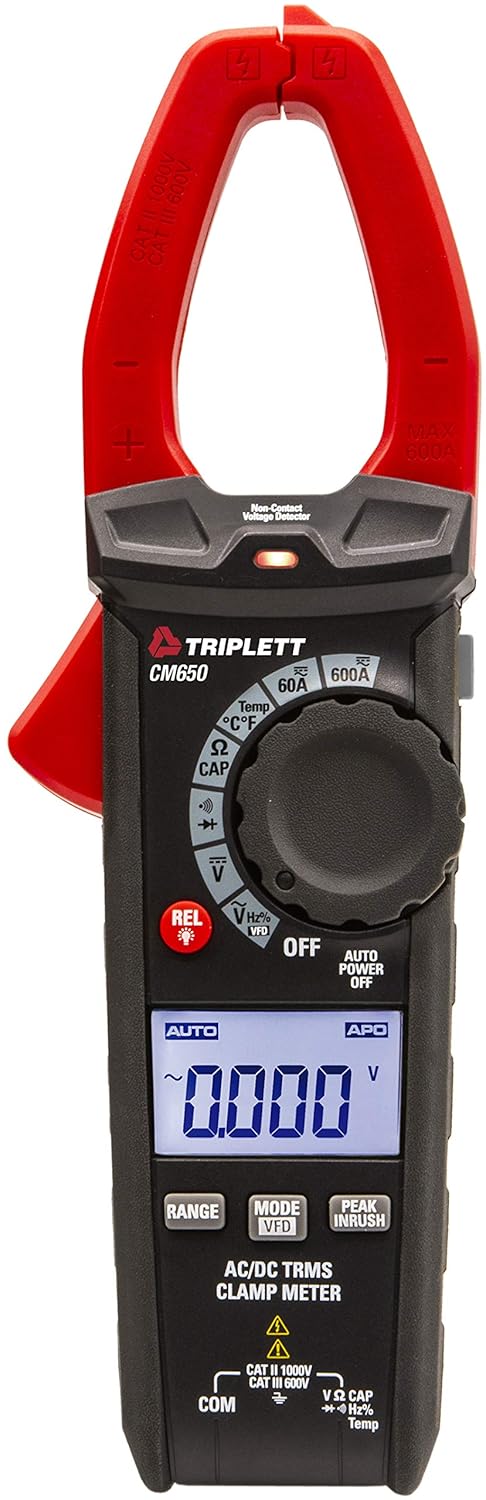
Şekil 2.1: Ön view of the Triplett CM650 True RMS 600A AC/DC Clamp Meter. This image displays the meter's main body, the red clamp jaws, the rotary dial, the LCD screen, and the function buttons.
2.1 Bileşenler ve Kontroller
- Clamp Çeneler: Temassız AC/DC akım ölçümü için kullanılır.
- Clamp Tetiklemek: Kapıyı açar ve kapatıramp çeneler.
- Döner Fonksiyon Anahtarı: İstenilen ölçüm fonksiyonunu seçer.
- LCD Ekran: 6000-count backlit display for reading measurements.
- Fonksiyon Düğmeleri: Include RANGE, MODE/VFD, PEAK INRUSH, REL/Light, and Data Hold.
- Giriş Jakları: For connecting test leads (COM, VΩCAPHzTemp).
- NCV Sensörü: Temassız Hacimtage detection sensor.
- El feneri: Integrated LED light for illuminating work areas.

Şekil 2.2: Kapatmak view of the Triplett CM650's rotary dial and function buttons. This image highlights the various measurement selections such as 60A, 600A, Temperature, Resistance/Capacitance, Continuity/Diode, Voltage, and VFD mode, along with the REL and backlight button.
3. Kurulum
3.1 Pil Kurulumu
The CM650 requires 3 AAA batteries (included). To install or replace batteries:
- Ensure the meter is OFF and disconnect all test leads.
- Pil bölmesini ölçüm cihazının arka tarafında bulun.
- Pil bölmesi kapağını açmak için tornavida kullanın.
- 3 adet AAA pili kutuplarına dikkat ederek (+/-) takın.
- Pil bölmesi kapağını yerine takın ve vidayla sabitleyin.
3.2 Test Uçlarının Bağlanması
cilt içintage, resistance, capacitance, frequency, temperature, diode, and continuity measurements, connect the test leads as follows:
- Siyah test kablosunu Bİlgİ Giriş jakı.
- Kırmızı test ucunu, VΩCAPHzTemp Giriş jakı.

Şekil 3.1: The Triplett CM650 clamp meter shown with its included accessories: test leads, K-type thermocouple probe, and a soft carrying case. This illustrates the complete package provided with the device.
4. Kullanım Talimatları
Turn the rotary switch to the desired function to begin measurement. The meter features an automatic shutdown function to conserve battery life, which can be deactivated if needed.
4.1 AC/DC Akım Ölçümü (Clamp)
To measure AC or DC current up to 600A without breaking the circuit:
- Döner anahtarı konumuna çevirin 60A or 600A AC/DC current range.
- Cl tuşuna basınamp çeneleri açmak için tetik.
- Enclose only one conductor within the clamp Çeneler. Çenelerin tamamen kapalı olduğundan emin olun.
- LCD ekranda mevcut değeri okuyun.

Şekil 4.1: A hand holding the Triplett CM650 clamp meter, with its jaws clamped around a single wire within an electrical panel, demonstrating how to measure current. The display shows a reading of 60.0 A.

Şekil 4.2: The Triplett CM650 clamp meter being used to measure current on a wire connected to an industrial motor. The meter's display shows a reading of 16.00 A, illustrating its application in industrial settings.
4.2 Cilttage Ölçümü (AC/DC)
AC veya DC hacmi ölçmek içintage:
- Connect the test leads to the appropriate input jacks (COM and VΩCAPHzTemp).
- Döner anahtarı konumuna çevirin V (cilttage) position. The meter will auto-range.
- Test problarını, voltaj değerlerinin bulunduğu devre noktalarına dokundurun.tage ölçülmelidir.
- Cildi okutagLCD ekranda e değeri.
4.3 Resistance, Capacitance, Frequency, Temperature, Diode, and Continuity
For these measurements, connect the test leads as described in Section 3.2 and select the corresponding function on the rotary switch. Use the MOD button to cycle through sub-functions if necessary (e.g., Resistance, Capacitance, Diode, Continuity share a dial position).
- Direnç (Ω): Measures electrical resistance in Ohms.
- Kapasitans (CAP): Kapasitansı Farad cinsinden ölçer.
- Frekans (Hz): Measures the frequency of an AC signal.
- Sıcaklık (°C/°F): Use the K-type thermocouple probe for temperature measurements.
- Diyot Testi: İleriye dönük volatiliteyi kontrol eder.tagBir diyotun e düşüşü.
- Süreklilik: Emits an audible tone if the circuit has low resistance (continuity).
4.4 Özel Fonksiyonlar
- Gerçek RMS: Provides accurate readings for non-sinusoidal or noisy AC waveforms.
- Inrush Current (PEAK INRUSH): Captures the instantaneous surge current when electrical equipment is powered on. Press the PEAK INRUSH Bu işlevi etkinleştirmek için düğmesine basın.
- Low Pass Filter (LPF/VFD): Filters out high-frequency noise and harmonics when measuring variable frequency drives (VFDs). Activate by pressing the MOD vol'deki düğmetage function until VFD appears.
- Temassız Hacimtage (NCV): AC hacmini algılartage without physical contact. Hold the NCV sensor near a live conductor. An LED indicator and audible beep will signal the presence of voltage.
- Göreceli Mod (REL): Allows for comparisons with a stored reference value. Press the İLETİŞİM button to store the current reading as a reference. Subsequent readings will show the difference from this reference.
- Veri tutma: Freezes the current reading on the display. Press the TUTMAK Etkinleştirme/devre dışı bırakma düğmesi.
- En az en çok: Records the minimum and maximum values during a measurement session.
- El feneri: Basın REL/Light button briefly to turn the integrated flashlight on or off.
5. Bakım
5.1 Temizlik
Wipe the meter with a dry, clean cloth. Do not use abrasives or solvents. Keep the input terminals free of dirt and moisture.
5.2 Pil Değişimi
Pil değiştirme talimatları için Bölüm 3.1'e bakın. Doğru ölçümler sağlamak için ekranda düşük pil göstergesi göründüğünde pilleri derhal değiştirin.
6. Sorun Giderme
| Sorun | Olası Neden | Çözüm |
|---|---|---|
| Sayaç açılmıyor | Bitmiş veya yanlış takılmış piller | Pil kutuplarını kontrol edin; pilleri değiştirin. |
| Hiçbir okuma veya "OL" görüntülenmiyor. | Incorrect function/range; open circuit; measurement exceeds range | Select correct function/range; check circuit continuity; ensure measurement is within meter's limits. |
| Yanlış okumalar | Low battery; external interference; dirty test leads | Replace batteries; move away from strong electromagnetic fields; clean test leads and input jacks. |
| NCV hacmi algılamıyortage | Cilttage too low; sensor not close enough; shielded wire | Hacmi sağlayıntage is present and within detectable range; place sensor closer to conductor; NCV may not work on shielded wires. |
7. Özellikler
| Özellik | Şartname |
|---|---|
| Örnek | CM650 |
| Görüntülemek | 6000 Count, Backlit LCD |
| AC/DC Akımı | 600A'ya kadar |
| Gerçek RMS | Evet |
| Giriş Akımı | Evet |
| Düşük Geçişli Filtre (LPF) | Evet |
| Temassız Hacimtage (NCV) | Yes, with LED indicator |
| Ölçümler | Resistance, Capacitance, Frequency, Temperature, Diode Test, Continuity |
| Güvenlik Derecelendirmesi | KAT III-600V |
| Güç Kaynağı | 3 adet AAA pil (dahil) |
| Ürün Boyutları | 22.35x7.62x4.06 cm |
| Ürün Ağırlığı | 290.3 gr |
| Dahil Aksesuarlar | Test cables, K-type thermocouple probe, carry case |
8. Garanti ve Destek
The Triplett CM650 True RMS 6000 Count 600A AC/DC Clamp Sayaç şunlarla birlikte gelir: 1 yıllık garanti satın alma tarihinden itibaren. Bu garanti, normal kullanımda malzeme ve işçilikteki kusurları kapsar.
For warranty claims, technical support, or service inquiries, please contact Triplett customer service. Keep your proof of purchase for warranty validation.
For more information, visit the official Triplett websiteyi ziyaret edin veya yerel distribütörünüzle iletişime geçin.


