1. Giriş
This manual provides essential information for the proper use and maintenance of Qoltec Thermal Rolls, model 51889. These thermal paper rolls are designed for use in various thermal printing devices, including cash registers, ATMs, and payment terminals. The product features high-quality materials and Long Life Technology to ensure clear, durable prints and reliable device operation. Each roll measures 80mm in width and 59 meters in length, with a paper weight of 65 g/m², and is certified BPA-free.
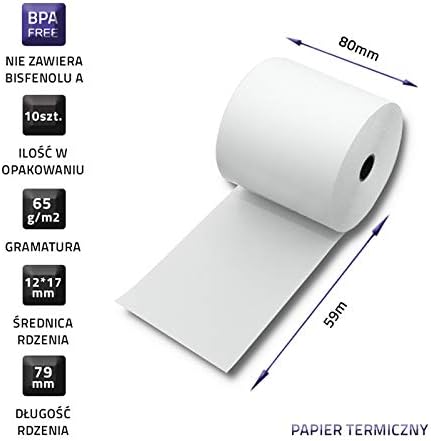
This image illustrates the key specifications of the Qoltec thermal paper roll, including its width of 80mm, length of 59 meters, paper weight of 65 grams per square meter, and a core diameter of 79mm. It also highlights that the product is BPA-free and comes in a pack of 10 pieces.
2. Kurulum ve Kurulum
Follow these general steps to install the thermal paper roll into a compatible device. Always refer to your specific device's user manual for detailed instructions.
- Yazıcının kapağını açın: Locate and open the paper compartment cover on your thermal printer, cash register, ATM, or terminal.
- Eski ruloyu çıkarın (varsa): If an old roll is present, remove it and any remaining core.
- Yeni Ruloyu Takın: Place the Qoltec thermal roll into the compartment. Ensure the paper feeds off the bottom of the roll and is positioned correctly for printing. The thermal side of the paper (usually the smoother side) should face the print head.
- Kağıt Besleme: Pull a small length of paper out past the cutting edge or feed slot.
- Kapağı Kapat: Close the printer cover securely. Ensure the paper is properly aligned and the cover latches into place.

This image demonstrates a Qoltec thermal paper roll correctly installed within a compatible thermal printer, ready for operation. It shows the paper feeding out of the printer mechanism.
3. Çalıştırma Yönergeleri
Once the thermal roll is installed, the device is ready for operation. The Qoltec thermal paper is designed for optimal performance in compatible thermal printers. No specific operational steps are required for the paper itself, as its function is passive within the printing device.
- Cihazın açık olduğundan ve düzgün şekilde bağlandığından emin olun.
- Initiate printing functions as per your device's operational instructions.
- The Long Life Technology ensures print quality and durability for records.
4. Bakım ve Saklama
Proper handling and storage will extend the life and quality of your thermal paper rolls.
- Saklama Koşulları: Store thermal rolls in a cool, dry place, away from direct sunlight, high humidity, and extreme temperatures.
- Kimyasallardan Kaçının: Do not expose thermal paper to chemicals, solvents, or adhesive tapes, as these can degrade the thermal coating and affect print quality.
- İşleme: Handle rolls by the edges to avoid transferring oils or dirt to the thermal surface.
- Ambalajlama: Keep unused rolls in their original packaging to protect them from environmental factors.

This image displays a complete pack of 10 Qoltec thermal paper rolls, illustrating the quantity included in the product offering.
5. Sorun Giderme
Most issues related to thermal paper are typically associated with the printing device itself. However, consider the following if you encounter problems:
- No Print or Faint Print:
- Ensure the thermal roll is inserted correctly with the thermal side facing the print head.
- Check if the roll is completely used and replace if necessary.
- Verify the thermal printer's settings and print head condition.
- Kağıt Sıkışmaları:
- Ensure the roll is properly seated and not too tight or loose in the compartment.
- Check for any obstructions in the paper path of the device.
- Discolored or Damaged Paper:
- Review storage conditions to ensure they meet recommendations (cool, dry, away from direct light/heat).
- Replace the roll if it appears damaged or discolored from improper storage.
6. Özellikler
Detailed specifications for the Qoltec Thermal Roll, Model 51889:
| Şartname | Değer |
|---|---|
| Marka | Qoltec |
| Model Numarası | 51889 |
| Rulo Genişliği | 80 mm |
| Rulo uzunluğu | 59 metre |
| Kağıt Ağırlığı | 65 gr/m² |
| Core Length | 79 mm |
| Kağıt Bitişi | Kaplamasız |
| Renk | Beyaz |
| BPA Durumu | BPA içermez |
| Miktar | 10'li paket |
| Ürün Ağırlığı (Paket) | 3167 Gram |
| ASIN | B08XWSCBDC |
7. Güvenlik Bilgileri
While thermal paper rolls are generally safe, observe the following precautions:
- Keep out of reach of small children to prevent accidental ingestion or choking hazards from the core.
- Avoid prolonged skin contact with the printed side of thermal paper, especially for individuals with sensitive skin.
- Dispose of used thermal paper according to local recycling guidelines.
8. Garanti ve Destek
Specific warranty information for Qoltec Thermal Rolls is not provided in this document. For details regarding product warranty, technical support, or further inquiries, please refer to the official Qoltec websiteye gidin veya doğrudan müşteri hizmetleriyle iletişime geçin.
Üretici: Qoltec


