1. Giriş
The Hombli Smart Doorbell 2 is an advanced video doorbell designed to enhance your home security. It features 1080p HD video, a 140-degree wide-angle view, two-way audio communication, motion detection, and infrared night vision. This manual provides detailed instructions for the installation, operation, and maintenance of your Smart Doorbell 2, ensuring optimal performance and security for your home.
Compared to its predecessor, the Smart Doorbell 2 offers a 25% faster response time and nearly double the battery life, along with flexible wired or wireless installation options.
2. Ürün Bittiview
Familiarize yourself with the components and features of your Hombli Smart Doorbell 2.

Image 2.1: Hombli Smart Doorbell 2 highlighting key features such as 140° wide-angle 1080p HD camera, motion detection, built-in 5000mAh battery, optional cloud storage, Micro SD slot, two-way audio, infrared night vision, weatherproof IP65 rating, and GDPR compliance.
- Kamera Lensi: Captures 1080p Full HD video with a 140° wide-angle view.
- Hareket Sensörü: Kapı zilinin önündeki hareketi algılar.
- Kapı Zili Düğmesi: Illuminates when pressed, sending a notification to your smartphone.
- Mikrofon: Çift yönlü ses iletişimi için.
- Konuşmacı: Çift yönlü ses iletişimi için.
- Şarj Portu: Dahili bataryayı şarj etmek için.
- Sıfırlama Düğmesi: Cihazın eşleştirilmesi ve sıfırlanması için kullanılır.
- Mikro SD Kart Yuvası: Supports local video storage up to 128GB.
3. Kutuda Neler Var?
Kuruluma başlamadan önce tüm bileşenlerin mevcut olduğundan emin olun:
- Hombli Akıllı Kapı Zili 2
- Montaj Braketi
- Angle Mount (optional, for optimal viewaçı)
- 3M Çift Taraflı Yapışkan Bant
- Montaj Vidaları ve Duvar Dübelleri
- USB Şarj Kablosu
- Kullanım Kılavuzu (bu belge)

Image 3.1: The Hombli Smart Doorbell 2 shown alongside its separate mounting bracket, illustrating how the device attaches to its base.
4. Kurulum ve Kurulum
4.1 İlk Şarj
Before installation, fully charge the Hombli Smart Doorbell 2 using the provided USB cable. A full charge ensures the device is ready for immediate use and helps calibrate the battery life indicator.
4.2 Uygulama Kurulumu ve Eşleştirme
- İndir Hombli app App Store'dan (iOS) veya Google Play Store'dan (Android).
- Bir hesap oluşturun veya zaten bir hesabınız varsa giriş yapın.
- Uygulamada, yeni bir cihaz eklemek için "+" simgesine dokunun.
- Select "Smart Doorbell 2" from the list of devices.
- Follow the on-screen instructions to connect the doorbell to your 2.4 GHz Kablosuz ağ. Ensure your phone is connected to the same 2.4 GHz network during pairing.

Image 4.1: A smartphone displaying the Hombli app interface, showing options like screenshot, speak, record, playback, cloud storage, and buzzer, positioned next to the Hombli Smart Doorbell 2.
4.3 Kapı Zilinin Montajı
Choose a suitable location for your doorbell, typically at eye level, ensuring a clear view of your entrance. The doorbell can be installed wirelessly or wired to existing doorbell connections.
- Wireless Installation (Battery Powered):
- Montaj yüzeyini iyice temizleyin.
- Attach the mounting bracket to the desired location using either the provided 3M double-sided adhesive tape or screws. For a more secure installation, screws are recommended.
- If needed, use the angle mount to adjust the viewing angle for optimal coverage of your entryway.
- Hombli Smart Doorbell 2'yi yerine oturana kadar monte edilmiş brakete kaydırın.
- Wired Installation (Continuous Power):
- Ensure power to your existing doorbell system is turned off at the circuit breaker.
- Remove your old doorbell.
- Connect the existing doorbell wires to the terminals on the Hombli Smart Doorbell 2 mounting bracket.
- Braketi vidaları kullanarak duvara monte edin.
- Slide the Hombli Smart Doorbell 2 onto the mounted bracket.
- Sigortadan elektriği geri verin.
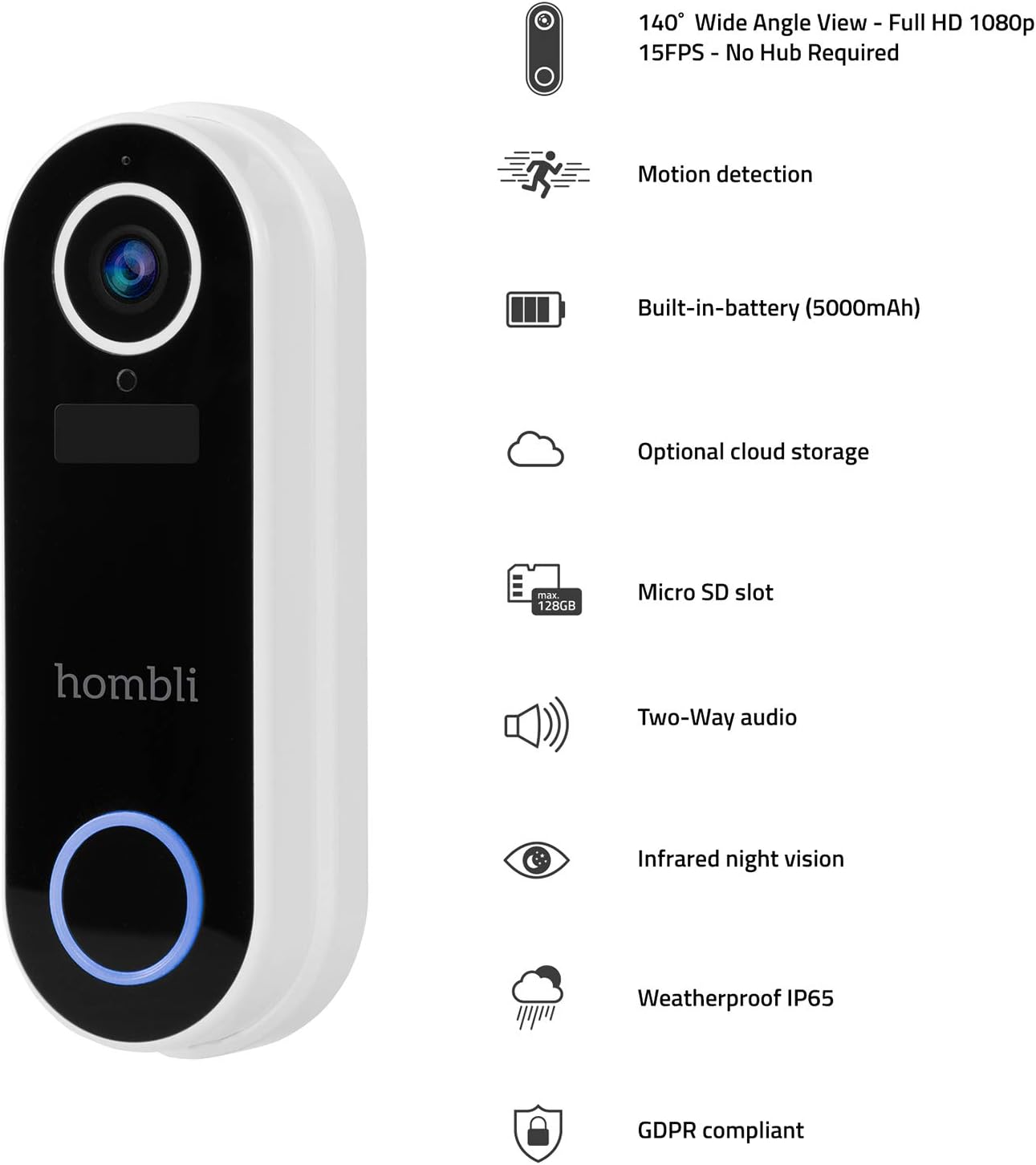
Image 4.2: The Hombli Smart Doorbell 2 is shown mounted on a brick wall, viewed from the side, demonstrating its slim profile and integration with the wall surface.

Image 4.3: The Hombli Smart Doorbell 2 is shown mounted on a brick wall, viewed from the front, highlighting its camera lens and illuminated doorbell button.
5. Operating the Smart Doorbell 2
5.1 Bildirim Alma
When someone presses the doorbell button or motion is detected, you will receive an instant notification on your smartphone via the Hombli app. Tap the notification to view canlı yayın.
5.2 İki Yönlü Ses İletişimi
canlı yayından view in the Hombli app, you can use the microphone and speaker icons to engage in real-time two-way audio communication with visitors at your door, even when you are away from home.
5.3 Canlı View ve Video Kaydı
Access the 1080p HD live video feed at any time through the Hombli app. You can manually record video or capture screenshots directly from the live view. The doorbell also automatically records events triggered by motion or doorbell presses.
5.4 Hareket Algılama
The integrated motion sensor detects activity in its field of view. You can adjust the motion detection sensitivity and set specific detection zones within the Hombli app to minimize false alerts.
5.5 Kızılötesi Gece Görüşü
The doorbell automatically switches to infrared night vision in low-light conditions, providing clear black-and-white video footagTamamen karanlıkta bile.
5.6 Video Depolama Seçenekleri
- Mikro SD kart: Insert a Micro SD card (up to 128GB, not included) into the designated slot for local storage of recorded video events.
- Bulut Depolama: Optional cloud storage plans are available through the Hombli app for secure, remote access to your video history.
5.7 Pil Ömrü
The built-in 5000mAh rechargeable battery provides 3 to 6 months of operation, depending on usage frequency and environmental factors. The Hombli app will notify you when the battery level is low.
6. Bakım
6.1 Pilin Şarj Edilmesi
When the battery is low, remove the doorbell from its mounting bracket and charge it using the provided USB cable. Connect the cable to the charging port on the doorbell and a standard USB power adapter (not included). The charging indicator will show the charging status.
6.2 Temizlik
Periodically clean the doorbell's camera lens and body with a soft, damp cloth to ensure clear video quality and proper functioning of the sensors. Avoid using harsh chemicals or abrasive materials.

Resim 6.1: Yakın çekim view of the Hombli Smart Doorbell 2's camera area, showing water droplets on its surface, demonstrating its IP65 weatherproof rating.
7. Sorun Giderme
| Sorun | Olası Neden | Çözüm |
|---|---|---|
| Doorbell not powering on | Low battery; Incorrect wired connection. | Charge the doorbell fully. For wired installation, ensure wires are correctly connected and power is on. |
| Wi-Fi'ye bağlanılamıyor | Incorrect Wi-Fi password; Not a 2.4 GHz network; Weak Wi-Fi signal. | Verify Wi-Fi password. Ensure you are connecting to a 2.4 GHz network. Move the doorbell closer to your router or use a Wi-Fi extender. Reset the doorbell and try pairing again. |
| Video kalitesi zayıf | Weak Wi-Fi signal; Dirty camera lens. | Improve Wi-Fi signal strength. Clean the camera lens with a soft cloth. |
| Hareket algılama uyarısı yok | Motion detection disabled; Sensitivity too low; Incorrect detection zone settings. | Enable motion detection in the Hombli app. Adjust sensitivity settings. Configure detection zones to cover the desired area. |
| No notifications on phone | App notifications disabled; Phone's notification settings. | Check notification settings within the Hombli app. Ensure your phone's system settings allow notifications from the Hombli app. |
8. Özellikler

Image 8.1: Technical drawing showing the dimensions of the Hombli Smart Doorbell 2: 14.2 cm height, 4.9 cm width (front), and 2.8 cm depth (side).
- Model Numarası: HBDB-0209
- Üretici: hombli
- Boyutlar (U x G x Y): 2.6x4.6x13 cm
- Ağırlık: 420 gram
- Renk: Beyaz
- Malzeme: Plastik
- Cilttage: 5 Volt
- Kurulum Yöntemi: Self-adhesive, Screws
- Dahil Bileşenler: Video kapitone
- Pil: 5000 mAh rechargeable (included)
- Kamera Çözünürlüğü: 1080p HD
- Alanı View: 140° Geniş Açı
- Gece Görüşü: Kızılötesi
- Bağlantı: 2.4 GHz Kablosuz
- Hava Koşullarına Dayanıklılık: IP65
- Depolamak: Micro SD card slot (up to 128GB), Optional Cloud Storage
9. Garanti ve Destek
For warranty information, technical support, or further assistance, please refer to the official Hombli website or contact Hombli customer service directly. Details regarding specific warranty periods and support channels can typically be found on the manufacturer's official product page or within the Hombli app.
Please note that information regarding spare parts availability is not provided in this manual. For inquiries about spare parts, please contact Hombli support.


