1. Giriş
This manual provides detailed instructions for the proper setup, operation, and maintenance of your Skechers SR1123 Casual Digital Watch. Please read this manual thoroughly to understand all features and ensure correct usage.
2. Gözetmekview
The Skechers SR1123 is a digital watch designed for everyday use, featuring a durable polyurethane strap and a clear digital display. It includes functions such as time, date, alarm, and stopwatch, with a water resistance rating suitable for swimming.
2.1 Saat Bileşenleri
Saatinizin düğmelerini ve ekran alanlarını tanıyın:

Resim: Yan view of the Skechers SR1123 Digital Watch, highlighting the 'ST/STP' (Start/Stop) and 'LIGHT' buttons on the right side of the watch case.
- MOD Düğmesi: Farklı modlar (Zaman, Alarm, Kronometre) arasında geçiş yapmak için kullanılır.
- Yeniden başlatma tuşu: Used to reset values or select items.
- ST/STP Düğmesi: Used to start/stop functions (e.g., stopwatch) or adjust settings.
- IŞIK Düğmesi: Activates the backlight for illumination.
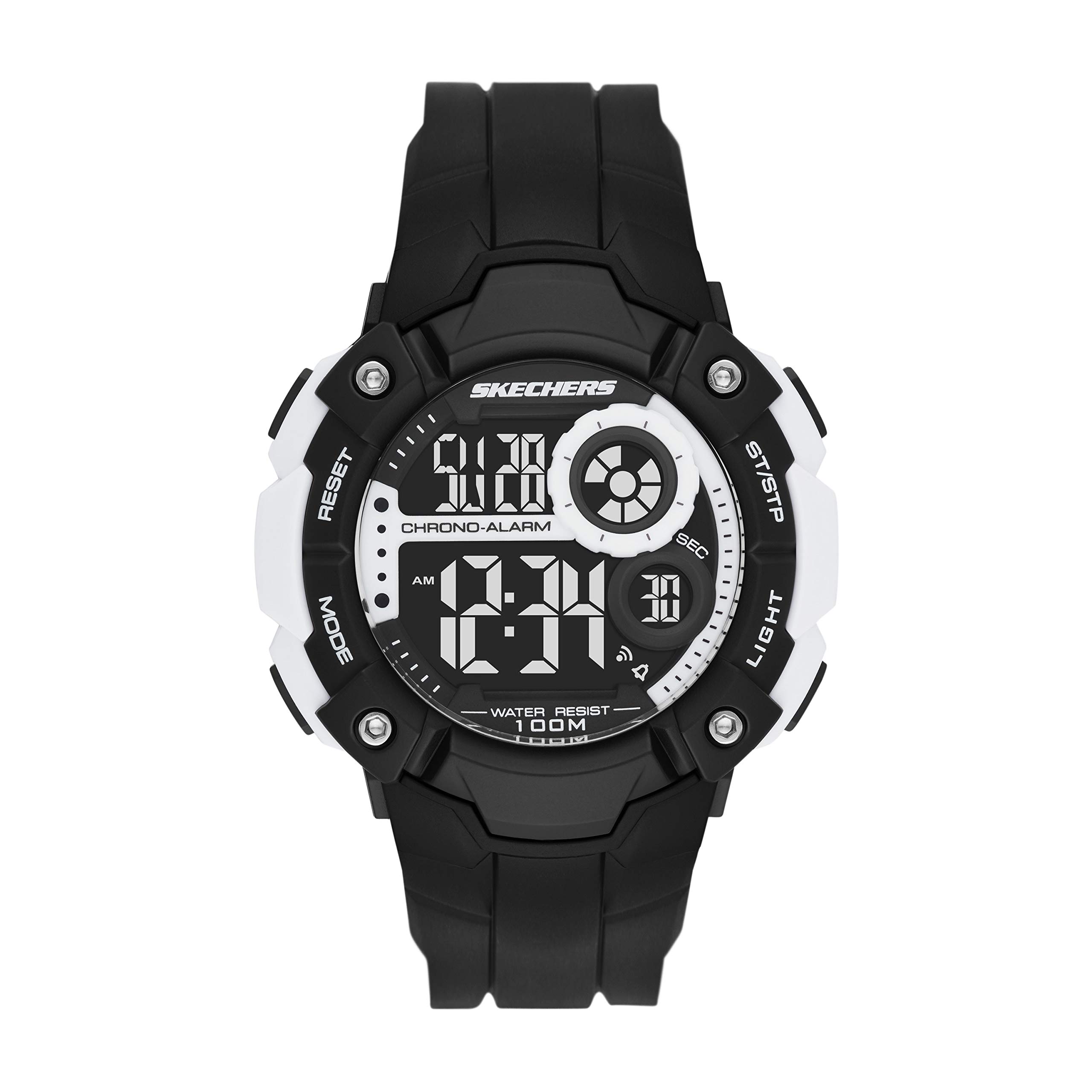
Resim: Ön view of the Skechers SR1123 Digital Watch, showcasing its black case and clear digital display.
3. İlk Kurulum
Upon first use, you may need to set the current time and date.
3.1 Saat ve Tarihin Ayarlanması
- Zaman Tutma Modundan, MOD button repeatedly until the time setting digits begin to flash. This indicates you are in setting mode.
- Basın SIFIRLAMA Ayarlar arasında geçiş yapmak için kullanılan düğme: saniye, saat, dakika, ay, tarih, haftanın günü.
- Kullanın ST / STP button to increase the flashing value. Hold the button to rapidly advance the digits.
- Tüm ayarlar yapıldıktan sonra, MOD Ayar modundan çıkmak ve Zaman İşleyişi Moduna geri dönmek için düğmeye basın.

Resim: Yakın çekim view of a digital watch display, illustrating how time and date information is presented.
4. Kullanım Talimatları
4.1 Arka Aydınlatmanın Kullanımı
Düşük ışık koşullarında ekranı aydınlatmak için tuşuna basın IŞIK button. The backlight will remain active for a few seconds.
4.2 Alarm Fonksiyonu
- Zaman Tutma Modundan, tuşuna basın MOD ulaşana kadar düğmesine basın. Alarm Modu. The alarm time will be displayed.
- Basın SIFIRLAMA Ayarlanacak saat veya dakika rakamlarını seçmek için düğme.
- Kullanın ST / STP Yanıp sönen saat veya dakikayı ayarlamak için düğmeye basın.
- Alarmı etkinleştirmek veya devre dışı bırakmak için tuşuna basın ST / STP button while in Alarm Modu (without digits flashing). An alarm icon will appear/disappear on the display.
- Basın MOD Zaman Tutma Moduna dönmek için düğmeye basın.
4.3 Kronometre Fonksiyonu
- Zaman Tutma Modundan, tuşuna basın MOD ulaşana kadar düğmesine basın. Kronometre Modu. The display will show "00:00:00".
- Basın ST / STP Kronometreyi başlatmak için düğmeye basın.
- Basın ST / STP Kronometreyi durdurmak için tekrar düğmeye basın.
- Basın SIFIRLAMA button to clear the stopwatch to "00:00:00".
- To record lap times (if available), press SIFIRLAMA Kronometre çalışırken, tur süresi kısa bir süre ekranda görünecek ve kronometre arka planda çalışmaya devam edecektir.
- Basın MOD Zaman Tutma Moduna dönmek için düğmeye basın.
5. Suya Dayanıklılık
Your Skechers SR1123 watch has a water resistance rating of 100 meters (10 ATM), making it suitable for swimming and showering. However, it is not recommended for diving or high-impact water sports.
- Saatiniz sudayken düğmelere basmayın.
- Saati aşırı sıcaklık değişimlerine maruz bırakmaktan kaçının (örneğin, sıcak duşun ardından soğuk su gelmesi).
- Tuzlu suya maruz kaldıktan sonra saati tatlı suyla durulayın ve iyice kurulayın.
6. Bakım
6.1 Saatinizi Temizleme
Saatin kasasını ve kayışını düzenli olarak yumuşak, kuru bir bezle silin. İnatçı kirler için biraz daha yumuşak bir bez kullanın.amp cloth and mild soap, then rinse with fresh water and dry completely.
6.2 Pil Değişimi
The watch is powered by a button-cell battery. When the display becomes dim or functions become erratic, it may be time to replace the battery. Battery replacement should ideally be performed by a qualified watch technician to ensure proper sealing and maintain water resistance.

Resim: Arka view of the Skechers SR1123 Digital Watch, showing the stainless steel case back and the buckle closure of the polyurethane strap.
7. Sorun Giderme
- Ekran boş veya loş: Pil zayıflamış veya bitmiş olabilir. Pili değiştirin.
- Düğmeler tepkisiz: Ensure the watch is not in a locked mode (if applicable, refer to specific model features). If the issue persists, a battery replacement or professional inspection may be needed.
- Zaman yanlış: Re-set the time and date following the instructions in Section 3.1. Ensure the correct 12/24-hour format is selected if available.
8. Özellikler
| Model Numarası | SR1123 |
| Görüntü Türü | Dijital |
| Hareket Türü | Dijital |
| Güç Kaynağı | Pil ile çalışır |
| Kasa Malzemesi | Plastik |
| Bant Malzemesi | Poliüretan |
| Suya Dayanıklılık Derinliği | 100 Metre (10 ATM) |
| Kasa Çapı | 51 Milimetre |
| Kasa Kalınlığı | 15 Milimetre |
| Bant Genişliği | 26 Milimetre |
| Ürün Ağırlığı | 57 Gram |
9. Garanti ve Destek
Your Skechers SR1123 watch is covered by a manufacturer's warranty. Please refer to the warranty card included with your purchase for specific terms and conditions. For further assistance or support, please contact Skechers customer service or visit their official webalan.
9.1 Related Product Video (General Digital Watch Operation)
Video: This video demonstrates general operation for a Skechers digital display watch (model SR1032). While not specific to SR1123, it may provide visual guidance on common digital watch functions such as time display and button interaction.


