giriiş
This manual provides essential instructions for the safe and effective use of your Welch Allyn Contact-Free Clinical-Grade Forehead Thermometer. Please read this manual thoroughly before initial use and retain it for future reference. This device is designed for accurate, non-contact temperature measurement of the forehead.
Güvenlik Bilgileri
- Termometreyi insan vücut sıcaklığını ölçmek dışında başka amaçlarla kullanmayın.
- Cihazı çocukların erişemeyeceği yerde saklayınız.
- Termometreyi düşürmekten veya sert darbelere maruz bırakmaktan kaçının.
- Termometreyi doğrudan güneş ışığına, aşırı sıcaklıklara veya yüksek neme maruz bırakmayın.
- Consult a physician if you have concerns about temperature readings or your health.
- Cihazı kendiniz sökmeye veya onarmaya çalışmayın.
Kutuda Neler Var?
Paketi açtıktan sonra, tüm ürünlerin eksiksiz ve hasarsız olduğundan emin olun:
- (1) Welch Allyn Contact-Free Clinical-Grade Forehead Thermometer
- (2) AAA Piller
Ürün Özellikleri
The Welch Allyn Contact-Free Thermometer offers several key features for efficient and accurate temperature measurement:
- Contact-Free Measurement: Eliminates the need for disposable probe covers and disinfection between readings, promoting hygiene.
- Clinical-Grade Accuracy: Designed for reliable temperature readings.
- Measurement Feedback System: Detects the proper operating distance to ensure consistent accuracy.
- Uzun Pil Ömrü: Capable of approximately 3,000 readings on two "AAA" batteries.
- Parlak Arka Aydınlatmalı Ekran: Ensures clear visibility of readings in various lighting conditions.
- Özel Fonksiyon Düğmeleri: Includes buttons for pulse timer, Celsius/Fahrenheit conversion, and memory recall.

Resim 1: Ön view of the Welch Allyn Contact-Free Forehead Thermometer, showing the display, measurement button, memory button, C/F button, and pulse timer button.
Kurmak
1. Pil Kurulumu
- Locate the battery compartment cover on the back or bottom of the thermometer.
- Bölmeyi açmak için kapağı yavaşça kaydırın veya açın.
- Insert the two "AAA" batteries, ensuring correct polarity (+ and -) as indicated inside the compartment.
- Pil bölmesi kapağını güvenli bir şekilde yerine takın.
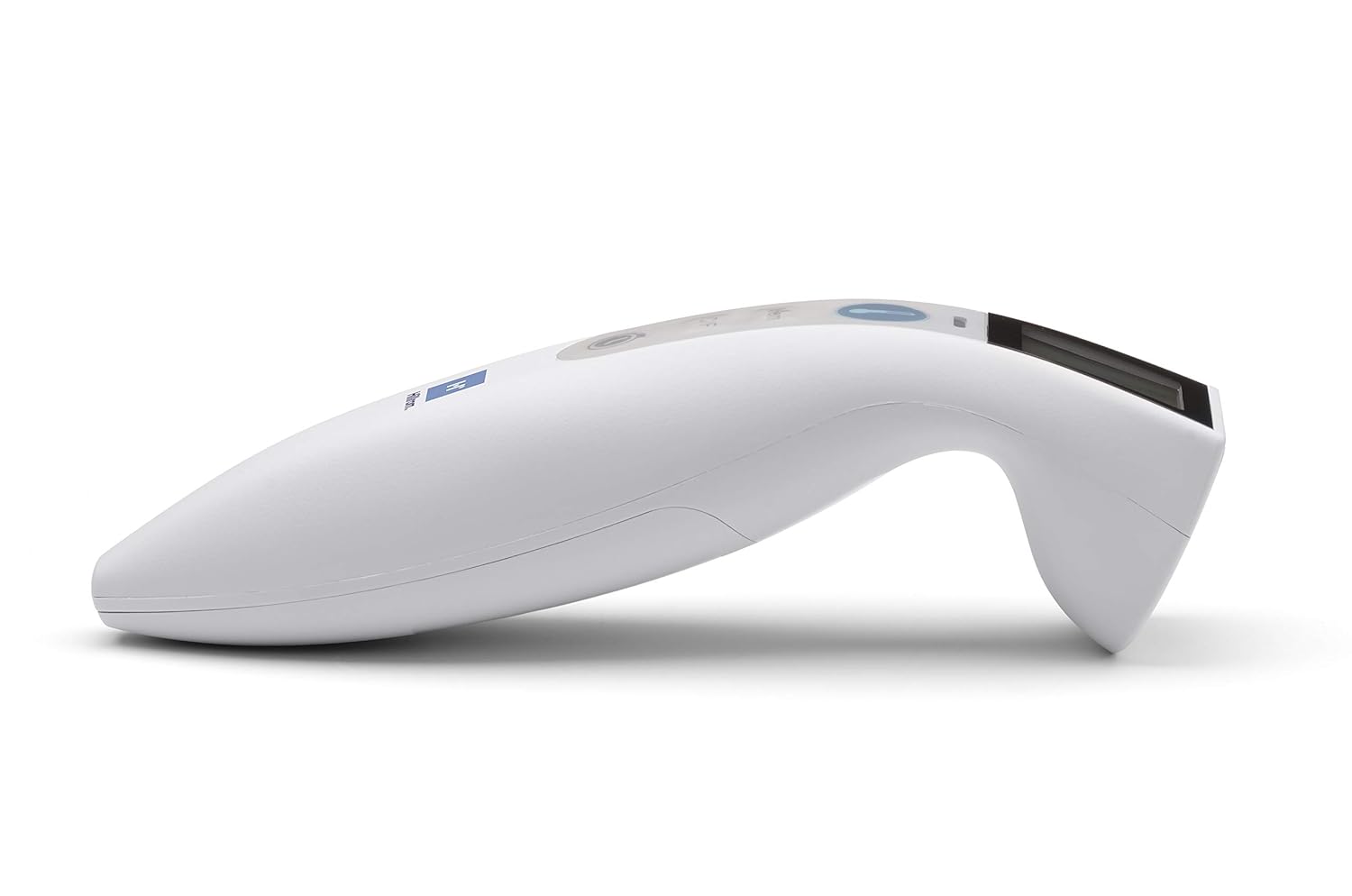
Resim 2: Yan view of the Welch Allyn Contact-Free Forehead Thermometer, illustrating its ergonomic design. The battery compartment is typically located on the underside or rear of the device.
2. İlk Açılış
After installing batteries, press the power/measurement button once to turn on the device. The display will illuminate, and the thermometer will perform a brief self-check before entering standby mode, ready for measurement.
Kullanım Talimatları
1. Taking a Temperature Measurement
- Ensure the thermometer is clean and free of obstructions.
- Position the thermometer approximately 1-2 inches (2.5-5 cm) from the center of the patient's forehead. The device features a measurement feedback system to guide you to the correct distance.
- Press and release the measurement button (often indicated by a thermometer icon).
- Hold the thermometer steady until a beep sounds and the temperature reading appears on the display.
- Record the reading if necessary. The thermometer will automatically turn off after a period of inactivity or can be manually turned off by pressing and holding the power button.

Resim 3: View of the Welch Allyn Contact-Free Forehead Thermometer, highlighting the infrared sensor area at the front, which should be aimed at the forehead for accurate readings.
2. Switching Between Celsius and Fahrenheit
To change the temperature unit, press the "C/F" button. The display will toggle between Celsius (°C) and Fahrenheit (°F). The selected unit will be indicated on the screen.
3. Hafıza Geri Çağırma
The thermometer stores previous temperature readings. To access these, press the "Mem" button. Repeated presses will cycle through stored readings. The number of stored readings may vary by model.
4. Pulse Timer Function
To use the pulse timer, press the dedicated pulse timer button (often indicated by a clock icon). Follow the on-screen prompts or refer to the specific timing sequence for accurate pulse measurement. This feature assists in manually counting pulse rates over a set period.
Bakım
Termometrenin Temizlenmesi
- Wipe the thermometer body with a soft cloth dampened with isopropyl alcohol (70% concentration) or a mild disinfectant.
- Pay special attention to the sensor lens. Use a cotton swab lightly moistened with alcohol to gently clean the lens. Avoid excessive pressure or abrasive materials, as this can damage the sensor.
- Termometreyi suya veya herhangi bir temizleme solüsyonuna batırmayın.
- Allow the thermometer to air dry completely before storage or next use.
Depolamak
- Termometreyi serin, kuru, doğrudan güneş ışığından ve aşırı sıcaklıklardan uzak bir yerde saklayın.
- If the thermometer will not be used for an extended period, remove the batteries to prevent leakage and potential damage to the device.
Sorun giderme
Termometrenizle ilgili sorunlarla karşılaşırsanız, lütfen aşağıdaki yaygın sorunlar ve çözümlerine bakın:
| Sorun | Olası Neden / Çözüm |
|---|---|
| Ekranda "Hata" mesajı |
|
| Yanlış veya tutarsız okumalar |
|
| Thermometer does not turn on |
|
| Ekran loş veya titriyor |
|
Özellikler
- Modeli: B08T5TLHMF
- Ölçüm Yöntemi: Temassız kızılötesi
- Güç Kaynağı: 2 x "AAA" batteries
- Pil Ömrü: Yaklaşık 3,000 okuma
- Görüntülemek: Arka aydınlatmalı LCD
- Birimler: Celsius (°C) / Fahrenheit (°F)
- Hafıza: Stores previous readings (specific capacity may vary)
- Üretici: Hillrom (Welch Allyn is a Hillrom brand)
- Paket Boyutları: 10.24 x 6.42 x 2.24 inç
- Ağırlık: 8.78 ons (piller dahil)
Garanti ve Destek
Garanti bilgileri, teknik destek veya servis talepleri için lütfen doğrudan üreticiyle iletişime geçin.
Üretici İletişim Bilgileri:
- Marka: Welch Allyn (a Hillrom brand)
- Telefon: 800-535-6663
- Webalan: www.welchallyn.com (or relevant Hillrom support site)
Please have your product model number (B08T5TLHMF) and date of purchase available when contacting support.


