1. Giriş
The Lepro PR902103-US Smart Table Lamp offers versatile lighting solutions for your home. This LED touch lamp features RGB color changing capabilities, tunable warm to cool white light, and dimmable brightness. It is designed for seamless integration with smart home ecosystems, supporting both Amazon Alexa and Google Assistant for voice control, as well as control via a dedicated mobile application. This manual provides comprehensive instructions for setup, operation, and maintenance.

Figure 1: Lepro Smart Table Lamp gösteriasing its app control interface.
2. Kutuda Neler Var?
Lütfen ambalajda tüm bileşenlerin mevcut olduğundan emin olun:
- 1 x Lepro Smart Table Lamp (Model: PR902103-US)
- 1 x 4.9 ft USB Cable
- 1 x Güç Adaptörü
- 1 x Kullanım Kılavuzu (bu belge)
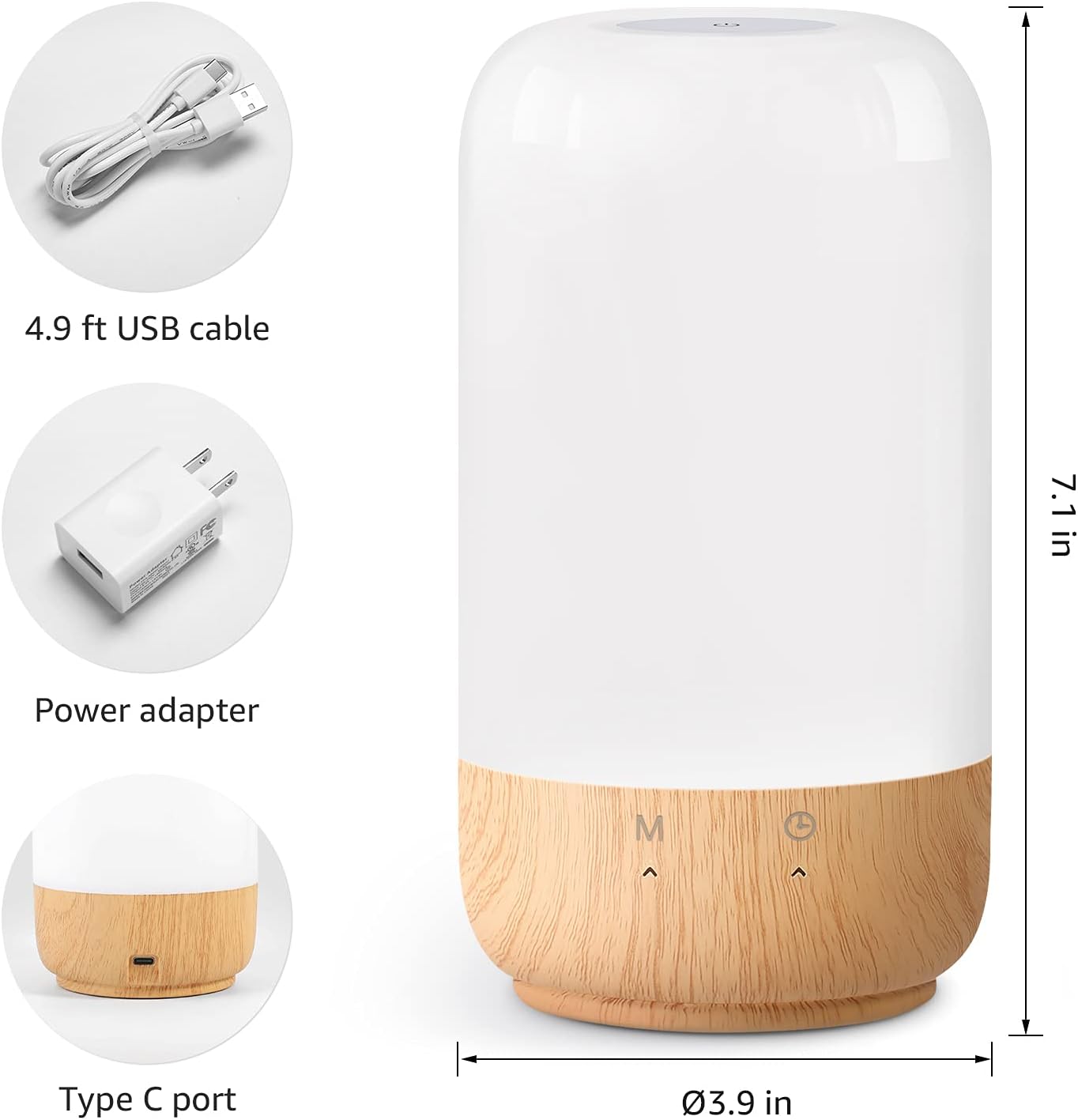
Şekil 2: Dahil edilen bileşenler ve ürün boyutları.
3. Kurulum
Follow these steps to set up your Lepro Smart Table Lamp:
- Güç Bağlantısı: Sağlanan USB kablosunu l'ye bağlayın.amp's Type-C port and the power adapter. Plug the power adapter into a standard wall outlet. The lamp aydınlatacaktır.
- Uygulama İndirme: Download the 'Lepro LampUX' app from your mobile device's App Store (iOS) or Google Play Store (Android).
- Hesap Kaydı: Open the 'Lepro LampUX' app and register a new account or log in if you already have one.
- Cihaz Eşleştirme:
- Uygulamada 'Cihaz Ekle'ye veya '+' simgesine dokunun.
- Select 'Table Lamp' from the lighting category.
- l'yi sağlayınamp is powered on. Long press the timer button on the lamp's base for at least 5 seconds until the indicator light blinks rapidly.
- Uygulamada gösterge ışığının hızlı bir şekilde yanıp söndüğünü onaylayın ve devam edin.
- Select your 2.4 GHz Wi-Fi network and enter the password. (Note: The lamp only supports 2.4 GHz Wi-Fi networks. If your router is 5 GHz, please set it to 2.4 GHz during setup.)
- The app will begin adding the device. Once successfully added, you can rename your lamp Daha kolay tanımlama için.
Video 1: Detailed steps on how to set up your Lepro Smart Lamp mobil uygulamayı kullanarak.
4. Kullanım Talimatları
The Lepro Smart Table Lamp can be controlled via touch, the mobile app, or voice commands.
4.1. Dokunmatik Kontroller
- Güç Açma/Kapatma: Short press the power button (marked 'M') on the lampüssü.
- Parlaklık Ayarı: Slide your finger along the left side of the lamp's base to adjust brightness.
- Renk Değişimi (RGB): Slide your finger along the right side of the lamp's base to cycle through RGB colors.
- Mod Anahtarı: Short press the timer button (clock icon) to switch between white light modes (warm white, cool white) and RGB color mode.
4.2. Mobile App Controls
The 'Lepro LampUX' app provides comprehensive control over your lamp:
- Brightness & Color Temperature: Adjust the brightness level and select color temperatures from 2700K (warm white) to 5700K (cool white).
- RGB Renk Seçimi: Choose from 16 million colors using the color wheel in the app.
- Sahneler: Select from pre-set scenes like 'Night', 'Read', 'Meeting', 'Leisure', or customize your own scenes with specific colors and effects.
- Timer & Wake-up: L için programlar belirleyinamp to turn on/off automatically. Utilize the 'Sunrise Simulation' feature to gradually increase light for a gentle wake-up.

Figure 3: Mobile application interface for controlling lamp Ayarlar.

Şekil 4: lamp's timer and wake-up functions in use.
4.3. Ses Kontrolleri
The Lepro Smart Table Lamp is compatible with Amazon Alexa and Google Assistant. To enable voice control:
- l'nizi sağlayınamp is successfully paired with the 'Lepro LampUX' app.
- Amazon Alexa veya Google Home uygulamasını açın.
- 'Beceriler ve Oyunlar' (Alexa) veya 'Google ile Çalışır' (Google Home) bölümüne gidin.
- Arama and enable the 'Lepro LampUX' skill/service.
- Link your 'Lepro LampUX' account with your Alexa/Google account.
- Bağlantı kurulduktan sonra şu tür sesli komutları kullanabilirsiniz:
- "Alexa, [L]'yi açamp İsim]."
- "Hey Google, set [Lamp Adı] sıcak beyaza."
- "Alexa, [L]'yi değiştiramp Name] to blue."
- "Hey Google, dim [Lamp Name] to 50%."

Figure 5: Voice control integration with Amazon Alexa.
Video 2: Demonstration of the Lepro Smart Table Lamp working with Alexa and Google Home.
5. Bakım
To ensure the longevity and optimal performance of your Lepro Smart Table Lamp, please follow these maintenance guidelines:
- Temizlik: Temizlemeden önce güç bağlantısını kesin. Yumuşak ve kuru bir bezle silin.amp's surface. Avoid using abrasive cleaners, solvents, or harsh chemicals, as these may damage the finish or electronic components.
- Depolamak: L'yi saklıyorsanızamp Uzun süre kullanacaksanız, temiz ve kuru olduğundan emin olun. Serin, kuru bir yerde, doğrudan güneş ışığından ve aşırı sıcaklıklardan uzakta saklayın.
- İşleme: L'yi idare etamp Dikkatli kullanın. Düşürmekten veya sert darbelere maruz bırakmaktan kaçının.
6. Sorun Giderme
If you encounter issues with your Lepro Smart Table Lamp, aşağıdaki yaygın sorunlara ve çözümlere bakın:
| Sorun | Olası Neden | Çözüm |
|---|---|---|
| Lamp açılmıyor. | Güç kaynağı yok. | Güç adaptörünün prize güvenli bir şekilde takılı olup olmadığını kontrol edin.amp and the wall outlet. Ensure the outlet is functional. |
| Wi-Fi'ye bağlanılamıyor. | Incorrect Wi-Fi band (5 GHz). Yanlış parola. Zayıf Wi-Fi sinyali. | Ensure your Wi-Fi network is 2.4 GHz. Verify the Wi-Fi password. Move the lamp closer to your router. |
| Ses kontrolü çalışmıyor. | Skill not enabled/linked. Yanlış cihaz adı. | Ensure the 'Lepro LampUX' skill is enabled and linked in your Alexa/Google Home app. Use the exact device name configured in the app. |
| Lamp yanıt vermiyor. | Geçici yazılım hatası. | Fişi çekinamp from the power outlet for 10 seconds, then plug it back in to perform a soft reset. |
7. Özellikler
| Özellik | Detay |
|---|---|
| Marka | Cüzzam |
| Model Numarası | PR902103-ABD |
| Ürün Boyutları | 3.9"D x 3.9"G x 7.1"Y |
| Ürün Ağırlığı | 1.19 pound |
| Malzeme | Plastik, Ahşap |
| Işık Kaynağı Türü | NEDEN OLMUŞ |
| Netage | 7 watt |
| Parlaklık | 350 Lümen |
| Açık Renk | RGB + CCT (Tunable White 2700-5700K) |
| Kontrol Yöntemi | App, Touch, Voice (Alexa, Google Assistant) |
| Bağlantı | Yalnızca 2.4 GHz WiFi |
| İç/Dış Mekan Kullanımı | Kapalı |
8. Garanti ve Destek
Lepro products are designed and manufactured to the highest quality standards. For warranty information and technical support, please refer to the contact details provided on the product packaging or visit the official Lepro webSite. Satın alma fişinizi, garanti talepleriniz için satın alma belgeniz olarak saklayın.


