giriiş
This manual provides essential information for the proper installation, operation, and maintenance of your Zebronics Zeb-D370S DVD Player. Please read this manual thoroughly before using the device to ensure safe and efficient operation. Keep this manual for future reference.
Önemli Güvenlik Bilgileri
- Yangın veya elektrik çarpmasını önlemek için cihazı yağmur veya neme maruz bırakmayın.
- C'yi açmayınasing. Tüm servis işlemlerini yetkili personele yaptırın.
- Ünitenin çevresinde yeterli havalandırma olduğundan emin olun. Havalandırma açıklıklarını kapatmayın.
- Use only the power adapter supplied with the unit or specified by the manufacturer.
- Cihazı dengesiz yüzeylere yerleştirmekten kaçının.
- Şimşekli fırtınalar sırasında veya uzun süre kullanılmadığında güç kablosunu çıkarın.
Paket İçeriği
Paketin içinde tüm öğelerin mevcut olduğundan emin olun:
- Zebronics Zeb-D370S DVD Player Unit
- Uzaktan kumanda
- AV Kablosu
- Güç kablosu
- Kullanım Kılavuzu
Ürün Bittiview
The Zebronics Zeb-D370S is a versatile DVD player featuring a built-in stereo speaker and amplifier, HDMI, USB, and SD card support, and dual karaoke microphone inputs. It supports multiple formats and offers 5.1 channel, coaxial, and optical audio outputs.
Front Panel Controls and Ports
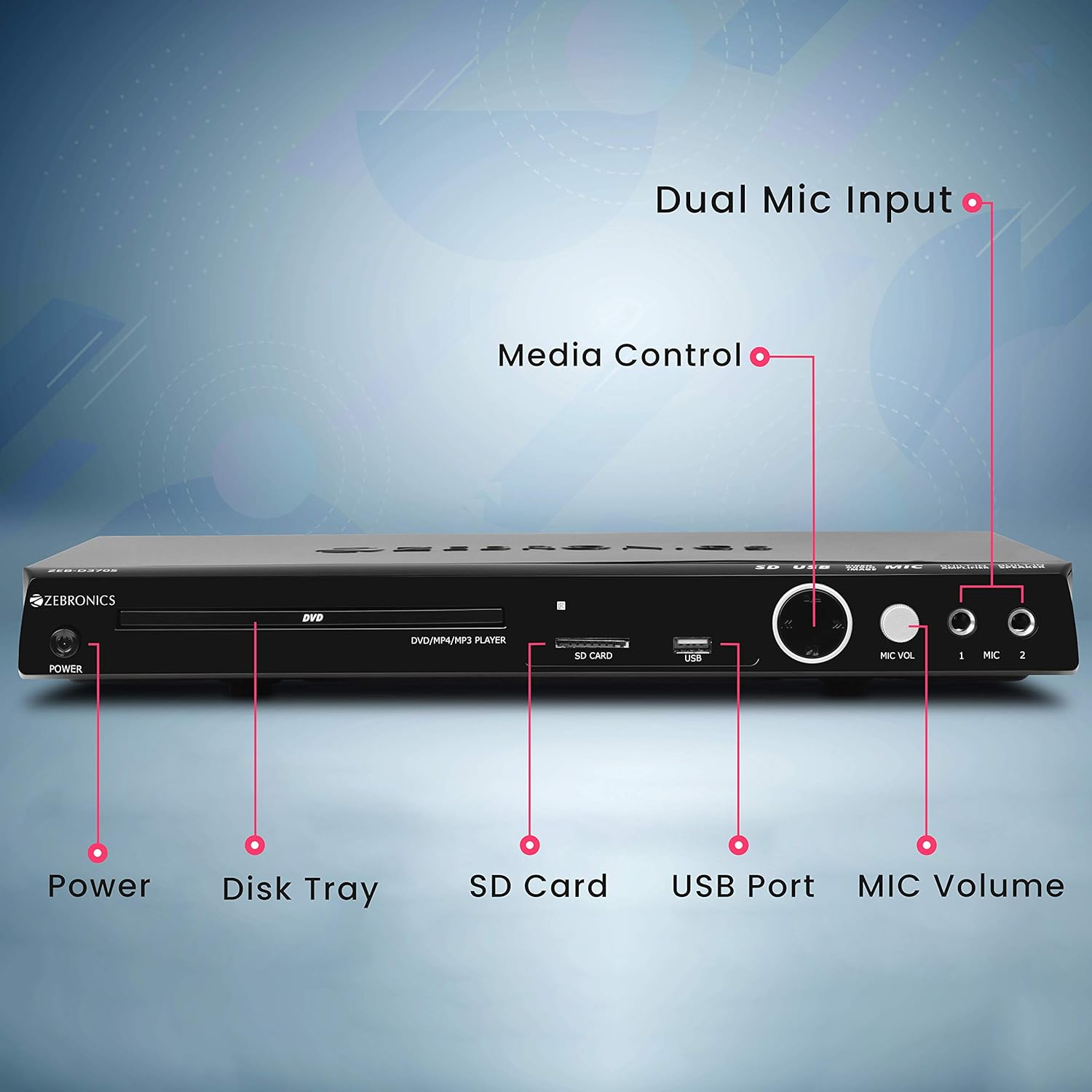
Front panel of the Zebronics Zeb-D370S DVD Player, showing the Power button, Disk Tray, SD Card slot, USB Port, MIC Volume control, and two Microphone inputs (MIC 1, MIC 2).
- Güç Düğmesi: Üniteyi açar veya kapatır.
- Disk Tray: For inserting DVDs, CDs, VCDs, and SVCDs.
- SD Kart Yuvası: Medya oynatmak için filebir SD karttan geliyor.
- USB Bağlantı Noktası: Medya oynatmak için files bir USB sürücüsünden.
- Mikrofon sesi: Bağlı mikrofonların ses seviyesini ayarlar.
- MIC 1 & MIC 2: Inputs for connecting microphones for karaoke.
- Medya Kontrol Düğmeleri: Play/Pause, Stop, Skip, etc.
Arka Panel Bağlantıları

Rear panel of the Zebronics Zeb-D370S DVD Player, detailing the Coaxial Output, Optical Output, 5.1 Channel Output, HDMI port, Composite video output, Component video output, S-Video output, and Ext-Audio Output.
- HDMI Çıkışı: For high-definition video and audio connection to a TV or display.
- Kompozit Video Çıkışı: Standard definition video output.
- Bileşen Video Çıkışı: Higher quality analog video output (YPbPr).
- S-Video Çıkışı: Improved analog video output.
- Digital Audio Output (Optical & Coaxial): For connecting to external audio receivers or sound systems.
- Analog 5.1 Channel Output: For connecting to a 5.1 channel speaker system.
- Ext-Audio Output: Additional audio output connections.
- Hoparlör Çıkışı: Terminals for connecting external speakers, utilizing the built-in ampcankurtaran.

Arka view of the Zebronics Zeb-D370S DVD Player highlighting the built-in amplifier, built-in speaker, and speaker output terminals.
Kurulum Talimatları
1. Güç Bağlantısı
- Ensure the DVD player is placed on a stable, flat surface with adequate ventilation.
- Connect the power cable to the AC input on the rear of the DVD player.
- Plug the other end of the power cable into a standard electrical outlet (110V - 260V AC).
2. Video Connection to TV/Display
Aşağıdaki bağlantı yöntemlerinden birini seçin:
- HDMI (Recommended for best quality): Connect an HDMI cable from the HDMI output on the DVD player to an HDMI input on your TV.
- Bileşen Videosu: Connect component video cables (Red, Green, Blue) from the DVD player's component outputs to the corresponding inputs on your TV.
- Kompozit video: Connect a composite video cable (Yellow) from the DVD player's composite output to the yellow video input on your TV.
- S-Video: Connect an S-Video cable from the DVD player's S-Video output to the S-Video input on your TV.
3. Ses Bağlantısı
Choose one of the following audio connection methods:
- HDMI: If using HDMI for video, audio will also be transmitted via the HDMI cable.
- 5.1 Channel Analog Output: Connect RCA cables from the 5.1 channel outputs (Front Left, Front Right, Center, Subwoofer, Surround Left, Surround Right) on the DVD player to a compatible 5.1 channel amplifier veya hoparlör sistemi.
- Dijital Ses (Optik/Koaksiyel): Connect an optical or coaxial cable from the respective output on the DVD player to a digital audio input on your amplifier or home theater system for surround sound.
- Dahili Hoparlör Çıkışı: If using the built-in speakers, ensure no external speakers are connected to the 5.1 channel outputs unless desired.
4. Microphone Connection (Optional)
- Plug your microphones into the MIC 1 and/or MIC 2 inputs on the front panel.
- Adjust the MIC Volume knob to control microphone audio levels.
Kullanım Talimatları

Zebronics Zeb-D370S DVD Player with a disc inserted, remote control, and a visual representation of content playing on a screen, illustrating its multimedia capabilities.
1. Disk Oynatma
- Basın Güç button to turn on the DVD player.
- Basın Aç/Kapat button (usually on the remote or front panel) to open the disc tray.
- Place a compatible disc (DVD Video, DVD+RW/-RW/+R/-R, Dual Layer Disc, CD Audio, CD-R/-RW, VCD, SVCD) onto the disc tray with the label side facing up.
- Basın Aç/Kapat button again to close the tray. The player will automatically begin playback or display a menu.
- Use the remote control for playback functions such as Play, Pause, Stop, Fast Forward, Rewind, and Chapter Skip.
2. USB/SD Media Playback
- Insert a USB drive into the USB port or an SD card into the SD card slot on the front panel.
- The player should automatically detect the media and display a menu to browse files. If not, select the USB or SD source using the remote control's Kaynak or Giriş düğme.
- Gezinmenizi sağlayın files (VOB, MP4, DIVX, AVI, MPEG-1, MPEG-2, 3GP, MP3, WMA, AAC, JPEG, TXT) using the remote control and press Oynamak oynatmayı başlatmak için.
3. Karaoke Fonksiyonu
- Connect one or two microphones to the MIC 1 and MIC 2 inputs.
- Play a karaoke disc or a media file with instrumental tracks.
- Adjust the MIC Volume knob on the front panel to control the microphone audio level.
4. Gelişmiş Fonksiyonlar
- CD Ripping: Convert audio CDs to digital formats (refer to on-screen menu for options).
- Picture Slideshow: View JPEG images from disc, USB, or SD card as a slideshow.
- Kademeli tarama: Provides a smoother, flicker-free image on compatible displays.
- Zoom IN/OUT: Magnify or reduce the displayed image during playback.
- High Speed Search: Quickly scan through disc or media content.
- Ebeveyn kilidi: Restrict playback of certain content based on ratings.
- Anında Tekrar: Jump back a few seconds during playback.
- Disc Resume: Resume playback from where it was last stopped on a disc.
Bakım
- Ünitenin Temizlenmesi: Use a soft, dry cloth to clean the exterior of the DVD player. Do not use liquid cleaners or abrasive materials.
- Disk Bakımı: Diskleri kenarlarından tutarak temizleyin. Temiz ve çiziksiz tutun. Diskleri merkezden dışa doğru silmek için yumuşak, tüy bırakmayan bir bez kullanın.
- Havalandırma: Aşırı ısınmayı önlemek için havalandırma açıklıklarının engellenmediğinden emin olun.
Sorun giderme
If you encounter issues with your DVD player, refer to the table below for common problems and solutions:
| Sorun | Olası Neden | Çözüm |
|---|---|---|
| Güç yok | Güç kablosu bağlı değil; Elektrik prizi çalışmıyor. | Güç kablosu bağlantısını kontrol edin; farklı bir priz deneyin. |
| Video çıkışı yok | Incorrect video cable connection; Incorrect input selected on TV | Ensure video cables are securely connected; Select the correct input source on your TV (e.g., HDMI 1, AV) |
| Ses çıkışı yok | Incorrect audio cable connection; TV/amplifier volume too low; Mute activated | Check audio cable connections; Increase volume; Deactivate mute function |
| Disk oynatılmıyor | Disc is dirty or scratched; Disc format not supported; Disc inserted incorrectly | Clean the disc; Ensure disc is compatible; Insert disc with label side up |
| USB/SD media not detected | USB drive/SD card not inserted correctly; Incompatible file format; Corrupted media | Reinsert USB/SD; Check supported file formats; Try a different USB/SD device |
Özellikler

Dimensions of the Zebronics Zeb-D370S DVD Player: 360mm (width), 220mm (depth), and 50mm (height).
| Özellik | Detay |
|---|---|
| Model Adı | Zeb D370S |
| Marka | ZEBRONİK |
| Ürün Boyutları | 28 x 39 x 82 mm (1.4 kg) |
| Çözünürlük | 1920 x 1080 (Supported resolutions: 480i/576i/480p/576p/720p/1080i/1080p) |
| Özel Özellikler | Surround Sound, Built-in Amplifier, Built-in Stereo Speaker, Karaoke Mic Input |
| Ses Çıkışı Modu | Stereo, Surround (2CH / 5.1CH / Virtual Surround Sound) |
| Hoparlör Surround Ses Kanalı Yapılandırması | 5.1 |
| Desteklenen Ses Biçimleri | Dolby Digital, MP3, WMA, AAC |
| Video Playback System | NTSC / PAL / AUTO |
| Bağlayıcı Türü | HDMI, USB, SD Slot, MIC 1 & MIC 2, Composite, Component, S-Video, Digital Audio Output (Optical & Coaxial), Analog 5.1Ch Output, Ext-Audio Output x 2 |
| Media Type (Playback Disc) | DVD Video, DVD+RW/-RW/+R/-R, Dual Layer Disc, CD Audio, CD-R/-RW, VCD, SVCD |
| Medya Files Desteklendi | VOB, MP4, DIVX, AVI, MPEG-1, MPEG-2, 3GP, MP3, WMA, AAC, JPEG, TXT |
| Çalışma Hacmitage | 110V - 260V AC |
| Fonksiyonlar | CD Ripping, Picture SlideShow, Progressive scan, Zoom IN/OUT, High speed search, Parental lock, Instant replay, Disc resume |
Garanti ve Destek
For warranty information, technical support, or service inquiries, please refer to the warranty card included with your product or visit the official Zebronics webLütfen bu siteyi ziyaret edin ve cihazı kendiniz tamir etmeye çalışmayın.


