1. Giriş
The Tycon TPSC2440NMPPT is an advanced Maximum Power Point Tracking (MPPT) solar charge controller designed for efficient battery charging from solar panels. It automatically adjusts to 12V or 24V battery systems and supports various battery types including Flooded, AGM, GEL, and Lithium, with a customizable USER setting. This controller features an integral LCD display for monitoring key system parameters.
2. Güvenlik Talimatları
Lütfen kurulum ve çalıştırmadan önce tüm talimatları okuyun ve anlayın. Bu talimatlara uyulmaması elektrik çarpmasına, yangına veya ciddi yaralanmalara neden olabilir.
- Tüm kabloların doğru şekilde kutuplandığından ve güvenli bir şekilde bağlandığından emin olun.
- Do not disassemble or attempt to repair the controller. Refer to qualified service personnel.
- Kontrol ünitesini iyi havalandırılan bir alana, yanıcı maddelerden ve aşındırıcı gazlardan uzak bir yere kurun.
- Always disconnect the battery and solar panel before installing or moving the controller.
- Kurulum sırasında uygun kişisel koruyucu ekipman (KKD) giyin.
- The controller is designed for indoor use or protected outdoor environments (IP32 rating). Avoid direct exposure to water.
3. Ürün Bittiview
The TPSC2440NMPPT controller is equipped with several features to optimize solar charging and battery management:
- MPPT Teknolojisi: Güneş panellerinden elde edilen enerjiyi en üst düzeye çıkarır.
- Auto-Ranging Voltage: Compatible with 12V or 24V battery arrays.
- Multimode Load Operation: Offers 5 selectable modes for load control.
- Soft Start Load Output: Powers high capacitive loads safely.
- Automatic Battery Equalization: Performs 30-day equalization for optimal battery health.
- Conformal Coated Electronics: Provides environmental protection.
- TVS Lightning Protection: Enhances durability against electrical surges.
- Integral LCD Display: Pil Hacmini Gösterirtage, Capacity, Charging Capacity, Temperature, Load Current, and Solar Current.
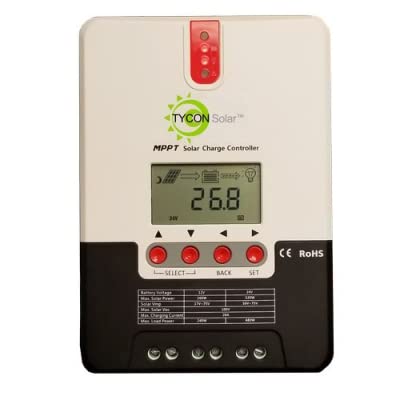
Şekil 1: Ön view of the Tycon TPSC2440NMPPT Solar MPPT Battery Charging Controller, showing the LCD display and connection terminals.
4. Kurulum ve Kurulum
Doğru kurulum için şu adımları izleyin:
- Montaj: Choose a suitable location for mounting the controller. Ensure good ventilation and protection from direct sunlight and moisture.
- Pil Bağlantısı: Connect the battery to the controller's battery terminals first. Ensure correct polarity (+ to + and - to -). The controller will automatically detect the battery voltage (12V veya 24V).
- Güneş Paneli Bağlantısı: Connect the solar panel array to the controller's solar input terminals. Observe correct polarity. Ensure the open-circuit voltage of the solar array does not exceed the controller's maximum input voltage (110V at 25°C).
- Yük Bağlantısı (Opsiyonel): If using the load output, connect your DC loads to the controller's load terminals. Do not exceed the rated load current (20A Max).
- Sıcaklık Sensörü: Connect the included battery temperature probe cable to the designated port on the controller. Place the sensor near the battery for accurate temperature compensation.
- Güç Açık: Tüm bağlantılar güvenli hale getirildikten sonra, kontrol ünitesi açılacak ve çalışmaya başlayacaktır.
5. Kullanım Talimatları
The integral LCD display provides real-time information about your solar charging system. Use the buttons (if present, assuming standard UP/DOWN/SET) to navigate through the display menus and adjust settings.
5.1 LCD Ekran Bilgileri
- Pil Hacmitage: Mevcut hacimtage bağlı pil.
- Pil Kapasitesi: Estimated state of charge.
- Şarj Kapasitesi: Current power being delivered to the battery.
- Pil Sıcaklığı: Temperature measured by the external probe.
- Yük Akımı: Current being drawn by connected DC loads.
- Solar Current: Current being generated by the solar panels.
5.2 Pil Tipi Ayarları
The controller supports Flooded, AGM, GEL, and Lithium battery types. A USER setting allows for custom charge parameters. Refer to the on-screen menu for selecting and configuring the battery type.
5.3 Load Operation Modes
The controller offers 5 selectable load operation modes. Consult the device's menu for details on each mode and how to select them, typically involving timed operation or dusk-to-dawn control.
6. Bakım
Düzenli bakım, güneş enerjisi şarj kontrol cihazınızın optimum performansını ve uzun ömrünü sağlar.
- Bağlantıları Denetle: Tüm kablo bağlantılarını sıkılık ve korozyon açısından periyodik olarak kontrol edin.
- Kontrol Cihazını Temizle: Keep the controller clean and free of dust. Use a dry cloth for cleaning. Do not use liquids.
- Pil Sağlığı: Pil hacmini izleyintage and capacity on the LCD. Ensure batteries are properly maintained according to their manufacturer's guidelines.
- Havalandırma: Aşırı ısınmayı önlemek için kurulum alanının iyi havalandırıldığından emin olun.
7. Sorun Giderme
| Sorun | Olası Neden | Çözüm |
|---|---|---|
| Ekran yok/Güç yok | Loose battery connection; Battery voltage too low; Blown fuse (external, if applicable). | Check battery connections and polarity. Charge battery if voltage is below operating threshold. Check and replace any external fuses. |
| Güneş enerjisiyle şarj yok | Solar panel not connected; Incorrect polarity; Insufficient sunlight; Damaged solar panel/wiring. | Verify solar panel connections and polarity. Ensure panels are receiving adequate sunlight. Inspect panels and wiring for damage. |
| Yükleme çalışmıyor. | Load disconnected; Overload; Short circuit; Battery voltage çok düşük. | Check load connections. Reduce load if exceeding 20A. Check for short circuits. Ensure battery is sufficiently charged. |
| Yanlış okumalar | Loose connections; Faulty sensor. | Check all wiring connections. Ensure temperature sensor is properly connected and placed. |
8. Özellikler
- Modeli: TPSC2440NMPPT
- Otomatik Hacimtage: 12V/24V (System)
- Ampburada: 40A
- Nominal Yük Akımı: 20A Maksimum
- Maksimum Kapasitif Yük: 10,000uF
- Maksimum Solar Giriş Hacmitage: 110V (25°C), 90V (25°C)
- Max Power Point Range: 2VDC to 75VDC (Battery Volts)
- Dönüşüm Verimliliği: %96 Tip.
- MPPT İzleme Verimliliği: %99
- Öz tüketim: 1W
- Sıcaklık Telafisi: -3.0mV/°C/Hücre
- Maksimum Tel Boyutu: 8AWG
- Cilttage and Current Accuracy: +/-%2
- Topraklama: Negatif Zemin
- Çevre Koruma: IP32
- Ürün Ölçüleri: 12 x 9 x 6 inç
- Ürün Ağırlığı: 5.16 pound
- Görüntüleme Türü: LCD


