1. Giriş
This instruction manual provides detailed guidance for the installation, operation, and maintenance of your Beghelli Dom-e Wi-Fi Full HD Pan/Tilt Surveillance Camera. Please read this manual thoroughly before using the product to ensure proper functionality and safety. Keep this manual for future reference.

Figure 1: Beghelli Dom-e Wi-Fi Full HD Pan/Tilt Surveillance Camera.
2. Ürün Bittiview
The Beghelli Dom-e Wi-Fi Camera is a versatile surveillance device designed for indoor use, offering Full HD 1080p resolution and comprehensive monitoring capabilities. It integrates seamlessly into your smart home system via the Dom-e Beghelli application.
Temel Özellikler:
- Tam HD 1080p Çözünürlük: Net ve detaylı video sağlartage.
- Pan ve Tilt Fonksiyonu: Motorized rotation of 355° horizontally and 85° vertically, controllable via the app.
- Gece Görüşü: Equipped with IR LEDs for clear visibility up to 10 meters in low-light conditions.
- Hareket Algılama: Sends real-time push notifications to your smartphone upon detecting movement, including specific person detection.
- Otomatik Takip: The "Tracking" function enables the camera to automatically follow moving subjects.
- İki Yönlü Ses: Built-in microphone and speaker allow for hands-free communication.
- Esnek Kayıt Seçenekleri: Record directly to your smartphone, to a MicroSD card (up to 128GB, not included), or via optional cloud storage.
- Wi-Fi Bağlantısı: Connects to your home Wi-Fi network (2.4 GHz).
- Veri Şifreleme: Ensures the security of your video data.
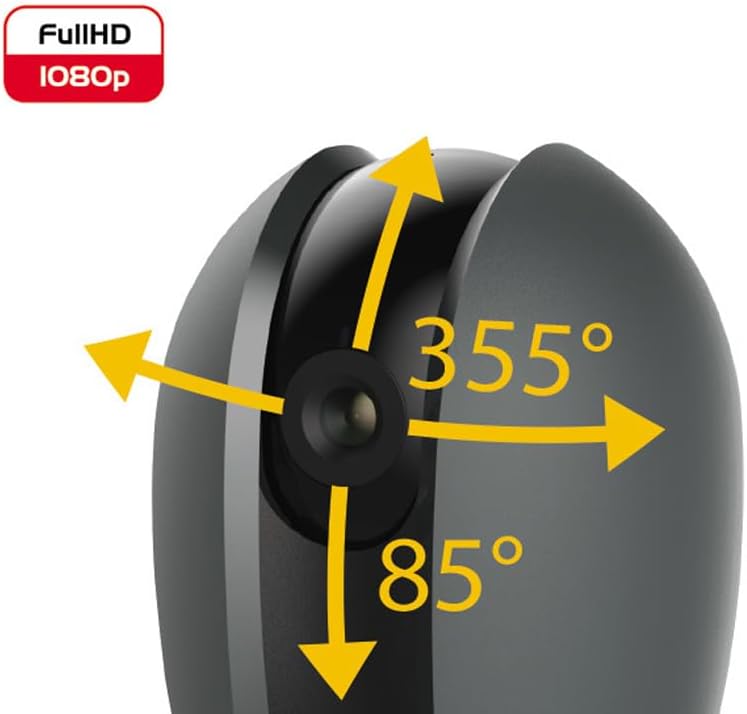
Figure 2: Camera's pan and tilt capabilities.
3. Paket İçeriği
Paketin içinde tüm öğelerin mevcut olduğundan emin olun:
- Beghelli Dom-e Wi-Fi Full HD Pan/Tilt Surveillance Camera
- USB Power Adapter (230V – DC 5V/1A)
- Mounting accessories (if included, not explicitly listed but implied by "wall or ceiling installation")
- Kullanım Kılavuzu (bu belge)

Figure 3: Product packaging for the Beghelli Dom-e Camera.
4. Kurulum
4.1 Kameranın Çalıştırılması
- Connect the provided USB power adapter to the camera's power input.
- Plug the adapter into a standard 230V power outlet. The camera will power on and initiate its startup sequence.
4.2 Mobil Uygulama Yükleme
The Beghelli Dom-e camera is controlled via the dedicated "Dom-e Beghelli" mobile application.
- Download the "Dom-e Beghelli" app from the Apple App Store (for iOS 8.0 or later) or Google Play Store (for Android 4.2 or later).
- Uygulamayı akıllı telefonunuza veya tabletinize yükleyin.
- Yeni bir hesap için kaydolun veya zaten bir hesabınız varsa giriş yapın.
4.3 Connecting to Wi-Fi and Pairing
Ensure your Wi-Fi network is 2.4 GHz (IEEE802.11 b/g/n). The camera does not support 5 GHz networks.
- Open the Dom-e Beghelli app and follow the on-screen instructions to add a new device.
- Select the Beghelli Dom-e camera from the list of available devices.
- Enter your Wi-Fi network name (SSID) and password when prompted.
- The app will guide you through the pairing process, which typically involves scanning a QR code displayed on your phone with the camera, or listening for an audio prompt.
- Once successfully paired, the camera's status indicator will change, and you will see the live feed in the app.

Figure 4: Simplified setup steps via the Dom-e Beghelli app.
4.4 Kamerayı Monte Etme
The camera can be installed on a wall or ceiling. Choose a location that provides the desired viewEğimli bir açıda olmalı ve Wi-Fi ağınızın ve bir elektrik prizinin menzili içinde bulunmalıdır.
- Mark the drilling points on the desired surface using the mounting template (if provided).
- Gerekirse delikler açın ve dübel takın.
- Secure the mounting bracket (if provided) to the surface.
- Kamerayı montaj braketine takın.
- Adjust the camera's angle manually or via the app after installation.
5. Kullanım Talimatları
5.1 Canlı View ve Pan/Tilt Kontrolü
- Open the Dom-e Beghelli app and select your camera to view canlı yayın.
- Use the directional controls within the app to pan the camera horizontally (355°) and tilt it vertically (85°) to adjust the viewing alanı.
5.2 Hareket Algılama ve Bildirimler
- Navigate to the camera settings in the app to enable motion detection.
- Configure sensitivity levels and detection zones as needed.
- Hareket algılandığında akıllı telefonunuza uyarı almak için anlık bildirimleri etkinleştirin.
- The camera also features person detection for more accurate alerts.
5.3 İki Yönlü Ses
- Sırasında viewCanlı yayını izlerken, uygulamadaki mikrofon simgesine dokunarak kameranın hoparlöründen konuşabilirsiniz.
- The camera's built-in microphone will capture audio from the monitored area, allowing you to listen in.
5.4 Kayıt ve Depolama
- MicroSD Kart Kaydı: Insert a MicroSD card (up to 128GB, not included) into the camera's slot for continuous recording or event-triggered recording.
- Smartphone Recording: You can manually record video clips directly to your smartphone while viewcanlı yayını izlemek.
- Bulut Depolama: An optional cloud storage service is available via subscription for off-site video backup. Refer to the app for details.
- Planlanmış Kayıt: Set up specific times for the camera to record automatically through the app settings.
5.5 Gece Görüşü
The camera automatically switches to night vision mode in low-light conditions, utilizing its IR LEDs to provide clear black-and-white footag10 metreye kadar.
6. Mobile Application (Dom-e Beghelli App)
The Dom-e Beghelli app is the central control interface for your camera and other compatible smart home devices. It allows for:
- Remote control of camera pan and tilt.
- Access to live video feed and recorded footage.
- Configuration of motion detection, notifications, and recording schedules.
- Çift yönlü sesli iletişim.
- Integration with other Dom-e smart home devices (e.g., alarms, smart plugs, lighting).
- Voice control compatibility with Google Assistant and Amazon Alexa (if associated with a compatible smartphone).

Figure 5: The Dom-e Beghelli app interface for camera control.
7. Özellikler
| Özellik | Şartname |
|---|---|
| Model Numarası | 60021 |
| Çözünürlük | Full HD 1080p (2 Megapixels) |
| Sensör | CMOS 1/2.9" |
| Mercek | 3.6 mm / f2.0 / 105° |
| Deklanşör Hızı | 1/25 - 1/100,000 sec |
| Pan Dönüşü | 355 ° Yatay |
| Eğim Dönüşü | 85 ° Dikey |
| Gece Görüş Aralığı | Up to 10 meters (IR LEDs) |
| Ses | Two-way, hands-free (in/out) |
| Depolamak | MicroSD card up to 128GB (not included), Smartphone, Cloud (optional subscription) |
| Wi-Fi standart | IEEE802.11 b/g/n (2.4 GHz) |
| Frekans Bandı | 2.4 GHz - 2.4835 GHz |
| Güç Girişi | 230V – DC 5V/1A (USB adapter included) |
| Maksimum Güç Tüketimi | 4.5 B |
| Boyutlar (U x G x Y) | 63 x 58 x 96 mm (Product description) / 7 x 7 x 11 cm (Specifications) |
| Ağırlık | 330 gram |
| Malzeme | Plastik |
| İşletim Sistemi Uyumluluğu | Apple iPhone iOS 8.0 or later / Android 4.2 or later |
| Önerilen Kullanım | Kapalı Alan Güvenliği |
Note: Some dimensions may vary slightly between product description and specifications list.
8. Bakım
8.1 Temizlik
- Temizlemeden önce kameranın kapalı ve fişinin çekilmiş olduğundan emin olun.
- Fotoğraf makinesinin gövdesini silmek için yumuşak, kuru bir bez kullanın.
- Objektifi çizilmelere karşı korumak için özel bir objektif temizleme bezi kullanın.
- Sıvı temizleyiciler, aerosoller veya aşındırıcı çözücüler kullanmayın.
8.2 Yazılım Güncellemeleri
Periodically check the Dom-e Beghelli app for firmware updates. Keeping your camera's firmware updated ensures optimal performance, security, and access to new features.
9. Sorun Giderme
| Sorun | Çözüm |
|---|---|
| Kamera açılmıyor | Ensure the USB power adapter is securely connected to the camera and a working power outlet. Verify the outlet has power. |
| Wi-Fi'ye bağlanılamıyor |
|
| Canlı video yayını yok. |
|
| Hareket algılama çalışmıyor |
|
| Cannot reconnect after Wi-Fi password change | If your Wi-Fi password changes, you will likely need to reset the camera and re-pair it with the app using the new Wi-Fi credentials. Refer to the app for device reset instructions. |
10. Garanti ve Destek
For warranty information and technical support, please refer to the documentation provided with your purchase or contact Beghelli customer service directly. You can typically find contact details on the Beghelli official website or within the Dom-e Beghelli application.
Manufacturer: Beghelli
Modeli: 60021


