1. Giriş
The Thermaltake Pacific PR32-D5 Plus is a high-performance pump and reservoir combination designed for custom liquid cooling systems. It features a powerful D5 pump, a large 400ml reservoir, and integrated RGB lighting with software control, offering both efficient cooling and aesthetic customization for your PC.
2. Ürün Özellikleri
- 360° Rotary Cap: The rotary cap allows for flexible adjustment of G1/4" thread port positions, simplifying tube routing even after mounting.
- Canlı RGB Aydınlatma: Equipped with 12 addressable LEDs, offering 16.8 million color combinations and numerous lighting effects customizable via TT RGB Plus software, and compatible with Alexa and Razer Chroma.
- Çok Yönlü Kurulum Seçenekleri: Includes a fan-mounting bracket for installation on a fan, providing water cooling advantages even in cases with limited traditional reservoir mounting space.
- Powerful D5 Pump: Features a 5-level speed control, capable of reaching a maximum pump head of 15 feet and a flow rate of 1135 liters per hour.
- Large Capacity Reservoir: A 400ml capacity reservoir, standing 267mm tall, designed to withstand a maximum pressure of 50 PSI.
3. Paket İçeriği
Lütfen kurulum işlemine başlamadan önce tüm parçaların eksiksiz ve hasarsız olduğundan emin olun.
- Thermaltake Pacific PR32-D5 Plus Pump/Reservoir Combo
- G 1/4" Stopper (x1)
- Montaj Braketi (x1)
- Klips (x1)
- USB 2.0 Connector (9 Pin) cable
- 4-Pin Power Connector cable
- Montaj Vidaları ve Aksesuarları
4. Özellikler
| Model Numarası | CL-W280-PL00SW-A |
| Boyutlar (U x G x Y) | 74.8 x 74.8 x 267 mm (2.94 x 2.94 x 10.51 inç) |
| Kapasite | 400 ml |
| Malzeme | AL + POM + PMMA |
| Konular | G 1/4" |
| Maksimum Hava Basıncı | 50 PSI |
| Güç Girişi | 37W / 6.5W |
| Bağlayıcı | 4 Pin |
| Arayüz | USB 2.0 Connectors (9 Pin) |
| Sistem Uyumluluğu | Windows 7 / 8 / 8.1 / 10 |
5. Kurulum ve Yükleme
5.1 Mounting the Pump/Reservoir
The Pacific PR32-D5 Plus offers flexible mounting options. Use the included bracket to install the unit directly onto a fan or utilize the standard pump/reservoir stand. Ensure the mounting is secure but avoid over-tightening screws to prevent damage to the unit.

Image: Multiple installation options for the pump/reservoir combo.
5.2 Bağlantı Noktalarını Bağlama
Utilize the G1/4" thread ports for connecting your liquid cooling loop. The 360° rotary cap allows you to adjust port positions for optimal tube routing. Ensure all fittings are hand-tightened to prevent leaks. The unit includes dedicated ports for filling and draining the coolant.
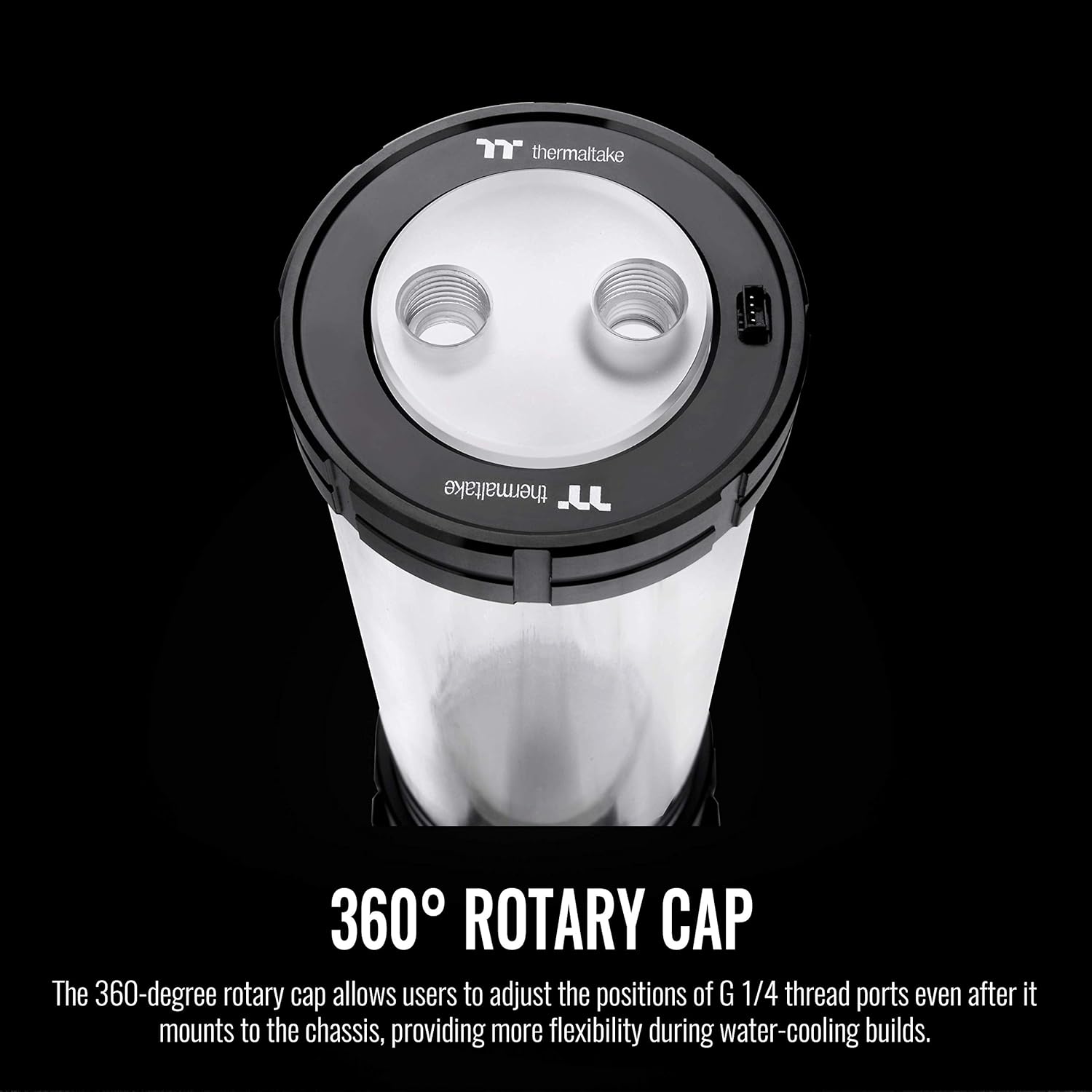
Image: The 360° rotary cap provides flexibility for port positioning.
5.3 Pump Speed Adjustment
The D5 pump features a 5-level speed control. Adjust the pump speed manually to achieve your desired flow rate and noise level. For basic loops, a setting of 2 to 3 is often recommended. Refer to the pump's base for the speed adjustment dial.
Video: Demonstration of a high-flow 12V DC water pump combo, illustrating pump operation and flow. This video is from a seller named Dracaena.
6. Kullanım Talimatları
6.1 Filling the Liquid Cooling Loop
- Ensure all connections are secure and fittings are tightened.
- Use a dedicated fill port to slowly add coolant to the reservoir.
- Power on the pump (without powering on other PC components) to circulate the coolant and remove air bubbles. Refill the reservoir as needed.
- Allow the system to run for several hours to ensure all air is purged and to perform a leak test. Check for any signs of leaks before powering on your PC.
6.2 RGB Aydınlatma Kontrolü
Connect the USB 2.0 cable from the pump/reservoir to your motherboard. Download and install the Thermaltake TT RGB Plus software to customize the 12 addressable LEDs. The lighting can be synchronized with Alexa and Razer Chroma for a unified aesthetic experience.

Image: The Pacific PR32-D5 Plus features customizable RGB lighting.
7. Bakım
- Regularly inspect your liquid cooling loop for any signs of leaks or coolant discoloration.
- It is recommended to change the coolant every 6-12 months to maintain optimal performance and prevent buildup.
- When draining the system, use the dedicated drain port for a clean and efficient process.
8. Sorun Giderme
- No Flow/Pump Not Running: Check power connections (4-pin connector) and USB interface. Ensure the pump speed is set correctly.
- Sızıntılar: Double-check all fittings and connections. Ensure O-rings are properly seated and not damaged. Avoid over-tightening.
- RGB Çalışmıyor: Verify the USB 2.0 connection to the motherboard. Ensure TT RGB Plus software is installed and updated. Check for conflicts with other RGB software.
- Excessive Air Bubbles: Tilt the PC case gently in different directions to help dislodge trapped air. Allow the pump to run for an extended period during the initial fill.
9. Garanti ve Destek
For warranty information, technical support, or further assistance, please visit the official Thermaltake webSite üzerinden satın alabilir veya müşteri hizmetleri departmanıyla iletişime geçebilirsiniz. Satın alma belgenizi garanti talepleriniz için saklayın.


