Ürün Bittiview
The Clean Remote Universal TV Remote CR1 is designed for simplicity and hygiene, ideal for environments where ease of use and cleanliness are paramount. This remote works with most TV brands without requiring complex programming codes. Its seamless, spill-proof surface prevents the accumulation of dirt and grime, making it exceptionally easy to clean and maintain.
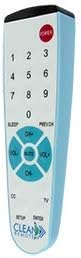
Resim: Ön view of the Clean Remote Universal TV Remote CR1, showing the simplified button layout including number keys, power, volume, and channel controls.
Kurmak
The Clean Remote CR1 is designed for hassle-free setup. No programming codes are needed for most TV brands. Simply insert the batteries, and the remote is ready for use.
Pil Kurulumu
- Locate the battery compartment on the back of the remote. The battery cover is hidden and attached, often secured with an optional screw to prevent loss.
- If secured, unscrew the small screw to open the battery compartment.
- Pil yuvasının içindeki işaretlere uyarak iki adet AAA pil (dahil değildir) takın ve kutupların (+/-) doğru olduğundan emin olun.
- Close the battery cover and re-secure the screw if applicable.
The remote retains its programming even if batteries are removed, eliminating the need for reprogramming.
Kullanım Talimatları
The Clean Remote CR1 features a simple key layout for intuitive operation.
- GÜÇ: Press the red POWER button to turn the TV on or off.
- Sayı Tuşları (0-9): Use these buttons to directly enter channel numbers.
- CH+ / CH-: Press CH+ to go to the next channel, and CH- to go to the previous channel.
- SES+ / SES-: Press VOL+ to increase the volume, and VOL- to decrease the volume.
- SESSİZ: Press MUTE to silence the TV audio. Press again to restore audio.
- UYUMAK: Activates the TV's sleep timer function (if supported by the TV).
- PREV.CH: Önceki sürüme geçiş yapar. viewed kanalı.
- CC (Altyazı): Toggles closed captioning on or off (if supported by the TV).
- SETUP / ENTER: These buttons are primarily for initial setup or advanced TV functions, though the remote is designed to work without complex setup for most TVs.
Bakım ve Temizlik
The Clean Remote CR1 is designed with a spill-proof surface and no porous areas, making it easy to clean and maintain hygiene.
- To clean the remote, simply wipe its surface with a damp cloth or a disinfectant wipe.
- Ensure no liquid seeps into the battery compartment.
- Avoid using abrasive cleaners or harsh chemicals that could damage the remote's surface.
- Regular cleaning helps prevent the buildup of dirt, crumbs, and bacteria, ensuring a clean and safe experience for all users.
Sorun giderme
Uzaktan Kumanda Yanıt Vermiyor
- Pilleri Kontrol Edin: Ensure batteries are inserted correctly with proper polarity and are not depleted. Replace if necessary.
- Görüş Hattı: Make sure there is a clear line of sight between the remote's infrared emitter and the TV's IR receiver. Obstructions can block the signal.
- Uzak Mesafe: Ensure you are within an effective range of the TV.
Remote Controls Volume but Not Channels
- The Clean Remote CR1 is primarily designed for basic TV functions. While it supports volume and power for most TVs, channel changing functionality can sometimes be limited depending on the specific TV model or if the TV requires a more complex signal for channel tuning (e.g., for cable boxes or specific smart TV interfaces).
- Ensure the TV is set to a standard input (e.g., TV/Antenna) where channel numbers are directly accessible.
- This remote is explicitly stated to "not work with cable boxes". If you are using a cable box, a different remote may be required for channel control.
Özellikler
| Özellik | Detay |
|---|---|
| Marka | UZAKTAN TEMİZLE |
| Model Numarası | 896595002051 |
| Uyumlu Cihazlar | Televizyon |
| Maksimum Desteklenen Cihaz Sayısı | 1 |
| Özel Özellik | Universal, Spillproof |
| Renk | Beyaz, Mavi |
| Ürün Ağırlığı | 2.39 ons |
| Paket Boyutları | 6.93 x 1.97 x 1.22 inç |
Garanti ve Destek
Specific warranty information for the Clean Remote Universal TV Remote CR1 is not provided in the product details. For any support inquiries or to obtain warranty details, please contact Clean Remote customer service directly or refer to the product packaging.


