1. Giriş
Thank you for choosing the MARVO Scorpion Gaming Mouse M399. This manual provides essential information for setting up, operating, maintaining, and troubleshooting your new gaming mouse. Please read it carefully to ensure optimal performance and longevity of your device.
2. Ürün Özellikleri
- Ultra-lightweight Honeycomb Design: Weighing approximately 76 grams, the mouse features a unique honeycomb shell for reduced weight and enhanced airflow.
- Yüksek Performanslı Optik Sensör: Equipped with a gaming-grade optical sensor, offering up to 6400 DPI for precise tracking.
- 6 Programlanabilir Düğme: Customize your gaming experience with six buttons that can be assigned various functions.
- Dinamik RGB Arka Aydınlatma: Enjoy 16.8 million colors with 7 different backlight modes to personalize your setup.
- Ambidextrous Ergonomic Design: Comfortable design suitable for both left and right-handed users, ideal for extended gaming or office use.
3. Paket İçeriği
- MARVO Scorpion Gaming Mouse M399
- Kullanıcı Kılavuzu
4. Kurulum
- Fareyi Bağlayın: Plug the USB connector of the MARVO Scorpion Gaming Mouse M399 into an available USB port on your computer.
- Otomatik Sürücü Kurulumu: Your operating system will typically detect the mouse and install the necessary drivers automatically. This may take a few moments.
- Test İşlevselliği: Once installed, move the mouse and click the buttons to ensure basic functionality.
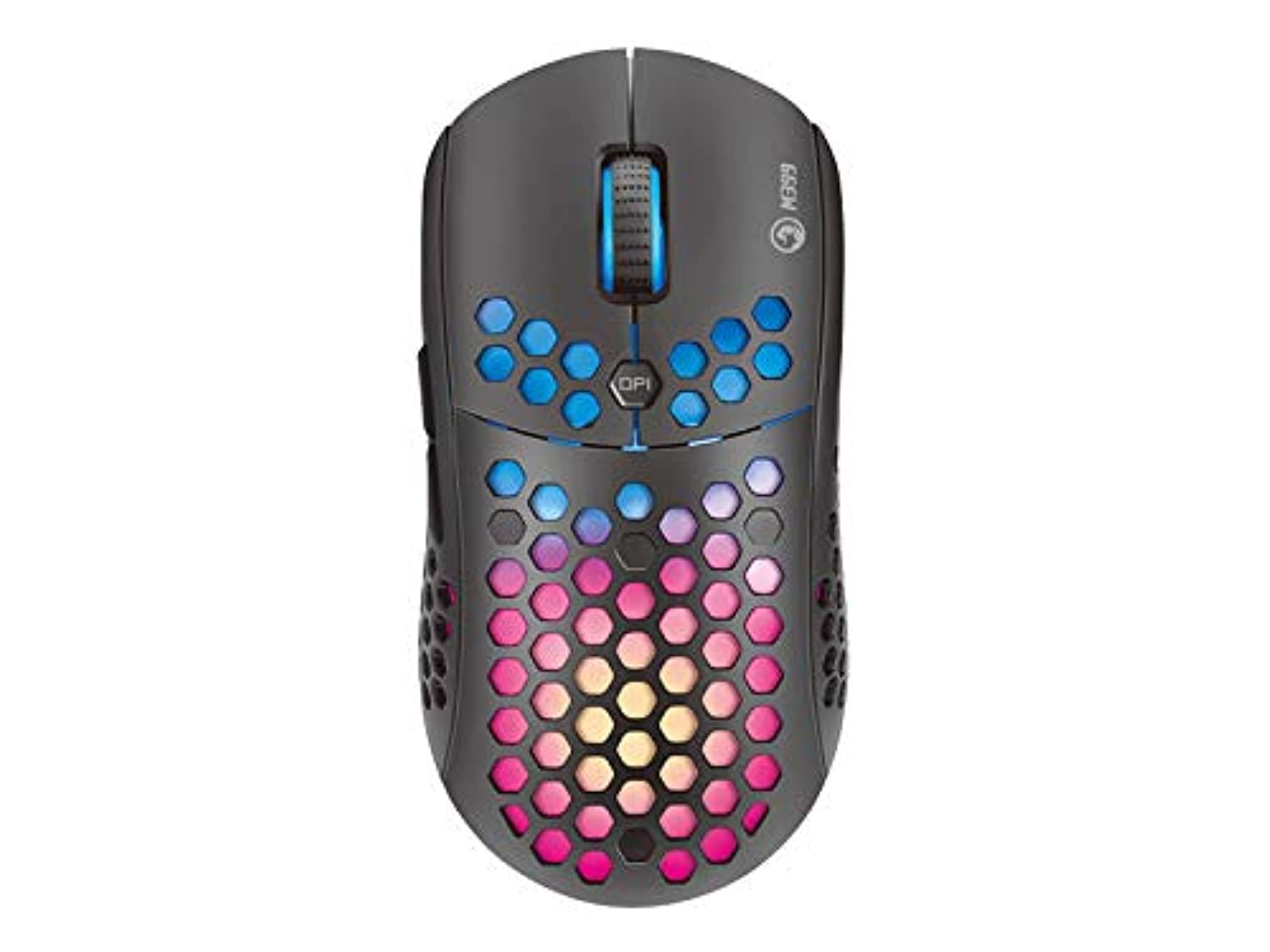
Şekil 1: Yukarıdan aşağıya view of the MARVO Scorpion Gaming Mouse M399, highlighting its honeycomb shell and illuminated scroll wheel.
5. Kullanım Talimatları
5.1 Temel Fonksiyonlar
- Sol tık: Birincil eylem düğmesi.
- Sağ tık: İkincil işlem düğmesi, genellikle bağlam menüleri için kullanılır.
- Kaydırma tekerleği: Belgeleri yukarı/aşağı kaydırın veya web Sayfalar. Orta tıklama işlevi için de tıklanabilir.
5.2 DPI Ayarı
The mouse features a dedicated DPI button (usually located behind the scroll wheel) to cycle through different sensitivity levels. Press this button to instantly change the DPI setting to match your preference or game requirements. The default DPI settings are typically pre-configured but can be customized via software.
5.3 Programlanabilir Düğme
The MARVO M399 includes 6 programmable buttons. These buttons can be assigned various functions, macros, or key combinations using the dedicated MARVO software. Refer to the customization section for more details.

Şekil 2: Yan view of the MARVO Scorpion Gaming Mouse M399, illustrating the ergonomic contour and accessible side buttons.
6. Özelleştirme
To unlock the full potential of your MARVO Scorpion Gaming Mouse M399, including button remapping, macro creation, and advanced RGB lighting effects, you will need to download and install the official MARVO software. This software allows for detailed personalization of your mouse settings.
- Düğme Ataması: 6 adet programlanabilir düğmeden herhangi birine işlevleri yeniden atayın.
- DPI Ayarları: Adjust DPI levels and create custom profiles.
- RGB Aydınlatma: Choose from 7 different backlight modes and millions of colors, adjust brightness, speed, and effects.
- Makro Düzenleyici: Create and assign complex macros to streamline in-game actions.
Note: The software can typically be found on the official MARVO webSiteyi ziyaret edin. M399 modeliniz için doğru sürümü indirdiğinizden emin olun.
7. Bakım
Oyun farenizin uzun ömürlü olması ve yüksek performans göstermesi için doğru bakım yapılması önemlidir.
- Temizlik: Fare yüzeyini silmek için yumuşak, kuru bir bez kullanın. İnatçı kirler için, biraz daha kuru bir bez yeterli olacaktır.amp cloth can be used, but ensure no liquid enters the mouse. Use compressed air to clean dust from the honeycomb holes and around buttons.
- Sensör Bakımı: Keep the optical sensor on the underside of the mouse clean and free from debris. Avoid touching the sensor directly.
- Kablo yönetimi: USB kablosunun hasar görmesini önlemek için keskin bükümlerden veya aşırı çekmelerden kaçının.
- Depolamak: Kullanılmadığı zamanlarda fareyi aşırı sıcaklıklardan ve doğrudan güneş ışığından uzakta, temiz ve kuru bir ortamda saklayın.
8. Sorun Giderme
If you encounter issues with your MARVO Scorpion Gaming Mouse M399, refer to the following common solutions:
| Sorun | Olası Çözüm |
|---|---|
| Fare yanıt vermiyor |
|
| İmleç hareketi düzensiz veya kesik kesik |
|
| RGB aydınlatma çalışmıyor veya takılı kalmış durumda. |
|
| Programlanabilir düğmeler çalışmıyor. |
|
9. Özellikler
| Özellik | Detay |
|---|---|
| Model Numarası | M399 |
| Sensör Tipi | Optik |
| DPI (İnç Başına Nokta Sayısı) | 6400 DPI'a kadar |
| Düğmeler | 6 Programlanabilir Düğme |
| Aydınlatma | RGB, 16.8 Million Colors, 7 Modes |
| Tasarım | Ultra-lightweight Honeycomb, Ambidextrous |
| Ağırlık | Yaklaşık 76 gram |
| Bağlantı | USB Kablolu |
| Ürün Boyutları | 4.4 x 3.23 x 2.98 cm (yaklaşık) |
10. Garanti ve Destek
10.1 Garanti Bilgileri
MARVO products are designed and manufactured to the highest quality standards. This product is covered by a limited warranty from the date of purchase. Please refer to the warranty card included with your product or visit the official MARVO webBölgenize özgü ayrıntılı garanti şartları ve koşulları için siteyi ziyaret edin.
10.2 Teknik Destek
For technical assistance, driver downloads, or further inquiries, please visit the official MARVO support website or contact their customer service. You may need your product model number (M399) and proof of purchase when seeking support.
- Resmi Webalan: www.marvo-tech.com (Lütfen bölgesel farklılıkları kontrol edin)
- Destek E-postası: Şuna bakın: webiletişim bilgileri için site.


