1. Giriş
This manual provides essential information for the safe and efficient operation of your iFFALCON 40F2A 40-inch Full HD Android Smart LED TV. Please read these instructions thoroughly before using the television and retain them for future reference.
The iFFALCON 40F2A is a 40-inch Full High Definition (1920x1080) Smart LED TV powered by Android, offering a rich entertainment experience with built-in Google Assistant, HDR10 support, and integrated streaming services.

Resim: Ön view of the iFFALCON 40F2A 40-inch Full HD Android Smart LED TV.
2. Kurulum
2.1 Kutudan Çıkarma ve Paket İçeriği
Televizyonu ambalajından dikkatlice çıkarın. Tüm parçaların eksiksiz olduğundan emin olun:
- 1 x iFFALCON 40F2A LED TV
- 1 x Masa Üstü Standı
- 1 x Kullanım Kılavuzu (bu belge)
- 1 x Garanti Kartı
- 1 x Uzaktan Kumanda
- 2 x AAA Pil
2.2 Stand Kurulumu
Masaüstü standı kullanıyorsanız:
- Televizyonunuzun hasar görmesini önlemek için ekranı aşağı bakacak şekilde yumuşak ve düz bir yüzeye yerleştirin.
- Ayaklık braketlerini televizyonun altındaki vida delikleriyle hizalayın.
- Verilen vidaları kullanarak standı sabitleyin.
- Carefully lift the TV to an upright position on a stable, level surface.
2.3 Duvara Montaj (Opsiyonel)
For wall mounting, consult a professional installer and refer to the wall mount kit's instructions. Ensure the wall mount is compatible with the TV's VESA mounting pattern.
2.4 Harici Cihazların Bağlanması
Connect your external devices (e.g., set-top box, gaming console, Blu-ray player) to the TV's ports. The TV features HDMI, USB, VGA, and Headphone ports.
- HDMI: For high-definition audio and video.
- USB BAĞLANTI: USB depolama aygıtlarını bağlamak için.
- Ethernet: Kablolu internet bağlantısı için.
- Kulaklık: Kulaklıklara ses çıkışı sağlamak için.
2.5 Güç Bağlantısı ve İlk Kurulum
- Uzaktan kumandaya verilen AAA pilleri takın.
- Güç kablosunu televizyona ve ardından elektrik prizine bağlayın.
- TV'yi açmak için uzaktan kumandadaki güç düğmesine basın.
- Dil seçimi, ağ bağlantısı (Wi-Fi veya Ethernet) ve Google hesabında oturum açma dahil olmak üzere ilk kurulumu tamamlamak için ekrandaki talimatları izleyin.
3. TV'nin çalıştırılması
3.1 Uzaktan Kumanda İşlevleri
The remote control provides access to all TV functions. It includes dedicated buttons for popular streaming services like Netflix, Amazon Prime Video, and Zee5, as well as a Google Assistant button for voice commands.

Image: The iFFALCON 40F2A Smart Remote Control, highlighting the Google Assistant and Netflix hotkey buttons.
3.2 Android TV Arayüzü
Navigate the Android TV interface using the remote's directional pad and OK button. The home screen displays recommended content, installed applications, and settings.

Image: The Android TV home screen on the iFFALCON 40F2A, showing various apps and features.
3.3 Google Asistan
Uzaktan kumandanızdaki Google Asistan düğmesine basın ve mikrofona konuşarak televizyonunuzu kontrol edin, içerik arayın, yanıt alın ve akıllı ev cihazlarını yönetin.
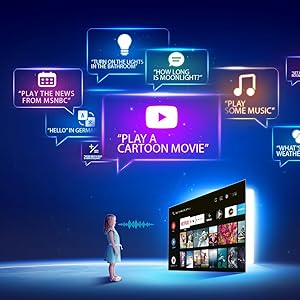
Image: Illustration of using Google Assistant voice commands with the TV.
3.4 Akış Uygulamaları
Access a wide range of pre-installed streaming applications such as Netflix, Amazon Prime Video, YouTube, Disney+Hotstar, Zee5, and more. Additional apps can be downloaded from the Google Play Store.

Image: The iFFALCON 40F2A displaying various streaming application logos.
3.5 Chromecast Yerleşik
Use the built-in Chromecast feature to cast content from your compatible smartphone, tablet, or computer directly to your TV screen.

Image: A smartphone casting content to the iFFALCON 40F2A TV via Chromecast.
4. Özellikler
4.1 Full HD Display with HDR10
Experience clear and vibrant visuals with Full HD (1920x1080) resolution. HDR10 support enhances contrast and color accuracy, providing a more dynamic picture.

Image: A side-by-side comparison of a scene without HDR10 and with HDR10, showing enhanced detail and color.
4.2 Micro Dimming
Micro Dimming analyzes video content in hundreds of separate zones to adjust brightness and darkness independently, improving contrast and picture quality.

Image: A comparison showing a city skyline without Micro Dimming and with Micro Dimming, highlighting improved contrast.
4.3 iPQ Engine
The iPQ Engine intelligently processes image quality, optimizing brightness, color range, and other visual parameters for a superior viewDeneyim.

Image: Visual representation of the iPQ Engine's high brightness precision and intelligent color range control technologies.
4.4 Dolby Ses
Enjoy immersive sound with Dolby Audio. The TV features 20 Watts speakers (10W + 10W) for clear and powerful audio output.

Image: Graphic illustrating the 10W + 10W Dolby Audio speakers for enhanced sound.
4.5 Slim Design
The iFFALCON 40F2A features a sleek and slim design, allowing it to blend seamlessly into any living space.

Image: A hand demonstrating the slim profile of the iFFALCON TV.
5. Bakım
5.1 Ekranı Temizleme
Ekranı yumuşak, tiftiksiz bir bezle nazikçe silin. İnatçı lekeler için hafifçe silin.ampBezi su veya özel bir ekran temizleyici ile temizleyin. Sert kimyasallar veya aşındırıcı malzemeler kullanmaktan kaçının.
5.2 TV Gövdesinin Temizlenmesi
Wipe the TV's frame and stand with a soft, dry cloth. Do not use liquid cleaners directly on the TV.
5.3 Genel Bakım
- Televizyonu doğrudan güneş ışığına veya aşırı sıcaklıklara maruz bırakmaktan kaçının.
- Televizyonunuzun aşırı ısınmasını önlemek için çevresinde yeterli havalandırma olduğundan emin olun.
- Şimşekli fırtınalar sırasında veya uzun süre kullanılmayacaksa televizyonun fişini çekin.
6. Sorun Giderme
Televizyonunuzda sorunlarla karşılaşırsanız, aşağıdaki yaygın sorunlara ve çözümlere bakın:
| Sorun | Olası Neden | Çözüm |
|---|---|---|
| Güç yok | Güç kablosu bağlantısı kesilmiş; Elektrik prizinde sorun var. | Check power cord connection; Try a different outlet; Press power button on TV/remote |
| Görüntü yok, ancak ses mevcut | Incorrect input source; Loose HDMI/AV cable | Select correct input source; Reconnect cables securely |
| Ses yok ama görüntü var | Volume muted or too low; Audio cable issue | Unmute or increase volume; Check audio settings; Reconnect audio cables |
| Uzaktan kumanda çalışmıyor | Pil bitmiş; Engel; Uzaktan kumanda eşleştirilmemiş | Pilleri değiştirin; Engelleri kaldırın; Gerekirse uzaktan kumandayı yeniden eşleştirin. |
| Wi-Fi'ye bağlanılamıyor | Yanlış şifre; Yönlendirici sorunu; TV yönlendiriciden çok uzakta | Verify password; Restart router; Move TV closer or use Ethernet |
| Uygulamalar yavaş veya donuyor | Insufficient memory; Network issue; App malfunction | Close unused apps; Check internet connection; Clear app cache/data or reinstall app |
Bu çözümleri denedikten sonra sorun devam ederse lütfen müşteri desteğiyle iletişime geçin.
7. Özellikler
Detailed technical specifications for the iFFALCON 40F2A Smart LED TV:

Image: Diagram showing the dimensions of the iFFALCON 40F2A TV.
| Özellik | Şartname |
|---|---|
| Marka | iFFALCON |
| Örnek | 40F2A |
| Ekran Boyutu | 40 İnç (102 cm) |
| Ekran Teknolojisi | LED, A+ Grade Panel |
| Çözünürlük | Full HD (1920 x 1080 Piksel) |
| Yenileme Hızı | 60 Hz |
| Tepki Süresi | 8.5 Milisaniye |
| ViewAçı | 178 Derece |
| Görüntü En Boy Oranı | 16:09 |
| Görüntü Kontrast Oranı | 5000:1 |
| İşletim Sistemi | Android |
| Kurulu RAM Bellek Boyutu | 1 GB |
| Dijital Depolama Kapasitesi | 8 GB |
| Grafik Eş İşlemcisi | Mali470x2 |
| Ses Çıkışı | 20 Watts (Dolby Audio) |
| Bağlantı Teknolojisi | Ethernet, HDMI, USB, Wi-Fi, Bluetooth |
| Donanım Arayüzü | HDMI, Headphone, USB, VGA |
| Toplam USB Bağlantı Noktaları | 1 |
| Güç Kaynağı | AC |
| Netage | 75 Watt (Açık modda güç tüketimi) |
| Ürün Boyutları (UxGxY) | 90.5 x 18.5 x 57.7 cm (standlı) |
| Ürün Ağırlığı | 6.1 kilo |
| Piller | 2 adet AAA pil (uzaktan kumanda için dahildir) |
8. Garanti ve Destek
8.1 Garanti Bilgileri
Your iFFALCON 40F2A TV comes with a 1 Yıl Garanti from the date of purchase. Please refer to the included Warranty Card for detailed terms and conditions. Retain your purchase receipt as proof of purchase for warranty claims.
8.2 Müşteri Desteği
For technical assistance, service requests, or any inquiries regarding your iFFALCON TV, please contact the manufacturer's customer support. Contact details can typically be found on the warranty card or the official iFFALCON webalan.


