1. Giriş
Satın aldığınız için teşekkür ederizasing the SHARP XL-B512 Stereo Sound System. This micro sound system offers a rich 45-watt sound experience with versatile connectivity options including Bluetooth, CD player, USB, and FM radio. Its elegant design with a wooden speaker housing and LED display complements any living space. This manual provides essential information for setting up, operating, and maintaining your device to ensure optimal performance and longevity.
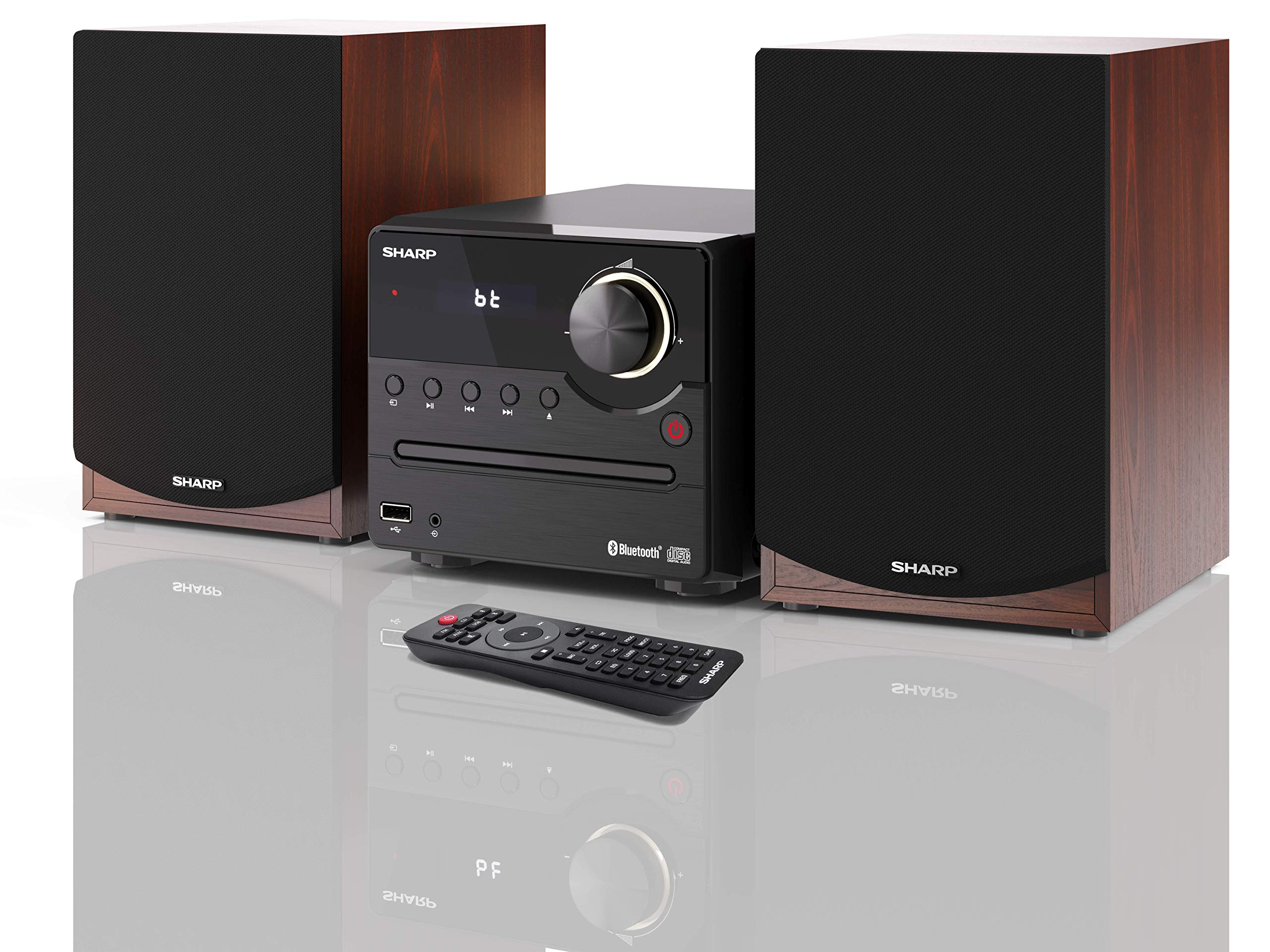
Şekil 1: SHARP XL-B512 Stereo Sound System. This image shows the central unit flanked by two wooden-cased speakers, reflecting on a polished surface.
2. Güvenlik Bilgileri
Ürünü kullanmadan önce lütfen tüm güvenlik talimatlarını dikkatlice okuyun. Bu kılavuzu ileride başvurmak üzere saklayın.
- Güç Kaynağı: Yalnızca belirtilen güç kaynağını kullanın. Ses seviyesinin doğru ayarlandığından emin olun.tage yerel elektrik kaynağınıza uygundur.
- Havalandırma: Havalandırma açıklıklarını hiçbir şekilde kapatmayın. Uygun hava akışı için ünitenin etrafında yeterli boşluk bırakın.
- Su ve Nem: Cihazı yağmur, nem veya damlayan/sıçrayan sıvılara maruz bırakmayın. Vazo gibi sıvı dolu nesneleri cihazın üzerine koymayın.
- Sıcaklık: Üniteyi radyatörler, kalorifer ızgaraları, sobalar veya diğer cihazlar (dahil) gibi ısı kaynaklarından uzak tutun. amp(ısı üreten)
- Temizlik: Temizlemeden önce cihazı prizden çıkarın. Sadece kuru bir bez kullanın.
- Servis: Bu ürüne kendiniz servis vermeye çalışmayın. Tüm servis işlemleri için kalifiye servis personeline başvurun.
3. Paket İçeriği
Aşağıda listelenen tüm öğelerin paketinizde bulunduğunu doğrulayın:
- SHARP XL-B512 Micro Sound System (Main Unit)
- Two Speakers (with wooden housing)
- Güç kablosu
- Uzaktan Kumanda (pilli)
- Kullanım Kılavuzu (bu belge)
- Hızlı Başlangıç Kılavuzu
4. Kurulum
4.1 Hoparlör Bağlantısı
Connect the two speakers to the main unit using the provided speaker cables. Ensure correct polarity (positive to positive, negative to negative) for optimal sound quality.
4.2 Güç Bağlantısı
Connect the power cable to the AC IN port on the rear of the main unit, then plug it into a wall outlet.

Şekil 2: Rear panel connections. This image displays the back of the central unit with ports for speaker wires and the AC power input, alongside the rear of the two speakers.
4.3 İlk Güç Açma
Sistemi açmak için ana ünitedeki veya uzaktan kumandadaki Güç düğmesine basın. LCD ekran yanacaktır.
5. Kullanım Talimatları
5.1 Ön Panel Kontrolleri

Şekil 3: Front panel controls. This close-up shows the central unit's display, volume knob, and various control buttons for playback and source selection.
- Güç Düğmesi: Üniteyi açar veya kapatır.
- Kaynak Düğmesi: Cycles through available input sources (CD, FM, Bluetooth, USB, AUX).
- Ses Düğmesi: Ana ses seviyesini ayarlar.
- Oynatma Kontrolleri: Play/Pause, Stop, Skip Forward/Backward for CD and USB modes.
- USB Bağlantı Noktası: For connecting USB storage devices for music playback.
- AUX Girişi: Harici ses cihazlarını bağlamak için 3.5 mm jak.
5.2 CD Oynatma
- Basın Kaynak 'CD' modunu seçmek için kullanılan düğme.
- Open the CD tray by pressing the Eject button.
- Place a CD (CD/CD-R/CD-RW/MP3 format) with the label side up into the tray.
- Close the CD tray. The system will read the disc and begin playback automatically or display track information.
- Use the playback controls (Play/Pause, Stop, Skip) to manage your music.
5.3 FM Radyo
- Basın Kaynak 'FM' modunu seçmek için kullanılan düğme.
- The system will automatically search for available stations or you can manually tune.
- Bir radyo istasyonunu ön ayar olarak kaydetmek için, istediğiniz istasyona ayarlayın, ardından tuşuna basılı tutun. Ön ayar button (if available on remote) or follow on-screen instructions. The system supports 40 preset memories.
- Kullanın Ön Ayar Yukarı/Aşağı Kayıtlı istasyonlar arasında gezinmek için düğmeler.
5.4 Bluetooth Eşleştirme
- Basın Kaynak button to select 'Bluetooth' mode. The display will show 'bt' and flash, indicating it's in pairing mode.
- Mobil cihazınızda Bluetooth'u etkinleştirin ve mevcut cihazları arayın.
- Select 'SHARP XL-B512' from the list of devices.
- Once paired, the 'bt' indicator on the system's display will stop flashing. You can now stream audio from your device.
5.5 USB Oynatma
- Insert a USB storage device into the USB port on the front panel.
- Basın Kaynak 'USB' modunu seçmek için kullanılan düğme.
- Sistem uyumlu sesi otomatik olarak algılayacak ve çalacaktır file(MP3).
- Use the playback controls to navigate tracks.
5.6 AUX Girişi
- Connect an external audio device (e.g., smartphone, MP3 player) to the AUX IN jack on the front panel using a 3.5mm audio cable (not supplied).
- Basın Kaynak 'AUX' modunu seçmek için düğme.
- Play audio from your connected device. The sound will be output through the SHARP XL-B512 system.
5.7 Ekolayzır Ayarları
The system features 6 preset equalizers with independent treble and depth control. Use the EQ button on the remote control or main unit to cycle through the presets and adjust sound to your preference.
6. Bakım
6.1 Ünitenin Temizlenmesi
Cihazı yumuşak, kuru bir bezle silin. Aşındırıcı temizleyiciler, cilalar veya çözücüler kullanmayın, çünkü bunlar yüzeye zarar verebilir. Temizlemeden önce cihazın fişinin çekili olduğundan emin olun.
6.2 CD Bakımı
CD'leri kenarlarından tutarak taşıyın. Temiz ve çiziksiz tutun. Kullanılmadıkları zaman CD'leri kutularında saklayın.
6.3 Hoparlör Bakımı
The wooden speaker housing can be cleaned with a soft, dry cloth. Avoid placing heavy objects on the speakers or exposing them to direct sunlight or extreme temperatures.
7. Sorun Giderme
If you encounter any issues with your SHARP XL-B512 system, refer to the following table for common problems and solutions.
| Sorun | Olası Neden | Çözüm |
|---|---|---|
| Güç yok | Power cable not connected securely; Power outlet not active. | Güç kablosu bağlantısını kontrol edin; farklı bir elektrik prizi deneyin. |
| Ses yok | Volume too low; Incorrect source selected; Speaker cables disconnected. | Sesi artırın; Doğru giriş kaynağını seçin; Hoparlör kablosu bağlantılarını kontrol edin. |
| Bluetooth eşleştirmiyor | System not in pairing mode; Device too far; Bluetooth disabled on device. | Ensure system is in Bluetooth pairing mode; Move device closer; Enable Bluetooth on your device. |
| CD çalmıyor | CD inserted incorrectly; CD is dirty or scratched; Incorrect format. | Reinsert CD correctly; Clean CD; Ensure CD is a supported format (CD/CD-R/CD-RW/MP3). |
| Uzaktan kumanda çalışmıyor | Piller bitmiş veya yanlış takılmış; uzaktan kumanda ile cihaz arasında engel var. | Replace batteries; Ensure correct battery polarity; Remove any obstructions. |
Bu çözümleri denedikten sonra sorun devam ederse lütfen müşteri desteğiyle iletişime geçin.
8. Özellikler
Below are the technical specifications for the SHARP XL-B512 Stereo Sound System:
- Modeli: XL-B512
- Toplam Çıkış Gücü: 45 Watt
- Ses Çıkış Modu: Stereo
- Speaker Output Channel Quantity: 2
- Desteklenen Ses Biçimleri: MP3, CD, CD-R, CD-RW
- Ayarlayıcı Teknolojisi: FM PLL Tuner
- FM Frekans Aralığı: 87.5 ila 108 MHz
- FM Preset Memory: 40 istasyon
- Bağlantı: Bluetooth, USB, Auxiliary (3.5mm)
- Özel Özellikler: 6 Preset Equalizers, LCD Display with white backlight
- Sound System Dimensions (W x H x D): 17x22x15 cm
- Speaker Dimensions (W x H x D): 14.5 x 17.7 x 22.3 cm (each)
- Ürün Ağırlığı: 4 kilo
- Güç Kaynağı: Kablolu Elektrik
- Uzaktan kumanda: Evet (piller dahil)
9. Garanti ve Destek
Your SHARP XL-B512 Stereo Sound System comes with a standard manufacturer's warranty. Please refer to the warranty card included in your package for specific terms and conditions, including the warranty period and coverage details.
For technical support, service inquiries, or further assistance, please contact your local SHARP customer service center. Contact information can typically be found on the manufacturer's websitede veya garanti belgelerinde yer almaktadır.


