giriiş
This manual provides essential information for the proper use and care of your Heyday 6-ft Lightning to USB-A Braided Cable. This cable is designed for charging and syncing compatible Apple devices with a Lightning port to devices with a USB-A port.
The braided TPU cord and metal-wrapped connectors are engineered for durability and ease of use, providing a reliable connection for your daily charging and data transfer needs.
Ürün Bittiview

Image: The Heyday 6-ft Lightning to USB-A Braided Cable in Midnight Purple, displaying the USB-A connector on the left and the Lightning connector on the right. Both connectors are purple, and the braided cable is a mix of purple and black.
The Heyday 6-ft Lightning to USB-A Braided Cable features:
- Lightning to USB-A Connectivity: Enables charging and data synchronization for compatible devices.
- Genişletilmiş Uzunluk: A 6-foot (approximately 1.8 meters) cable provides flexibility for use at home, work, or while traveling.
- MFi Sertifikalı: Ensures compatibility and safe operation with Apple devices.
- Dayanıklı Yapı: Features a braided nylon cord and metal-wrapped connectors for enhanced longevity and resistance to wear.
- Yüksek Performans: 2.4'e kadar destekler Amps for efficient charging and a data transfer rate of 480 Mbps.
Kurmak
Setting up your Heyday Braided Cable is straightforward. No software installation is required.
- Bağlayıcıları Tanımlayın: Locate the Lightning connector (smaller, reversible end) and the USB-A connector (larger, rectangular end).
- Güç kaynağına/bilgisayara bağlayın: Insert the USB-A connector into a compatible USB-A port on a wall charger, power bank, computer, or other USB-A enabled device. Ensure the connection is firm.
- Cihaza Bağlan: Insert the Lightning connector into the Lightning port of your compatible Apple device (e.g., iPhone, iPad, iPod). The Lightning connector is reversible, so it can be inserted in either orientation.
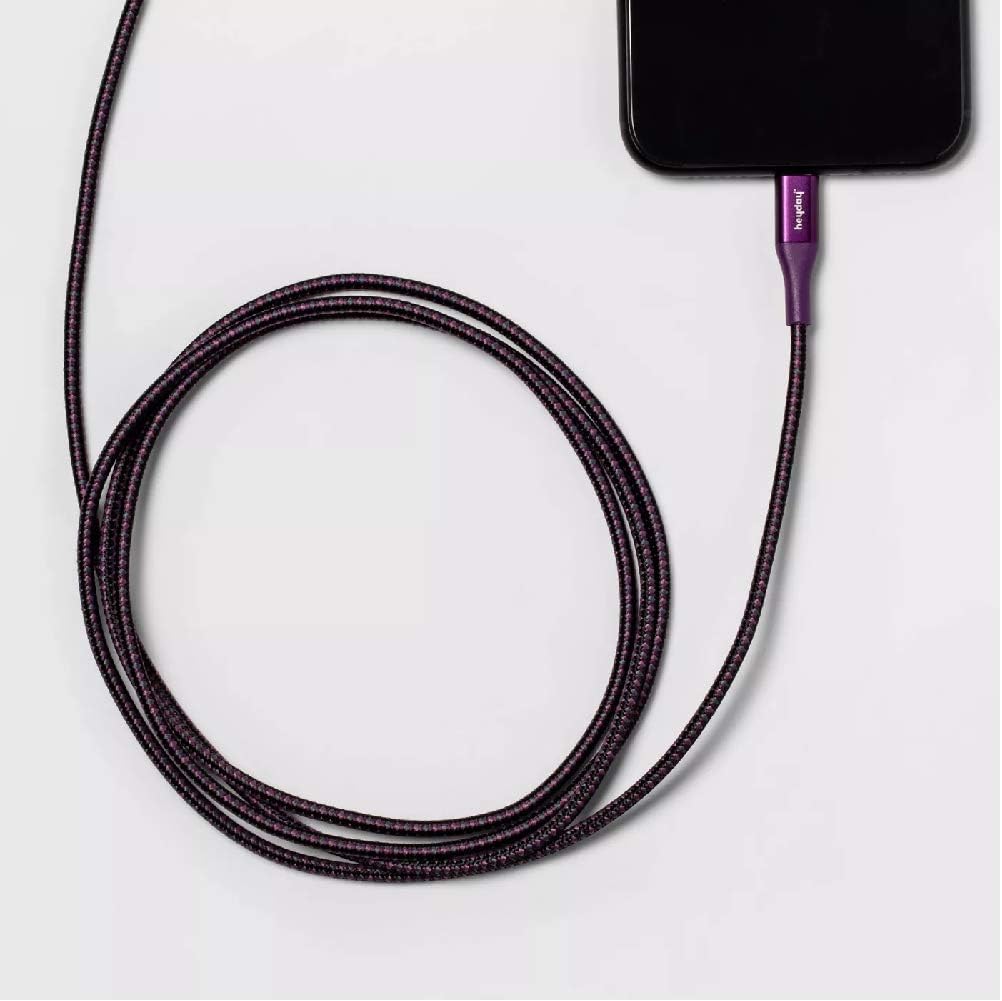
Image: The Heyday Lightning cable with its Lightning connector securely plugged into the charging port of a smartphone, demonstrating a typical connection for charging or data transfer.
Kullanım Talimatları
Once connected, the cable will facilitate charging or data transfer automatically, depending on the connected devices and their settings.
- Şarj: When connected to a power source (e.g., wall adapter, power bank), your Apple device will begin charging. The charging indicator on your device will confirm this.
- Data Transfer/Syncing: When connected to a computer, your device may prompt you to "Trust This Computer." Follow the on-screen instructions to allow data transfer and syncing with applications like iTunes or Finder.
- Optimum Performans: For best charging results, use with a power adapter that provides at least 2.4 Amps (e.g., 12W USB power adapter).
Bakım
Proper care will extend the life of your cable.
- Depolamak: When not in use, coil the cable loosely. Avoid tight coiling or sharp bends, especially near the connectors, as this can damage the internal wires.
- Temizlik: If the cable or connectors become dirty, gently wipe them with a soft, dry, lint-free cloth. Do not use harsh chemicals or abrasive materials.
- İşleme: Always grasp the connector housing when plugging or unplugging the cable. Do not pull directly on the cable itself, as this can strain the connection points.
- Çevresel Koşullar: Kabloyu aşırı sıcaklıklara, uzun süre doğrudan güneş ışığına veya aşırı neme maruz bırakmaktan kaçının.

Image: The Heyday 6-ft Lightning to USB-A Braided Cable neatly coiled, demonstrating proper storage to prevent damage and tangling.
Sorun giderme
If you encounter issues with your cable, try the following steps:
- Cable Not Charging/Syncing:
- Kablo uçlarının her ikisinin de ilgili bağlantı noktalarına tam ve güvenli bir şekilde takıldığından emin olun.
- Farklı bir USB-A bağlantı noktası veya güç adaptörü kullanmayı deneyin.
- Test the cable with a different compatible device to rule out an issue with your device.
- Check the Lightning port on your device for any debris or lint that might be obstructing the connection.
- Restart your device and the connected computer/power source.
- Yavaş Şarj:
- Ensure you are using a power adapter that provides sufficient amperage (e.g., 2.4A or higher).
- Şarj sırasında cihazınızı yoğun bir şekilde kullanmaktan kaçının.
- "Accessory Not Supported" Message:
- This message can sometimes appear if the cable is not fully inserted or if there's debris in the port. Re-insert the cable firmly.
- Cihazınızın yazılımının güncel olduğundan emin olun.
- As the cable is MFi certified, this message is less likely but can occur with very old or damaged devices.
If problems persist after trying these steps, the cable may be damaged or defective. Please refer to the warranty information if applicable.
Özellikler
| Marka | altın çağ |
| Model Numarası | 0818009024695 |
| Kablo Tipi | Lightning to USB-A |
| Uzunluk | 6 feet (yaklaşık 1.8 metre) |
| Renk | Midnight Purple |
| Veri Aktarım Hızı | 480 Mbps (0.48 Gigabits Per Second) |
| Şarj Akımı | 2.4'e kadar Amps |
| Özel Özellikler | Braided, MFi Certified |
| Uyumlu Telefon Modelleri | iPhone 12, iPhone 12 Pro, iPhone 12 Pro Max, iPhone 12 mini, iPhone SE (2020), iPhone 11, iPhone 11 Pro, iPhone 11 Pro Max, iPhone XR, iPhone XS, iPhone XS Max, iPhone X, iPhone 8, iPhone 8 Plus |
| Ürün Ağırlığı | 2.89 ons |
Garanti ve Destek
Bu ürünle ilgili özel garanti detayları mevcut bilgilerde yer almamaktadır. Lütfen ürün ambalajına veya üreticinin resmi talimatlarına bakın. webGaranti şartları ve koşulları için lütfen siteyi ziyaret edin.
For further assistance or technical support, please contact Heyday customer service through their official channels, typically found on their website veya ürün ambalajı.


