giriiş
The HyperX CloudX Gaming Headset is officially licensed for Xbox, designed to provide an exceptional audio experience for serious gamers. This manual will guide you through the features, setup, and care of your new headset, ensuring optimal performance and longevity. The CloudX headset combines signature HyperX comfort with robust durability and high-quality sound, making it an ideal choice for extended gaming sessions.
It features convenient in-line audio controls for quick adjustments without interrupting your game. The sturdy aluminum frame ensures long-lasting reliability, while 100% memory foam ear cushions and a leatherette-padded headband offer superior comfort. Equipped with 53mm drivers, the headset delivers crystal clear highs, mids, and lows with enhanced bass reproduction. The closed-cup design helps to immerse you in your game by muting external noise. The noise-cancelling microphone is detachable and can be positioned for clear communication. The CloudX is compatible with Xbox One, Xbox Series X|S, and mobile devices with CTIA standard connectors.
Kutuda Neler Var?
- HyperX CloudX Gaming Headset
- Ayrılabilir Gürültü Önleyici Mikrofon
- Kullanım Kılavuzu (bu belge)

Image: HyperX CloudX headset shown alongside its retail packaging, illustrating the product as it appears when unboxed.
Ürün Bittiview
Tasarım ve Konfor
The HyperX CloudX headset is engineered for comfort during long gaming sessions. It features a durable aluminum frame that provides stability and longevity. The ear cushions are made from 100% memory foam and covered with premium leatherette, conforming to your ears for a comfortable fit and excellent passive noise isolation.
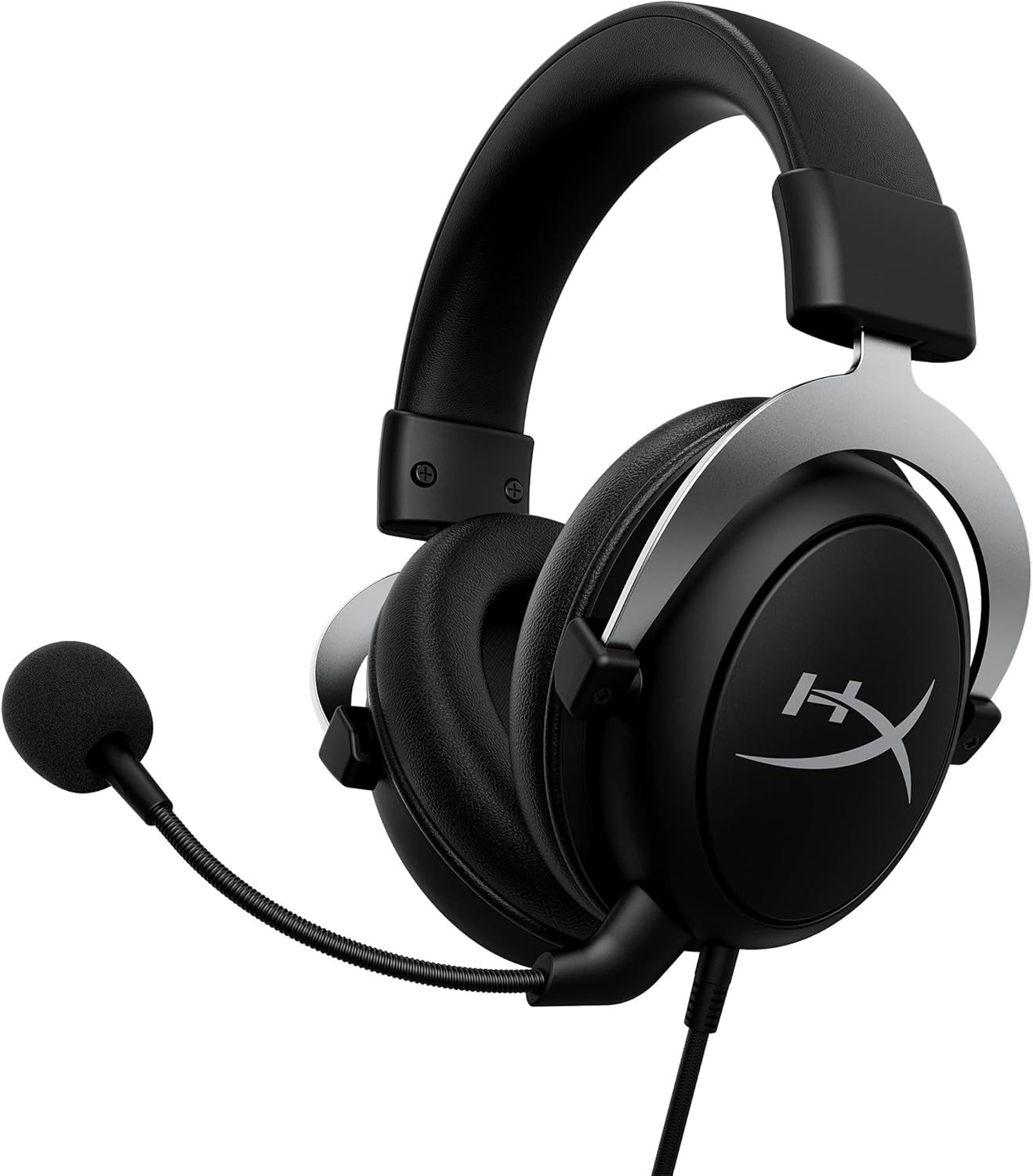
Image: The HyperX CloudX Gaming Headset, showcasing its black and silver design with the detachable microphone attached.
Ses Kalitesi
Experience immersive in-game audio with the CloudX headset's 53mm dynamic drivers. These drivers deliver crystal clear highs, rich mids, and powerful lows, enhancing your gaming experience. The closed-cup design helps to block out external distractions, allowing you to focus entirely on your game's soundscape.
Ayrılabilir Gürültü Önleyici Mikrofon
The flexible, noise-cancelling microphone ensures clear voice communication by reducing background noise. It can be easily positioned to your preference or detached when not needed, such as when listening to music or using the headset for single-player experiences.

Resim: Ayrıntılı view of the HyperX CloudX headset, highlighting the detachable microphone and its connection point.
In-line Audio Controls
The headset features convenient in-line audio controls, allowing you to adjust volume and mute the microphone directly on the cable. This eliminates the need to navigate through console menus, providing quick and intuitive control over your audio settings.

Image: Close-up of the in-line audio control unit on the HyperX CloudX headset cable, showing the volume wheel and microphone mute switch.
Kurulum Kılavuzu
Connecting to Xbox One / Xbox Series X|S
- Ensure your Xbox controller has a 3.5mm headset jack. Most modern Xbox controllers include this.
- Plug the 3.5mm audio jack from the HyperX CloudX headset firmly into the headset jack on your Xbox controller.
- If prompted, update your controller's firmware via the Xbox settings.
- Adjust the volume using the in-line audio control on the headset cable or through your Xbox audio settings.
- Ensure the microphone mute switch on the in-line control is in the 'unmuted' position if you intend to use voice chat.

Image: A person wearing the HyperX CloudX headset while holding an Xbox controller, demonstrating typical usage.
Mobil Cihazlara Bağlanma
- The HyperX CloudX headset is compatible with mobile devices that have a CTIA standard 3.5mm audio jack.
- Plug the 3.5mm audio jack from the headset into your mobile device's audio port.
- For audio-only use, you may detach the microphone.
Kullanım Talimatları
Sesi Ayarlama
Locate the volume wheel on the in-line audio control unit. Rotate the wheel upwards to increase volume and downwards to decrease volume.
Mikrofon Sesi Kapat/Aç
The in-line audio control unit features a switch to mute or unmute the microphone. Slide the switch to the position indicated for 'mute' (often with a red indicator) to turn off your microphone, and slide it to the 'unmute' position to enable it.
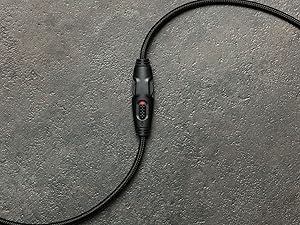
Resim: Yakın çekim view of the in-line audio controls, showing the volume dial and the microphone mute switch with a red indicator for the muted state.
Detaching the Microphone
To detach the microphone, gently pull it straight out from the headset's microphone port. To reattach, align the microphone's connector with the port and push it firmly until it clicks into place.
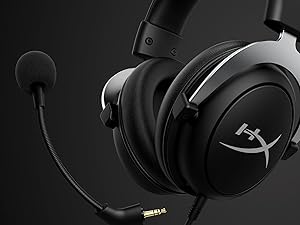
Image: The HyperX CloudX headset with its detachable microphone removed, illustrating the versatility of the design.
Bakım ve Özen
- Kulak Yastıklarının Temizlenmesi: Gently wipe the leatherette ear cushions with a soft, damp bez. Sert kimyasallar veya aşındırıcı temizleyiciler kullanmaktan kaçının.
- Kafa Bandının Temizlenmesi: Wipe the headband with a soft, dry cloth.
- Mikrofon Temizliği: If necessary, gently wipe the microphone foam with a dry cloth.
- Kablo Bakımı: Kabloya zarar gelmemesi için keskin kıvrımlardan veya aşırı çekme kuvvetinden kaçının.
- Depolamak: Kulaklığınızı serin, kuru ve doğrudan güneş ışığından ve aşırı sıcaklıklardan uzak bir yerde saklayın.
Sorun giderme
Kulaklıktan ses gelmiyor.
- 3.5 mm jakın kumanda ünitesine veya cihaza tamamen takıldığından emin olun.
- Check the in-line volume wheel and ensure it is turned up.
- Verify the audio settings on your Xbox or mobile device.
- Cihaza özgü bir sorunu elemek için kulaklığı başka bir cihazla test edin.
Mikrofon çalışmıyor
- Mikrofonun kulaklığa güvenli bir şekilde takıldığından emin olun.
- Check the in-line microphone mute switch and ensure it is in the 'unmuted' position (no red indicator).
- Verify microphone settings on your Xbox or mobile device.
- Ensure your Xbox controller firmware is up to date.
- Mümkünse mikrofonu başka bir uygulama veya cihazla test edin.
Özellikler
| Özellik | Detay |
|---|---|
| Model Adı | BulutX |
| Bağlantı Teknolojisi | Kablolu |
| Kulaklık Girişi | 3.5 mm Jak |
| Ses Sürücüsü Boyutu | 53 Milimetre |
| Frekans Aralığı | 20 Hz - 20,000 Hz |
| Hassasiyet | 95 dB |
| Empedans | 41 Ohm |
| Gürültü Kontrolü | Aktif Gürültü Engelleme (Mikrofon) |
| Uyumlu Cihazlar | Xbox One, Xbox Series X|S, Mobile (CTIA standard) |
| Malzeme | Alüminyum (Çerçeve) |
| Ürün Ağırlığı | 337 Gram (11.9 ons) |
| Kablo Uzunluğu | 3 Ayak |
| Renk | Siyah, Gümüş |
Garanti Bilgileri
The HyperX CloudX Gaming Headset typically comes with a manufacturer's warranty. Please refer to the warranty card included with your product or visit the official HyperX website for detailed warranty terms and conditions. The standard return policy for new products purchased from Amazon is 30 days.
Destek
For technical assistance, troubleshooting beyond this manual, or warranty claims, please contact HyperX customer support. You can find contact information and additional resources on the official HyperX website. For general product information, you may also visit the Amazon'da HyperX Mağazası.


