1. Giriş
Thank you for choosing the Sunbuck AS-35BU Stereo Amplifier. This compact yet powerful amplifier is designed to enhance your home audio experience, offering versatile connectivity options including Bluetooth 5.0, RCA, USB, SD card, FM radio, and AUX input. With a maximum output of 400W x 2 (RMS 60W x 2), it delivers high-fidelity sound with low distortion, suitable for various environments such as offices, small apartments, basements, and garages. This manual provides detailed instructions for setup, operation, maintenance, and troubleshooting to ensure optimal performance and longevity of your device.
2. Önemli Güvenlik Talimatları
- Güç Kaynağı: Sağlamak amplifier is connected to a power supply matching the voltage indicated on the unit. Use only the provided AC power plug.
- Havalandırma: Havalandırma açıklıklarını kesinlikle kapatmayın. Üreticinin talimatlarına uygun olarak kurulum yapın. Aşırı ısınmayı önlemek için yeterli hava akışı çok önemlidir.
- Su ve Nem: Do not expose this apparatus to rain or moisture. Do not use near water (e.g., bathtubs, sinks, swimming pools).
- Sıcaklık: Radyatörler, kalorifer ızgaraları, sobalar veya diğer cihazlar (dahil) gibi herhangi bir ısı kaynağının yakınına kurmayın. amp(ısı üreten)
- Temizlik: Clean only with a dry cloth. Avoid using liquid or aerosol cleaners.
- Servis: Bu ürünü kendiniz tamir etmeye çalışmayın. Tüm servis işlemlerini yetkili servis personeline yaptırın. Cihazın herhangi bir şekilde hasar görmesi durumunda (örneğin, güç kaynağı kablosu veya fişi hasar görmüşse, içine sıvı dökülmüşse veya cisimler düşmüşse, cihaz yağmur veya neme maruz kalmışsa, normal çalışmıyorsa veya düşürülmüşse) servis gereklidir.
- Aşırı yük: Yangın veya elektrik çarpması riskine neden olabileceğinden duvar prizlerini veya uzatma kablolarını aşırı yüklemeyin.
3. Paket İçeriği
Aşağıda listelenen tüm öğelerin paketinizde bulunduğunu doğrulayın:
- 1 x Sunbuck AS-35BU Stereo Ampkaldırıcı (110V)
- 1 x Uzaktan Kumanda
- 1 x FM Anteni
- 1 x AC Power Plug

Image: Contents of the Sunbuck AS-35BU ampamplifikatör paketi, aşağıdakileri içerir: amplifier unit, remote control, FM antenna, and AC power plug.
4. Ürün Bittiview
4.1 Ön Panel
The front panel provides access to primary controls and inputs for convenient operation.
- Güç düğmesi: Geçiş yapar ampkaldırıcı açık/kapalı.
- Giriş Seçici: Rotary knob to select between Media Player (USB/SD/Bluetooth/FM), AUX, CD, and Line inputs.
- Ton Kontrolleri: Separate knobs for Treble and Bass adjustment to fine-tune audio output.
- Yankı Kontrolü: Mikrofon girişleri için yankı efektini ayarlar.
- Mic 1/2 Volume: Controls the overall volume for both microphone inputs.
- Müzik Sesi: Main rotary knob for adjusting the overall music volume.
- USB/SD/MMC/BT Player: Digital display and control buttons for media playback (Play/Pause, Scan, Mode, Next/Previous Track, Volume +/-).
- Mikrofon Girişleri: Two 1/4" (6.35mm) jacks for connecting microphones.

Resim: Ön view of the Sunbuck AS-35BU amplifier, showing all controls and inputs including power switch, input selector, tone controls, media player interface, and microphone inputs.
4.2 Arka Panel
The rear panel houses all the necessary connections for your audio sources and speakers.
- RCA Ses Girişleri: Two pairs of RCA inputs labeled 'CD' and 'LINE' for connecting external audio devices.
- Hoparlör Çıkışları: Spring clip terminals for connecting left and right passive speakers.
- DC Güç Girişi: For alternative DC power supply (DC12V 5A-10A).
- AC Güç Girişi: Standard AC power cord connection.
- Cilttage Conversion Switch: Allows selection between 230V and 115V AC power.
- FM Anten Girişi: Coaxial connector for the FM antenna.

Resim: Arka view of the Sunbuck AS-35BU amplifier, displaying RCA audio inputs, speaker terminals, power input, voltage selector, and FM antenna connection.
4.3 Boyutlar
The compact design of the AS-35BU allows for flexible placement in various settings.
- Ürün Ölçüleri: 6.1 x 5.31 x 2.17 inç (15.5 x 13.5 x 5.5 cm)
- Ürün Ağırlığı: 2.2 pound (1 kg)
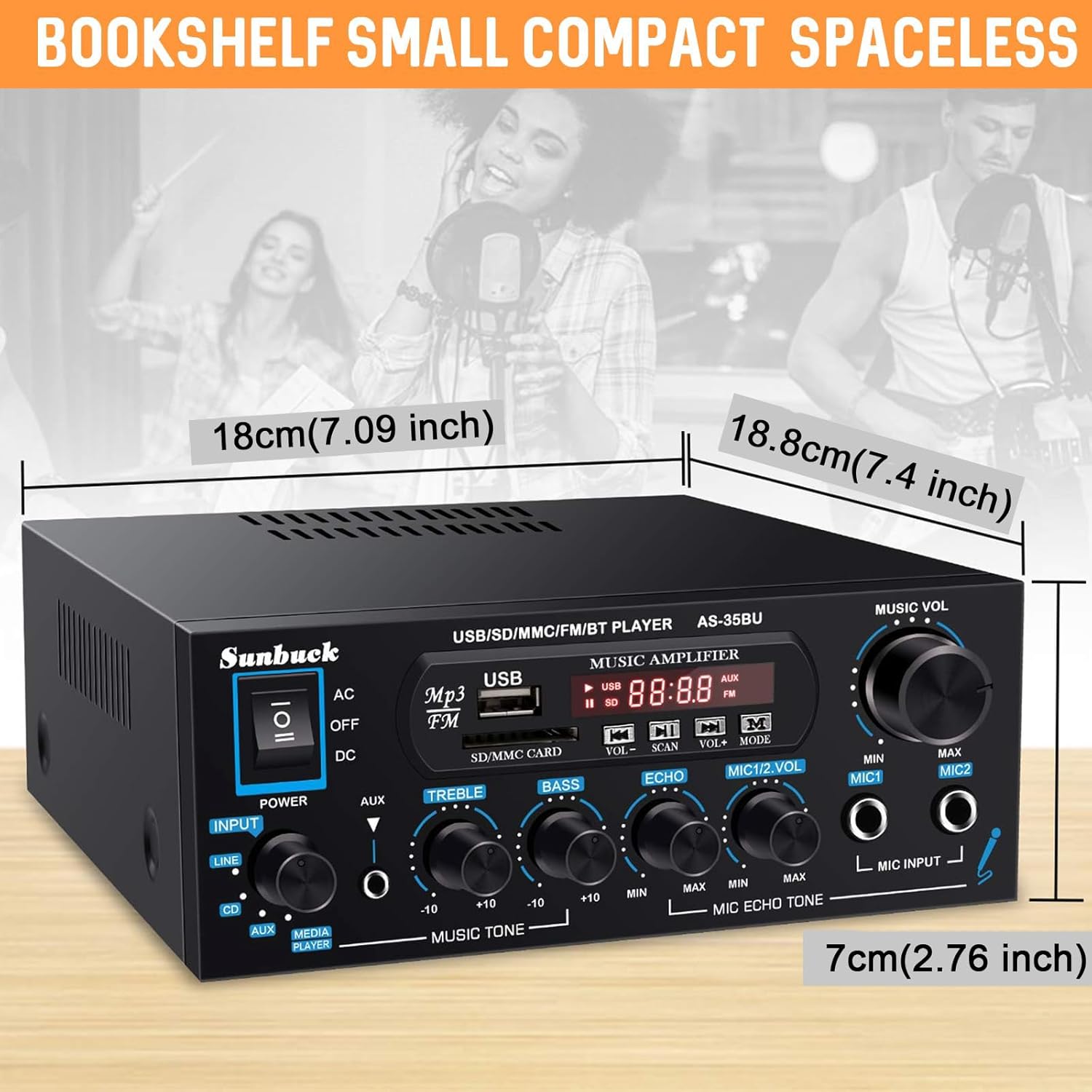
Image: Diagram showing the compact dimensions of the Sunbuck AS-35BU amplifier, highlighting its small footprint.
5. Kurulum
5.1 Hoparlör Bağlantısı
Connect your passive speakers to the speaker output terminals on the rear panel. Ensure correct polarity (positive to positive, negative to negative) for optimal sound quality.
- Strip approximately 1/2 inch (1.2 cm) of insulation from the ends of your speaker wires.
- Press down on the spring clip terminal to open the connection point.
- Insert the bare wire into the opening.
- Release the spring clip to secure the wire.
- Repeat for all four connections (Left +, Left -, Right +, Right -).
5.2 Ses Girişi Bağlantısı
Connect your audio sources to the appropriate RCA inputs on the rear panel.
- CD Girişi: Use RCA cables to connect a CD player or other audio device.
- HAT Girişi: Use RCA cables to connect devices like laptops, TVs, or projectors with AV audio output.
- AUX Input (Front Panel): Use a 3.5mm to 3.5mm audio cable to connect portable devices like smartphones or tablets to the front panel AUX jack.

Image: Diagram illustrating various input and output connections for the Sunbuck AS-35BU amplifier, including RCA, speaker terminals, and compatible devices.
5.3 Güç Bağlantısı
Before connecting to power, ensure the voltage conversion switch on the rear panel is set correctly for your region (230V or 115V). Then, connect the provided AC power plug to the ampLifier ve bir duvar prizi.
5.4 FM Anten Bağlantısı
Connect the included FM antenna to the FM ANT coaxial input on the rear panel for radio reception.
6. Kullanım Talimatları
6.1 Güç Açma/Kapatma
Flip the power switch on the front panel to the 'ON' position to power on the amplifier. The digital display will illuminate. Flip to 'OFF' to power down.
6.2 Giriş Seçimi
Rotate the 'INPUT' knob on the front panel to select your desired audio source: 'MEDIA PLAYER' (for USB/SD/Bluetooth/FM), 'AUX', 'CD', or 'LINE'.
6.3 Ses Seviyesi ve Ton Kontrolü
Adjust the 'MUSIC VOL' knob to control the overall output volume. Use the 'TREBLE' and 'BASS' knobs to fine-tune the high and low frequencies of your music.
6.4 USB/SD/MMC Oynatma
Insert a USB drive or SD/MMC card containing MP3 audio files into the respective slots on the front panel. The amplifier will automatically switch to 'MEDIA PLAYER' mode and begin playback. Use the control buttons (VOL+/-, SCAN, MODE, Next/Previous) to navigate and control playback.
6.5 Bluetooth Bağlantısı
Bir Bluetooth cihazını bağlamak için:
- Switch the input selector to 'MEDIA PLAYER'. The display will show 'BLUE' indicating Bluetooth mode.
- Mobil cihazınızda (akıllı telefon, tablet, dizüstü bilgisayar) Bluetooth'u etkinleştirin ve kullanılabilir cihazları arayın.
- Select 'AS-35BU' from the list of devices to pair. Once connected, you will hear a confirmation tone.
- Artık cihazınızdan kablosuz olarak ses akışı sağlayabilirsiniz amplifier. The wireless range is approximately 40 feet (12 meters). Note that signal and volume may be intermittent if there are physical obstructions like walls between the devices.

Image: Visual representation of the Sunbuck AS-35BU amplifier connecting wirelessly to various devices via Bluetooth, including smartphones, tablets, and laptops.
6.6 FM Radyo Çalışması
FM radyo işlevini kullanmak için:
- Switch the input selector to 'MEDIA PLAYER' and then press the 'MODE' button until 'FM' is displayed.
- Press the 'SCAN' button to automatically scan and save available FM stations as presets.
- Use the 'Next/Previous Track' buttons on the front panel or the remote control to cycle through the saved presets. For direct frequency input, use the number pad on the remote control.
6.7 Mikrofon ve Karaoke Fonksiyonu
The amplifier supports two microphone inputs for karaoke or public address.
- Plug your 1/4" (6.35mm) microphones into the 'MIC INPUT' jacks on the front panel.
- Adjust the 'MIC 1/2 VOL' knob to control the microphone volume.
- Use the 'ECHO' knob to add or remove echo effect to the microphone sound.
6.8 Uzaktan Kumanda Kullanımı
The included remote control provides convenient access to various functions from a distance. It allows for direct input of FM frequencies, track navigation, volume control, and mode selection.

Image: Step-by-step guide for installing the battery in the remote control, ensuring proper functionality.
7. Sorun Giderme
If you encounter any issues with your Sunbuck AS-35BU amplifier, please refer to the table below for common problems and their solutions.
| Sorun | Olası Neden | Çözüm |
|---|---|---|
| Güç yok | Power cord not connected; Power switch off; Incorrect voltage seçimi. | Ensure power cord is securely plugged in. Turn power switch ON. Verify voltage anahtarı (230V/115V) doğru şekilde ayarlanmış. |
| Ses çıkışı yok | Incorrect input selected; Volume too low; Speaker wires loose or incorrect polarity. | Select the correct input source. Increase 'MUSIC VOL' knob. Check speaker wire connections and polarity. |
| Bluetooth bağlantı sorunları | Cihaz eşleştirme modunda değil; Amplifier too far from device; Obstructions. | Emin olmak amplifier is in 'BLUE' mode. Move device closer to amplifier. Remove obstructions. Try re-pairing. |
| Zayıf FM radyo alımı | Antenna not connected or positioned poorly; Weak signal. | Connect FM antenna securely. Adjust antenna position for better reception. Perform a new auto-scan for stations. |
| Bozuk ses | Volume too high; Tone controls set incorrectly; Poor audio source quality. | Reduce 'MUSIC VOL'. Adjust 'TREBLE' and 'BASS' knobs. Test with a different audio source. |
8. Özellikler
- Modeli: AS-35BU
- Güç Çıkışı: Max 400W x 2 (RMS 60W x 2)
- Bluetooth Sürümü: 5.0 (Wireless range: 40 feet / 12 meters)
- Girişler: 2 x RCA Audio (CD, Line), 2 x Microphone (1/4"), USB2.0, SD Card, Bluetooth 5.0, FM Radio, AUX (3.5mm front)
- Çıktılar: 2-Channel Speaker Output
- Boyutlar (U x G x Y): 6.1 x 5.31 x 2.17 inç (15.5 x 13.5 x 5.5 cm)
- Ağırlık: 2.2 pound (1 kg)
- Üretici: JS Electronics Limited
9. Bakım ve Özen
Ürününüzün uzun ömürlü olmasını ve optimum performans göstermesini sağlamak için amplifier, aşağıdaki bakım yönergelerini izleyin:
- Temizlik: Yüzeyini düzenli olarak silin. amplifier with a soft, dry cloth. Do not use abrasive cleaners, waxes, or solvents.
- Havalandırma: Keep the ventilation openings clear of dust and debris. Ensure adequate space around the unit for proper airflow.
- Depolamak: Eğer depolanıyorsa amplifier for an extended period, disconnect it from the power source and store it in a cool, dry place away from direct sunlight and extreme temperatures.
- İşleme: Cihazı dikkatli kullanın. Düşürmekten veya şiddetli darbelere maruz bırakmaktan kaçının.
10. Garanti ve Destek
Sunbuck products are manufactured with high-quality standards. For specific warranty information, please refer to the documentation included with your purchase or contact the retailer. If you require technical support or have questions not covered in this manual, please contact Sunbuck customer service or the authorized dealer from whom you purchased the product. Provide your model number (AS-35BU) and a detailed description of the issue for faster assistance.