giriiş
Welcome and thank you for choosing the Umax Webcam W5. This manual provides essential information for setting up, operating, maintaining, and troubleshooting your webcam. Please read it carefully before use to ensure proper functionality and longevity of your device.
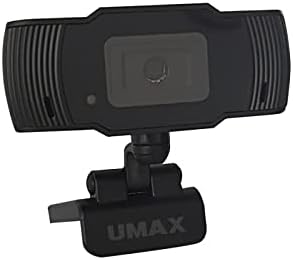
Resim: Ön view of the Umax W5 Webcam. This image displays the main unit of the webcam, highlighting its lens and overall design.
1. Kurulum
1.1 Paket İçeriği
- Umax W5 Webkam
- Ayna
1.2 Sistem Gereksinimleri
Umax W5 Webcam is compatible with most operating systems that support standard USB webcams, including Windows, macOS, and Linux distributions.
1.3 Bağlama Webkam
- Açın webcam's integrated clip/stand.
- Yerleştir webcam securely on top of your monitor, laptop screen, or a flat surface.
- USB kablosunu şuradan bağlayın: webkameranızı bilgisayarınızdaki kullanılabilir bir USB bağlantı noktasına bağlayın.
- The webcam should be automatically recognized by your operating system. No additional drivers are typically required for basic functionality.
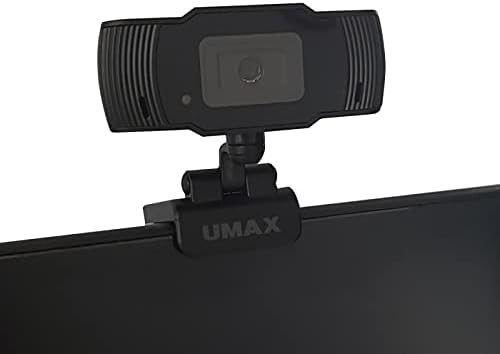
Image: Umax W5 Webcam mounted on top of a computer monitor. This image shows the webcam securely positioned on the upper edge of a computer monitor, demonstrating its typical mounting configuration.
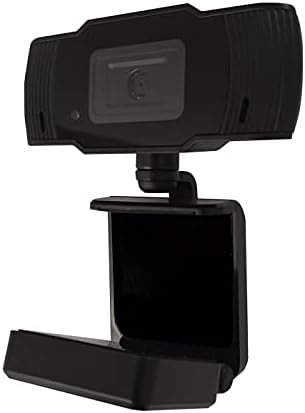
Image: Umax W5 Webcam with its adjustable clip/stand unfolded. This image displays the webcam with its integrated clip fully extended, illustrating how it can be adjusted to fit various monitor thicknesses or stand independently on a flat surface.
2. Çalıştırma Webkam
2.1 Temel İşlevsellik
Once connected, the Umax W5 Webcam is ready for use with various video conferencing applications, streaming software, and other programs that utilize a webkam.
2.2 Uygulamalarla Kullanım
- Open your desired application (e.g., Zoom, Skype, OBS Studio).
- Navigate to the application's settings or preferences menu.
- Select "Umax W5 Webcam" as your primary video input device.
- Adjust video settings such as resolution or frame rate within the application if these options are available.
2.3 Manual Focus
Umax W5 Webcam features manual focus. To adjust the focus, gently rotate the lens ring located around the camera lens until the image displayed on your screen appears clear and sharp.
3. Bakım
3.1 Lensin Temizlenmesi
To ensure optimal image quality, periodically clean the webkamera lensi.
- Optik yüzeyler için özel olarak tasarlanmış, yumuşak ve tüy bırakmayan bir bez kullanın.
- Avoid abrasive materials or harsh chemical cleaners, as these can damage the lens coating.
- Tozu veya lekeleri çıkarmak için merceği dairesel hareketlerle yavaşça silin.
3.2 Depolama
Kullanılmadığı zaman, saklayın webcam in a clean, dry place away from extreme temperatures, high humidity, and direct sunlight to prevent damage.
4. Sorun Giderme
4.1 WebKamera algılanmadı
- USB kablosunun her iki tarafa da güvenli bir şekilde bağlı olduğundan emin olun. webcam and an active USB port on your computer.
- Bağlantı kurmayı deneyin. webKamerayı bilgisayarınızdaki farklı bir USB bağlantı noktasına bağlayın.
- Bilgisayarınızı yeniden başlatın.
- İşletim sisteminizin Aygıt Yöneticisi'ni (Windows) veya Sistem Bilgilerini (macOS) kontrol ederek, webkamera listelenmiştir.
4.2 Düşük Görüntü Kalitesi
- Adjust the manual focus ring on the webcam until the image is clear.
- Ensure adequate lighting in your environment. Poor lighting can significantly affect image quality.
- Temizle webBakım bölümünde açıklandığı gibi kamera merceği.
- Check the video settings within your application (e.g., resolution, frame rate) to ensure they are set appropriately.
5. Özellikler
| Özellik | Detay |
|---|---|
| Marka | Umaks |
| Model Adı | W5 |
| Ürün Model Numarası | W5 |
| Renk | Siyah |
| Paket Boyutları | 6.18 x 3.43 x 1.89 inç |
| Ürün Ağırlığı | 5.6 ons |
| Lens Türü | Yakınlaştır |
| Odak Türü | Manuel Odaklama |
| Görüntü Sabitleme | HAYIR |
| Piller | 2 adet AA pil gereklidir. (dahildir) |
| Dahil Bileşenler | Ayna |
| İlk Mevcut Tarih | 14 Eylül 2020 |
| Üretici | Umaks |
6. Garanti ve Destek
For warranty information and technical support, please refer to the official Umax webSite üzerinden satın alabilir veya doğrudan müşteri hizmetleriyle iletişime geçebilirsiniz. Herhangi bir garanti talebi için satın alma belgeniz olarak satın alma fişinizi saklamanız önerilir.
Üretici: Umaks
İlk Mevcut Tarih: 14 Eylül 2020


