1. Giriş
The Seagate One Touch 4TB External Hard Drive provides portable storage for your digital files. This device is designed for easy use with both PC and Mac computers, offering a simple solution for backing up and accessing your data.

Image 1.1: Seagate One Touch 4TB External Hard Drive. This image displays the silver-colored external hard drive with its minimalist design, suitable for various environments.
2. Paket İçeriği
Paketin içinde tüm öğelerin mevcut olduğundan emin olun:
- Seagate One Touch 4TB Harici Sabit Disk
- USB 3.0 Kablosu
- Hızlı Başlangıç Kılavuzu (bu belge)
3. Kurulum ve Bağlantı
The Seagate One Touch drive is designed for plug-and-play operation. Follow these steps to connect your device:
- Connect the small end of the included USB 3.0 cable to the USB port on the Seagate One Touch drive.
- Connect the larger end of the USB 3.0 cable to an available USB port on your computer (PC or Mac).
- Sürücü otomatik olarak açılacak ve işletim sisteminiz tarafından algılanacaktır.
Not: For Mac users, reformatting may be required for full compatibility with Time Machine backup software. Refer to your Mac's documentation for reformatting instructions.

Image 3.1: Universal Compatibility. This image illustrates the connection of the USB 3.0 cable to the drive and highlights its compatibility with both Windows and Mac operating systems.
4. Cihazı Çalıştırma
4.1 Veri Depolama ve Aktarımı
Seagate One Touch sürücüsü bağlandıktan sonra bilgisayarınızda harici bir depolama aygıtı olarak görünecektir. Sürükleyip bırakabilirsiniz. filesürücüye ve sürücüden veri aktarımı yapın veya işletim sisteminizin file management tools to organize your data.
4.2 Backup Features
Sürücü çeşitli yedekleme yöntemlerini destekler:
- Tek Tıkla Yedekleme: Utilize the included software (if applicable) or your operating system's backup utility for immediate data backup.
- Zamanlanmış Yedeklemeler: Configure automatic daily, weekly, or monthly backups to ensure your data is regularly protected.
4.3 Included Software Features
The Seagate One Touch drive may include access to software subscriptions designed to enhance your digital experience:
- Mylio Oluştur: A one-year complimentary subscription to Mylio Create is included, allowing you to organize and protect your photos and videos across multiple devices.
- Adobe Creative Cloud Fotoğrafçılık Planı: A four-month membership to the Adobe Creative Cloud Photography plan is included, providing access to photo editing tools like Adobe Photoshop and Lightroom.
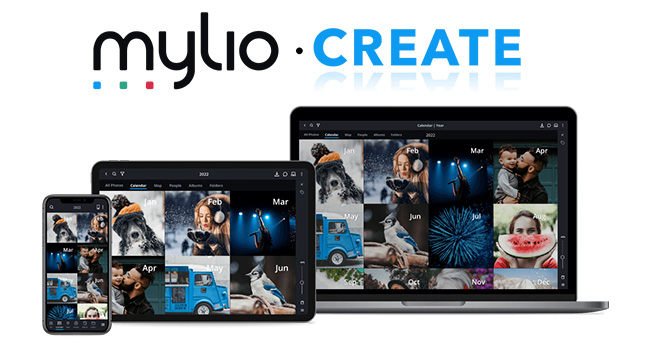
Image 4.1: Mylio Create Interface. This image shows the Mylio Create application running on various devices, demonstrating its capability to organize and display photos.
5. Bakım ve Özen
To ensure the longevity and optimal performance of your Seagate One Touch drive, follow these guidelines:
- Fiziksel İşleme: Handle the drive with care. Avoid dropping it or subjecting it to strong impacts, as this can damage internal components.
- Çevresel Koşullar: Aracı aşırı sıcaklıklardan, doğrudan güneş ışığından ve yüksek nemden uzak tutun.
- Temizlik: Sürücünün dışını temizlemek için yumuşak ve kuru bir bez kullanın. Sıvı temizleyiciler veya çözücüler kullanmayın.
- Güvenli Fırlatma: Always safely eject the drive from your computer's operating system before disconnecting the USB cable to prevent data corruption.
6. Sorun Giderme
If you encounter issues with your Seagate One Touch drive, refer to the following common solutions:
6.1 Sürücü Algılanamadı
- Kablo bağlantısını kontrol et: USB kablosunun hem sürücüye hem de bilgisayarınıza güvenli bir şekilde bağlı olduğundan emin olun.
- Farklı Bir USB Portunu Deneyin: Sürücüyü bilgisayarınızdaki başka bir USB portuna bağlayın.
- Farklı Bir Kablo Deneyin: If available, use a different USB 3.0 cable to rule out a faulty cable.
- Bilgisayarı yeniden başlat: Sometimes a simple computer restart can resolve detection issues.
- Disk Yönetimi'ni (Windows) / Disk İzlencesi'ni (Mac) kontrol edin: Verify if the drive appears in your operating system's disk management tools. If it appears but is unformatted, you may need to format it (this will erase all data).
6.2 Yavaş Aktarım Hızları
- USB 3.0 Portunu Kullanın: Ensure the drive is connected to a USB 3.0 port on your computer for optimal speeds. USB 2.0 ports will result in slower transfers.
- Diğer USB Aygıtlarından Kaçının: Büyük aktarımlar sırasında diğer yüksek bant genişliğine sahip USB aygıtlarını çıkarın.
- Sürüş Sağlığını Kontrol Edin: Run a disk check utility on your computer to identify any potential issues with the drive.
Daha fazla yardım için lütfen resmi Seagate destek sayfasını ziyaret edin. webalan.
7. Özellikler
| Özellik | Detay |
|---|---|
| Model Numarası | STKC4000401 |
| Depolama Kapasitesi | 4 TB (4000 GB) |
| Sabit Disk Türü | Mekanik Sabit Disk |
| Arayüz | USB 3.0 |
| Uyumluluk | Bilgisayar, Mac |
| Boyutlar (UxGxY) | 5.59 x 4.02 x 1.65 inç |
| Ürün Ağırlığı | 9.5 ons |
| Renk | Gümüş |
8. Garanti ve Destek
8.1 Sınırlı Garanti
Your Seagate One Touch drive is covered by a limited warranty. Please refer to the warranty information provided with your product or visit the official Seagate webGaranti şartları ve koşullarıyla ilgili ayrıntılar için lütfen siteyi ziyaret edin.
8.2 Veri Kurtarma Hizmetleri
Most Seagate drives include Rescue Data Recovery Services with their warranty. These services are designed to help protect against data loss due to power outages, natural disasters, user error, viruses, and other unforeseen events. With an industry-leading success rate, these services provide peace of mind for your stored files.

Image 8.1: Seagate Rescue Data Recovery Services. This image highlights the availability of data recovery services to protect against data loss.
8.3 Teknik Destek
For technical assistance, product registration, or to access additional resources, please visit the official Seagate support webalan: www.seagate.com/support


