1. Giriş
This manual provides detailed instructions for the IPEGA PG-SW023 Bluetooth Wireless Game Controller. This versatile controller is designed to enhance your gaming experience across multiple platforms, including N-S consoles, PlayStation 3 (PS3), Android devices, and personal computers running Windows 7, 8, or 10.
Ürünün doğru çalışmasını sağlamak ve özelliklerinden en iyi şekilde yararlanmak için lütfen ürünü kullanmadan önce bu kılavuzu dikkatlice okuyun.
2. Ürün Özellikleri
- Çoklu Platform Uyumluluğu: Suitable for gaming on N-S consoles, PS3, Android devices, and PCs (Windows 7/8/10).
- Gelişmiş Oyun Deneyimi: Supports vibration feedback and a six-axis gyroscope function for immersive gameplay and precise control.
- Customizable Macro Function: Rear buttons can be configured as common keys or combination keys for simplified actions.
- Continuous TURBO Function: Features a dedicated TURBO button for rapid-fire actions, compatible with N-S Pro gamepads.
- Ergonomik Tasarım: Engineered for comfort during extended gaming sessions, fitting securely in the palm.

Image: The IPEGA PG-SW023 Wireless Game Controller highlighting its key features: two vibrating motors, six-axis design, high-sensitive buttons, and Turbo function.
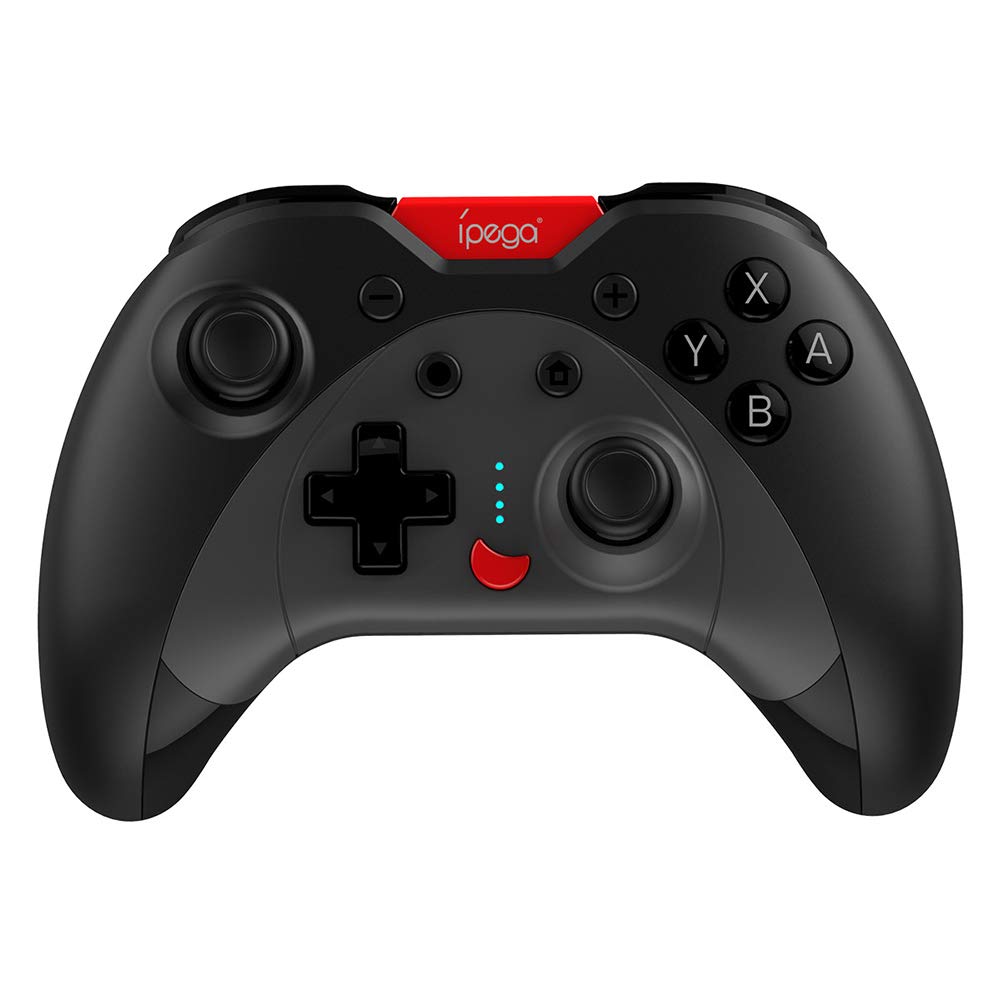
Image: A green IPEGA PG-SW023 controller illustrating its built-in six-axis gyroscope design for improved body feeling and accurate targeting.
3. Paket İçeriği
Lütfen pakette tüm öğelerin mevcut olduğundan emin olun:
- 1 x IPEGA PG-SW023 Wireless Game Controller
- 1 x Type-C Şarj Kablosu
- 1 x Kullanım Kılavuzu
4. Özellikler
| Özellik | Şartname |
|---|---|
| Marka | Ipega |
| Örnek | PG-SW023 |
| Renk Seçenekleri | Black, Green, Blue, Yellow |
| Çalışma Hacmitage | Doğru Akım 3.7V |
| Çalışma Akımı | <30mA |
| Statik akım | <20uA |
| Sürekli Oyun Süresi | Yaklaşık 15 saat |
| Giriş Voltage/Akım | DC 5V/500mA |
| Şarj Süresi | Yaklaşık 2 saat |
| Bluetooth Sürümü | 3.0 |
| İletim Mesafesi | ≤8 metre |
| Pil Kapasitesi | 400mAh |
| Ürün Boyutları | 15 x 10 x 5.5 cm (5.91 x 3.94 x 2.17 inç) |
| Ürün Ağırlığı | Yaklaşık 215g (7.58 ons) |
| Uyumlu Cihazlar | N-S Console, PS3, Android, PC (Win 7/8/10) |
| Bağlantı | Kablosuz (Bluetooth) |
| Güç Kaynağı | Pil ile çalışır |
5. Kurulum
5.1 Kontrol Ünitesinin Şarj Edilmesi
- Connect the provided Type-C charging cable to the controller's charging port.
- Kablo ucunu bir USB güç kaynağına (örneğin, bilgisayar, USB duvar adaptörü) bağlayın.
- The indicator lights on the controller will show charging status. Once fully charged (approx. 2 hours), the lights will indicate completion or turn off.
5.2 Cihazlarla Eşleştirme
The pairing method varies slightly depending on the device. Ensure the controller is sufficiently charged before attempting to pair.

Image: A blue IPEGA PG-SW023 controller positioned in front of a Nintendo Switch, PlayStation 3, and a laptop, illustrating its multi-platform compatibility.
5.2.1 Pairing with N-S Console
- On your N-S console, go to the HOME Menu.
- 'Kontrolcüler' > 'Tutma/Sıra Değiştirme' seçeneğini seçin.
- Press and hold the pairing button on the IPEGA controller (refer to controller diagram for exact location) until the indicator lights begin to flash rapidly.
- The console will detect the controller. Once paired, the indicator light will become solid.
5.2.2 Pairing with PS3
- Connect the controller to the PS3 console using the Type-C cable.
- Denetleyicideki HOME düğmesine basın.
- Once recognized, you can disconnect the cable and the controller should remain paired wirelessly.
5.2.3 Android Cihazlarla Eşleştirme
- Android cihazınızda Bluetooth'u etkinleştirin.
- On the controller, press and hold the Android pairing button combination (refer to controller diagram or quick start guide for specific button combination, usually 'A' + HOME or 'X' + HOME) until the indicator lights flash rapidly.
- On your Android device, search for new Bluetooth devices and select 'IPEGA PG-SW023' (or similar name) from the list.
- Once paired, the indicator light on the controller will become solid.
5.2.4 Pairing with PC (Windows 7/8/10)
- Bilgisayarınızda Bluetooth özelliğinin etkinleştirildiğinden emin olun.
- Go to 'Settings' > 'Devices' > 'Bluetooth & other devices' and click 'Add Bluetooth or other device'.
- Select 'Bluetooth'.
- On the controller, press and hold the PC pairing button combination (refer to controller diagram or quick start guide for specific button combination, usually 'L1' + HOME or 'Y' + HOME) until the indicator lights flash rapidly.
- Select 'IPEGA PG-SW023' (or similar name) from the list of available devices on your PC.
- Once paired, the indicator light on the controller will become solid.
6. Kullanım Talimatları
6.1 Temel Düğme İşlevleri
The controller features standard gaming buttons including directional pad, analog sticks, action buttons (A, B, X, Y), shoulder buttons (L1, R1), and triggers (L2, R2). Specific button mapping may vary by game and platform.

Image: Hands comfortably gripping a black IPEGA PG-SW023 controller, showcasing its ergonomic design for comfortable and convenient use.
6.2 TURBO Fonksiyonu
The TURBO function allows for continuous rapid input of a selected button. This can be useful in games requiring fast, repeated button presses.
- To activate TURBO: Press and hold the desired action button (e.g., A, B, X, Y) and then press the TURBO button simultaneously. The button will now continuously input as long as it's held down.
- To deactivate TURBO: Repeat the same process (press the action button and TURBO button simultaneously).

Image: A yellow IPEGA PG-SW023 controller with its prominent TURBO button, shown with a Nintendo Switch console, illustrating the auto-fire feature.
6.3 Makro Fonksiyonu
The macro function allows you to assign a sequence of button presses or a single common button to the programmable rear buttons. This can simplify complex in-game actions.
- Refer to the specific instructions provided in the quick start guide or on the manufacturer's website for detailed steps on programming macro buttons, as this process can vary.
6.4 Vibration and Gyroscope
The controller features dual motors for vibration feedback, providing tactile sensations that correspond to in-game events. The built-in six-axis gyroscope allows for motion control in supported games, offering a more immersive and precise aiming experience.

Image: A blue IPEGA PG-SW023 controller in use, with visual cues indicating its double motor vibrating design for immersive feedback during gameplay.
7. Bakım
Proper care will extend the life of your controller:
- Temizlik: Kumanda ünitesini temizlemek için yumuşak, kuru bir bez kullanın. İnatçı kirler için hafifçe kurulayın.ampBezi su veya hafif bir temizleme solüsyonuyla silin. Sert kimyasallardan kaçının.
- Depolamak: Kontrol cihazını serin, kuru ve doğrudan güneş ışığından ve aşırı sıcaklıklardan uzak bir yerde saklayın.
- Etkiden Kaçının: Kumanda cihazını düşürmeyin veya sert darbelere maruz bırakmayın, çünkü bu iç bileşenlere zarar verebilir.
- Sıvıya Maruz Kalma: Keep the controller away from liquids. If it comes into contact with liquid, power it off immediately and allow it to dry completely before attempting to use it again.
8. Sorun Giderme
If you encounter issues with your IPEGA PG-SW023 controller, try the following solutions:
- Kontrol Cihazı Bağlanmıyor:
- Kontrol cihazının tam şarjlı olduğundan emin olun.
- Cihazınızda Bluetooth'un etkin olduğunu doğrulayın.
- Try re-pairing the controller by following the setup instructions for your specific device.
- Move the controller closer to the device to ensure it is within the 8-meter transmission range.
- Hem kumandayı hem de oyun cihazınızı yeniden başlatın.
- Yanıt Vermeyen Düğmeler:
- Check if the controller is properly connected and paired.
- Test the controller with another game or application to rule out software-specific issues.
- Düğmelerin altına herhangi bir yabancı madde sıkışmadığından emin olun.
- Titreşim Çalışmıyor:
- Verify that the game or system settings have vibration enabled.
- Bazı oyunlar titreşimli geri bildirim özelliğini desteklemeyebilir.
- Kısa Pil Ömrü:
- Kullanmadan önce kontrol cihazının tamamen şarj olduğundan emin olun.
- Battery life can vary based on usage intensity (e.g., continuous vibration).
- Aşırı sıcak veya soğuk ortamlarda şarj etmekten kaçının.
9. Garanti ve Destek
For warranty information, technical support, or service inquiries regarding your IPEGA PG-SW023 Bluetooth Wireless Game Controller, please refer to the product packaging or contact the manufacturer directly through their official webGaranti taleplerinde bulunmak için lütfen web sitemizi veya müşteri hizmetleri kanallarımızı kullanın. Satın alma belgeniz olarak satın alma fişinizi saklayın.


