1. Giriş
This manual provides essential instructions for the safe and efficient use of your CALIMA 46038 Solar Power Bank 5000 mAh. This portable power bank is designed to charge your electronic devices, such as smartphones and tablets, using its internal 5000 mAh lithium polymer battery. It features both Micro USB input for standard charging and a solar panel for supplementary charging, along with a practical LED flashlight.

Image 1.1: The CALIMA Solar Power Bank attached to a backpack, demonstrating its portability for outdoor use.
2. Güvenlik Bilgileri
- Do not expose the power bank to extreme temperatures (above 45°C or below 0°C), direct sunlight for prolonged periods, or high humidity.
- Avoid dropping, disassembling, or attempting to repair the device yourself. This may void the warranty and cause damage.
- Keep the power bank away from water and flammable materials.
- Sadece sertifikalı şarj kabloları ve adaptörleri kullanın.
- Çocukların erişemeyeceği yerde saklayınız.
- Taşınabilir güç bankasını, elektronik atıklarla ilgili yerel yönetmeliklere uygun olarak imha edin.
3. Kurulum
3.1 Power Bank'ın İlk Şarjı
Before first use, fully charge the power bank using the Micro USB input. Connect the provided USB charging cable to the Micro USB input port on the power bank and the other end to a USB power source (e.g., wall adapter, computer USB port).

Resim 3.1: Yakın çekim view of the Micro USB input port (IN) and USB Type-A output port (OUT) on the power bank, protected by rubber covers.
3.2 LED Göstergelerini Anlama
The power bank features four LED indicators to display charging status and battery capacity.
- Charging Status (Green LED): When the power bank is being charged via Micro USB or solar panel, a green LED will illuminate, indicating that charging is in progress.

Resim 3.2: Üst view of the power bank showing the green LED indicator illuminated, signifying that the device is currently charging.
- Battery Capacity (Blue LEDs): Press the power button once to check the remaining battery capacity. The blue LEDs will light up to indicate the charge level:
- 1 LED: %0-25
- 2 LED: %25-50
- 3 LED: %50-75
- 4 LED: %75-100
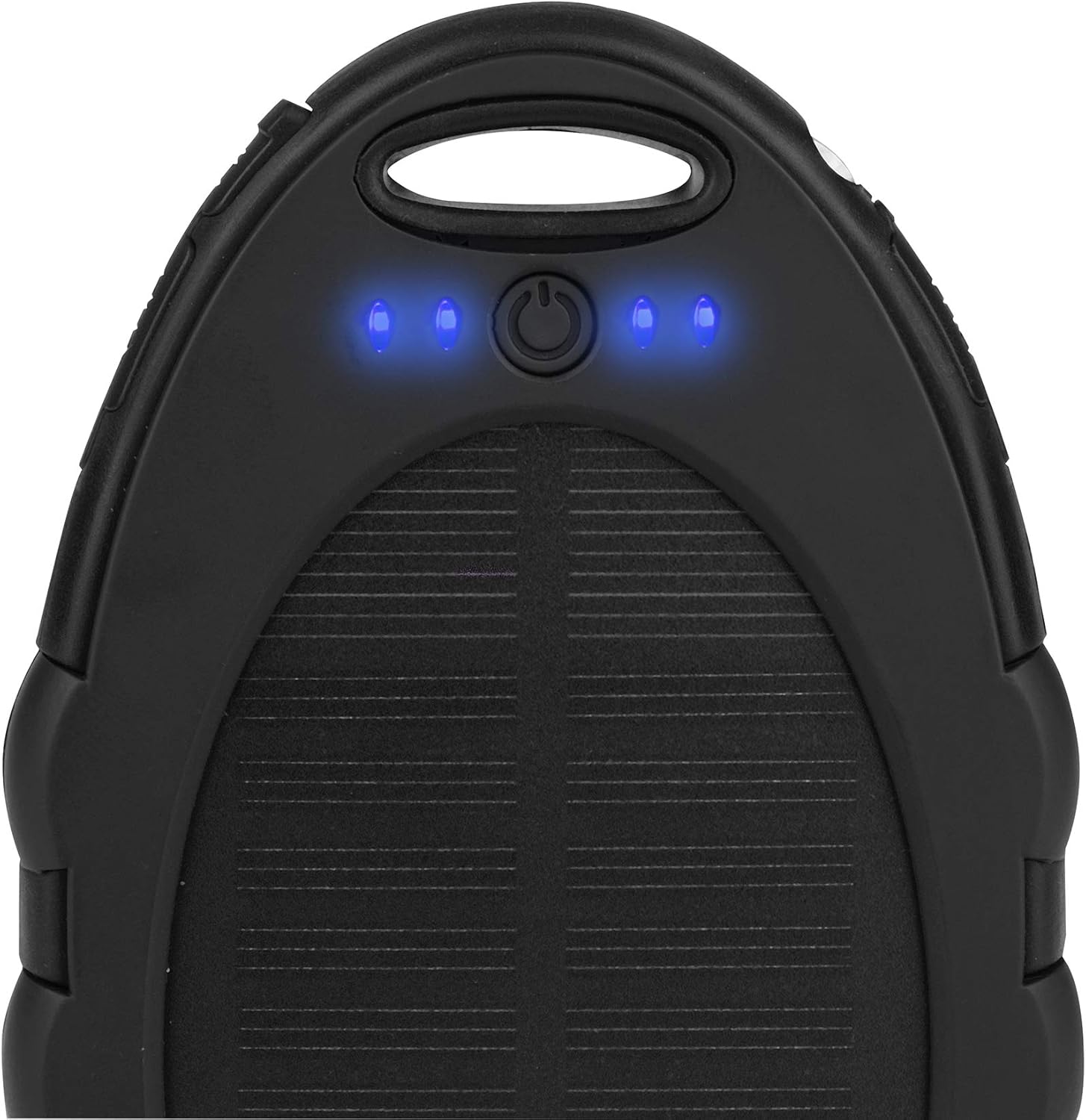
Resim 3.3: Üst view of the power bank showing four blue LED indicators illuminated, indicating a full or near-full battery capacity.
3.3 Solar Şarj
The integrated solar panel provides a supplementary charging method. Place the power bank in direct sunlight to utilize solar charging. The green LED indicator will illuminate when solar charging is active. Note that solar charging is slower than USB charging and is primarily intended for emergency power or maintaining charge, not as a primary charging source.
4. Kullanım Talimatları
4.1 Harici Cihazların Şarj Edilmesi
- Connect your device's USB charging cable to the USB Type-A output port (labeled "OUT") on the power bank.
- Kablo ucunu elektronik cihazınıza bağlayın.
- Power bank, cihazınızı otomatik olarak şarj etmeye başlayacaktır. Başlamazsa, şarj işlemini başlatmak için güç düğmesine bir kez basın.
- The blue LED indicators will show the remaining battery capacity of the power bank during discharge.
4.2 LED El Fenerinin Kullanımı
Bu taşınabilir şarj cihazı, kullanım kolaylığı için dahili bir LED el feneri içerir.
- To turn the flashlight on, press and hold the power button for approximately 2-3 seconds.
- To turn the flashlight off, press and hold the power button again for approximately 2-3 seconds.
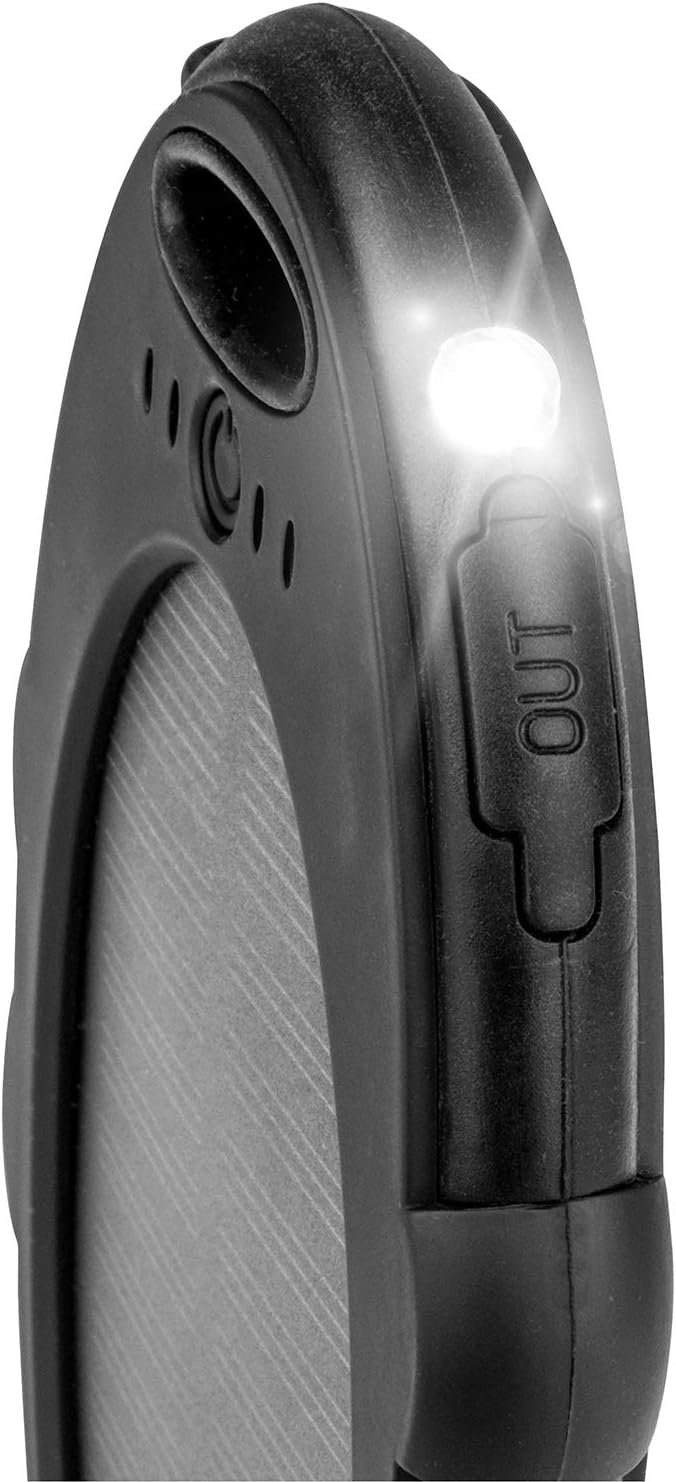
Resim 4.1: Yakın çekim view of the power bank with its integrated LED flashlight illuminated, providing portable light.
5. Bakım
- Temizlik: Powerbank'i yumuşak, kuru bir bezle silin. Sert kimyasallar veya aşındırıcı temizleyiciler kullanmayın.
- Depolamak: Store the power bank in a cool, dry place away from direct sunlight and extreme temperatures. For long-term storage, it is recommended to charge the power bank to about 50-75% capacity every 3-6 months to preserve battery life.
- Pil Bakım: Avoid fully discharging the power bank frequently, as this can reduce the overall lifespan of the lithium polymer battery.
6. Sorun Giderme
6.1 Power Bank Şarj Olmuyor
- Ensure the Micro USB cable is securely connected to both the power bank's input port and the power source.
- Verify that the power source (e.g., wall adapter) is functional.
- If using solar charging, ensure the solar panel is exposed to direct, strong sunlight. Note that solar charging is supplementary and slower.
6.2 External Device Not Charging
- Check if the USB cable connecting the power bank to your device is securely plugged in at both ends.
- Ensure the power bank has sufficient charge by checking the blue LED indicators.
- Press the power button once to activate the power bank and initiate charging.
- Try using a different USB cable or charging a different device to rule out cable or device issues.
6.3 Flashlight Not Working
- Powerbank'in yeterli şarja sahip olduğundan emin olun.
- Press and hold the power button for 2-3 seconds to activate the flashlight. Repeat to turn it off.
7. Özellikler
| Model Numarası | 46038 |
| Marka | KALIMA |
| Pil Türü | Lityum Polimer |
| Pil Kapasitesi | 5000 mAh (18.5 Wh) |
| Giriş | Micro USB Type B, DC 5V 1A |
| Çıktı | USB Type A, 5V 1A |
| Özel Özellikler | Solar Charging, LED Flashlight, 4 LED Charge Indicators |
| Boyutlar | Yaklaşık. 148 x 85 x 13.6 mm |
| Ağırlık | 130 gr |
| Önerilen Kullanım | Akıllı telefon |
| Güç Kaynağı | Solar, Battery, Electric Cable |
8. Garanti ve Destek
For warranty information and customer support, please refer to the documentation provided at the point of purchase or contact the retailer. The manufacturer of this product is EAL GmbH.