1. Giriş
Thank you for choosing the GoHawk RE9-X Motorcycle/UTV Bluetooth Speaker System. This manual provides essential information for the proper installation, operation, and maintenance of your new speaker system. Please read this manual thoroughly before use to ensure optimal performance and safety.

Image 1.1: GoHawk RE9-X Speaker System Overview
The GoHawk RE9-X is a waterproof speaker system designed for motorcycles, ATVs, UTVs, 4-wheelers, Go-Karts, and Golf Karts. It features Bluetooth wireless connectivity, an integrated LED light strip, AUX-in, FM radio, and a USB port for MP3 playback.
2. Güvenlik Bilgileri
- Always ensure the speaker system is securely mounted to prevent detachment during vehicle operation.
- Verify all wiring connections are correct and insulated to avoid electrical shorts or damage.
- Do not operate the speaker system at excessively high volumes that may impair your ability to hear traffic or emergency signals.
- This product is designed for 12V DC power systems only. Connecting to other voltagElektronik kaynaklar hasara neden olabilir.
- While the unit is waterproof, avoid submerging it in water or exposing it to high-pressure water jets.
3. Paket İçeriği
Lütfen paketi aşağıdaki öğeler açısından kontrol edin:
- 1 x Speaker Stereo Main Unit
- 2 x Montaj Clamps
- 1 x Güç Kablosu
- 1 x Kullanım Kılavuzu (bu belge)
4. Özellikler
The GoHawk RE9-X speaker system offers a range of features for an enhanced audio experience:
- Bluetooth Kablosuz: Stream audio from compatible devices.
- 24 White LEDs Strip: Integrated lighting feature, controllable with one click.
- USB 2.0 Bağlantı Noktası: MP3'ü destekler file playback from USB drives.
- YARDIMCI: Kablolu bağlantılar için 3.5 mm ses girişi.
- FM Radyo: Built-in radio tuner.
- Display with Clock: Digital display for information and time.
- Suya Dayanıklı Tasarım: Advanced protection against water exposure.
- Alüminyum Muhafaza: Durable and satin-finished construction.
- Innovative Mounting: Ball stub design with 360-degree swivel for flexible installation.
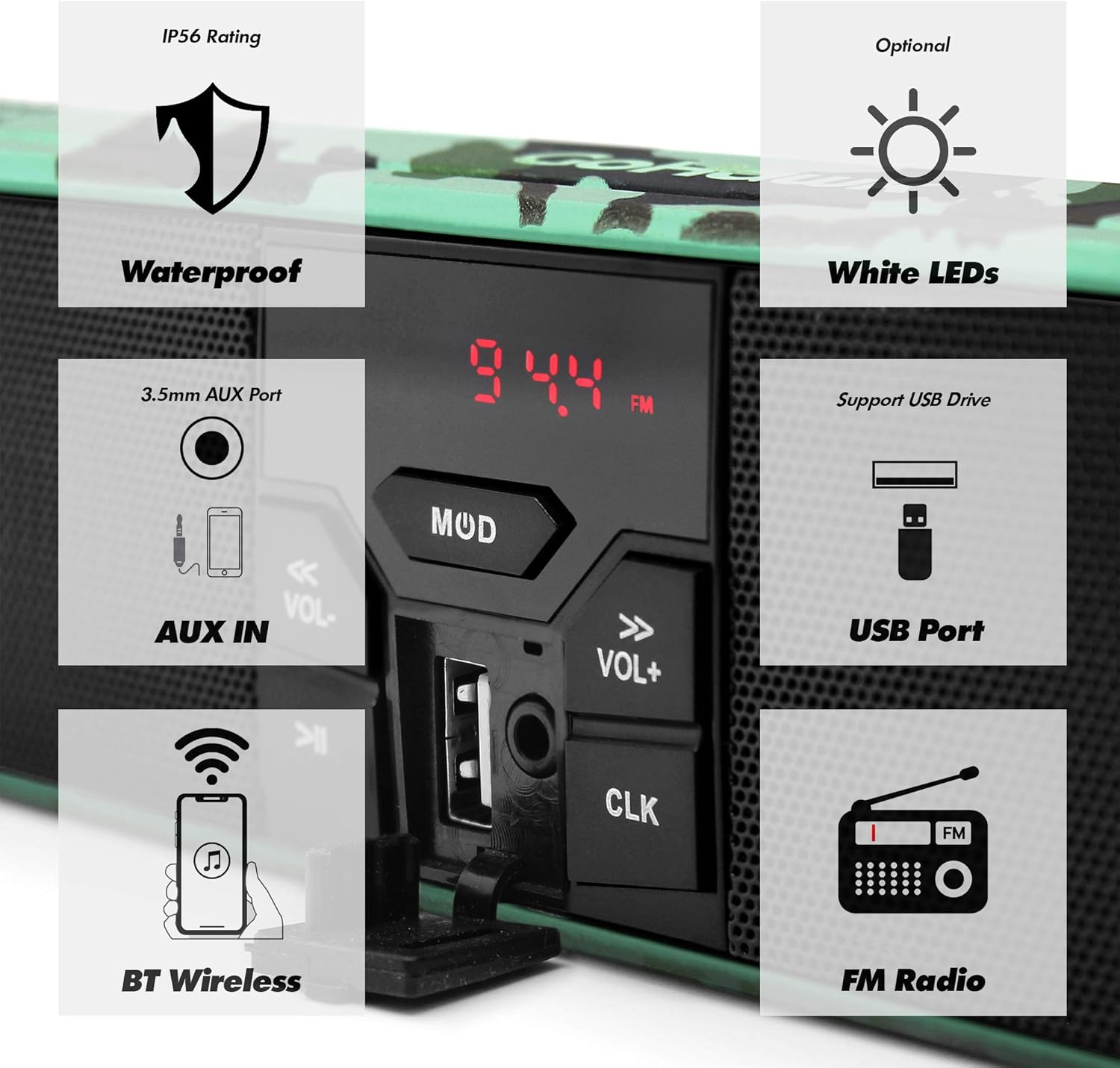
Image 4.1: Key Features of the RE9-X System
5. Kurulum ve Kurulum
5.1 Handlebar Clearance Measurement
Before installation, measure your handlebar's center clearance. The RE9-X model has an overall width of 18-1/4 inches. If your clearance is smaller, consider the RE8 model (16-3/4 inches overall width).

Image 5.1: Handlebar Clearance Comparison and Wiring Diagram
5.2 Mounting the Speaker System
- Montaj cl'yi takınamps to your vehicle's handlebar. The clamps support handlebar sizes from 7/8 inch to 1 1/4 inches.
- Secure the speaker unit to the mounting clamps using the ball stub design. This allows for 360-degree swivel adjustment to achieve the desired angle.
- Ensure all mounting bolts are tightened securely to prevent movement during operation.
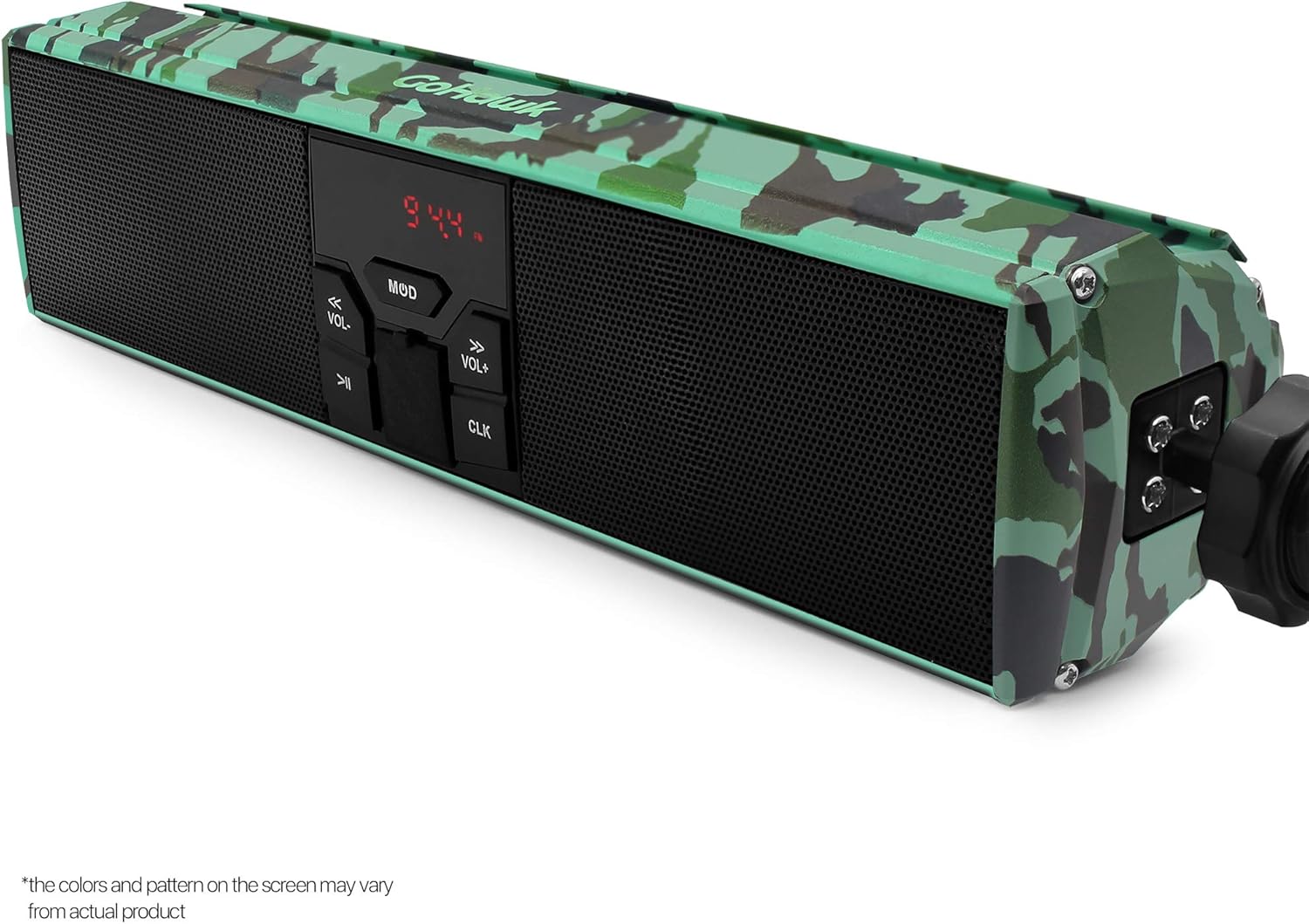
Image 5.2: Mounting Clamp and Swivel Mechanism
5.3 Kablo Bağlantıları
The system includes a 59-inch battery cable harness with ring terminal connectors for direct connection to your 12V DC battery.
- Connect the red wire of the power harness to the positive (+) terminal of your 12V battery.
- Connect the black wire of the power harness to the negative (-) terminal of your 12V battery.
- Kısa devreleri önlemek için tüm bağlantıların sıkı ve uygun şekilde yalıtılmış olduğundan emin olun.
- Route the wiring safely, away from moving parts or heat sources, and secure it with cable ties if necessary.

Image 5.3: Power Harness Wiring Diagram

Image 5.4: Speaker System Mounted on Handlebar
6. Operasyon
6.1 Güç Açma/Kapatma
Basın MOD Cihazı açıp kapatmak için kullanılan düğme.
6.2 Mod Seçimi
Basın MOD button repeatedly to cycle through available modes: Bluetooth, FM Radio, AUX-IN, USB.
6.3 Ses Kontrolü
Kullanın HACİM+ Ve cilt ses seviyesini ayarlamak için düğmeler.
6.4 Bluetooth Eşleştirme
- Switch the speaker system to Bluetooth mode. The display will indicate pairing readiness.
- Mobil cihazınızda Bluetooth'u etkinleştirin ve mevcut cihazları arayın.
- Select "GoHawk RE9-X" (or similar name) from the list to pair.
- Once paired, you can stream audio wirelessly. The wireless transmission range is typically over 15 meters.
6.5 FM Radyo Çalışması
- Switch the speaker system to FM Radio mode.
- Kullanın Önceki Parça Ve Sonraki Parça buttons (often labeled with arrows) to scan for radio stations.
- The display will show the current frequency (e.g., 94.4 FM).
6.6 USB Oynatma
- MP3 içeren bir USB sürücüsü takın fileUSB bağlantı noktasına takın.
- Switch the speaker system to USB mode.
- The system will automatically begin playing MP3 files. Kullan Önceki Parça Ve Sonraki Parça Parçalar arasında gezinmek için düğmeler.
6.7 AUX-IN Kullanımı
Connect an external audio device (e.g., MP3 player) to the 3.5mm AUX-IN port using a standard audio cable. Switch the speaker system to AUX-IN mode to play audio from the connected device.
6.8 LED Işık Şeridi
The integrated 24 white LED strip can be turned on or off with a single click of the dedicated LED button (often indicated by an arrow icon).
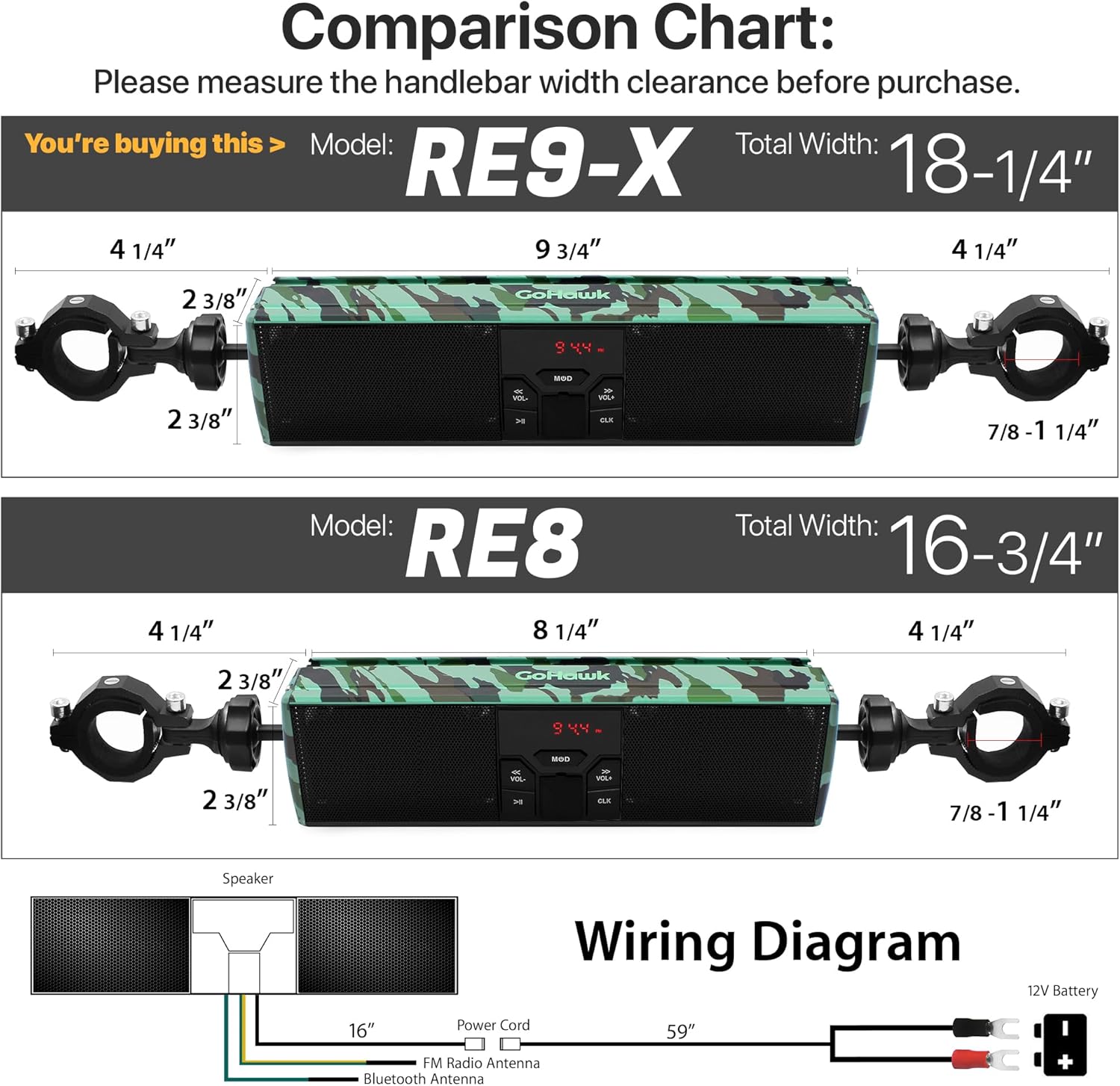
Image 6.1: Illuminated LED Strip
6.9 Saat Gösterimi
The digital display also functions as a clock. Refer to the specific button on your unit (often labeled CLK) for setting the time.
7. Bakım
- Temizlik: Yumuşak bir d kullanınamp cloth to clean the speaker unit. Avoid harsh chemicals or abrasive cleaners.
- Su Geçirmez Bakım: Although waterproof, ensure all ports (USB, AUX-IN) are covered when not in use to maintain water resistance.
- Bağlantı Kontrolü: Periodically check all wiring connections for corrosion or looseness, especially after riding in wet conditions.
- Montaj Güvenliği: Regularly inspect the mounting clamps and bolts to ensure they remain tight and secure.
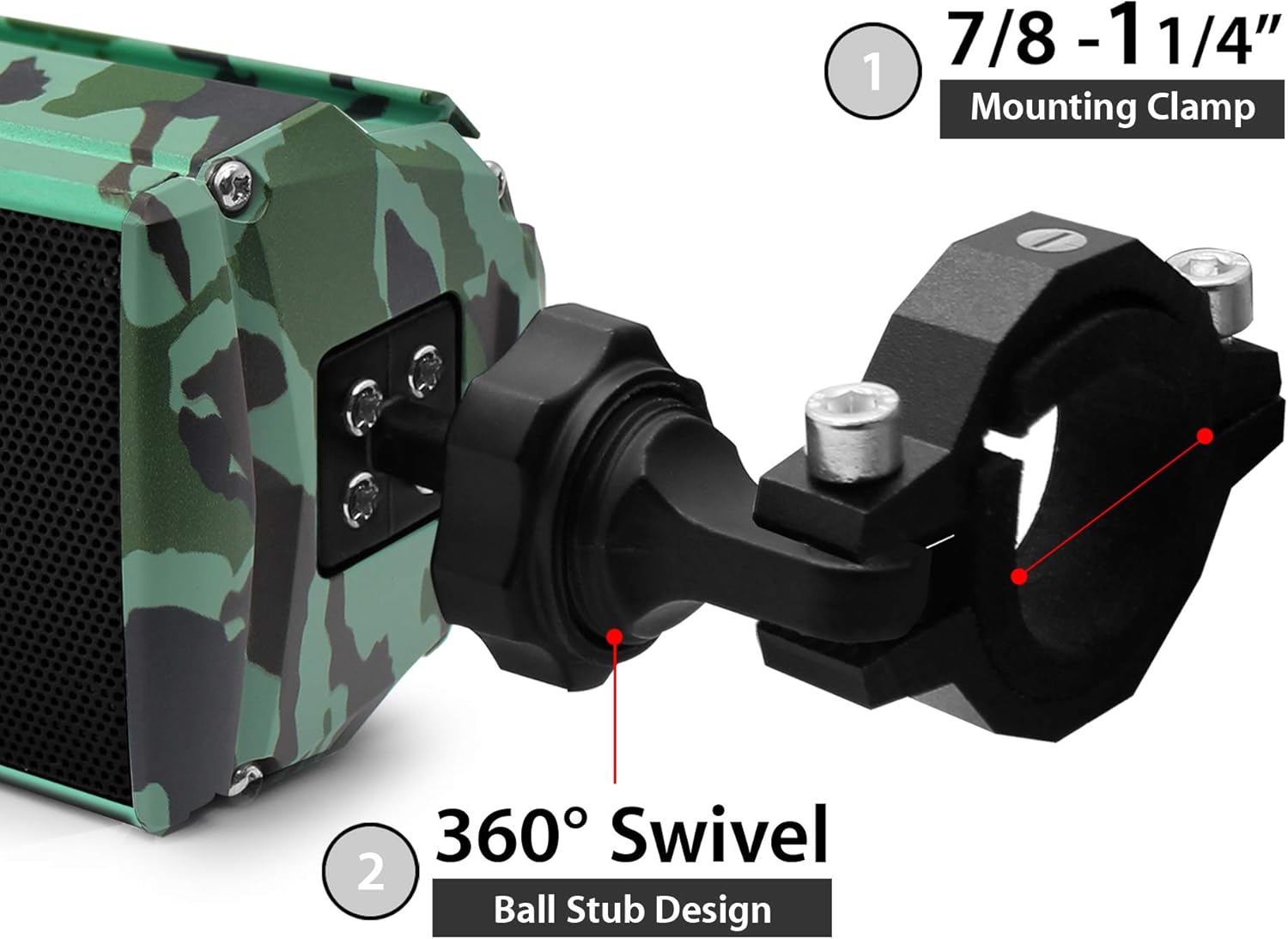
Image 7.1: Aluminum Housing with Camo Green Finish
8. Sorun Giderme
| Sorun | Olası Neden | Çözüm |
|---|---|---|
| Güç yok | Gevşek güç bağlantısı, atmış sigorta, düşük pil hacmitage. | Check power harness connections. Verify battery voltage. Inspect vehicle's fuse box. |
| Ses yok | Volume too low, incorrect mode, device not paired (Bluetooth), faulty cable (AUX). | Increase volume. Select correct input mode. Re-pair Bluetooth device. Check AUX cable. |
| Bluetooth bağlanmıyor | Hoparlör eşleştirme modunda değil, cihaz çok uzakta, parazitlenme. | Hoparlörün Bluetooth modunda olduğundan emin olun. Cihazı hoparlöre yaklaştırın. Her iki cihazı da yeniden başlatın. |
| Zayıf FM alımı | Weak signal, interference, antenna obstruction. | Relocate vehicle for better signal. Scan for stronger stations. |
| USB oynatma sorunları | Desteklenmiyor file format, corrupted USB drive, drive not properly inserted. | Emin olmak files are MP3 format. Try a different USB drive. Reinsert USB drive. |
9. Özellikler
| Özellik | Şartname |
|---|---|
| Örnek | RE9-X |
| Anma Hacmitage | 12V doğru akım |
| Maksimum Giriş Gücü | 12W x 2 |
| Anma Empedans | 4 - 8 Ω |
| Bluetooth Sürümü | 4.0 |
| Kablosuz İletim Menzili | > 15m (49.21 feet) |
| Frekans Aralığı | 20Hz - 20KHz |
| FM Cover | 87.5 - 108 MHz |
| FM Hassasiyeti | ≤37dB |
| FM Bozulması | ≤0.5% |
| FM SNR | ≥40dB |
| AUX GİRİŞİ | 3.5 mm jak |
| USB Desteği | USB Drive in MP3 format |
| Speaker Width (Body) | 9-3/4 inç |
| Speaker Width (Overall) | 18-1/4 inç |
| Gidon Clamp Boyut | 7/8 to 1-1/4 in. |
| Malzeme | Alüminyum |
| Su Direnç Seviyesi | Su geçirmez |
10. Garanti Bilgileri
This GoHawk product comes with a limited warranty. For specific details regarding warranty coverage, duration, and terms, please refer to the warranty card included with your purchase or contact GoHawk customer support.
11. Müşteri Desteği
If you encounter any issues or have questions regarding your GoHawk RE9-X speaker system that are not covered in this manual, please contact GoHawk customer support for assistance. Contact information can typically be found on the product packaging or the official GoHawk webalan.