giriiş
This manual provides essential information for the proper setup, operation, and maintenance of your NEC DTZ-12D-3 DT400 12-Button Display Phone. Please read these instructions carefully to ensure optimal performance and longevity of your device. This phone is designed for business communication environments, offering a range of features to enhance productivity.
Ürün Bittiview
The NEC DTZ-12D-3 DT400 is a corded 12-button display phone, featuring a clear LCD screen for call information and menu navigation. It is designed for efficient communication in a professional setting.
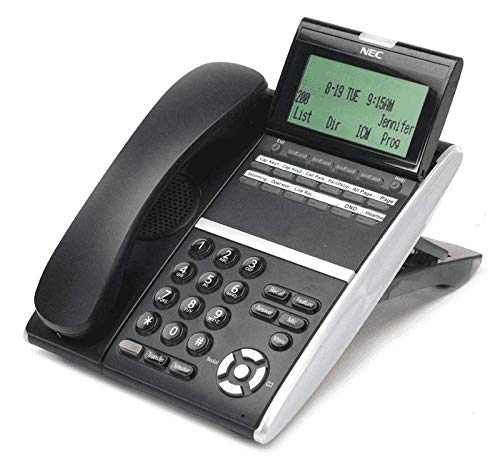
Şekil 1: NEC DTZ-12D-3 DT400 12-Button Display Phone. This image shows the black corded desk phone with its adjustable display unit. The display shows time, date, and soft-key options. The phone features a standard dial pad, 12 programmable function keys, and dedicated buttons for speaker, transfer, redial, and navigation.
Temel Bileşenler:
- Mobil cihaz: Özel görüşmeler için.
- Ekran Görüntüsü: Shows call status, time, date, and menu options.
- Programmable Feature Keys (12): Customizable buttons for speed dials, line access, or specific functions.
- Tuş takımı: Standard numeric keys (0-9, *, #) for dialing.
- Gezinme Tuşları: For scrolling through menus and lists.
- Hoparlör Düğmesi: Activates the speakerphone function.
- Transfer Button: Used to transfer an active call to another extension.
- Tekrar Arama Düğmesi: En son aranan numarayı arar.
- DND (Do Not Disturb) Button: Activates/deactivates the Do Not Disturb feature.
Kurmak
1. Paketten çıkarma
- Tüm bileşenleri dikkatlice ambalajından çıkarın.
- Verify that all items are present: phone unit, handset, coiled handset cord, and telephone line cord.
2. Telefonun Bağlanması
Connect one end of the coiled handset cord to the handset and the other end to the handset jack located on the side or back of the phone unit.
3. Connecting to the Telephone Line
Plug one end of the telephone line cord into the LINE jack on the phone unit and the other end into a standard telephone wall jack.
4. Gücü Bağlama
This phone is designed for corded electric operation. Ensure it is connected to a compatible telephone system that provides power, or use the appropriate power adapter if supplied separately (check your system's requirements).
Kullanım Talimatları
Çağrı Yapmak
- Ahizeyi kaldırın veya Konuşmacı düğme.
- Dial the desired telephone number using the dial pad.
- Aramanın bağlanmasını bekleyin.
Bir Çağrıyı Cevaplama
- Telefon çaldığında ahizeyi kaldırın veya tuşa basın. Konuşmacı düğme.
Using Programmable Feature Keys
The 12 programmable keys can be configured for various functions such as speed dialing, line access, or system features. Consult your system administrator for specific programming details and assigned functions.
Caller Identification (Caller ID)
If subscribed to Caller ID service, the incoming caller's number and name (if available) will be displayed on the screen before you answer the call.
Bir Çağrıyı Aktarma
- Etkin bir çağrı sırasında, Aktarım düğme.
- Dial the extension or number to which you want to transfer the call.
- Wait for the recipient to answer, then announce the call and hang up. Alternatively, you may hang up immediately for an unsupervised transfer.
Son Numarayı Tekrar Aramak
Ahizeyi kaldırın veya Konuşmacı düğmesine basın, ardından Yeniden Son aranan numarayı aramak için kullanılan düğme.
Rahatsız Etmeyin (DND)
Basın Rahatsız Etmeyin button to activate or deactivate the Do Not Disturb feature. When active, incoming calls may be redirected to voicemail or a busy signal, depending on system configuration.
Bakım
Temizlik
- Telefonun dış yüzeyini yumuşak bir bezle silin.amp Kumaş.
- Do not use harsh chemicals, abrasive cleaners, or excessive moisture.
- Temizlemeden önce telefonun güç kaynağından bağlantısının kesildiğinden emin olun.
Depolamak
Telefonu uzun süre kullanmadığınız zamanlarda serin, kuru ve doğrudan güneş ışığından ve aşırı sıcaklıklardan uzak bir yerde saklayın.
Sorun giderme
Çevir Sesi Yok
- Check all cable connections, especially the telephone line cord.
- Ensure the phone system is operational.
- Test with another phone if available to rule out line issues.
Ekran Çalışmıyor
- Verify the phone is properly connected to the system and receiving power.
- Adjust the display contrast if applicable (refer to system administrator).
Cannot Make or Receive Calls
- Check if the DND feature is accidentally activated.
- Ensure the telephone line is active.
- Contact your system administrator for assistance with line configuration.
Özellikler
| Özellik | Detay |
|---|---|
| Örnek | DTZ-12D-3 DT400 |
| Marka | NEC Co |
| Telefon Türü | fitilli |
| Renk | Siyah |
| Malzeme | Plastik |
| Ürün Ağırlığı | 2.9 pound |
| Paket Boyutları | 12.28 x 9.21 x 4.61 inç |
| Güç Kaynağı | Kablolu Elektrik |
| Çevirici Türü | Single Keypad (tone dialing) |
| Yanıtlama Sistemi Türü | Dijital |
| Çoklu Hat İşlemi | Tek Hatlı Çalışma |
| Arayan Kimliği | Evet |
| Uyumlu Cihazlar | Traditional telephone networks (PSTN, ISDN), potential integration with other communication devices. |
Garanti ve Destek
For warranty information and technical support, please refer to the documentation provided by your system vendor or contact your NEC authorized dealer. As this product may be a renewed item, specific warranty terms may vary from new products. Please consult your purchase agreement for details.
For further assistance, it is recommended to contact your IT department or the telecommunications system administrator responsible for your NEC phone system.


