1. Giriş
This manual provides comprehensive instructions for the safe and effective operation, maintenance, and troubleshooting of the RS PRO RSDS 1052 DL+ Digital Storage Oscilloscope. Please read this manual thoroughly before using the device to ensure proper functionality and to prevent damage or injury.
The RS PRO RSDS 1052 DL+ is a versatile 2-channel digital storage oscilloscope with a 50 MHz bandwidth, designed for precise signal analysis. It features a 7-inch TFT LCD display for clear waveform visualization and supports various measurement parameters and mathematical operations.
2. Güvenlik Bilgileri
Always adhere to the following safety precautions to prevent electric shock, fire, or damage to the instrument.
- Güç Kaynağı: Ensure the oscilloscope is connected to a power source within the specified voltage aralığı (100-240V AC, 50/60Hz).
- Topraklama: The instrument must be properly grounded to prevent electric shock. Do not defeat the grounding plug.
- Çevre: Operate the oscilloscope in a dry, well-ventilated area, away from direct sunlight, high temperatures, and excessive dust.
- Problar: Use only probes supplied or recommended by RS PRO. Ensure probes are correctly rated for the voltagÖlçülmekte olan.
- Bakım: Refer all servicing to qualified service personnel. Do not attempt to open the instrument casing unless explicitly instructed.
- Güvenlik Kategorisi: This device is rated CAT I, CAT II. Observe all safety warnings on the device and in this manual.
3. Ürün Bittiview ve Bileşenler
Bu bölüm bir genel bakış sağlarview of the RS PRO RSDS 1052 DL+ oscilloscope and its main components.
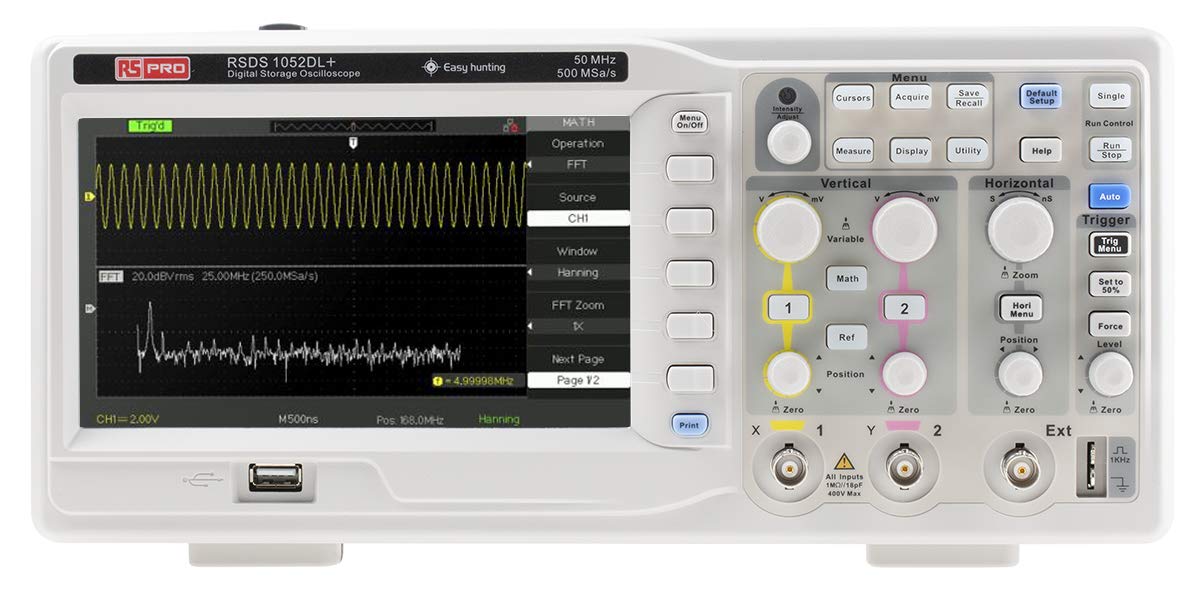
Şekil 3.1: Ön View of the Oscilloscope. This image shows the front panel of the RS PRO RSDS 1052 DL+ oscilloscope, highlighting the 7-inch TFT LCD display, control knobs, function buttons, and input connectors for channels 1 and 2. The screen displays a typical waveform and FFT analysis.

Şekil 3.2: Açısal View of the Oscilloscope. This image provides an angled perspective of the RS PRO RSDS 1052 DL+ oscilloscope, showcasing its compact design and integrated handle for portability. The side ventilation grilles are also visible.

Şekil 3.3: Arka View of the Oscilloscope. This image displays the rear panel of the RS PRO RSDS 1052 DL+ oscilloscope, featuring the power input, USB device port, USB host port, LAN port, and Pass/Fail output. Safety warnings and product labels are also visible.
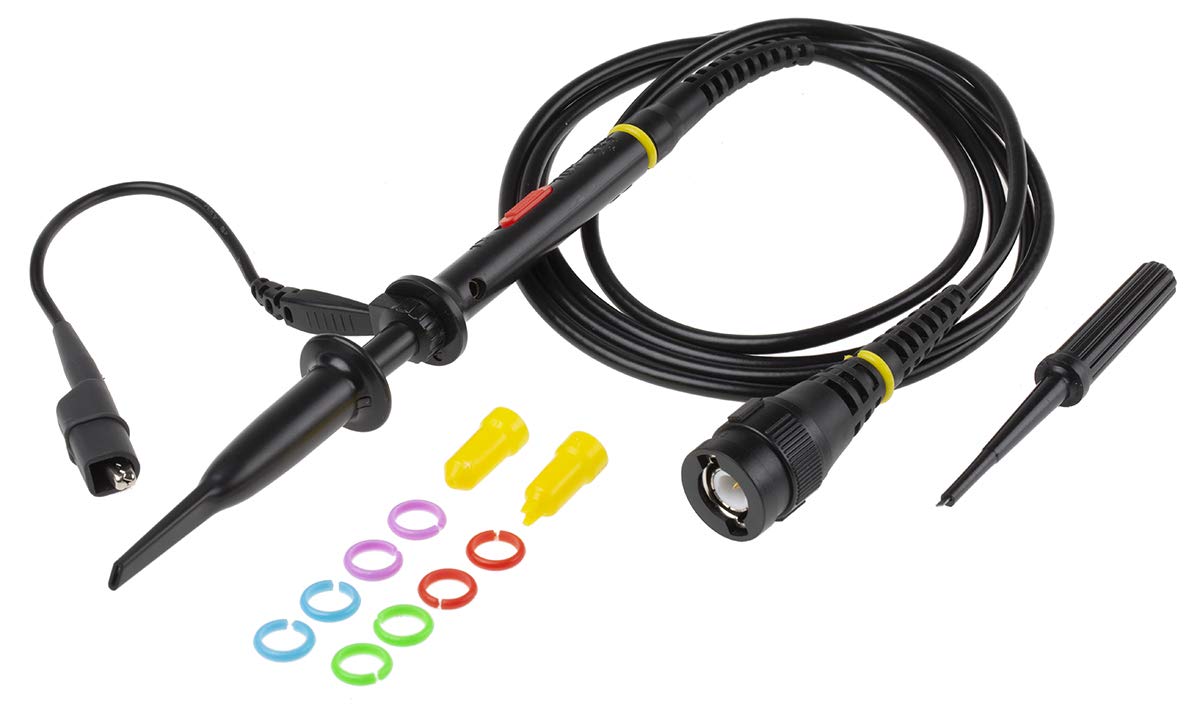
Figure 3.4: Oscilloscope Probe and Accessories. This image shows a passive oscilloscope probe (1:1/10:1) along with various accessories, including colored rings for channel identification and probe tip covers. These are essential for connecting signals to the oscilloscope.

Figure 3.5: Power Plugs and Probe Tip. This image displays an assortment of power plugs (EU, UK, US types) that may be included with the oscilloscope, along with a specialized probe tip. These ensure compatibility with various power outlets and provide versatility for measurements.
3.1 Dahil Aksesuarlar
The RS PRO RSDS 1052 DL+ typically includes the following accessories:
- Passive Probe 1:1/10:1 (x2)
- USB kablosu
- Hızlı Başlangıç Kılavuzu
- Kalite Belgesi
- Güç Kablosu (bölgeye özgü)
- CD (including User Manual and EasyScopeX software)
4. Kurulum
4.1 Paketin Açılması ve Muayene
- Carefully remove the oscilloscope and all accessories from the packaging.
- Inspect the instrument for any signs of physical damage during transit. If damage is found, contact your supplier immediately.
- Verify that all included accessories listed in Section 3.1 are present.
4.2 Güç Bağlantısı
- Arka paneldeki güç anahtarının KAPALI konumunda olduğundan emin olun.
- Verilen güç kablosunu osiloskobun arka panelindeki AC girişine bağlayın.
- Plug the other end of the power cord into a grounded AC power outlet. The oscilloscope supports 100-240V AC, 50/60Hz.
4.3 Prob Bağlantısı ve Kompensasyon
- Connect the BNC connector of the passive probe to one of the input channels (CH1 or CH2) on the front panel.
- Attach the probe tip to the probe compensation output (usually a square wave test signal) on the front panel.
- Adjust the compensation trimmer on the probe until the displayed square wave is flat-topped, without overshoot or undershoot. This ensures accurate measurements.
5. Kullanım Talimatları
5.1 Temel İşlemler
- Güç Açma/Kapatma: Press the power button on the front panel to turn the oscilloscope on or off.
- Otomatik Kurulum: Basın Otomatik button to automatically adjust vertical, horizontal, and trigger settings for a stable waveform display.
- Dikey Kontroller: Kullanın VOLT/BÖLÜM knob to adjust the vertical scale (voltage per division) and the KONUM knob to move the waveform vertically.
- Yatay Kontroller: Kullanın SEC/BÖL knob to adjust the horizontal scale (time per division) and the KONUM knob to move the waveform horizontally.
- Tetik Kontrolleri: Ayarla SEVİYE knob to set the trigger threshold. The trigger ensures a stable display of repetitive waveforms.
5.2 Gelişmiş İşlev
- Ölçüm İşlevleri: Basın Ölçüm button to access automatic measurement parameters such as Vpp, Vmax, Vmin, Freq, Period, etc.
- Matematik Fonksiyonları: Basın Matematik button to perform mathematical operations on waveforms (e.g., Add, Subtract, Multiply, Divide, FFT).
- Storage and Recall: Kullanın Kaydet/Geri Çağır buttons to save waveform data, setups, or screenshots to internal memory or a USB drive.
- USB Bağlantısı: Connect a USB drive to the front panel USB host port for data storage. Use the rear USB device port to connect the oscilloscope to a PC for data transfer and control via EasyScopeX software.
6. Bakım
6.1 Temizlik
- Temizlemeden önce elektrik kablosunu çıkarın.
- Yumuşak bir d kullanınamp cloth with mild detergent to clean the exterior of the instrument.
- Do not use abrasive cleaners or solvents that may damage the plastic parts.
- Ensure no liquid enters the instrument.
6.2 Kalibrasyon
The oscilloscope is factory calibrated. For optimal performance, periodic calibration by qualified personnel is recommended, typically every 12-24 months, depending on usage and environmental conditions.
6.3 Depolama
When not in use for extended periods, store the oscilloscope in a dry, dust-free environment, away from extreme temperatures and humidity.
7. Sorun Giderme
Bu bölümde karşılaşabileceğiniz yaygın sorunlara çözümler sunulmaktadır.
| Sorun | Olası Neden | Çözüm |
|---|---|---|
| Güç yok | Güç kablosu bağlantısı kesilmiş; Güç anahtarı kapalı; Sigorta atmış | Güç kablosu bağlantısını kontrol edin; Güç anahtarını açın; Sigorta değişimi için servisle iletişime geçin. |
| Dalga formu görüntülenmiyor. | Input signal too small/large; Incorrect vertical/horizontal settings; Trigger not set correctly; Probe not connected | Adjust VOLTS/DIV and SEC/DIV; Use Auto Setup; Adjust trigger level; Ensure probe is connected and compensated. |
| Kararsız dalga formu | Incorrect trigger settings; No trigger source selected | Adjust trigger level and mode; Select appropriate trigger source (e.g., CH1, CH2, Ext). |
| Bozulmuş dalga formu | Probe compensation incorrect; Probe damaged; Input overloaded | Perform probe compensation; Try a different probe; Check input signal amplütuf |
If the problem persists after attempting these solutions, please contact RS PRO customer support.
8. Özellikler
Key technical specifications for the RS PRO RSDS 1052 DL+ Digital Storage Oscilloscope:
- Analog Kanallar: 2
- Oscilloscope Type: Dijital Depolama
- Bant Genişliği: 50 MHz
- Gerçek zamanlı Sample Oranı: Up to 500 MSa/s
- Bellek Derinliği: 32 Kpt
- Görüntüleme Türü: TFT LCD
- Ekran Boyutu: 7 inches (800 x 480 pixels)
- Dikey Hassasiyet: 2mV/div ila 10V/div
- Time Base Range: 10ns/div'den 50s/div'e
- Güç Kaynağı: Mains operated (100-240V AC, 50/60Hz)
- Ağırlık: 2.5 kilo
- Güvenlik Kategorisi: CAT I, CAT II
- Arayüzler: RS232, USB Host, USB Device, LAN
9. Garanti ve Destek
RS PRO products are manufactured to high standards and are typically covered by a manufacturer's warranty. Please refer to the warranty card included with your product or visit the official RS PRO webAyrıntılı garanti şartları ve koşulları için siteyi ziyaret edin.
For technical support, service, or inquiries regarding your RS PRO RSDS 1052 DL+ oscilloscope, please contact RS PRO customer service through their official channels. Contact information can usually be found on the RS PRO website or in the documentation provided with the product.
RS PRO Official Webalan: https://uk.rs-online.com/web/


