giriiş
The TC Electronic DITTO+ LOOPER is a compact and powerful looper pedal designed for musicians. It allows you to record, overdub, and playback musical phrases with ease. With its advanced features, including multi-session storage and extended loop modes, the DITTO+ LOOPER provides unparalleled flexibility for practice, performance, and creative exploration. This manual will guide you through the setup, operation, and maintenance of your new looper pedal.

Şekil 1: Ön view of the DITTO+ LOOPER pedal, highlighting its intuitive interface.
Kurmak
Before using your DITTO+ LOOPER, ensure it is properly connected to your audio setup and power supply.
- Güç Bağlantısı: Connect a standard 9V DC power supply (not included) to the power input jack on the pedal. Ensure the power supply meets the pedal's voltagve güncel gereksinimler.
- Ses Girişi: Connect your instrument (e.g., guitar) to the INPUT jack on the side of the pedal using a standard 1/4-inch instrument cable.
- Ses Çıkışı: Pedalın ÇIKIŞ jakını şunlara bağlayın: amplifier, audio interface, or next pedal in your signal chain using another 1/4-inch instrument cable.
- USB Bağlantısı (Opsiyonel): For firmware updates or transferring loops, connect the mini-USB port on the pedal to your computer using a USB cable.

Şekil 2: Açısal view of the DITTO+ LOOPER, illustrating the placement of input/output jacks and power input.
Kullanım Talimatları
The DITTO+ LOOPER offers intuitive controls for recording, playback, and managing your loops.
Basic Looping (DITTO Mode)
- Kayıt: Press the footswitch once to start recording. The display will show recording progress.
- Play/Overdub: Press the footswitch again to stop recording and start playback. While playing, press the footswitch once more to begin overdubbing.
- Durdur: Oynatmayı durdurmak için ayak pedalına iki kez dokunun.
- Temizlemek: While stopped, press and hold the footswitch to clear the current loop.
- Geri al/Yinele: While playing or overdubbing, press and hold the footswitch to undo the last overdub. Repeat to redo.
Multi-Session Management
The DITTO+ LOOPER can store and recall up to 99 individual loop sessions, each with up to 60 minutes of recording time.
- Navigate Sessions: Kullanın UP Ve AŞAĞI arrow buttons next to the display to scroll through stored loop sessions. The display shows the current session number.
- Load Session: Once you've selected a session number, press the footswitch to load it.
- Save Session: Loops are automatically saved when you switch sessions or power off the pedal.
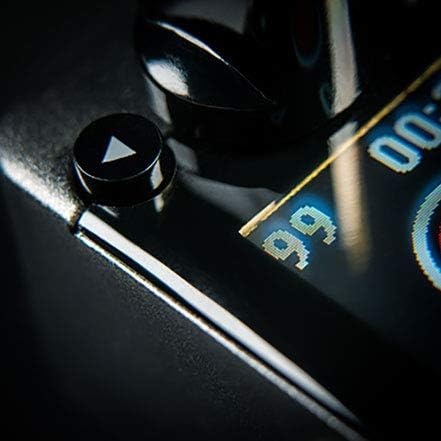
Figure 3: The DITTO+ LOOPER display indicating the ability to store up to 99 loop sessions.
Extend Loop Mode and Auto Cue
The Extend Loop Mode allows you to lay down longer overdubbed phrases over shorter base loops, while Auto Cue assists with timing.
- Activate Extend Loop Mode: Refer to the pedal's advanced settings (usually accessed via a combination of button presses or software) to enable this mode.
- Using Auto Cue: When enabled, Auto Cue helps synchronize your overdub with the start of the loop, ensuring seamless transitions.
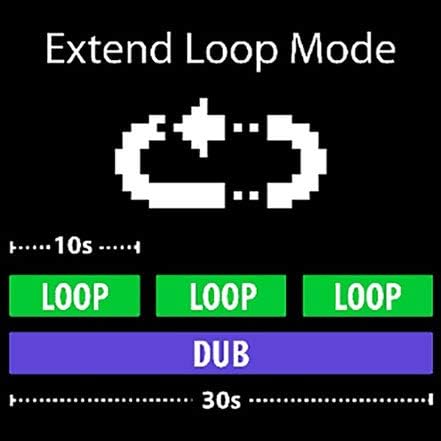
Figure 4: Visual representation of Extend Loop Mode, showing how longer dubs can wrap around shorter loops.
Bakım
To ensure the longevity and optimal performance of your DITTO+ LOOPER, follow these maintenance guidelines:
- Temizlik: Use a soft, dry cloth to wipe down the pedal. Avoid abrasive cleaners or solvents, which can damage the finish or internal components.
- Depolamak: Pedalı serin, kuru ve doğrudan güneş ışığından ve aşırı sıcaklıklardan uzak bir yerde saklayın.
- Güç Kaynağı: Always use a compatible power supply to prevent damage. Disconnect power when not in use for extended periods.
- Donanım Yazılımı Güncellemeleri: Periodically check the TC Electronic website for firmware updates to ensure your pedal has the latest features and bug fixes.
Sorun giderme
If you encounter issues with your DITTO+ LOOPER, try the following solutions:
| Sorun | Olası Çözüm |
|---|---|
| No power/Pedal not turning on |
|
| Ses çıkışı yok |
|
| Loop sounds distorted or noisy |
|
| Cannot save or recall loops |
|
Özellikler
- Modeli: DITTO+ LOOPER
- Marka: TC Elektronik
- Kayıt Süresi: 60 dakikaya kadar
- Loop Sessions: 99'e kadar
- Boyutlar (U x G x Y): Approximately 1.44" x 0.79" x 0.78" (36.6 x 20.1 x 19.8 mm)
- Ağırlık: Yaklaşık 7.1 ons (200 gram)
- Güç Kaynağı: 9V DC, center-negative (not included)
- Bağlantı: 1/4" TS Input, 1/4" TS Output, Mini-USB port
- Malzeme: Plastik
Garanti ve Destek
TC Electronic products are covered by a limited warranty. For detailed warranty information, product registration, and technical support, please visit the official TC Electronic websitesine bakın veya müşteri hizmetleri departmanıyla iletişime geçin.
Resmi Webalan: www.tcelektronik.com
Garanti talepleri için lütfen satın alma belgenizi saklayın.


