1. Giriş
The Epomaker Ajazz i610T is a compact 61-key mechanical keyboard designed for versatility and performance. It supports both Bluetooth wireless and wired (Type-C) dual-mode connectivity, allowing connection to up to three devices simultaneously. Featuring N-key rollover and 17 distinct backlight effects, this keyboard is suitable for various applications, including gaming and professional work environments.
This manual provides detailed instructions for setting up, operating, maintaining, and troubleshooting your Ajazz i610T keyboard.
2. Paket İçeriği
Lütfen paketi aşağıdaki öğeler açısından kontrol edin:
- 1 x Ajazz i610T Mechanical Keyboard
- 1 x Tip-C Kablo
- 1 x Kullanım Kılavuzu
3. Kurulum
3.1 Kablolu Mod Bağlantısı
- Locate the Type-C port on the keyboard, typically on the side or back.
- Birlikte verilen Type-C kablosunun bir ucunu klavyeye bağlayın.
- Connect the other end of the Type-C cable to an available USB port on your computer.
- The keyboard will automatically be recognized and function in wired mode. The keyboard will also charge its internal battery while connected via USB.
3.2 Bluetooth Wireless Mode Connection
The Ajazz i610T supports connecting to up to three different Bluetooth devices.
- Ensure the keyboard is powered on. The power switch is usually located on the back or side of the keyboard.
- Basmak Fn + Q, Fn + W, veya Fn + E to select one of the three Bluetooth device channels. The corresponding key (Q, W, or E) will flash to indicate pairing mode.
- Cihazınızda (bilgisayar, tablet, akıllı telefon) Bluetooth'u etkinleştirin ve yeni cihazları arayın.
- Select "Ajazz i610T" (or similar name) from the list of available devices to pair.
- Once paired, the flashing light on the selected key will become solid, indicating a successful connection.
- Eşleştirilmiş cihazlar arasında geçiş yapmak için sadece tuşuna basın Fn + Q, Fn + W, veya Fn + E İstenilen kanal için.

Resim: Yan view of the Epomaker Ajazz i610T keyboard, highlighting the Type-C port for wired connection and charging.
4. Kullanım Talimatları
4.1 Function Key (Fn) Combinations
Due to its compact 61-key layout, many functions are accessed via the Fn key in combination with other keys. Refer to the keycaps for specific markings indicating secondary functions.
- Fn + [Number Row]: Access F1-F12 functions (e.g., Fn + 1 = F1, Fn + 2 = F2, etc.).
- Fn + P: Print Screen (PrtSc).
- Fn+;: Scroll Lock (ScrlK).
- Fn + ': Duraklat.
- Fn + J: Insert.
- Fn + K: Home.
- Fn + L: Page Up (PgUp).
- fn+m: Delete (Del).
- Fn + ,: End.
- Fn + .: Page Down (PgDn).
- Fn + Ok Tuşları: Navigate (Up, Down, Left, Right).
- Fn + Spacebar (hold for 3 seconds): Reset to default mode or exit special modes.
4.2 Arka Işık Kontrolü
The keyboard features 17 monochrome backlight effects. Specific key combinations are used to cycle through these effects and adjust brightness.
- Fn + \|: Cycle through different backlight effects.
- Fn + [Arka ışık parlaklığını azaltın.
- Fn + ]Arka ışık parlaklığını artırın.
4.3 N-Tuşlu Devrilme (NKRO)
The Ajazz i610T supports N-Key Rollover, meaning all keys pressed simultaneously will be registered accurately. This feature is particularly beneficial for fast typists and gamers, preventing ghosting or missed key presses.
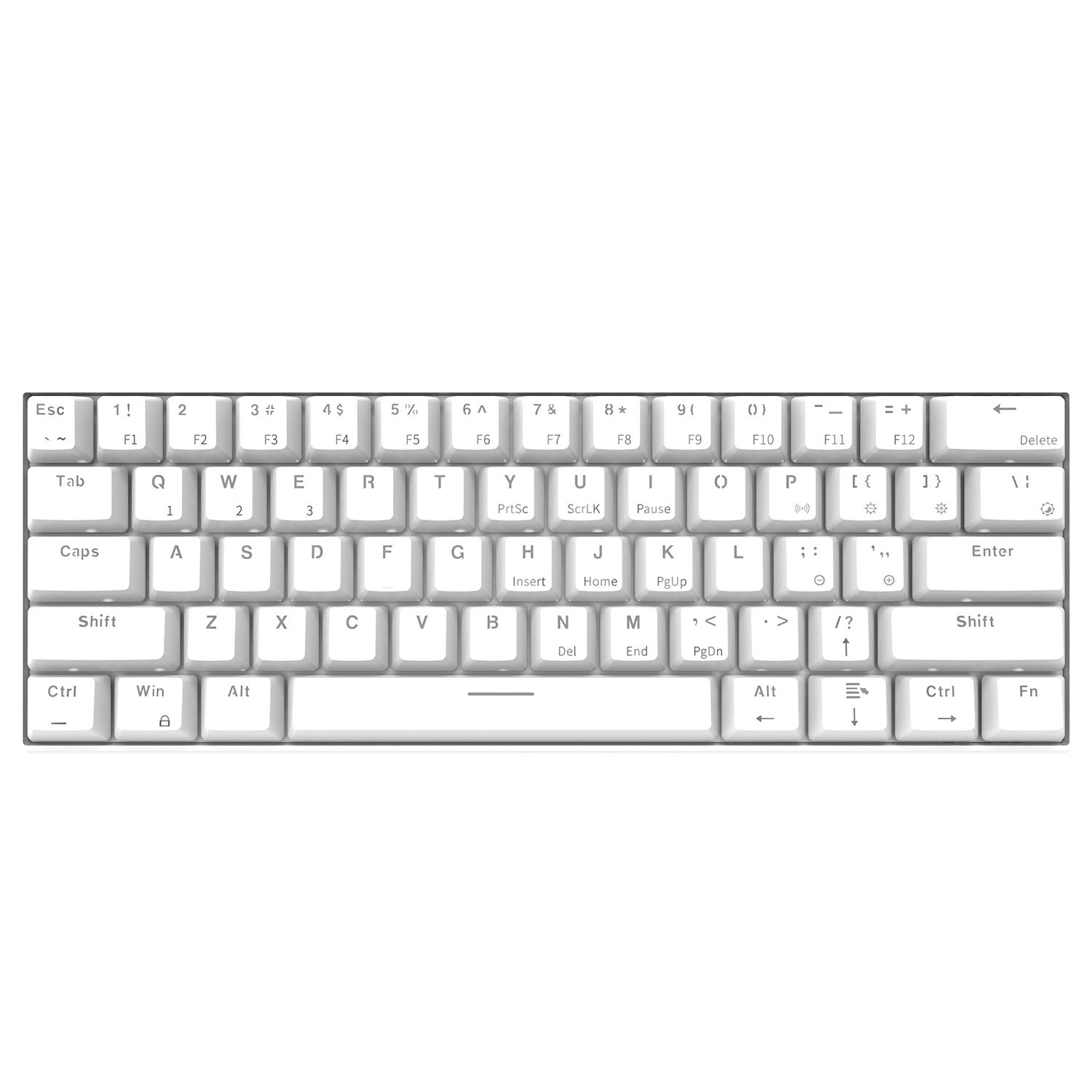
Görüntü: Yukarıdan aşağıya doğru açılı view of the Epomaker Ajazz i610T keyboard, showcasing its compact 61-key layout and keycap legends.
5. Bakım
Doğru bakım, klavyenizin uzun ömürlü olmasını ve optimum performans göstermesini sağlar.
- Temizlik: Use a soft, dry cloth to wipe the keyboard surface. For deeper cleaning, use a can of compressed air to remove dust and debris from between the keycaps. For stubborn stains, a slightly damp Klavyeye sıvı girmemesine dikkat edilerek, hafif sabunlu bir bez kullanılabilir.
- Depolamak: Klavyeyi serin, kuru ve doğrudan güneş ışığından ve aşırı sıcaklıklardan uzak bir yerde saklayın.
- Dökülmeleri Önleyin: Dahili bileşenlerin hasar görmesini önlemek için sıvıları klavyeden uzak tutun.
- Kablo Bakımı: Avoid bending or twisting the Type-C cable excessively to prevent internal wire damage.
6. Sorun Giderme
If you encounter issues with your Ajazz i610T keyboard, refer to the following common solutions:
| Sorun | Olası Çözüm |
|---|---|
| Kablolu modda klavye yanıt vermiyor. |
|
| Klavye Bluetooth üzerinden bağlanmıyor. |
|
| Arka ışık çalışmıyor veya takılı kalmış. |
|
| Some keys are not responding. |
|
7. Özellikler
| Özellik | Detay |
|---|---|
| Marka | EPOMAKER / Ajazz |
| Örnek | i610T |
| Düzen | 61 Tuş ( %60 Kompakt) |
| Bağlantı | Bluetooth 3.0 Wireless / USB Type-C Wired Dual Mode |
| Arka ışık | Monochrome Backlight (17 effects) |
| Anahtar Devir | N-Anahtar Devir (NKRO) |
| Anahtar Türü | Mechanical (Black Switch, White color variant) |
| Malzeme | ABS |
| Pil Kapasitesi | 1000mAh Lityum İyon |
| Kablo Uzunluğu | Yaklaşık. 1.5m |
| İşletim Sistemi Desteği | Windows 2000/XP/Vista/7/8/10 |
| Ürün Ölçüleri (U*G*Y) | 29.1 X 10.1 X 4 sm (11.46 X 3.98 X 1.57 olarak) |
| Ürün Ağırlığı | Yaklaşık. 580 gr (20.46 ons) |

Resim: Açısal view of the Epomaker Ajazz i610T keyboard, demonstrating its compact form factor.
8. Garanti ve Destek
For warranty information and technical support, please refer to the documentation provided with your purchase or contact the manufacturer directly through their official webSite. Satın alma belgenizi garanti talepleriniz için saklayın.


