1. Giriş
Thank you for choosing the STRONG SRT 24HC3023 24-inch TV. This television is designed for versatile use, offering a triple tuner for DVB-T2 HD, DVB-C, and DVB-S2 reception, making it suitable for both home entertainment and mobile applications such as motorhomes, caravans, or boats, thanks to its 12 Volt compatibility. This manual provides essential information for setting up, operating, and maintaining your new television. Please read it thoroughly before use to ensure proper functionality and safety.

Figure 1.1: STRONG SRT 24HC3023 24-inch TV
2. Güvenlik Bilgileri
Güvenli çalışmayı sağlamak ve hasarı önlemek için lütfen aşağıdaki güvenlik önlemlerine uyun:
- Yangın veya elektrik çarpmasını önlemek için televizyonu yağmur veya neme maruz bırakmayın.
- Havalandırma açıklıklarını kapatmayın. Hava akışının düzgün olması için televizyonun etrafında yeterli boşluk bırakın.
- Use only the power adapter supplied with the TV. For 12V operation, ensure the power source is stable and within the specified voltage aralığı.
- Güç kablosunun, özellikle fişlerde, prizlerde ve cihazdan çıktığı noktalarda üzerine basılmasını veya sıkışmasını önleyin.
- Bu ürüne kendiniz servis vermeye çalışmayın. Tüm servis işlemleri için kalifiye servis personeline başvurun.
- Clean the TV only with a dry cloth. Do not use liquid cleaners or aerosol cleaners.
- Keep batteries for the remote control out of reach of children.
3. Paket İçeriği
Carefully unpack your TV and check that all items listed below are included and undamaged. If any items are missing or damaged, contact your retailer.
- GÜÇLÜ SRT 24HC3023 LED TV
- Remote Control (including 2x AAA Batteries)
- Stand (Base and Screws)
- Power Adapter (Standard Euro; 12V power cable not included)
- Kullanıcı Kılavuzu

Şekil 3.1: Ürün Paketleme

Şekil 3.2: Uzaktan Kumanda
4. Kurulum
4.1 Standın Takılması
- Place the TV face down on a soft, clean surface to prevent scratching the screen.
- Sehpayı televizyonun altındaki montaj delikleriyle hizalayın.
- Birlikte verilen vidaları kullanarak standı sabitleyin. Çok fazla sıkmayın.
4.2 Çevre Birimlerini Bağlama
Your TV offers a variety of connection ports for different devices.
- Anten/Uydu: Connect your DVB-T/T2 antenna to the "ANT In" port or your satellite dish to the "SAT In" port.
- HDMI: For high-definition devices like Blu-ray players, game consoles, or streaming sticks.
- SKART: For older devices like DVD players or VCRs.
- USB BAĞLANTI: USB sürücülerden medya oynatmak için.
- AV In / Mini YPbPr: For analog video and audio sources.
- Kulaklık: Özel dinleme için.
- S/PDIF: Harici ses sistemlerine dijital ses çıkışı sağlamak için.
- CI Yuvası: For CI+ modules (e.g., for freenet-TV).
- 12V Güç: This TV is 12V compatible, ideal for mobile use. A 12V power cable is not included and must be purchased separately.

Şekil 4.1: TV Boyutları
4.3 İlk Güç Açılışı ve Kanal Taraması
- Connect the TV to a power source (either the supplied AC adapter or a compatible 12V source).
- Televizyondaki veya uzaktan kumandadaki güç düğmesine basın.
- Follow the on-screen instructions for initial setup, including language selection and channel scanning. The triple tuner allows you to scan for DVB-T/T2, DVB-C, and DVB-S2 channels.
5. Kullanım Talimatları
5.1 Temel Fonksiyonlar
- Güç Açma/Kapatma: Basın Güç Uzaktan kumandadaki düğmeye basın.
- Kanal Seçimi: Kullanın +/- buttons to change channels sequentially, or enter channel numbers directly using the numeric keypad.
- Ses Kontrolü: Kullanın SES +/- Sesi ayarlamak için düğmeler.
- Kaynak Seçimi: Basın KAYNAK button to switch between input sources (HDMI, SCART, TV, etc.).
5.2 Üçlü Tuner Çalışması
The integrated triple tuner supports DVB-T/T2 (terrestrial), DVB-C (cable), and DVB-S2 (satellite) reception. During the initial setup, you will be prompted to select your preferred reception type and perform a channel scan. You can switch between these modes via the input source menu.
5.3 Elektronik Program Rehberi (EPG)
Basın EPG button on the remote control to access the Electronic Program Guide. This displays program schedules for upcoming broadcasts and allows you to set timers for recording or viewIng.
5.4 USB Oynatma
Insert a USB storage device into the USB port. The TV will typically detect the device and prompt you to access its media content (photos, music, videos). Navigate through the fileUzaktan kumandayı kullanarak.
5.5 CI+ Slot
The CI+ slot allows you to insert a Conditional Access Module (CAM) and a smart card (e.g., for freenet-TV in Germany) to decrypt encrypted channels. Follow the instructions provided with your CI+ module for installation and activation.
Video 5.1: Resmi ürün video gösterimiasing the STRONG 24HC3023 TV's features, including its 12V compatibility for mobile use in settings like camping or motorhomes.

Figure 5.1: STRONG TV in a mobile setting, highlighting 12V compatibility.
6. Bakım
Proper maintenance helps extend the life of your TV.
- Ekranın Temizlenmesi: Ekranı yumuşak, tüy bırakmayan bir bezle nazikçe silin. İnatçı lekeler için, doğrudan ekrana değil, beze uygulanan ekrana özel bir temizleme solüsyonu kullanın.
- Kabinin Temizlenmesi: Televizyon sehpasını silmek için yumuşak, kuru bir bez kullanın. Aşındırıcı temizleyiciler veya çözücüler kullanmayın.
- Havalandırma: Ensure the ventilation openings are clear of dust and debris. Do not place the TV in an enclosed space without adequate airflow.
- Kapat: Always unplug the TV from the power outlet before cleaning or when not in use for extended periods.
7. Sorun Giderme
If you encounter problems with your TV, refer to the following common issues and solutions.
| Sorun | Olası Neden | Çözüm |
|---|---|---|
| Güç yok | Güç kablosu bağlı değil; prizden elektrik gelmiyor. | Güç kablosunun bağlantısını kontrol edin. Prizde başka bir cihazla test edin. |
| Görüntü yok, ancak ses mevcut | Yanlış giriş kaynağı seçildi; video kablosu gevşek. | Press SOURCE button to select correct input. Check video cable connections. |
| Ses yok ama görüntü var | Volume too low or muted; incorrect audio output setting. | Increase volume or unmute. Check audio settings in the menu. |
| Kötü görüntü kalitesi | Weak signal; antenna/cable issue; picture settings. | Check antenna/cable connection. Adjust picture settings (brightness, contrast). |
| Uzaktan kumanda çalışmıyor | Piller bitmiş veya yanlış takılmış; tıkanıklık var. | Pilleri değiştirin. Kumanda ile televizyon arasında herhangi bir engel olmadığından emin olun. |
Bu çözümleri denedikten sonra sorun devam ederse lütfen yetkili servis personeliyle iletişime geçin.
8. Özellikler
| Özellik | Detay |
|---|---|
| Model Numarası | SRT24HC3023 |
| Ekran Boyutu | 24 inç (61 cm) |
| Ekran Teknolojisi | NEDEN OLMUŞ |
| Çözünürlük | 720p (1366 x 768 piksel) |
| Yenileme Hızı | 60 Hz |
| Ayarlayıcılar | DVB-T2 HD, DVB-C, DVB-S2 (Triple Tuner) |
| Bağlantı | HDMI, SCART, USB, AV In, Mini YPbPr, Headphone, S/PDIF, PC Audio In, ANT In, SAT In, CI Slot |
| Güç Kaynağı | AC 220-240V, 50/60Hz; 12V DC compatible |
| Güç Tüketimi (Açık Mod) | 25 watt |
| Enerji Verimliliği Sınıfı | F |
| Boyutlar (G x D x Y) | 55.07 x 16.1 x 36.73 cm (standlı) |
| Ağırlık | 2.66 kilo |
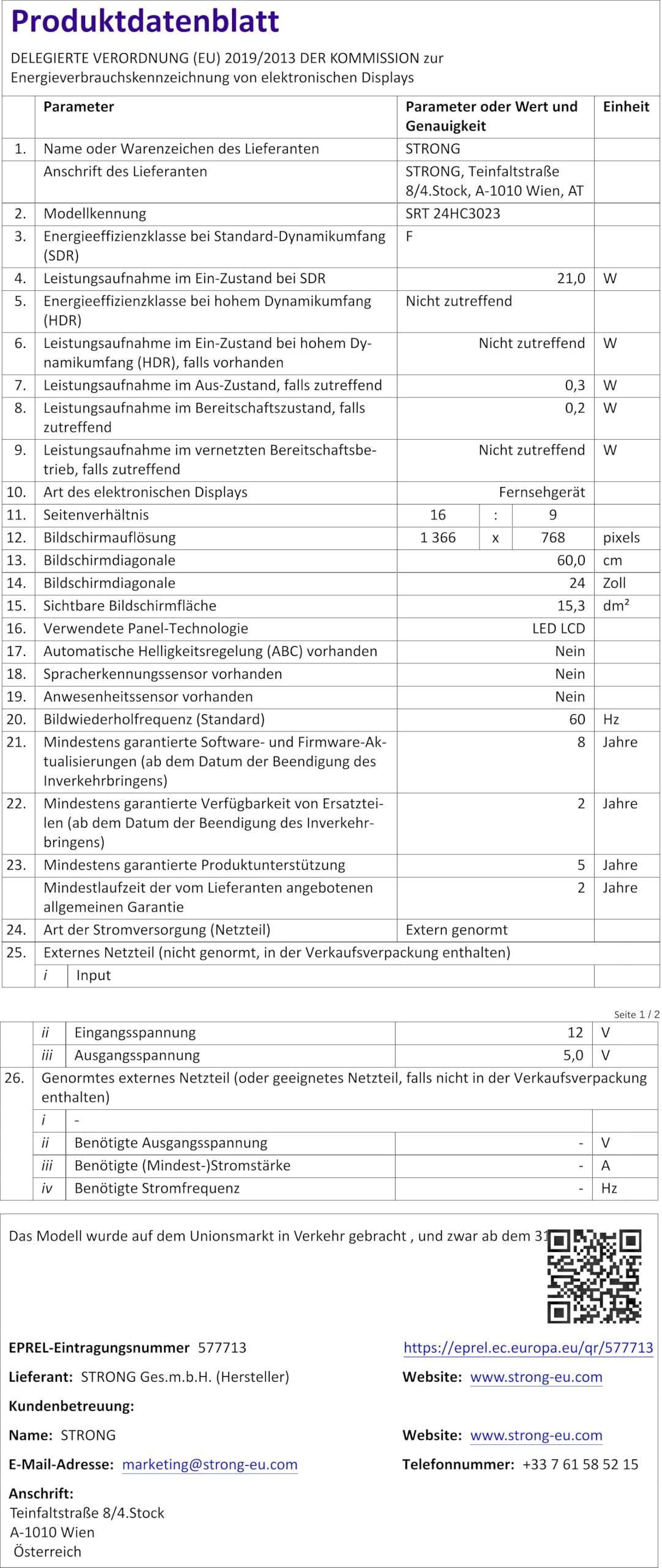
Figure 8.1: Product Fiche (Energy Label Information)
For more detailed energy information, please refer to the EPREL veritabanı (QR kod bağlantısı).

Şekil 8.2: Enerji Verimliliği Etiketi
9. Garanti ve Destek
Your STRONG SRT 24HC3023 TV comes with a standard manufacturer's warranty. Please refer to the warranty card included in your package for specific terms and conditions. For technical support, troubleshooting assistance beyond this manual, or warranty claims, please contact STRONG customer service or your local retailer.
You can find more information and support on the official STRONG webalan: www.strong.tv


