giriiş
The Forty4 Wireless Gaming Controller is designed to provide a versatile and immersive gaming experience across multiple platforms. Featuring 2.4GHz wireless technology, dual vibration motors, and programmable M buttons, this gamepad offers precise control and enhanced realism for your gaming sessions. It supports both wireless and wired modes, ensuring uninterrupted gameplay.
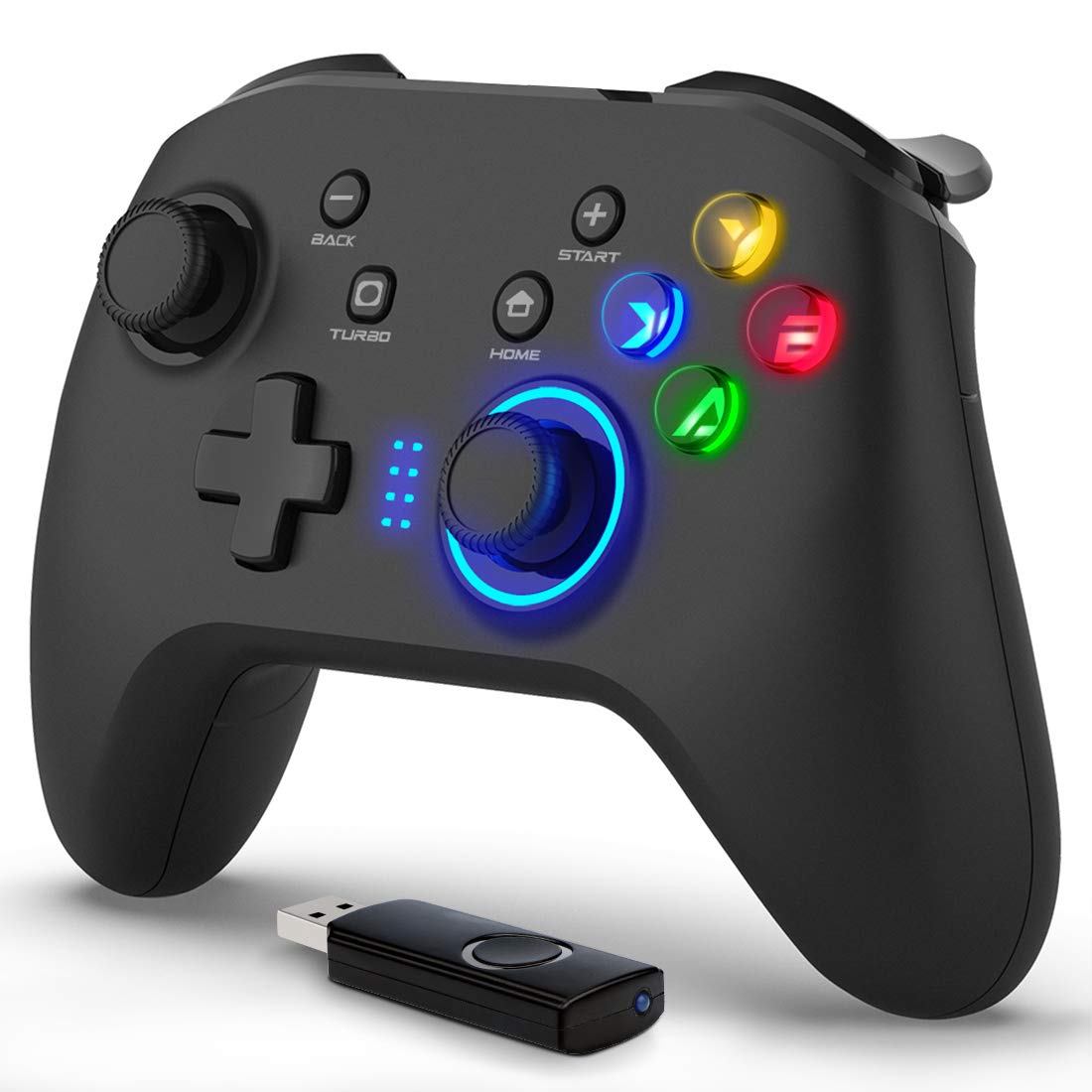
Resim: Ön view of the Forty4 Wireless Gaming Controller, showcasing ergonomik tasarımı ve tuş dizilimi.
Temel Özellikler
- 2.4 GHz Kablosuz Teknolojisi: Offers a long transmission distance, bidirectional transmission, and substantial anti-interference for a reliable connection.
- Geniş Uyumluluk: Compatible with Windows (Xinput and Dinput), PS3, and Switch. (Not compatible with Xbox 360, Xbox One, Mac, iOS, PlayStation 4, Amazon Fire TV, Amazon Fire Stick).
- M Buttons: Features programmable M buttons (M1, M2) on the back, allowing users to assign complex operations for enhanced control. Combination keys include A, B, X, Y, LB, RB, L3, LT, RT, R3, and directional keys (up, down, left, right).
- Çift Titreşim: Asymmetrical and linear vibrating motors provide distinct feedback during gameplay, increasing the realism of game scenarios and immersion.
- Wireless & Wired Mode: Seamlessly switch between wireless and wired modes. If the battery runs low, simply connect the USB cable to continue playing while charging.

Image: Illustration of the dual vibration motors within the controller, highlighting the immersive gaming experience.
Paket İçeriği
Paketi açtığınızda lütfen aşağıdaki tüm öğelerin mevcut olduğundan emin olun:
- Forty4 Wireless Gaming Controller (Model: GC201)
- 2.4GHz USB Receiver (Wireless Dongle)
- USB-C Şarj Kablosu
- Kullanım Kılavuzu (bu belge)
Video: Unboxing the Forty4 Wireless Gaming Controller, showing the controller, USB receiver, and charging cable.
Kurulum Talimatları
1. Kablosuz Bağlantı
- Insert the 2.4GHz USB receiver into an available USB port on your PC, PS3, or Switch dock.
- Press the "Home" button on the controller to power it on. The indicator lights will illuminate.
- The controller should automatically pair with the USB receiver. If not, hold the "Home" button for a few seconds to cycle through connection modes until it connects (often indicated by a steady light). For Windows, ensure the controller is in X-input mode for optimal compatibility.

Image: The Forty4 controller and its USB receiver, demonstrating how to connect wirelessly to a computer.
2. Kablolu Bağlantı
- Connect one end of the provided USB-C charging cable to the USB-C port on the top of the controller.
- Connect the other end of the USB-C charging cable to an available USB port on your PC, PS3, or Switch dock.
- The controller will automatically switch to wired mode and begin charging if needed.

Image: A visual representation of both wireless and wired connection methods for the Forty4 controller.
Kullanım Talimatları
Düğme Düzeni ve İşlevleri
The Forty4 controller features a standard button layout for intuitive gameplay:
- Sol/Sağ Analog Çubuklar: Hassas 360 derece hareket ve kamera kontrolü için.
- Yön Düğmesi: Yönlü giriş için.
- Eylem Düğmeleri (A, B, X, Y): Standard action inputs.
- Omuz Düğmeleri (LB, RB): Top-mounted buttons for various in-game actions.
- Tetikleyiciler (LT, RT): Analog triggers for nuanced control, especially in racing or shooting games.
- BACK/SELECT Button: Typically used for menu navigation or secondary functions.
- Başlama butonu: Typically used for pausing games or accessing menus.
- Ana menü tuşu: Powers the controller on/off and can be used to switch controller modes (e.g., X-input/D-input).
- TURBO Düğmesi: Düğmelere hızlıca basıldığında turbo işlevini etkinleştirir.
- M Buttons (M1, M2): Programmable back buttons for custom macros or remapping. Refer to the detailed manual for programming instructions.

Image: Close-up of the back of the controller, highlighting the M1 and M2 programmable buttons for advanced customization.
Çift Titreşim Geri Bildirimi
The controller's dual vibration motors provide tactile feedback during gameplay, enhancing immersion. You will feel vibrations for in-game events such as explosions, impacts, or specific actions, making the experience more realistic.
Controller in Action
Video: Demonstration of the Forty4 Wireless Gaming Controller's features and responsiveness during gameplay.
Kontrol Ünitesini Şarj Etme
To charge the controller, connect it to a USB power source (e.g., computer USB port, USB wall adapter) using the provided USB-C cable. The indicator lights may show charging status and turn off or change color when fully charged.
Bakım
- Temizlik: Kumandayı temizlemek için yumuşak ve kuru bir bez kullanın. Sert kimyasallar veya aşındırıcı malzemeler kullanmaktan kaçının.
- Depolamak: Kontrol cihazını serin, kuru ve doğrudan güneş ışığından ve aşırı sıcaklıklardan uzak bir yerde saklayın.
- Pil Bakım: Pil ömrünü uzatmak için kumandanın pilini sık sık tamamen boşaltmaktan kaçının. Sürekli kullanılmasa bile düzenli olarak şarj edin.
Sorun giderme
Kumanda Bağlanmıyor/Yanıt Vermiyor
- USB alıcısını kontrol edin: Ensure the 2.4GHz USB receiver is securely plugged into a working USB port on your device.
- Güç Açık: Make sure the controller is powered on by pressing the "Home" button.
- Mod Değiştir: Hold the "Home" button to cycle through different connection modes (e.g., X-input, D-input) until the controller is recognized by your system. For PC, X-input mode is generally recommended.
- Tamirat: If issues persist, try unplugging and replugging the USB receiver, then re-powering the controller to re-establish the connection.
- Pil Seviyesi: Ensure the controller has sufficient battery charge. Connect it via the USB-C cable to check if it functions in wired mode.
Input Delay in Wireless Mode
- If you experience noticeable input delay in wireless mode, try switching to wired mode using the provided USB-C cable for a more direct connection.
Stick Drift or Unresponsive Buttons
- While designed for durability, prolonged heavy use can sometimes lead to wear. If you experience stick drift or unresponsive buttons, try recalibrating the controller through your device's settings. If the issue persists, please contact customer support.
Özellikler
| Özellik | Detay |
|---|---|
| Model Numarası | GC201 |
| Bağlantı | 2.4GHz Wireless, Wired (USB-C) |
| Uyumluluk | PC (Windows 7/8/10/11 - Xinput & Dinput), PS3, Switch |
| Titreşim | Çift Titreşim Motorları |
| Özel Özellikler | Programmable M Buttons, Colorful Backlight |
| Güç Kaynağı | 1 Lityum İyon pil (dahil) |
| Ürün Ağırlığı | 11.6 ons |
| Paket Boyutları | 6.38 x 4.69 x 2.8 inç |
| Üretici | Kırk4 |
| İlk Mevcut Tarih | 25 Mayıs 2020 |
Garanti ve Destek
The Forty4 Wireless Gaming Controller comes with a Bir Yıllık Garanti. For any troubleshooting assistance, warranty claims, or product inquiries, please contact Forty4 customer service.
Ek bilgi için resmi Kullanım Kılavuzu PDF dosyasına başvurabilirsiniz: Kullanım Kılavuzu (PDF)


