Önemli Güvenlik Talimatları
Please read these instructions carefully before operating your Altec Lansing AL-5001 speaker and retain them for future reference. Following these guidelines will ensure safe operation and prolong the life of your device.
- Güç Kaynağı: Yalnızca kutu içeriğinde bulunan güç adaptörünü kullanın. Ses seviyesinin doğru ayarlandığından emin olun.tage matches the requirements specified on the speaker.
- Su ve Nem: Do not expose this appliance to rain, moisture, dripping, or splashing. Do not place objects filled with liquids, such as vases, on the apparatus.
- Sıcaklık: Radyatörler, kalorifer ızgaraları, sobalar veya diğer cihazlar (dahil) gibi herhangi bir ısı kaynağının yakınına kurmayın. amp(ısı üreten)
- Havalandırma: Yeterli havalandırmayı sağlayın. Havalandırma açıklıklarını kapatmayın. Üreticinin talimatlarına uygun olarak kurulum yapın.
- Temizlik: Temizlemeden önce cihazın fişini çekin. Sadece kuru bir bezle temizleyin.
- Servis: Bu ürünü kendiniz tamir etmeye çalışmayın. Tüm servis işlemlerini yetkili servis personeline yaptırın. Cihazın herhangi bir şekilde hasar görmesi durumunda (örneğin, güç kaynağı kablosu veya fişi hasar görmüşse, içine sıvı dökülmüşse veya cisimler düşmüşse, cihaz yağmur veya neme maruz kalmışsa, normal çalışmıyorsa veya düşürülmüşse) servis gereklidir.
- Pil Güvenliği: This product contains a Lithium battery. Do not expose to excessive heat or direct sunlight. Dispose of batteries properly according to local regulations.
Paket İçeriği
Aşağıda listelenen tüm öğelerin paketinizde bulunduğunu doğrulayın:
- Altec Lansing AL-5001 Multimedia DJ Trolley Speaker
- Kullanıcı Kılavuzu
- Güç Adaptörü
- Uzaktan kumanda
- Kablosuz Mikrofon
Ürün Bittiview
The Altec Lansing AL-5001 is a portable multimedia DJ trolley speaker designed for powerful audio output and versatile connectivity. It features a robust design with a pull rod and wheels for easy transport, integrated disco ball lighting, and multiple input options.

Şekil 1: Ön view of the Altec Lansing AL-5001 speaker, showcasing the main speaker grille, control panel, and the disco ball light on top. The extendable handle is visible in its retracted position.
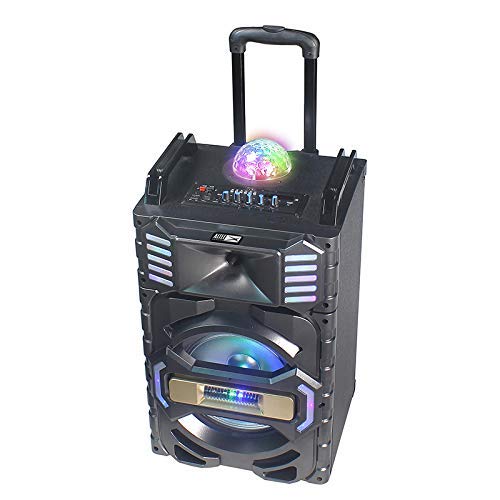
Şekil 2: Açılı view of the Altec Lansing AL-5001 speaker, highlighting the side panels with integrated LED lights and the extendable trolley handle in an extended position for portability.
Key components include the main speaker unit, control panel with various buttons and knobs, input ports (USB, TF Card, AUX, Mic), and the built-in disco ball light.
Kurmak
- Paketin açılması: Carefully remove the speaker and all accessories from the packaging. Retain the packaging for future transport or storage.
- Atama: Place the speaker on a stable, flat surface. Ensure there is adequate space around the speaker for proper ventilation.
- Güç Bağlantısı: Connect the provided power adapter to the DC IN port on the speaker and then plug it into a standard wall outlet. The speaker can operate directly from AC power or use its internal rechargeable battery.
- İlk Şarj: For first-time use, it is recommended to fully charge the speaker's internal lithium battery. The charging indicator will typically show the charging status and turn off or change color once fully charged.
Kullanım Talimatları
Güç Açık/Kapalı
Locate the power button on the control panel. Press and hold it for a few seconds to turn the speaker ON or OFF. A power indicator light will illuminate when the speaker is on.
Bluetooth Eşleştirme
- Hoparlörü açın. Yanıp sönen bir LED ile belirtildiği gibi, otomatik olarak Bluetooth eşleştirme moduna girecektir.
- Mobil cihazınızda (akıllı telefon, tablet, dizüstü bilgisayar) Bluetooth'u etkinleştirin ve kullanılabilir cihazları arayın.
- Select "AL-5001" from the list of devices.
- Eşleştirme tamamlandığında, hoparlör bir onay sesi çıkaracak ve Bluetooth gösterge ışığı sürekli yanacaktır.
The maximum operating distance for Bluetooth connectivity is approximately 1 foot (0.3 meters).
USB/TF Kart Oynatma
- Insert a USB flash drive or a TF (MicroSD) card into the respective port on the control panel.
- Hoparlör, medyayı otomatik olarak algılayacak ve sesi çalmaya başlayacaktır. files. If not, press the 'Mode' button to switch to USB or TF Card mode.
- Use the 'Play/Pause', 'Next Track', and 'Previous Track' buttons on the control panel or remote control to manage playback.
AUX Girişi
- 3.5 mm ses kablosunun (dahil değildir) bir ucunu hoparlördeki AUX IN girişine bağlayın.
- Connect the other end of the cable to the headphone jack or audio output of your external device (e.g., laptop, smartphone).
- Press the 'Mode' button on the speaker until 'AUX' mode is selected.
- Bağlı cihazınızdan oynatmayı ve ses seviyesini kontrol edin.
FM Radyo
- FM radyo moduna geçmek için 'Mod' düğmesine basın.
- Press the 'Play/Pause' button once to initiate an automatic scan for FM stations. The speaker will save all found stations.
- Use the 'Next Track' and 'Previous Track' buttons to navigate between saved FM stations.
Mikrofon Kullanımı
The AL-5001 includes a wireless microphone for karaoke or announcements.
- Ensure the wireless microphone has fresh batteries installed.
- Kablosuz mikrofonu açın. Otomatik olarak hoparlöre bağlanacaktır.
- Adjust the microphone volume using the dedicated 'Mic Vol' knob on the speaker's control panel.
Disko Topu Işığı
The speaker features an integrated disco ball light. Locate the dedicated button on the control panel to turn the light ON or OFF, or to cycle through different light modes.
Uzaktan kumanda
The included remote control allows for convenient operation of the speaker from a distance. Functions include power, mode selection, volume control, track navigation, play/pause, and light control.
Bakım
Temizlik
Always unplug the speaker from the power outlet before cleaning. Use a soft, dry, lint-free cloth to wipe the exterior surfaces. Do not use liquid cleaners, aerosols, or abrasive chemicals, as these may damage the finish or internal components.
Depolamak
Uzun süre kullanılmadığı zamanlarda hoparlörü serin, kuru bir yerde, doğrudan güneş ışığından ve aşırı sıcaklıklardan uzakta saklayın. Mümkünse, koruma için orijinal ambalajını kullanın.
Pil Bakımı
To maintain the longevity of the internal lithium battery, avoid fully discharging it frequently. If storing for a long time, charge the battery to approximately 50-70% every few months.
Sorun giderme
- Güç Yok:
- Ensure the power adapter is securely connected to both the speaker and a working wall outlet.
- Check if the speaker's internal battery is charged. Connect to power and try again. - Ses Yok:
- Increase the volume on both the speaker and your connected audio source.
- Ensure the correct input mode (Bluetooth, USB, AUX, FM) is selected.
- Check all audio cable connections for AUX mode. - Bluetooth Bağlanmıyor:
- Ensure the speaker is in Bluetooth pairing mode (flashing indicator).
- Cihazınızın Bluetooth özelliğini kapatıp açın.
- Move your device closer to the speaker (within 1 foot).
- Forget the speaker from your device's Bluetooth list and try pairing again. - FM Radyo Çekimi Zayıf:
- Reposition the speaker to a location with better signal reception.
- Ensure no large metal objects are obstructing the signal. - Mikrofon Çalışmıyor:
- Ensure the wireless microphone is turned on and has fresh batteries.
- Adjust the 'Mic Vol' knob on the speaker.
Özellikler
| Örnek | AL-5001 |
| Marka | Altec Lansing |
| Hoparlörlerin Maksimum Çıkış Gücü | 50 Watt |
| Güç Kaynağı | Kablolu Elektrik |
| Bağlantı Teknolojisi | AUX, USB, Bluetooth |
| Bluetooth Teknolojisini Destekler | Evet |
| Maximum Operating Distance (Bluetooth) | 1 Foot (0.3 meters) |
| Toplam USB Bağlantı Noktaları | 1 |
| Ses Girişi | Ek |
| Malzeme | Plastik, Ahşap |
| Ürün Boyutları (UxGxY) | 35x35x64 cm |
| Ürün Ağırlığı | 9.95 kilo |
| Piller Dahil | Evet |
| Pil Hücresi Kompozisyonu | Lityum |
| Özel Özellikler | Portable, In-built FM radio, Disco ball light |
| Uyumlu Cihazlar | Dizüstü Bilgisayar, Akıllı Telefon |
Garanti ve Destek
Altec Lansing products are manufactured to the highest quality standards. This product is covered by a limited warranty from the date of purchase. For specific warranty terms and conditions, please refer to the warranty card included with your product or visit the official Altec Lansing webalan.
For technical support, troubleshooting assistance, or service inquiries, please contact Altec Lansing customer support through their official channels. Contact information can typically be found on the product packaging or the official webalan.


