giriiş
Satın aldığınız için teşekkür ederizasing the Altec Lansing AL-5003 Multimedia DJ Trolly Speaker. This speaker is designed to deliver powerful audio for various applications, including parties and surround sound systems. Featuring wireless connectivity, a built-in trolley for portability, and multiple input options, the AL-5003 offers a versatile audio experience. Please read this manual carefully to ensure proper setup, operation, and maintenance of your speaker.
Önemli Güvenlik Talimatları
- Hoparlörü çalıştırmadan önce bu talimatları dikkatlice okuyun.
- Bu kılavuzu ileride başvurmak üzere saklayın.
- Hoparlörü yağmur veya neme maruz bırakmayın.
- Havalandırma açıklıklarını kapatmayın.
- Radyatörler, kalorifer ızgaraları, sobalar veya diğer cihazlar (dahil) gibi herhangi bir ısı kaynağının yakınına kurmayın. amp(ısı üreten)
- Güç kablosunun, özellikle fişlerde, prizlerde ve cihazdan çıktığı noktalarda üzerine basılmasını veya sıkışmasını önleyin.
- Sadece üretici tarafından belirtilen aparatları/aksesuarları kullanın.
- Yıldırımlı havalarda veya uzun süre kullanılmayacaksa bu cihazın fişini çekin.
- Tüm bakımları yetkili servis personeline yaptırın.
Paket İçeriği
Lütfen paketi aşağıdaki öğeler açısından kontrol edin:
- Altec Lansing AL-5003 Multimedia DJ Trolly Speaker
- Güç Kablosu
- Uzaktan kumanda
- Kullanıcı Kılavuzu
- Auxiliary Cable (may vary by region)
Ürün Bittiview
The AL-5003 speaker features a robust design with integrated wheels and a handle for easy transport. It includes a powerful 10-inch speaker and a 1-inch tweeter, providing clear and dynamic sound. The control panel is located on the top of the unit, offering easy access to various functions.
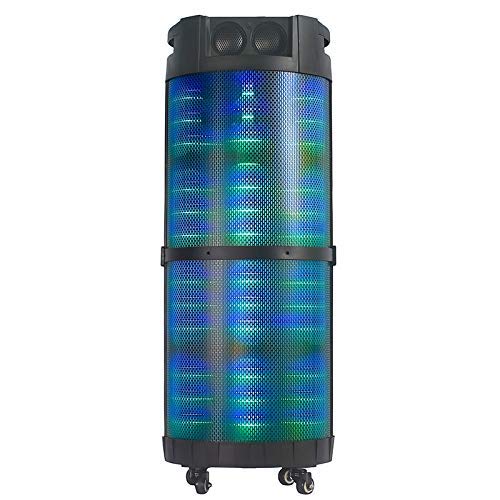
Resim 1: Ön view of the Altec Lansing AL-5003 speaker, showcasing its cylindrical design and illuminated grille. The speaker features a sturdy build with integrated wheels at the base for portability.
Kontrol Paneli ve Bağlantılar
The top panel of the speaker houses the main controls and input/output ports.
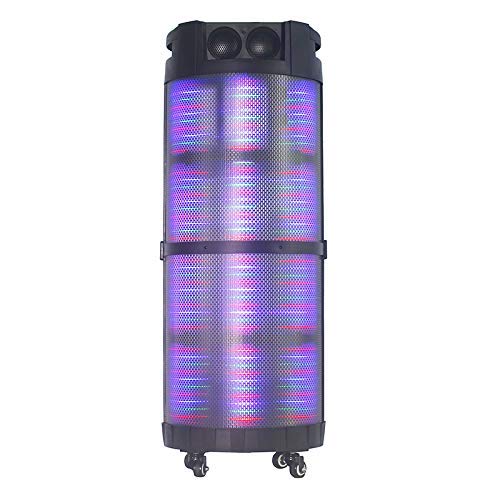
Resim 2: Yukarıdan aşağıya view of the AL-5003 speaker, highlighting the control panel with various buttons and knobs, along with the top-mounted speakers. This view also shows the integrated handle for easy transport.
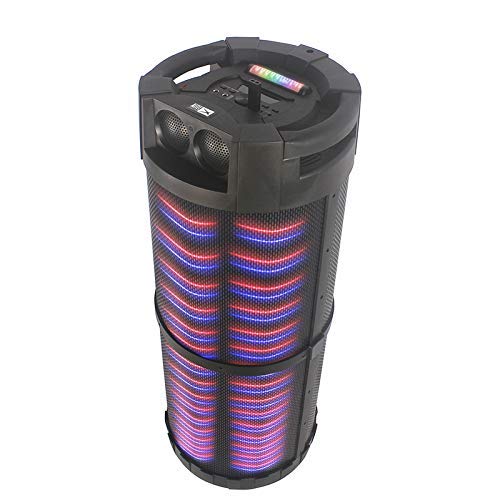
Resim 3: Açılı view of the AL-5003 speaker, providing a perspective of its overall structure, including the side grille and the top control area. The dynamic lighting effects are visible through the mesh.
Common controls include Power, Volume, Mode selection, Play/Pause, Track Skip, and inputs for USB, Auxiliary, and potentially Microphone (if available on the model).
Kurulum Talimatları
- Paketin açılması: Carefully remove the speaker and all accessories from the packaging. Retain the packaging for future transport or storage.
- Atama: Place the speaker on a stable, flat surface. Ensure there is adequate ventilation around the unit. For optimal sound, position the speaker in a central location within the listening area.
- Güç Bağlantısı: Connect the provided power cord to the AC input on the speaker and then plug it into a standard wall outlet (AC 100-240V, 50/60Hz).
- Initial Charge (if applicable): If the speaker has an internal battery (Lead Acid battery mentioned in specs), it is recommended to fully charge it before first use. The charging indicator light will typically show charging status.
- Güç Açık: Press the Power button on the control panel or remote control to turn on the speaker.
Kullanım Talimatları
1. Bluetooth Modu
- Bluetooth'u etkinleştirin: Turn on the speaker. Press the "Mode" button on the control panel or remote until "Bluetooth" or "BT" is displayed (or indicated by a blue LED). The speaker will enter pairing mode, indicated by a flashing light or audible prompt.
- Cihazla Eşleştirme: On your mobile device (smartphone, tablet, laptop), go to Bluetooth settings and enable Bluetooth. Arama available devices. You should see "AL-5003" or "Altec Lansing" in the list. Select it to pair.
- Bağlantı Onayı: Once successfully paired, the speaker will emit a confirmation sound, and the Bluetooth indicator light will become solid.
- Playback: Start playing audio on your connected device. Use the speaker's volume controls or your device's volume controls to adjust the sound level. Use the Play/Pause, Next, and Previous buttons on the speaker or remote to control playback.
2. Auxiliary (AUX) Mode
- AUX Kablosunu Bağlayın: Insert one end of a 3.5mm auxiliary cable into the AUX input port on the speaker. Connect the other end to the headphone jack or audio output of your external audio device (e.g., MP3 player, laptop).
- Select AUX Mode: Press the "Mode" button on the speaker or remote until "AUX" is displayed or indicated.
- Playback: Play audio from your connected device. Adjust volume using both the speaker's controls and your device's volume.
3. USB Oynatma Modu
- USB Sürücüyü Takın: MP3 ses dosyası içeren bir USB flash sürücü takın fileHoparlörün USB portuna takın.
- USB Modunu Seçin: The speaker may automatically switch to USB mode. If not, press the "Mode" button until "USB" is displayed or indicated.
- Playback: Hoparlör otomatik olarak ses çalmaya başlayacaktır. files from the USB drive. Use the Play/Pause, Next, and Previous buttons to control playback.
4. Karaoke Function (if applicable)
If your AL-5003 model includes a microphone input, you can use it for karaoke:
- Mikrofonu Bağlayın: Plug a wired microphone into the designated microphone input jack.
- Sesi Ayarla: Use the dedicated Microphone Volume knob (if present) to adjust the microphone's volume.
- Yankı Kontrolü: Some models may have an Echo knob to add an echo effect to the microphone audio.
5. Uzaktan Kumanda İşlemi
Ürünle birlikte gelen uzaktan kumanda, tüm önemli işlevlere kolay erişim sağlar:
- Güç: Turn the speaker On/Off.
- Mod: Switch between Bluetooth, AUX, USB, and other available modes.
- Hacim +/-: Ana ses seviyesini ayarlayın.
- Oynat/Duraklat: Oynatmayı başlatın veya duraklatın.
- Önceki Sonraki: Önceki veya sonraki parçaya atla.
- EQ: Farklı ekolayzır ön ayarlarını seçin (varsa).
- Sesini kapatmak: Sesi kapatın veya açın.
Bakım
- Temizlik: Hoparlörün dışını temizlemek için yumuşak ve kuru bir bez kullanın. Sıvı temizleyiciler veya aşındırıcı malzemeler kullanmayın.
- Depolamak: Uzun süre kullanılmayacaksa hoparlörü serin, kuru, doğrudan güneş ışığından ve aşırı sıcaklıklardan uzak bir yerde saklayın.
- Pil Bakım: If the speaker has a built-in rechargeable battery, avoid fully discharging it frequently. For long-term storage, charge the battery to approximately 50-70% every few months to prolong its lifespan.
- Havalandırma: Aşırı ısınmayı önlemek için havalandırma açıklıklarının kapalı olmadığından emin olun.
Sorun giderme
| Sorun | Olası Neden | Çözüm |
|---|---|---|
| Güç yok | Power cord not connected; Power outlet not working; Speaker is off; Battery drained. | Ensure power cord is securely connected. Try a different outlet. Press the Power button. Charge the battery. |
| Ses yok | Volume too low; Incorrect mode selected; Device not connected properly; Mute function active. | Increase volume on speaker and source device. Select the correct input mode (Bluetooth, AUX, USB). Reconnect device. Check if mute is active on remote. |
| Bluetooth eşleştirme hatası | Speaker not in pairing mode; Device Bluetooth off; Speaker too far from device; Interference. | Ensure speaker is in Bluetooth pairing mode. Turn on Bluetooth on your device. Move device closer to speaker. Turn off other Bluetooth devices nearby. |
| USB oynatma çalışmıyor | USB sürücüsü doğru şekilde takılmamış; Uyumsuz file Biçimlendirme hatası; USB sürücüsü bozuldu. | Reinsert USB drive. Ensure fileDosyalar MP3 formatındadır. Farklı bir USB bellek deneyin. |
| Uzaktan kumanda çalışmıyor | Batteries drained; Obstruction between remote and speaker; Remote not pointed at sensor. | Replace remote control batteries. Remove any obstructions. Point remote directly at the speaker's IR sensor. |
Özellikler
| Özellik | Detay |
|---|---|
| Model Adı | Altec Lansing AL-5003 Multimedia DJ Trolly Speaker |
| Hoparlör Tipi | Çevresel Ses |
| Özel Özellik | Kablosuz |
| Önerilen Kullanımlar | For Surround Sound Systems, Party |
| Uyumlu Cihazlar | Gaming Console, Karaoke Machine, Laptop, MP3 Player, Smartphone, Tablet |
| Çevresel Ses Kanalı Yapılandırması | 1.0 |
| Kontrol Yöntemi | Uzak |
| Kablosuz İletişim Teknolojisi | Bluetooth |
| Hoparlör Boyutu | 10 inç |
| Güç Kaynağı | Kablolu Elektrik |
| Tweeter Çapı | 1 inç |
| Ses Girişi Uyumlu | Yardımcı, USB |
| Hoparlör Bağlantısı | Wired (for power), Wireless (Bluetooth) |
| Sesli Wattage | 100 Watt |
| Pil Hücresi Kompozisyonu | Kurşun Asit |
| Montaj Tipi | Ayakta |
Garanti ve Destek
Altec Lansing products are manufactured to the highest quality standards. For information regarding warranty coverage, technical support, or service inquiries, please refer to the warranty card included with your product or visit the official Altec Lansing website. Please have your model number (AL-5003) and purchase details ready when contacting support.
Webalan: www.alteclansing.com (Bu genel bir bağlantıdır, gerçek bağlantı bölgeye göre değişiklik gösterebilir.)


