CREATE/COOL DC Tower Fan User Manual
Model: 901ac5f5-3fab-4ab6-92cb-7ef7d8ca7a54
1. Giriş
Thank you for choosing the CREATE/COOL DC Tower Fan. This bladeless tower fan is designed to provide efficient and quiet air circulation with its advanced DC motor and 9-speed settings. Featuring a sleek design, remote control, and 90-degree oscillation, it offers optimal comfort for any room.
Cihazın güvenli ve doğru kullanımı için lütfen çalıştırmadan önce bu kılavuzu dikkatlice okuyun. Bu kılavuzu ileride başvurmak üzere saklayın.
2. Güvenlik Talimatları
- Temizlik veya herhangi bir bakım işlemi yapmadan önce mutlaka vantilatörün fişini prizden çekin.
- Vantilatörü hasarlı bir kablo veya fişle çalıştırmayın. Kablo veya fiş hasarlıysa, kalifiye servis personeliyle iletişime geçin.
- Do not place the fan near water or in excessively humid environments.
- Keep fingers, hair, and loose clothing away from the fan's openings during operation.
- Devrilmeyi önlemek için vantilatörün sabit ve düz bir yüzeye yerleştirildiğinden emin olun.
- Bu cihaz, fiziksel, duyusal veya zihinsel yetenekleri kısıtlı olan veya deneyim ve bilgi eksikliği bulunan kişiler (çocuklar dahil) tarafından, güvenliklerinden sorumlu bir kişi tarafından cihazın kullanımıyla ilgili olarak gözetim veya talimat sağlanmadığı sürece kullanılmak üzere tasarlanmamıştır.
- Çocukların cihazla oynamamalarını sağlamak için gözetim altında tutulmaları gerekir.
- Vantilatörün deliklerine herhangi bir cisim sokmayın.
- Çalışma sırasında fanın üzerini örtmeyin.
3. Paket İçeriği
Paketin içinde tüm öğelerin mevcut olduğundan emin olun:
- CREATE/COOL DC Tower Fan Unit
- Uzaktan kumanda
- Güç Kablosu (entegre)
- Kullanım Kılavuzu (bu belge)
4. Kurulum
- Vantilatörün ambalajını açın: Kule tipi vantilatörü ve tüm aksesuarlarını ambalajından dikkatlice çıkarın.
- Atama: Place the fan on a firm, level surface. Ensure there is adequate space around the fan for proper air circulation and oscillation.
- Gücü bağlayın: Güç fişini standart bir elektrik prizine takın. Ses seviyesinin doğru ayarlandığından emin olun.tage, fanın gereksinimlerini karşılar (230V).
- Uzaktan Kumanda Pili: The remote control may require batteries (not included). Open the battery compartment and insert the correct type and number of batteries, observing polarity.
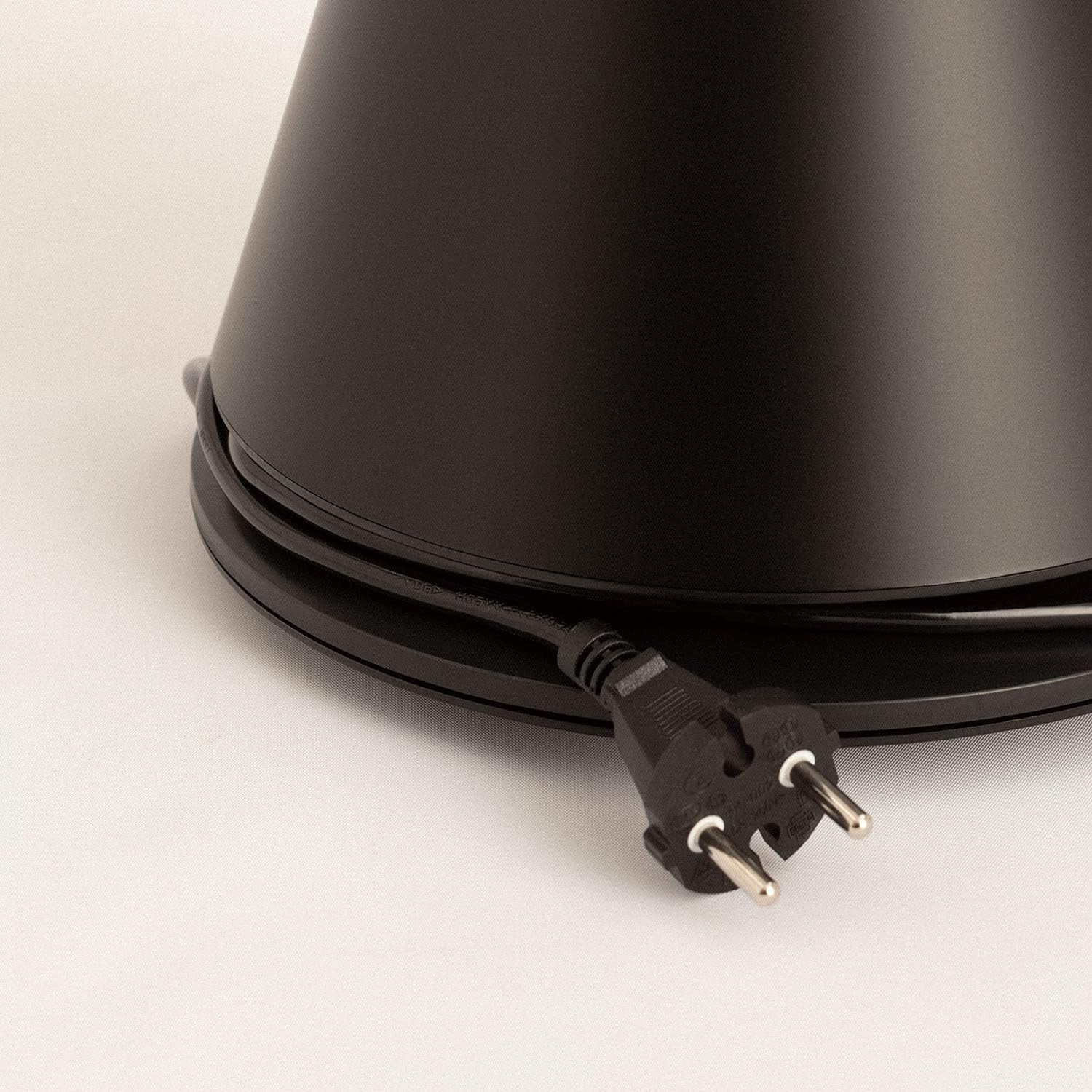
Image: Power cord connected to the fan base.
This image shows the integrated power cord and plug, ready for connection to a wall outlet. The cord is neatly wrapped around the base for storage.
5. Kullanım Talimatları
Control Panel (Digital Display Touch-System)
The fan features a digital display touch-system on its top, which also serves as the integrated remote control storage. Touch the icons to control the fan.
Uzaktan kumanda
The magnetic remote control can be stored conveniently on top of the fan. It provides full functionality for operating the fan from a distance.

Image: Remote control for the tower fan.
This image displays the compact remote control with clearly labeled buttons for power, speed adjustment, mode selection, and oscillation control.
Fonksiyonlar:
- Güç Açma/Kapatma: Güç tuşuna baş (⏻) vantilatörü açmak veya kapatmak için.
- Hız Ayarı: The fan has 9 speed levels. Use the '+' and '-' buttons to increase or decrease the fan speed.
- Rüzgar Modları: Select between 2 wind modes (e.g., Normal, Sleep, Natural - specific modes may vary). Press the mode button to cycle through available modes.
- Salınım: Salınım düğmesine basın (↻) to activate or deactivate the 90-degree oscillation feature, which distributes air evenly across the room.
- Zamanlayıcı: Set the fan to automatically turn off after a specified period. Refer to the display for timer settings (e.g., 1-12 hours).

Image: Tower fan placed in a bedroom.
This image shows the sleek black tower fan positioned in a modern bedroom, demonstrating its compact footprint and aesthetic integration into a living space.
6. Bakım
Düzenli temizlik, fanın performansını korumaya ve kullanım ömrünü uzatmaya yardımcı olacaktır.
- Dış Cephe Temizliği: Fanın dış yüzeylerini yumuşak bir bezle silin.amp bezle silin. Aşındırıcı temizleyiciler veya çözücüler kullanmayın.
- Toz Giderimi: Use a vacuum cleaner with a brush attachment or compressed air to remove dust from the air intake and outlet grilles.
- Depolamak: Vantilatörü uzun süre saklayacaksanız, fişini çekin, iyice temizleyin ve serin, kuru bir yerde, tercihen orijinal ambalajında saklayın.
- Fanı suya veya başka bir sıvıya daldırmayın.
7. Sorun Giderme
| Sorun | Olası Neden | Çözüm |
|---|---|---|
| Fan çalışmıyor. | Takılı değil; Elektrik prizi çalışmıyor; Güç düğmesine basılmamış. | Ensure the fan is securely plugged into a working outlet. Press the power button. |
| Zayıf hava akışı. | Low speed setting; Air inlets/outlets blocked by dust. | Fan hızını artırın. Hava giriş ve çıkışlarını temizleyin. |
| Fan gürültülü. | Fan not on a level surface; Internal obstruction; High speed setting. | Place the fan on a flat, stable surface. Check for any obstructions. Reduce fan speed. |
| Uzaktan kumanda çalışmıyor. | Batteries dead or incorrectly inserted; Obstruction between remote and fan. | Replace batteries, ensuring correct polarity. Remove any obstructions. Ensure remote is pointed at the fan. |
8. Özellikler
| Özellik | Detay |
|---|---|
| Marka | YARATMAK |
| Model Numarası | 901ac5f5-3fab-4ab6-92cb-7ef7d8ca7a54 |
| Ürün Boyutları | 102 x 23 x 102 cm (yaklaşık 23D x 23G x 102Y cm) |
| Ağırlık | 2.6 Kilogram |
| Renk | Siyah |
| Güç Kaynağı | Kablolu Elektrik |
| Cilttage | 230 Volt |
| Netage | 26 Watt |
| Gürültü Seviyesi | 2 dB (Note: This value seems unusually low based on customer reviews, typical fan noise is higher. Please refer to actual product performance.) |
| Hız Sayısı | 9 |
| Özel Özellikler | Oscillating, Lightweight, DC Motor, Timer, Remote Control |
9. Garanti ve Destek
CREATE products are manufactured to the highest quality standards. For information regarding warranty coverage, please refer to the warranty card included with your purchase or visit the official CREATE webalan.
For technical support, troubleshooting assistance, or spare parts, please contact CREATE customer service. Contact details can typically be found on the product packaging or the official brand webalan.
Webalan: CREATE Official Store


