1. Giriş
This manual provides detailed instructions for the setup, operation, maintenance, and troubleshooting of your iProda T1045A 10.1 inch Android Tablet. Please read this manual thoroughly before using your device to ensure proper functionality and to maximize your user experience.
The iProda T1045A is a 10.1-inch tablet featuring an HD IPS display with 1280x800 resolution, powered by a 64-bit Quad-core processor running Android 9 Pie. It includes 3GB RAM, 64GB internal storage expandable up to 128GB via TF card, dual-band Wi-Fi, HDMI output, and a 5000mAh battery for extended use.
2. Ürün Bittiview
2.1 Paket İçeriği
Paketi açtığınızda, tüm öğelerin mevcut olduğundan emin olun:
- iProda T1045A 10.1 inch Android Tablet
- USB kablosu
- Güç Adaptörü
- Kullanım Kılavuzu (bu belge)

Image: Contents of the iProda T1045A tablet package.
2.2 Cihaz Düzeni
Tabletinizin fiziksel bileşenlerini ve bağlantı noktalarını tanıyın:
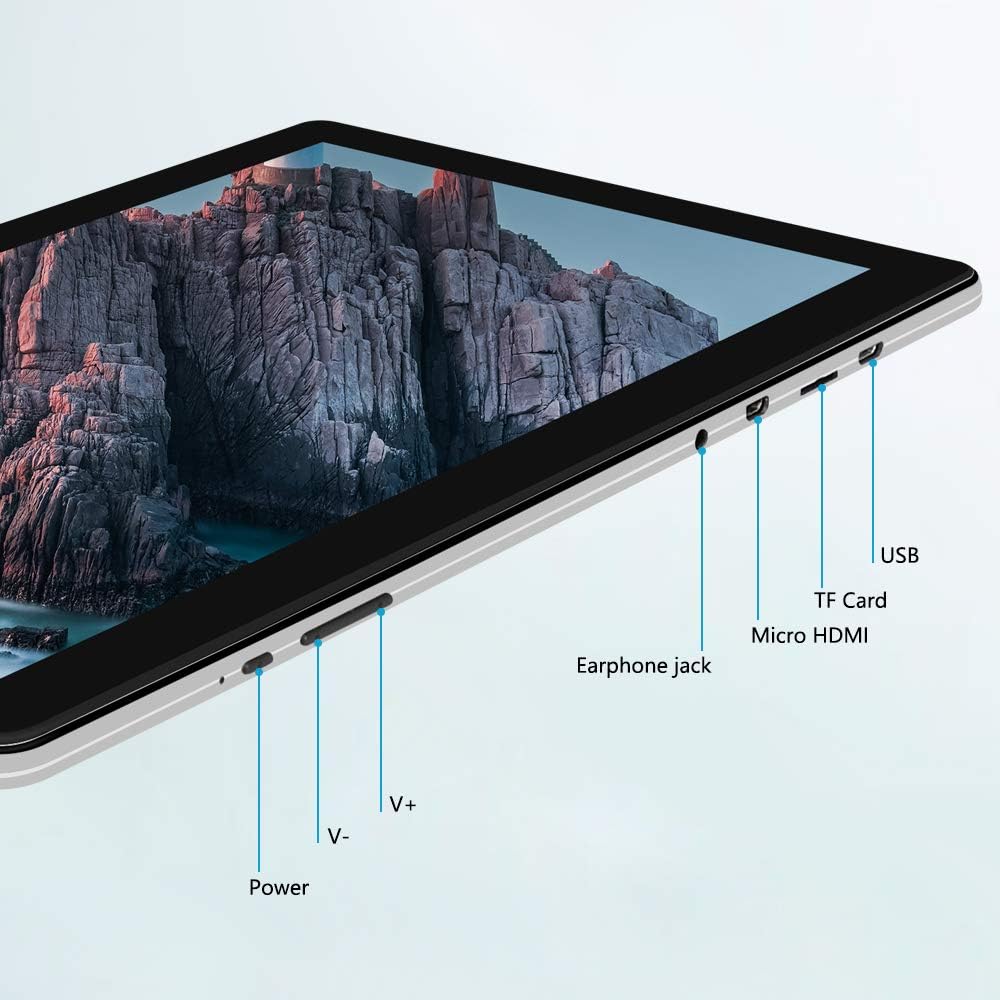
Resim: Yan view of the iProda T1045A tablet highlighting port locations.
- Güç Düğmesi: Press and hold to power on/off or restart the tablet. Short press to turn the screen on/off.
- Volume Buttons (V+, V-): Ses seviyesini ayarlayın.
- Kulaklık girişi: 3.5 mm kulaklık bağlayın.
- TF Kart Girişi: Insert a microSD card for expandable storage (up to 128GB).
- Mikro HDMI Bağlantı Noktası: Connect to an external display using a Micro HDMI to HDMI cable.
- USB Bağlantı Noktası: Connect to a computer for data transfer or for charging the device.
3. Kurulum
3.1 İlk Şarj
Before first use, fully charge the tablet. Connect the provided USB cable to the tablet's USB port and the power adapter, then plug the adapter into a wall outlet. The charging indicator will typically illuminate. A full charge may take several hours.
3.2 Açma/Kapatma
- Açmak İçin: Ekran aydınlanana kadar Güç düğmesini basılı tutun.
- Kapatmak İçin: Ekranda güç menüsü görünene kadar Güç düğmesini basılı tutun. "Kapat" seçeneğini seçin ve onaylayın.
- Yeniden başlatmak: Güç menüsünden "Yeniden Başlat" seçeneğini seçin.
- Ekran Açık/Kapalı: Briefly press the Power button to turn the screen off (sleep mode) or wake it up.
3.3 İlk Kurulum Sihirbazı
The first time you power on the tablet, you will be guided through an initial setup process. Follow the on-screen prompts to:
- Tercih ettiğiniz dili seçin.
- Bir Wi-Fi ağına bağlanın.
- Google hesabınızı kurun (isteğe bağlıdır, ancak uygulama indirmeleri için önerilir).
- Tarih ve saat ayarlarını yapılandırın.
3.4 Inserting a TF Card (MicroSD)
To expand the tablet's storage:
- Locate the TF card slot on the side of the tablet.
- Carefully insert a microSD card (up to 128GB) into the slot with the gold contacts facing down until it clicks into place.
- Çıkarmak için, kartı hafifçe içeri doğru itin, kendiliğinden dışarı fırlayacaktır.
4. Kullanım Talimatları
4.1 Temel Gezinme
The iProda T1045A uses a touch-sensitive screen for navigation:
- Musluk: Bir öğeyi seçin veya bir uygulamayı açın.
- Bas ve basılı tut: Bağlamsal menülere erişin veya simgeleri taşıyın.
- Tokatlamak: Listelerde gezinin veya ana ekranlar arasında geçiş yapın.
- Tutam: Görüntüleri yakınlaştırın veya uzaklaştırın ve web sayfalar.
4.2 Wi-Fi Bağlantısı
Bir kablosuz ağa bağlanmak için:
- Git Ayarlar > Ağ ve İnternet > Wifi.
- Wi-Fi'yi aç/kapat On.
- İstediğiniz ağı listeden seçin.
- İstendiğinde şifreyi girin ve ardından dokunun Bağlamak.
The tablet supports both 2.4G and 5G dual-band Wi-Fi for faster and more stable connections.
4.3 Bluetooth Eşleştirme
To pair with Bluetooth devices (e.g., headphones, speakers):
- Git Ayarlar > Bağlı cihazlar > Bluetooth.
- Bluetooth'u aç/kapat On.
- Bluetooth cihazınızın eşleştirme modunda olduğundan emin olun.
- Mevcut cihazlar listesinden cihazınızı seçin ve eşleştirmeyi tamamlamak için ekrandaki yönergeleri izleyin.
4.4 Kameraların Kullanımı
The tablet is equipped with a 2MP front camera and a 5MP rear camera.
- Açın Kamera application from the app drawer.
- Ön ve arka kameralar arasında geçiş yapmak için kamera simgesine dokunun.
- Fotoğraf çekmek veya video kaydını başlatmak/durdurmak için deklanşör düğmesine dokunun.

Image: Tablet in use, showcasing its camera capabilities.
4.5 Harici Ekrana Bağlantı (HDMI)
To display your tablet's screen on a larger monitor or TV:
- Connect one end of a Micro HDMI cable to the tablet's Micro HDMI port.
- Connect the other end of the cable to an HDMI input on your external display.
- Harici ekranınızda doğru HDMI giriş kaynağını seçin.
- The tablet's screen content should now be mirrored on the external display.
4.6 Uygulama Yönetimi
The tablet runs Android 9 Pie and supports applications from the Google Play Store.
- Uygulamalar yükleniyor: Açın Oyun Mağazası Uygulamayı bulun, istediğiniz uygulamayı arayın ve dokunun. Düzenlemek.
- Uygulamaları Kaldırma: Tap and hold an app icon on the home screen or in the app drawer, then drag it to "Uninstall" or select "App info" and choose "Uninstall". Alternatively, go to Ayarlar > Uygulamalar ve bildirimlerUygulamayı seçin ve dokunun. Kaldır.
5. Bakım
5.1 Cihazın Temizlenmesi
Tabletinizi temizlemek için:
- Power off the tablet before cleaning.
- Yumuşak, tiftiksiz bir bez kullanın, hafifçe kurulayın.ampEkranı ve gövdeyi silmek için su veya ekran temizleyicisi kullanın.
- Sert kimyasallar, aşındırıcı temizleyiciler ve aşırı nem kullanmaktan kaçının.
5.2 Yazılım Güncellemeleri
Periodically check for software updates to ensure optimal performance and security:
- Git Ayarlar > Sistem > Gelişmiş > Sistem güncellemesi.
- Ekranda gösterilen yönergeleri izleyerek mevcut güncellemeleri indirin ve yükleyin. Güncellemeler sırasında tabletinizin yeterince şarjlı olduğundan veya güce bağlı olduğundan emin olun.
5.3 Depolama Yönetimi
To manage internal storage and the TF card:
- Git Ayarlar > Depolamak.
- Burada yapabilirsiniz view storage usage, free up space, and manage files on both internal storage and the inserted TF card.
6. Sorun Giderme
This section addresses common issues you might encounter with your iProda T1045A tablet.
6.1 Cihaz Açılmıyor
- Tabletin yeterli şarja sahip olduğundan emin olun. Güç adaptörüne bağlayın ve tekrar açmayı denemeden önce en az 30 dakika şarj olmasını bekleyin.
- Try holding the Power button for 10-15 seconds to force a restart.
6.2 Wi-Fi Bağlantı Sorunları
- Verify that Wi-Fi is enabled in Ayarlar.
- Doğru Wi-Fi şifresini girdiğinizden emin olun.
- Wi-Fi yönlendiricinizi ve tabletinizi yeniden başlatın.
- Try connecting to a different Wi-Fi network to determine if the issue is with the tablet or the network.
6.3 Yavaş Performans
- Gereksiz arka plan uygulamalarını kapatın.
- Clear cached data for apps in Ayarlar > Uygulamalar ve bildirimler > [Uygulama Adı] > Depolama ve önbellek > Önbelleği temizle.
- Ensure sufficient free storage space. Uninstall unused apps or move large files to a TF card.
- Tableti yeniden başlatın.
6.4 Pilin Hızlı Bitmesi
- Ekran parlaklığını azaltın.
- Kullanmadığınız zaman Wi-Fi, Bluetooth ve GPS'i devre dışı bırakın.
- Önemli miktarda güç tüketen arka plan uygulamalarını kapatın.
- Pil kullanımını kontrol edin Ayarlar > Pil güç tüketen uygulamaları belirlemek için.
- Ensure the tablet is not allowed to run below 15% charge frequently, as this can impact battery longevity.
6.5 Fabrika Ayarlarına Sıfırlama
Sürekli sorunlar devam ederse, fabrika ayarlarına sıfırlama işlemi sorunu çözebilir. Uyarı: Bu işlem tabletinizdeki tüm verileri silecektir. İşleme başlamadan önce önemli verilerinizi yedekleyin.
- Git Ayarlar > Sistem > Gelişmiş > Seçenekleri sıfırla.
- Seçme Tüm verileri sil (fabrika ayarlarına sıfırla).
- Kararınızı onaylayın ve ekrandaki yönergeleri izleyin.
7. Özellikler
Below are the technical specifications for the iProda T1045A tablet:
| Model Adı | T1045A |
| İşletim Sistemi | Android 9 Pasta |
| Ekran Boyutu | 10.1 inç |
| Ekran Çözünürlüğü | 1280 x 800 piksel (HD IPS) |
| İşlemci | MediaTek Quad-core 1.5Ghz |
| Veri deposu | 3 GB |
| Dahili Depolama | 64 GB SSD |
| Genişletilebilir Depolama | Up to 128 GB via TF Card (MicroSD) |
| Grafik Eş İşlemcisi | ARM Mali-T720 MP2 |
| Arka Kamera | 5 MP |
| Ön Kamera | 2 MP |
| Pil Kapasitesi | 5000 mAh Lityum Polimer |
| Ortalama Pil Ömrü | 8 saate kadar |
| Kablosuz Bağlantı | Dual-Band Wi-Fi (802.11a/b/g/n), Bluetooth 4.0 |
| Limanlar | 1x USB 2.0, 1x Micro HDMI, 3.5mm Earphone Jack, TF Card Slot |
| Boyutlar | 34.5x19.7x5.5 cm |
| Ağırlık | 550 gr |

Resim: Tabletin temel performans özellikleri.

Image: Tablet portability and battery details.
8. Garanti ve Destek
8.1 Ürün Garantisi
The iProda T1045A tablet comes with a 12 ay garanti Satın alma tarihinden itibaren geçerlidir. Bu garanti, üretim hatalarını ve normal kullanım koşullarındaki arızaları kapsar. Yanlış kullanım, kazalar, yetkisiz onarımlar veya normal aşınma ve yıpranmadan kaynaklanan hasarları kapsamaz.
8.2 Müşteri Desteği
If you encounter any issues not covered in the troubleshooting section or require further assistance, please contact iProda customer support. Refer to your purchase documentation or the iProda official webiletişim bilgileri için site.
When contacting support, please have your tablet's model number (T1045A) and purchase details readily available.


