1. Giriş
This manual provides detailed instructions for the Valefod DC-DC 5A Buck Converter, Model VA-0189. This module is designed to efficiently step down a higher DC input voltage'den daha düşük, ayarlanabilir bir DC çıkış ses seviyesinetage. It features a digital LED display for voltage monitoring and a potentiometer for precise output voltage ayar.

Figure 1: Two Valefod DC-DC 5A Buck Converter modules.
2. Ürün Özellikleri
- High Precision Design: Features 36u thickened circuit boards, a high-Q inductance with an output LED indicator, and solid-state capacitors for effective high-frequency noise filtering.
- Giriş Voltage Aralık: DC 4V to 38V. Note: Input voltage, istenen çıkış voltajından en az 1.5V daha yüksek olmalıdır.tage (no boost function).
- Çıkış Hacmitage Aralık: Continuously adjustable from DC 1.25V to 36V.
- Maksimum Çıkış Akımı: 5 Amporada.
- Kompakt Boyut: Dimensions are 62mm x 38mm x 14mm (including potentiometer).
- Entegre LED Ekran: Digital voltmeter for monitoring input or output voltage.
- Adjustable Potentiometer: Allows for easy adjustment of the output voltage.
3. Önemli Güvenlik Notları
- Cilttage Diferansiyel: giriş hacmitage must always be at least 1.5V higher than the output voltage. This module does not support voltage boosting.
- Polarite: Do not reverse the polarity of the input and output connections. Incorrect wiring can damage the module.
- Current/Power Limits: Keep the output current under 5A and the total power under 75W. For prolonged operation at higher loads, a heat sink is recommended to prevent overheating.
- İlk Ayarlama: The factory setting for the output voltage may be high. It may be necessary to turn the blue potentiometer screw counter-clockwise approximately 7-15 full rotations before the output voltage begins to decrease.
4. Kurulum ve Bağlantılar
Follow these steps to set up your Valefod DC-DC Buck Converter:
- Terminalleri Tanımlayın: Locate the "IN+" and "IN-" terminals for input, and "OUT+" and "OUT-" terminals for output.
- Giriş Bağlantısı: Connect your DC power source (4V-38V) to the "IN+" (positive) and "IN-" (negative) terminals. Ensure correct polarity.
- Çıkış Bağlantısı: Connect your load or device to the "OUT+" (positive) and "OUT-" (negative) terminals. Ensure correct polarity.
- İlk CilttagKontrol edin: Before connecting a sensitive load, it is highly recommended to verify the output voltagBir multimetre kullanarak.

Figure 2: Module layout with input/output connections and controls.

Şekil 3: Ayrıntılı view of the buck converter components.
5. Kullanım Talimatları
5.1. Çıkış Voltajını Ayarlamatage
çıkış hacmitage is adjusted using the blue multi-turn potentiometer located on the module. A small screwdriver is required for this adjustment.
- Güç Açık: Connect the input power source. The LED display will illuminate.
- Monitör Çıkışı: Use a multimeter to accurately measure the voltage across the "OUT+" and "OUT-" terminals. While the onboard LED display provides an indication, a multimeter offers higher precision for initial setup.
- Adjust Potentiometer:
- vidayı çevir saat yönünde ile arttırmak çıkış hacmitage.
- vidayı çevir saat yönünün tersi ile azaltmak çıkış hacmitage.
- Initial Adjustment Note: As mentioned in the safety notes, the factory default voltage may be high. You might need to turn the potentiometer counter-clockwise for 7-15 full rotations before the voltage starts to drop. Each full rotation typically adjusts the voltage by approximately 1V.
- İnce ayar: Adjust slowly until the desired output voltage is achieved on your multimeter.
5.2. Using the Digital Voltmeter
The module includes a digital LED display to show voltage readings. There are two buttons for controlling the display:
- Left Button ("ON/OFF"):
- Kısa Basış: Turns the digital voltmeter ON.
- Long Press (1-4 seconds): Turns the digital voltmeter OFF.
- Right Button ("Mode"):
- Kısa Basış: Toggles between displaying the input voltage (indicated by "IN" LED) and the output voltage (indicated by "OUT" LED).
6. Voltmeter Calibration (Optional)
For users requiring highly accurate voltage readings from the onboard digital display, the voltmeter can be calibrated. The calibration range is -0.5V to +0.5V, with a factory setting of 0.0V.
- Activate Voltmeter: Short press the left "ON/OFF" button to ensure the digital display is active.
- Kalibrasyon Moduna Girin: Long press the left "ON/OFF" button for more than 4 seconds.
- The "IN" indicator LED will light up, signifying that input voltage measurement calibration has started.
- Adjust Input Voltage Kalibrasyon:
- Dokunun sol düğme ile azaltmak the calibration value.
- Dokunun sağ düğme ile arttırmak the calibration value.
- Since one unit of adjustment is less than 0.1V, you may need to tap the button 1-5 times continuously to observe a 0.1V change on the display.
- Switch to Output Voltage Kalibrasyon: After calibrating the input voltage, long press the right "Mode" button for more than 2 seconds.
- The "OUT" indicator LED will light up, signifying that output voltage measurement calibration has started.
- Çıkış Hacmini Ayarlatage Kalibrasyon: Use the left and right buttons as described in step 3 to adjust the output voltage calibration value.
- Kaydet ve çık: After completing both calibrations, long press the right "Mode" button for more than 2 seconds to save the adjusted values. The module will then return to normal voltage display mode. The calibrated values are retained even after power loss.
7. Bakım
The Valefod DC-DC Buck Converter is designed for reliable operation with minimal maintenance. Observe the following guidelines:
- Temizlik: Keep the module free from dust, dirt, and moisture. Use a soft, dry cloth for cleaning.
- Havalandırma: Ensure adequate airflow around the module, especially when operating at higher currents or for extended periods. If necessary, attach the provided heat sink or ensure it is mounted in a well-ventilated enclosure.
- Bağlantılar: Tüm giriş ve çıkış bağlantılarının sağlam ve korozyondan arınmış olduğundan emin olmak için periyodik olarak kontrol edin.
- Çevresel Koşullar: Operate the module within its specified temperature and humidity ranges to ensure optimal performance and longevity.

Figure 4: Module with included heatsink and mounting hardware.
8. Sorun Giderme
If you encounter issues with your buck converter, consider the following troubleshooting steps:
- Çıkış Hacmi Yoktage / Ekran Kapalı:
- Check input power supply: Ensure it is connected correctly and providing voltage within the 4V-38V range.
- Verify polarity: Confirm that input and output connections are not reversed.
- Check for short circuits: Inspect output connections for any short circuits that might trigger protection.
- Display ON/OFF: Short press the left button to ensure the digital display is turned on.
- Çıkış Hacmitage Not Adjusting:
- Initial High Voltage: Remember that the factory setting might be high. Turn the potentiometer counter-clockwise for 7-15 full rotations to bring the voltage down into an adjustable range.
- Giriş VoltagGereksinim: Giriş hacmini sağlayıntage is at least 1.5V higher than your target output voltage.
- Potentiometer Functionality: If after many turns the voltage still doesn't change, the potentiometer might be faulty.
- Modül Aşırı Isınması:
- Yük Akımı: Reduce the load current. The module is rated for a maximum of 5A.
- Güç Çıkışı: Ensure total output power does not exceed 75W.
- Soğutucu: Attach the provided heat sink if operating at higher loads or for extended periods. Ensure good thermal contact.
- Havalandırma: Modül çevresindeki havalandırmayı iyileştirin.
- Inaccurate Voltmeter Display:
- Kalibrasyon: Perform the voltmeter calibration procedure described in Section 6.
- External Multimeter: Always use a calibrated external multimeter for precise voltage measurements, especially during critical setup.
9. Özellikler
| Özellik | Şartname |
|---|---|
| Model Numarası | VA-0189 |
| Giriş Voltage | DC 4V - 38V |
| Çıkış Hacmitage | DC 1.25V - 36V (Continuously Adjustable) |
| Maksimum Çıkış Akımı | 5A (Requires heat sink for prolonged high current) |
| Maksimum Çıkış Gücü | 75W |
| Boyutlar (U x G x Y) | Xnumxmm x xnumxmm x xnumxmm (xnumx "x xnumx" x xnumx ") |
| Voltmetre Aralığı | 4V - 40V (Deviation: ±0.05V) |
| Montaj Tipi | PCB Bağlantısı |
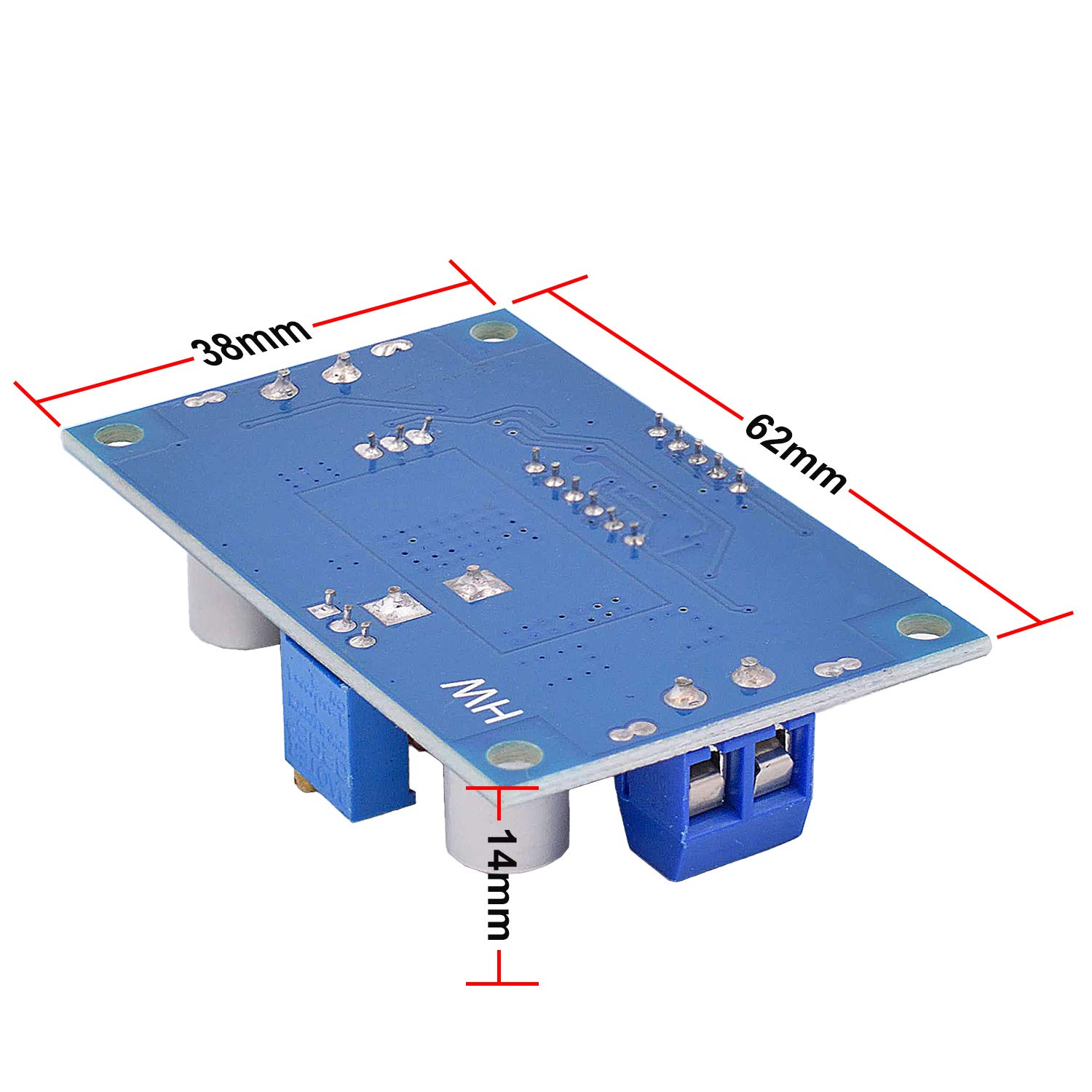
Figure 5: Module dimensions.
10. Garanti ve Destek
Valefod products are designed for quality and reliability. For any questions, technical assistance, or support regarding your DC-DC Buck Converter, please refer to the seller's contact information or the platform where the product was purchased.
Please retain your proof of purchase for any warranty claims. Specific warranty terms may vary by region and retailer.


