1. Giriş
Thank you for choosing the VMAI 38 Inch 2.1 Sound Bar. This sound bar is designed to enhance your home entertainment experience with powerful audio, featuring dual built-in subwoofers and versatile connectivity options. Please read this manual thoroughly before use to ensure proper operation and to maximize your enjoyment of the product.
2. Güvenlik Bilgileri
- Bu cihazı damlayan veya sıçrayan sıvılara maruz bırakmayın.
- Havalandırma açıklıklarını kapatmayın. Üreticinin talimatlarına uygun şekilde kurulum yapın.
- Radyatörler, kalorifer ızgaraları, sobalar veya diğer cihazlar (dahil) gibi herhangi bir ısı kaynağının yakınına kurmayın. amp(ısı üreten)
- Güç kablosunun, özellikle fişlerde, prizlerde ve cihazdan çıktıkları yerlerde üzerine basılmasını veya sıkışmasını önleyin.
- Sadece üretici tarafından belirtilen aparatları/aksesuarları kullanın.
- Yıldırımlı havalarda veya uzun süre kullanılmayacaksa cihazın fişini çekin.
3. Paket İçeriği
Lütfen paketinizde tüm ürünlerin eksiksiz olarak bulunduğundan emin olun:
- VMAI 38 Inch Sound Bar
- Uzaktan kumanda
- Premium 5 ft Optical cable
- 5 ft RCA cable
- Güç Adaptörü
- Wall mounting brackets and screws
- Kullanıcı Kılavuzu
4. Ürün Bittiview
The VMAI Sound Bar HD-019 is engineered to deliver a powerful and clear audio experience. It features dual 25W built-in subwoofers and four speakers, providing 90W of total power for room-shaking bass and precise sound.

Figure 4.1: VMAI 38 Inch Sound Bar and included remote control.
The sound bar incorporates advanced DSP technology and Bluetooth 5.0 for stable and fast wireless transmission. It offers multiple input connections including HDMI ARC, Optical, AUX, and USB (for flash drives only).

Figure 4.2: Internal components of the VMAI Sound Bar, highlighting the 6 speakers and 90 watts of power for a superb sound experience.

Figure 4.3: Illustration of the sound bar's dual built-in subwoofers, designed to deliver deep bass.
5. Kurulum
5.1 Yerleştirme Seçenekleri
The VMAI Sound Bar offers flexible placement options to suit your home theater setup:
- Masaüstü Yerleşimi: Position the sound bar directly in front of your TV on a flat surface, ensuring it does not obstruct the TV's remote sensor.
- Duvar montajı: For an elegant, space-saving setup, the sound bar can be mounted on the wall using the included mounting brackets and template. Ensure the wall can support the weight of the sound bar.

Figure 5.1: The sound bar's mountable design allows for both wall mounting and desktop placement.
5.2 Connecting Your Sound Bar
The sound bar supports various connection methods to integrate with your devices:
- HDMI ARK: Connect an HDMI cable from the sound bar's HDMI ARC port to your TV's HDMI ARC port. This allows for audio return channel functionality, simplifying control.
- Optik Giriş: Use the included optical cable to connect the sound bar to your TV's optical audio output.
- AUX Girişi: Connect devices using the included RCA cable to the AUX input.
- USB Girişi: USB flash bellekten ses çalmak için.
- Bluetooth 5.0: Wirelessly connect your Bluetooth-enabled devices.

Figure 5.2: The sound bar supports HDMI (ARC), AUX, Optical, USB, and Bluetooth 5.0 connections.
5.3 Important Note for Optical Mode (PCM Setting)
When using the Optical input, it is crucial to adjust your TV's audio settings to PCM (Pulse Code Modulation). Failure to do so may result in no sound or distorted audio.
Steps to enable PCM (may vary by TV brand):
- Go to the 'Settings' menu on your TV.
- Navigate to 'Audio Format' or 'Sound Output' settings.
- Select 'PCM' as the digital audio output format.
- If using HDMI ARC, also check 'HDMI Audio Format' and set it to 'PCM'.
6. Kullanım Talimatları
6.1 Açma/Kapatma
Basın Güç/Mod Ses çubuğundaki veya uzaktan kumandadaki düğmeyi kullanarak cihazı açıp kapatabilirsiniz.
6.2 Giriş Seçimi
Basın Selection (M) ses çubuğundaki düğmeye veya GİRİŞ button on the remote control to cycle through available input sources (HDMI ARC, Optical, AUX, USB, Bluetooth).
6.3 Ses Kontrolü
Kullanın Cilt + Ve Hacim - Ses seviyesini ayarlamak için ses çubuğundaki veya uzaktan kumandadaki düğmeler kullanılır.
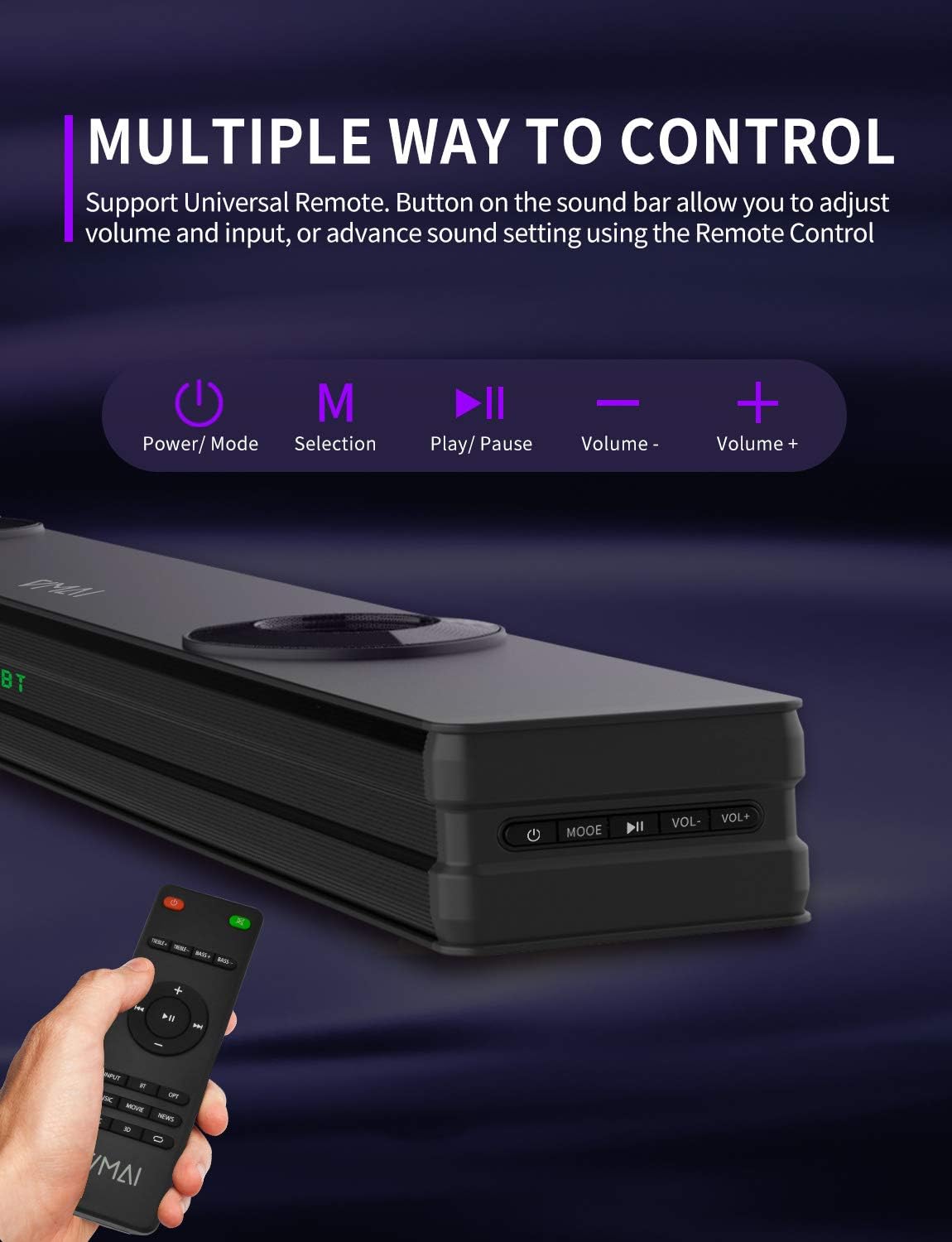
Figure 6.1: The sound bar can be controlled via its integrated buttons or the included remote control.
6.4 Ekolayzır Modları
The sound bar features 4 distinct sound modes to optimize your listening experience. Use the remote control to switch between them:
- Müzik Modu: Optimized for music playback, enhancing clarity and bass.
- Movies Mode: Provides a cinematic surround sound experience, ideal for films.
- Haber Modu: Enhances vocal clarity for news broadcasts and dialogue-heavy content.
- 3D Çevresel Ses Modu: Creates an immersive, three-dimensional audio field.
6.5 Bluetooth Eşleştirme
To pair your Bluetooth device:
- Switch the sound bar to Bluetooth mode (indicated by 'BT' on the display).
- Cihazınızda (akıllı telefon, tablet vb.) Bluetooth özelliğini etkinleştirin.
- Arama 'VMAI Sound Bar' in your device's Bluetooth settings.
- Select it to pair. Once connected, the 'BT' indicator will stop flashing.
7. Bakım
VMAI Sound Bar'ınızın uzun ömürlü olmasını ve optimum performans göstermesini sağlamak için aşağıdaki bakım yönergelerini izleyin:
- Temizlik: Use a soft, dry cloth to clean the surface of the sound bar. Do not use liquid cleaners or aerosol sprays.
- Havalandırma: Aşırı ısınmayı önlemek için havalandırma açıklıklarının engellenmediğinden emin olun.
- Depolamak: Ses sistemini uzun süre saklayacaksanız, fişini prizden çekin ve serin, kuru bir yerde saklayın.
- Nemden Kaçının: Ses çubuğunu sudan ve yüksek nemden uzak tutun.
8. Sorun Giderme
VMAI Sound Bar'ınızla ilgili sorunlarla karşılaşırsanız lütfen aşağıdaki yaygın sorunlara ve çözümlere bakın:
| Sorun | Olası Neden / Çözüm |
|---|---|
| Ses çubuğundan ses gelmiyor. |
|
| Bozuk veya düşük ses kalitesi. |
|
| Bluetooth bağlantı sorunları. |
|
| Uzaktan kumanda çalışmıyor. |
|
| Bass is weak or not noticeable. |
|
9. Özellikler
| Özellik | Şartname |
|---|---|
| Model Adı | HD-019 |
| Boyutlar (D x G x Y) | 4.3"D x 38"G x 2.5"Y |
| Ürün Ağırlığı | 6 Pound |
| Hoparlör Maksimum Çıkış Gücü | 90 Watt |
| Giriş Voltage | 240 Volt |
| Hoparlör Tipi | 3D, Ses Çubuğu, Subwoofer, Çevresel Ses |
| Bağlantı Teknolojisi | Optical, HDMI (ARC), AUX, USB, Bluetooth |
| Bluetooth Sürümü | 5.0 |
| Bluetooth Menzili | 15.24 Metre (50 Ayak) |
| Ses Çıkışı Modu | Stereo, Surround |
| Malzeme | Metal |
| Renk | Mat Siyah |
10. Garanti ve Destek
VMAI offers a 12-month coverage for its products. Every VMAI sound bar undergoes a strict quality test process before shipment. For any issues or inquiries, please contact VMAI customer support. We are committed to resolving all your problems within 24 hours.
VMAI aims to provide high-quality audio products that deliver fantastic audio-visual enjoyment and an authentic interactive experience.


