1. Giriş
The ANCEL FX1000 is a professional vehicle diagnostic tool designed to read and clear trouble codes, view live data, and perform various special functions for a single-car manufacturer. It supports full OBD service modes and is compatible with vehicles manufactured from 1996 onwards. This manual provides detailed instructions for setting up and operating your device.
2. Ürün Özellikleri
- Full OBDII Service Modes: Supports 8 OBDII service modes for comprehensive diagnostics.
- Multi-System Diagnostics: Capable of diagnosing all major vehicle systems including Engine, Transmission, SRS (Supplemental Restraint System), SAS (Steering Angle Sensor), TPMS (Tire Pressure Monitoring System), ABS (Anti-lock Braking System), and more.
- Özel Fonksiyonlar: Includes advanced functions such as DPF (Diesel Particulate Filter) Regeneration, Battery Replacement, ABS Bleeding, Oil Service Reset, EPB (Electronic Parking Brake) Reset, and Throttle Position Adaption.
- Çoklu Dil Desteği: Supports 7 languages: English, French, Spanish, German, Russian, Polish, and Portuguese.
- Manufacturer-Specific Tool: Designed for a single-car manufacturer, allowing in-depth diagnostics for a specific brand's vehicle series.
- Lifetime Free Online Updates: Ensures your device always has the latest software and vehicle coverage.
3. Paket İçeriği
Your ANCEL FX1000 package should include the following items:
- ANCEL FX1000 Diagnostic Tool
- OBDII Bağlantı Kablosu
- Micro USB Cable (for PC connection and updates)
- Kılavuzu İndir
- Sert Kabuk Taşıma Çantası
4. Cihaz Düzeni
Familiarize yourself with the buttons and ports on your ANCEL FX1000 device for optimal operation.

Image: ANCEL FX1000 device showing LCD display, Return button, Scroll Left/Right/Up/Down buttons, Fn button, and Ok button. Dimensions are also indicated.
- LCD Ekran: Shows diagnostic information and menu options.
- Geri düğmesi: Önceki ekrana veya menüye geri döner.
- Scroll Buttons (Up/Down/Left/Right): Menülerde gezinmek ve seçenekleri seçmek için kullanılır.
- Fn Düğmesi: Function button, may have context-specific uses.
- Tamam Düğmesi: Seçimleri onaylar veya alt menülere girer.
- OBDII Konektörü: Connects the device to the vehicle's OBDII port.
- USB Bağlantı Noktası: For connecting to a computer for software updates.
5. Kurulum ve Bağlantı
Follow these steps to connect your ANCEL FX1000 to your vehicle:
- Aracınızın OBDII portunu bulun. Bu port genellikle sürücü tarafındaki gösterge panelinin altında bulunur.
- Ensure the vehicle's ignition is ON, but the engine is NOT running. For push-button start vehicles, press the start button until all dashboard lights illuminate without starting the engine.
- Plug the OBDII connector from the ANCEL FX1000 into your vehicle's OBDII port. The device will power on automatically.
- Once powered on, the device is ready for use.
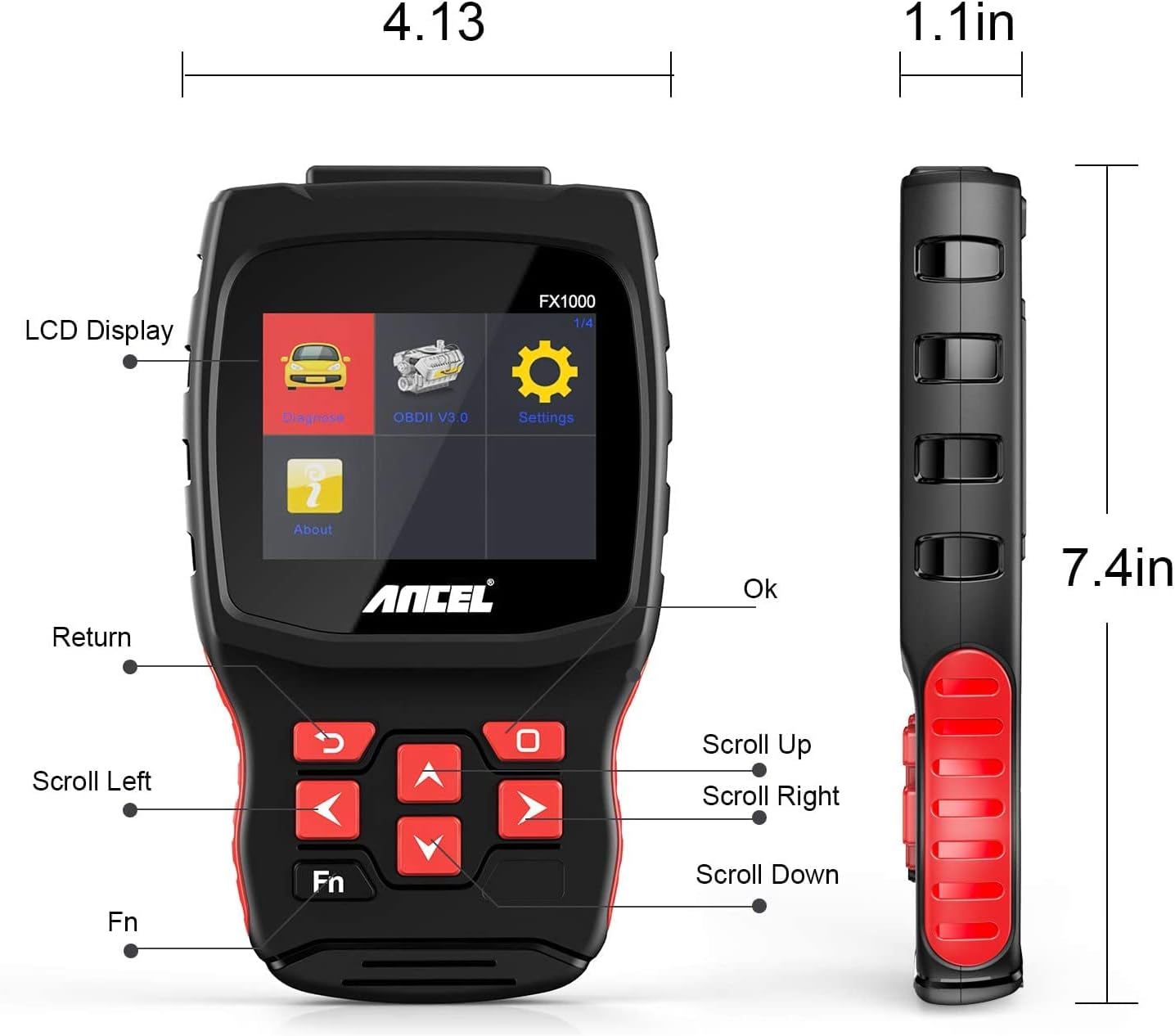
Image: A hand holding the ANCEL FX1000 connected to a vehicle's OBDII port, with the car's dashboard visible.
6. Gezinme ve Ayarlar
The ANCEL FX1000 features a user-friendly interface. Use the arrow buttons to navigate and the OK button to select.
- Teşhis: Access vehicle-specific diagnostic functions.
- OBDII V3.0: Access general OBDII functions for all compatible vehicles.
- Ayarlar: Cihaz tercihlerini yapılandırın.
- Hakkında: View device information such as serial number, firmware version, and software version.
Ayarlar Menüsü Seçenekleri:
- Dil: Ekran dilini değiştirin.
- Birim: Sıcaklık okumaları için Celsius ve Fahrenheit arasında geçiş yapın.
- Bip: Sesli geri bildirim özelliğini etkinleştirin veya devre dışı bırakın.
- Kayıt: View recorded diagnostic data.
- Düğme Testi: Test the functionality of the device buttons.
- LCD Test: Test the LCD display.
7. Sistem Tanılama
The ANCEL FX1000 allows you to perform in-depth diagnostics on various vehicle systems. After selecting 'Diagnose' and your vehicle's manufacturer (e.g., Toyota), you can choose specific systems.
Image: Visual representation of systems diagnosed by FX1000, including Engine, ABS, TPMS, Transmission, Oil Service, Airbag, Battery, Audio, and Headlight Activate.
Teşhis Fonksiyonları:
- Read Trouble Code: Retrieves current, pending, and history Diagnostic Trouble Codes (DTCs).
- Clear Trouble Code: Araç bilgisayarındaki arıza kodlarını siler.
- Veri Akışını Oku: Aracın sensörlerinden gelen gerçek zamanlı veri parametrelerini görüntüler.
- Aktif Test: Allows bidirectional control to test specific components.
- Özel fonksiyon: Accesses advanced maintenance and service functions.
8. Özel İşlevler
The ANCEL FX1000 offers several special functions for vehicle maintenance:

Image: Visual representation of special functions including Oil Service Reset, ABS Bleeding, TPMS Reset, and EPB Reset.
- Yağ Servisi Sıfırlama: Yağ değişiminden sonra yağ servis uyarı ışığını sıfırlar.
- ABS Kanaması: ABS fren sisteminin havasını alma işlemlerini gerçekleştirir.
- EPB Sıfırlama: Elektronik park freni sistemini sıfırlar.
- Throttle Position Adaption: Gaz kelebeği konum sensörünü ayarlar.
- DPF Yenilenmesi: Initiates the regeneration process for the Diesel Particulate Filter.
- Pil Değişimi: Yeni pil değişimlerini kaydeder.
9. OBDII Functions (General)
The 'OBDII V3.0' menu provides general diagnostic functions compatible with all OBDII-compliant vehicles (1996 and newer).
- Read Current Trouble Code: Displays active DTCs.
- Clear Trouble Code: Erases all stored DTCs.
- Read Current Data: View Canlı sensör verileri.
- Read Pending Trouble Code: Displays DTCs that have not yet fully matured.
- Read Freeze Frame Data: Shows a snapshot of vehicle conditions when a DTC was set.
- Readiness Tests: Emisyonla ilgili izleme cihazlarının durumunu kontrol eder.
Readiness Test:
The Readiness Test is crucial for emissions inspections. It indicates whether various emission control systems have completed their self-tests. Look for 'Complete' or 'Supported' status for all monitors. If a monitor shows 'Not Complete' or 'Not Supported', it may indicate an issue or that the drive cycle has not been completed.
10. Clearing Trouble Codes
To clear trouble codes, navigate to the 'Clear Trouble Code' option within the relevant diagnostic menu. The device will prompt you to confirm. After clearing, it is recommended to cycle the vehicle's ignition off and on to ensure all related warning lights are reset.
Note: The ANCEL FX1000 can only read and clear SRS error codes; it does NOT support SRS reset functions.
11. Yazılım güncellemesi
To ensure your ANCEL FX1000 has the latest vehicle coverage and features, regular software updates are recommended. The device offers lifetime free online updates.
- Connect the device to your computer using the provided Micro USB cable.
- Follow the instructions in the 'Download Guide' included in your package to install the update software on your computer.
- Register your device using the serial number and your email address.
- Select the specific car manufacturer software you need for your device.
- Perform the update as prompted by the software.

Image: ANCEL FX1000 connected via USB cable to a laptop, illustrating the update process.
12. Sorun Giderme
If you encounter issues while using your ANCEL FX1000, refer to the following common scenarios:
-
İlgili Belgeler - FX1000

ANCEL VD500 Kullanıcı Kılavuzu: OBD2 Tanı Aracı Kılavuzu
ANCEL VD500 OBD2 teşhis tarayıcısı için kapsamlı kullanım kılavuzu. Otomotiv teşhis cihazınızın güvenlik önlemleri, özellikleri, çalışması, teknik özellikleri ve garanti bilgileri hakkında bilgi edinin.
ANCEL VOD700 Kullanım Kılavuzu - Volvo Çoklu Sistem Tarayıcısı
ANCEL VOD700 çok sistemli tarayıcı için kapsamlı kullanım kılavuzu; teşhis, özel fonksiyonlar, cihaz kurulumu ve güncellemeler de dahil olmak üzere Volvo araçlarına yönelik ayrıntılı talimatlar sunmaktadır.
ANCEL DS160, DS100, DS200 Kullanım Kılavuzu - Otomotiv Teşhis Aletleri
ANCEL DS160, DS100 ve DS200 otomotiv teşخيص cihazları için kullanım kılavuzu. Bu OBD2 tarayıcıların özellikleri, parametreleri, kullanımı, fonksiyonları, sık sorulan sorular ve garantisi hakkında bilgi içerir.
ANCEL BD300 OBD2 Tarayıcı Kullanım Kılavuzu
ANCEL BD300 OBD2 tarayıcısı için kapsamlı kullanım kılavuzu. ANCEL uygulamasını nasıl indireceğinizi, Bluetooth üzerinden nasıl bağlantı kuracağınızı, araç teşhisini nasıl gerçekleştireceğinizi, yazılımı nasıl güncelleyeceğinizi ve EPB, CBS, ABS ve Airbag sıfırlama gibi özel fonksiyonları nasıl kullanacağınızı öğrenin. BMW ve diğer araçlar için tam sistem teşhisini destekler.
ANCEL FD500 Kullanıcı Kılavuzu: Araç Tanılama için Kapsamlı Kılavuz
Ford, Lincoln ve Mercury araçlar için tasarlanmış, kapsamlı bir çok sistemli OBD2 tarayıcısı olan ANCEL FD500'ü keşfedin. Bu kullanım kılavuzu, özellikleri, güvenlik önlemleri ve Motor, ABS, SRS, Şanzıman, 4WD sistemleri, EPB, Yağ Sıfırlama ve Akü Kaydı gibi teşhis fonksiyonları hakkında ayrıntılı talimatlar sunar.
ANCEL BD300 Kullanım Kılavuzu ve Hızlı Başlangıç Rehberi
BMW/Mini araçlar için ANCEL BD300 Bluetooth OBD2 teşخيص cihazının kurulumu, çalıştırılması ve özelliklerini kapsayan kapsamlı kullanım kılavuzu. Uygulama bağlantısı, sistem teşhisi ve servis sıfırlama talimatlarını içerir.