giriiş
The EVOLVEO EASYPHONE FM is a user-friendly mobile phone designed for straightforward communication. It features large, separated keys, a clear display, and essential functions to ensure ease of use. This manual provides instructions for setting up, operating, and maintaining your device.
1. Paket İçeriği
Lütfen paketi aşağıdaki öğeler açısından kontrol edin:
- EVOLVEO EASYPHONE FM Mobile Phone
- Şarj İstasyonu
- AC Adaptörü
- Li-ion 1000 mAh Battery
- Kullanıcı Kılavuzu
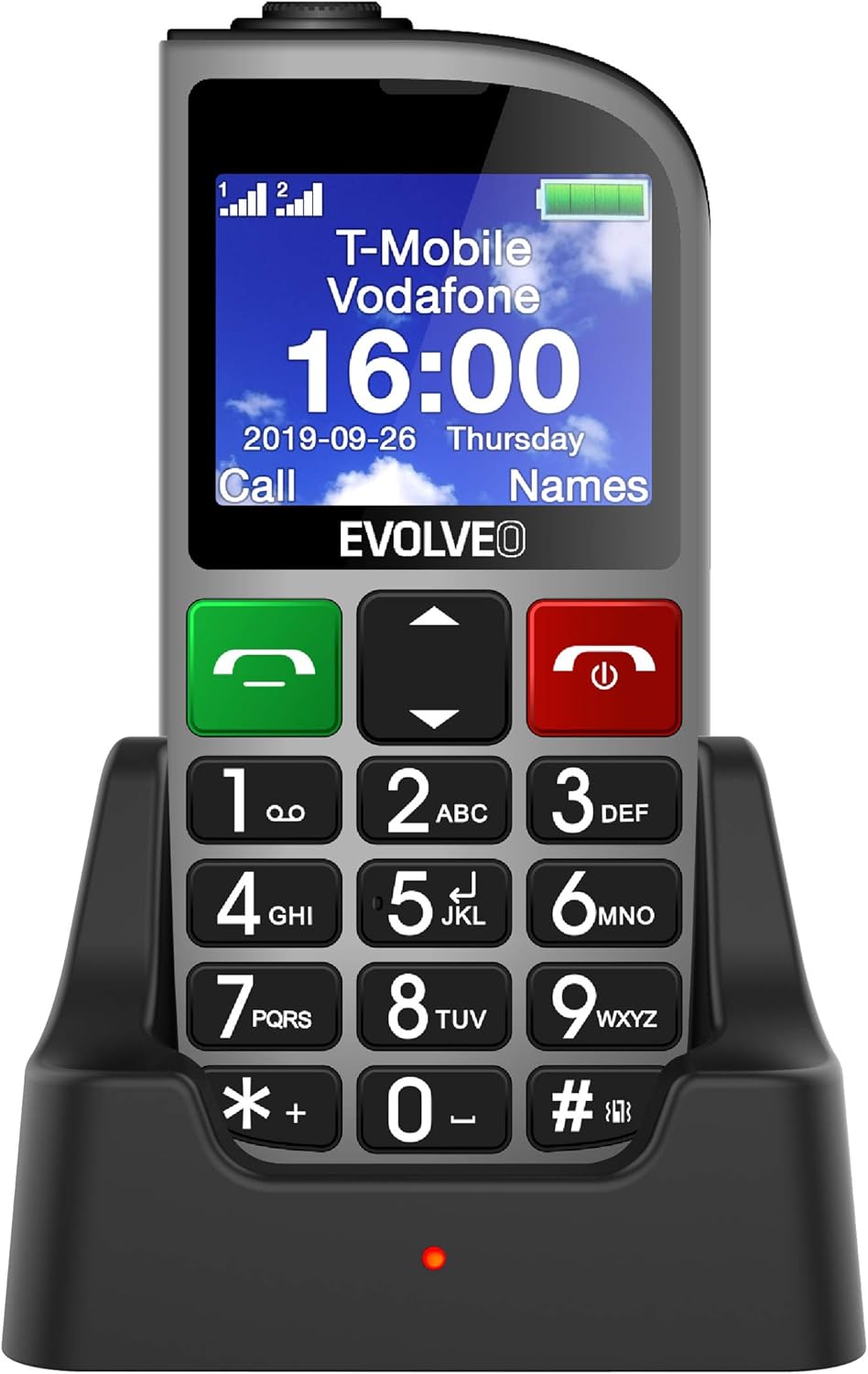
Şekil 1.1: EVOLVEO EASYPHONE FM placed in its charging dock. The phone features a large display showing time and network information, with prominent green call and red end call buttons, and a numeric keypad below.
2. Kurulum
2.1. Pilin Takılması ve Şarj Edilmesi
- Telefonun arka kapağını çıkarın.
- Insert the Li-ion 1000 mAh battery, ensuring the contacts align correctly.
- Arka kapağı değiştirin.
- Connect the AC adapter to the charging dock.
- Place the phone into the charging dock. The charging indicator light will illuminate.
- Telefonu ilk kullanımdan önce tamamen şarj olmasına izin verin.
2.2. SIM Kart(lar)ın Takılması
The phone supports two SIM cards (Dual SIM) for GSM/GPRS 850/900/1800/1900 MHz networks.
- Telefonun kapalı olduğundan emin olun.
- Arka kapağı ve pili çıkarın.
- Locate the SIM card slots.
- Insert your SIM card(s) into the designated slots, ensuring correct orientation.
- Pili ve arka kapağı yeniden takın.
2.3. Inserting a MicroSDHC Card
You can expand the phone's storage for music, photos, and other files by inserting a MicroSDHC card.
- Telefonun kapalı olduğundan emin olun.
- Arka kapağı ve pili çıkarın.
- Locate the MicroSDHC card slot.
- Gently insert the MicroSDHC card until it clicks into place.
- Pili ve arka kapağı yeniden takın.
3. Kullanım Talimatları
3.1. Güç Açma/Kapatma
- Açmak için: tuşuna basın ve basılı tutun Red End Call/Power ekran aydınlanıncaya kadar düğmesine basın.
- Kapatmak için: tuşuna basın ve basılı tutun Red End Call/Power button until the power off options appear, then confirm.

Şekil 3.1: Ön view of the EVOLVEO EASYPHONE FM, highlighting the large display, call buttons, and numeric keypad for easy dialing.
3.2. Arama Yapma ve Alma
- Arama yapmak: Dial the number using the numeric keypad and press the Yeşil Çağrı düğme.
- Hızlı arama: The phone supports quick access to 8 popular contacts. Assign numbers to keys 2-9 for speed dialing. Press and hold the assigned key to dial.
- Bir Çağrı Alma: Basın Yeşil Çağrı Gelen bir aramayı cevaplamak için düğme.
- Aramayı Bitirme: Basın Red End Call/Power button to end an active call.
3.3. SMS Mesajları Gönderme ve Alma
The separated keyboard keys facilitate easy writing of SMS messages.
- Navigate to the Messaging menu.
- Select "Write Message" to compose a new SMS.
- Alıcının numarasını girin veya kişilerden seçin.
- Tuş takımını kullanarak mesajınızı yazın.
- Mesajı iletmek için "Gönder"e basın.
3.4. Ses Kontrolü
Adjust the call and ringtone volume using the dedicated volume control button located on the left side of the phone.

Şekil 3.2: Left side of the phone, showing the volume control buttons and the FM radio activation button.
3.5. SOS Acil Durum Düğmesi
The SOS button, located on the back of the device, allows for quick emergency calls and messages.
- Before use, configure up to five emergency contact numbers in the phone settings.
- Acil bir durumda, tuşuna basın ve basılı tutun s.o.s. düğme.
- The phone will automatically dial the predefined emergency numbers sequentially and send an emergency message to these contacts.

Şekil 3.3: Arka view of the EVOLVEO EASYPHONE FM, showing the prominent red SOS emergency button and the camera lens.
3.6. FM Radyo
The phone includes an FM radio with a dedicated activation button.
- To turn on the FM radio, press the independent FM button on the side of the device.
- The radio can play in the background, allowing you to use other phone functions.
- During an incoming or outgoing call, the radio will automatically mute and resume playback after the call ends.
3.7. El feneri
A powerful flashlight is integrated into the phone, activated by a dedicated button.
- Press the dedicated flashlight button on the side of the phone to turn the flashlight on or off.

Şekil 3.4: Right side of the phone, showing the dedicated flashlight button.
3.8. Diğer Özellikler
- Kamera: The phone includes a VGA camera for basic photo capture.
- Müzik çalar: Müzik çal files stored on your MicroSDHC card.
- Digital Recorder (Dictaphone): Sesli notlar kaydedin.
- Takvim: Önemli tarih ve olayları takip edin.
- Çalar Saat: Hatırlatıcılar için alarmlar kurun.
- Hesaplama: Temel hesaplamaları yapın.
- Büyüteç: Utilize the screen as a magnifying glass.
4. Bakım
4.1. Cihazın Temizlenmesi
- Use a soft, dry cloth to clean the phone's surface and screen.
- Avoid using liquid cleaners or abrasive materials, as they may damage the device.
- Şarj portuna veya diğer açıklıklara nem girmemesine dikkat edin.
4.2. Pil Bakımı
- Pil ömrünü uzatmak için telefonu aşırı sıcaklıklara maruz bırakmaktan kaçının.
- Charge the battery regularly, but avoid overcharging or letting it completely drain for extended periods.
- Telefon uzun süre kullanılmayacaksa, saklamadan önce pilini yaklaşık %50'ye kadar şarj edin.
5. Sorun Giderme
If you encounter issues with your EVOLVEO EASYPHONE FM, refer to the following common problems and solutions:
5.1. Telefon Açılmıyor
- Pilin doğru şekilde takıldığından ve şarj edildiğinden emin olun.
- Connect the phone to the charger and wait a few minutes before attempting to power it on again.
- Pil temas noktalarının temiz olup olmadığını kontrol edin.
5.2. Cannot Make or Receive Calls
- Check if the SIM card(s) are correctly inserted and activated.
- Ağ bağlantınızın olduğundan emin olun.
- Verify that the phone is not in airplane mode (if applicable).
- Check your account balance or subscription status with your service provider.
5.3. FM Radio Not Working
- Ensure you are in an area with good FM signal reception.
- Check if the FM radio is properly activated using its dedicated button.
5.4. Ekran Sorunları
- If the display is dim, check the brightness settings.
- If the screen is unresponsive, try restarting the phone.
6. Özellikler
| Marka | evrim |
| Örnek | EASYPHONE FM |
| Ekran Boyutu | 1.8 inç |
| Ekran Çözünürlüğü | 320 x 240 piksel |
| Hücresel Teknoloji | 2G (GSM/GPRS 850/900/1800/1900 MHz) |
| SIM Desteği | Çift SIM |
| Bağlantı | Bluetooth, 3.5 mm Jak |
| Pil | Lityum iyon 1000 mAh |
| Boyutlar | 130 × 61 × 16.5 mm |
| Ağırlık | 105 gr (pil dahil) |
| Kamera | VGA |
| Depolama Genişletmesi | MicroSDHC kart yuvası |
Not: Teknik özellikler önceden haber verilmeksizin değiştirilebilir.
7. Garanti ve Destek
For warranty information and technical support, please refer to the warranty card included in your package or visit the official Evolveo webSite. Satın alma belgenizi garanti talepleriniz için saklayın.