1. Giriş
Thank you for choosing the VANTRUE N4 3 Channel Dash Cam. This manual provides detailed instructions for the installation, operation, and maintenance of your dash cam. Please read this manual thoroughly before use to ensure proper functionality and to maximize your device's potential.
The VANTRUE N4 is designed to provide comprehensive surveillance for your vehicle, featuring three channels for simultaneous recording of the front, interior, and rear views. Its advanced capabilities include high-resolution video capture, infrared night vision, and intelligent parking modes, offering reliable protection and peace of mind on the road and while parked.

Image: The VANTRUE N4 dash cam, highlighting its 3-channel recording capability as an optimal solution for road safety.
2. Kutuda Neler Var?
Lütfen paket içeriğini kontrol ederek tüm öğelerin mevcut olduğundan emin olun:
- VANTRUE N4 Dash Cam with Suction Cup Mount
- Araba Şarj Cihazı
- USB Veri Kablosu
- Kurulum Aracı
- Kullanım Kılavuzu (bu belge)
3. Ürün Bittiview
The VANTRUE N4 features a compact design with multiple cameras to cover various angles. Below is an overview of the main unit and its components.
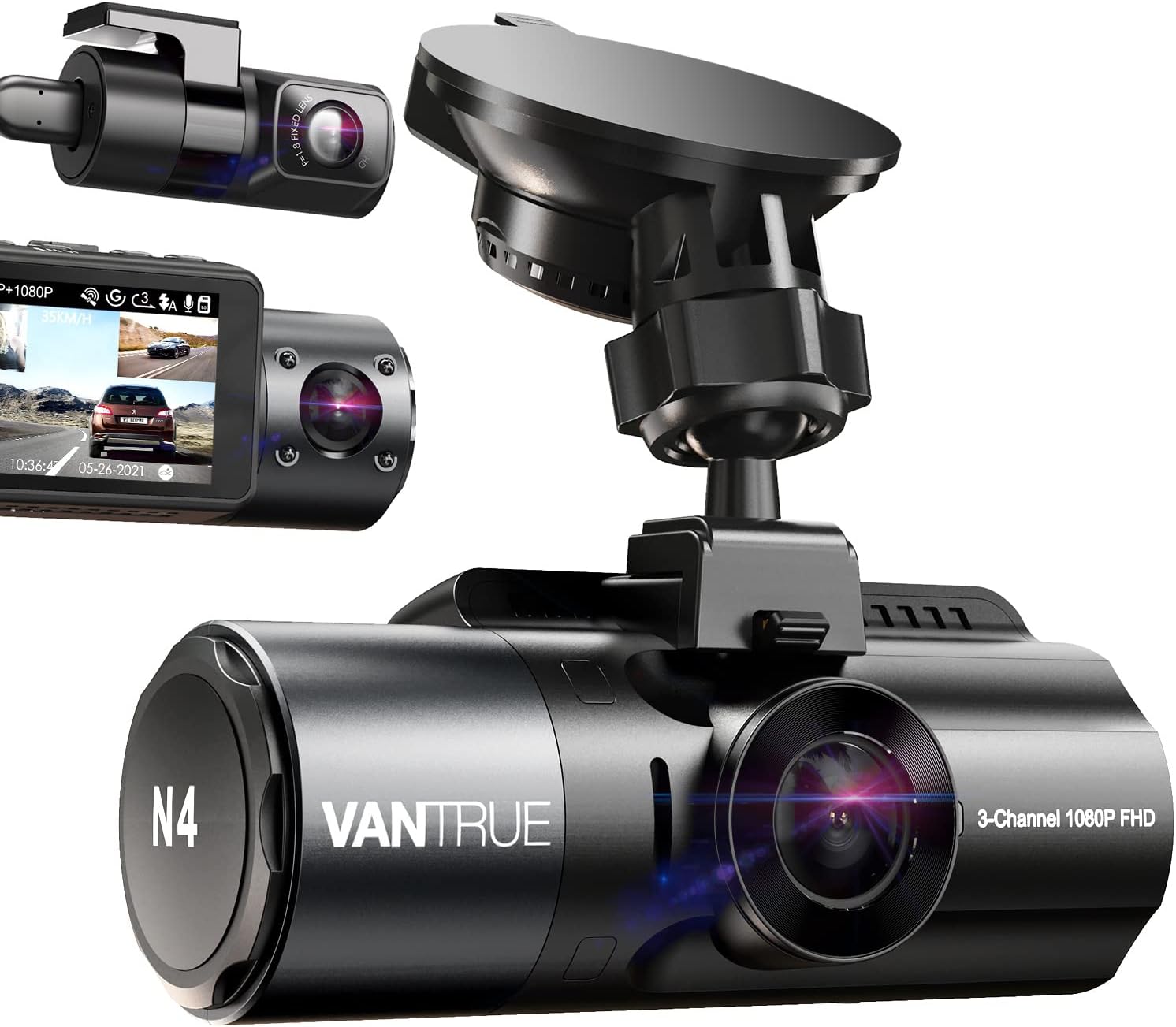
Image: The VANTRUE N4 dash cam, showing its main unit, suction cup mount, and separate interior and rear camera modules.
Temel Özellikler:
- Three Channel Recording: Simultaneously records front (155°), interior (165°), and rear (160°) views.
- Yüksek Çözünürlük: Up to 1440P + 1440P + 1080P in 3-channel mode, or 4K when front camera is used alone.
- Kızılötesi Gece Görüşü: Equipped with STARVIS CMOS sensor, F1.4/F1.8 aperture lenses, and 4 IR LED lights for clear low-light recording.
- 24 Saat Park Modu: Supports low bitrate, motion detection, and collision detection parking modes (requires hardwire kit).
- Süper Kapasitör: Heat resistant, operating from 14°F to 158°F (-10°C to 70°C), extending lifespan.
- G-Sensörü ve Döngüsel Kayıt: Foo'yu otomatik olarak kilitlertage upon impact and overwrites oldest filehafıza kartı dolduğunda.
4. Kurulum ve Kurulum
Follow these steps to properly install your VANTRUE N4 Dash Cam in your vehicle.
4.1. Montaj Yerinin Seçilmesi
Ön camınızda görüşünüzü engellemeyecek bir yer seçin. view of the road. The ideal position is usually behind the rearview ayna.
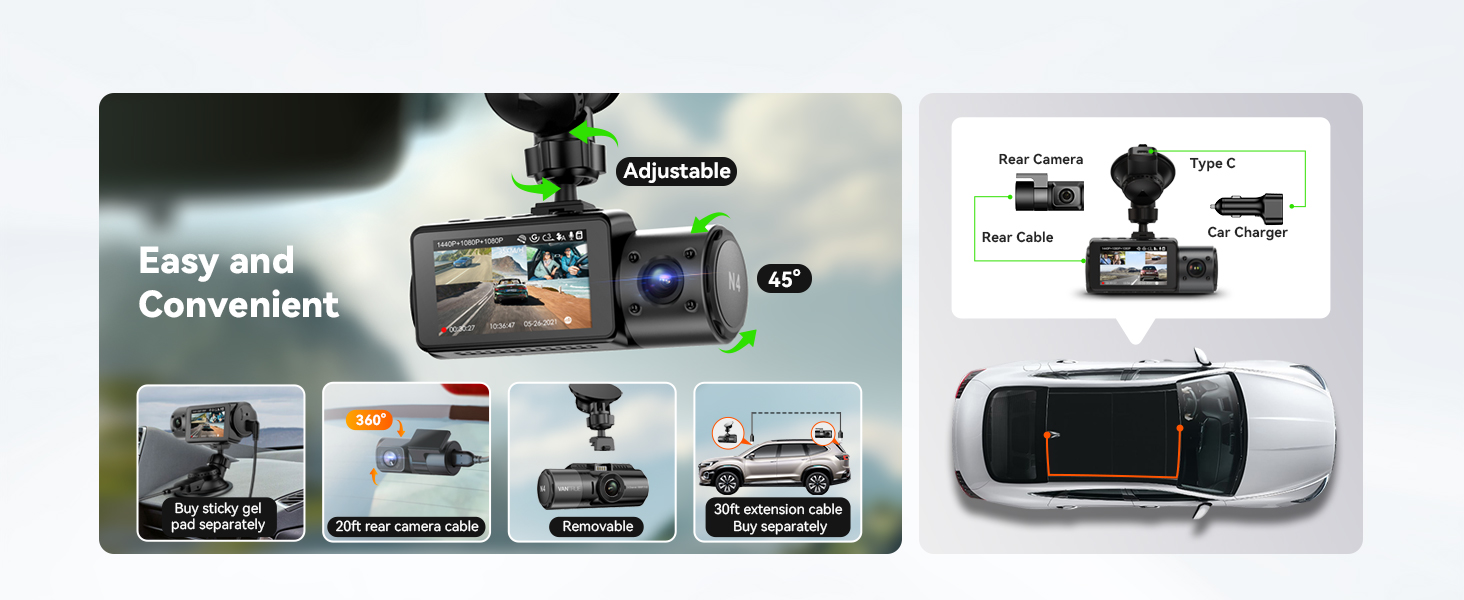
Image: Visual guide for easy installation, showing the adjustable mount, removable camera, and cable routing for the rear camera.
4.2. Installing the Front Dash Cam
- Clean the windshield area where the suction cup mount will be attached.
- Attach the suction cup mount to the windshield and secure it by flipping the lever.
- Slide the main dash cam unit onto the mount until it clicks into place.
- Adjust the angle of the front camera to ensure it captures the road ahead clearly.
4.3. Arka Kameranın Takılması
The rear camera connects to the main unit via a 20ft extension cable, suitable for most vehicles.
- Arka kamera kablosunu ana araç içi kamera ünitesine bağlayın.
- Route the cable neatly along the vehicle's headliner and pillar trim to the rear of the vehicle.
- Arka kamerayı arka cama monte edin ve net bir görüntü elde edin. view of the road behind. The rear camera can be adjusted up to a full 360° angle.
4.4. Güç Bağlantısı
Connect the car charger to your vehicle's cigarette lighter socket and the other end to the dash cam's power input. For 24-hour parking mode functionality, a hardwire kit (sold separately, ASIN B083XB8T7T) or an external battery is required.
5. Kullanım Talimatları
This section details how to use the various recording modes and features of your N4 Dash Cam.
5.1. Kayıt Modları
The N4 offers flexible recording configurations:
- Three Channel Mode: Records front, interior, and rear simultaneously at 1440P + 1440P + 1080P.
- Front and Rear Dual Channel: Records front at 4K (2160P) and rear at 1080P.
- Front and Inside Dual Channel: Records front and interior at 1440P + 1440P.
- Sadece Ön: Records front camera only at up to 4K resolution.

Image: Diagram illustrating the different high-resolution recording modes available: 3-channel, front+rear, front+cabin, and front only.
5.2. Kızılötesi Gece Görüşü
The N4 is equipped with advanced night vision capabilities to capture clear footage in low-light conditions, both outside and inside the vehicle.

Image: Illustration of Super Night Vision, showing clear front, rear, and interior views in dark environments, supported by WDR and IR lights.
5.3. 24 Hours Parking Mode
To enable 24-hour parking mode, the dash cam must be connected to a hardwire kit (ASIN B083XB8T7T) or an external battery. This mode offers several options:
- Hareket Algılama: The camera automatically starts recording when motion is detected around your vehicle.
- Çarpışma Algılama: Utilizes the G-sensor to detect impacts or scratches and automatically records the event.
- Düşük Bit Hızı Kaydı: Continuously records at 720P, saving storage space while providing constant surveillance.
- Low Frame Rate (Time Lapse): Records at 1 or 5 frames per second, suitable for monitoring changes in the parking environment over time.

Image: Depiction of 24-hour Motion Detection Parking Mode, showing the dash cam's ability to record when movement is detected around the car.

Image: Illustration of Collision Detection Parking Mode, demonstrating how the G-sensor detects and records impacts.

Image: Visual explanation of Low Bitrate Recording Parking Mode, showing continuous recording at lower quality to save space.

Image: Depiction of Low Frame Rate Parking Mode, capturing changes in the parking environment with 1 or 5 frames per second.
5.4. Döngüsel Kayıt ve G-Sensörü
The dash cam continuously records, overwriting the oldest files when the memory card is full. The G-sensor detects sudden shakes or collisions and automatically locks the current footage to a separate event folder to prevent it from being overwritten.

Image: Visual representation of Loop Recording and G-Sensor functionality, showing how videos are continuously recorded and locked upon impact.
5.5. Zaman Atlamalı Kayıt
In Time Lapse mode, the dash cam captures photos at set intervals (1s or 5s) and stitches them into a video, ideal for documenting long journeys or monitoring parking over extended periods.

Resim: Eskiample of Time Lapse recording, showing a scenic view captured over time.
5.6. Optional GPS Functionality
An optional GPS mount (sold separately, ASIN B083XBS88L) allows the dash cam to track your route, location, and speed (in KM/H or MP/H). VANTRUE provides a free GPS player software for viewing this data on your computer, enabling effective capture of license plate details with a zoom-in function.
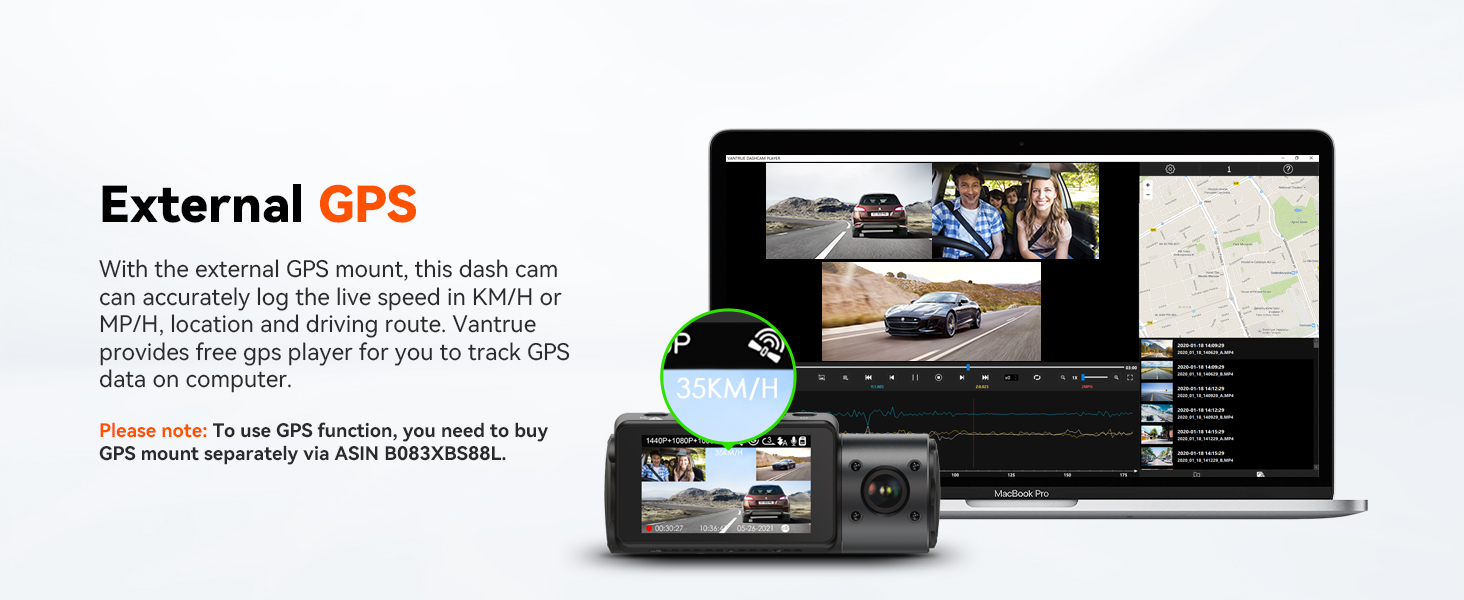
Image: Display of the external GPS feature, showing how route, location, and speed data can be viewed alongside video footage. bilgisayarda.
5.7. Memory Card Support
The N4 supports external memory cards up to 512GB (not included). A Vantrue SD card (ASIN B09SNRFSS3) is recommended for optimal performance.

Image: Chart showing supported memory card sizes (64GB, 128GB, 256GB, 512GB) and their corresponding recording durations.
6. Bakım
Doğru bakım, araç içi kameranızın uzun ömürlü olmasını ve en iyi performansı göstermesini sağlar.
6.1. Cihazın Temizlenmesi
- Araç içi kamera gövdesini temizlemek için yumuşak, kuru bir bez kullanın.
- For lenses, use a lens cleaning cloth and specialized lens cleaning solution to avoid scratches.
- Sert kimyasallar veya aşındırıcı temizleyiciler kullanmayın.
6.2. Sıcaklık Hususları
The N4 is built with a super capacitor, making it resistant to extreme temperatures from 14°F to 158°F (-10°C to 70°C). This design enhances durability compared to traditional lithium-ion batteries.

Image: Illustration of the built-in supercapacitor, highlighting its ability to withstand temperatures from -20°C to 70°C.
6.3. Ürün Yazılımı Güncellemeleri
Periodically check the VANTRUE official website for firmware updates. Updates can provide continuous improvements and new features for your device.
7. Sorun Giderme
If you encounter issues with your VANTRUE N4 Dash Cam, refer to the following common problems and solutions:
| Sorun | Olası Çözüm |
|---|---|
| Araç kamerası açılmıyor. | Ensure the car charger is properly connected to both the dash cam and the vehicle's power outlet. Check if the vehicle's cigarette lighter socket is functioning. |
| Kayıt beklenmedik bir şekilde duruyor. | Check if the memory card is full; enable loop recording. Ensure the memory card is a high-speed (Class 10 or U3) card and is formatted correctly. The camera may shut off if ambient temperature exceeds operating limits. |
| video footage bulanık veya belirsiz. | Fotoğraf makinesinin lenslerini temizleyin. Lenslerden koruyucu filmin çıkarıldığından emin olun. Fotoğraf makinesinin sağlam bir şekilde monte edildiğinden ve titreşmediğinden emin olun. |
| Parking mode is not working. | Parking mode requires a continuous power supply via a hardwire kit (sold separately) or an external battery. Ensure the hardwire kit is correctly installed and providing power. |
| Araç içi kamera çalışırken ısınıyor. | It is normal for the dash cam to get warm during operation, especially in high-resolution modes or hot environments. The super capacitor design helps manage heat. If it overheats and shuts down, allow it to cool before resuming use. |
If the problem persists, please contact VANTRUE customer support.
8. Özellikler
| Özellik | Detay |
|---|---|
| Model Adı | ONDASH N4 |
| Ürün Boyutları | 4.1 x 1.57 x 5 inç |
| Ürün Ağırlığı | 1.76 pound |
| Video Yakalama Çözünürlüğü | Up to 4K (Front only), 1440P+1440P+1080P (3-channel) |
| Mercek Açısı | Front: 155°, Inside: 165°, Rear: 160° |
| Özel Özellikler | Built-In Microphone, Infrared Night Vision, G-Sensor, Loop Recording, Parking Mode |
| Depolama Desteği | Up to 512GB external memory (MicroSD card, not included) |
| Güç Kaynağı | Super Capacitor (14°F to 158°F / -10°C to 70°C) |
| Bağlantı Teknolojisi | Cigarette Lighter Connected (No WiFi or Bluetooth) |
| Montaj Tipi | Emme Yuvası |
9. Garanti ve Destek
VANTRUE, yüksek kaliteli ürünler ve mükemmel müşteri hizmeti sunmaya kendini adamıştır.
9.1. Garanti Bilgileri
This product comes with an extendable 18 ay garanti. Please register your product on the official VANTRUE website to activate and extend your warranty.
9.2. Müşteri Desteği
For any questions, technical assistance, or warranty claims, please contact VANTRUE customer support:
- E-posta: destek@vantrue.net (24 saat içinde yanıt)
- Telefon: 510-666-4086
VANTRUE also offers a 30 günlük iade politikası ve bir %100 memnuniyet garantisi.

Image: Information on VANTRUE's 18-month extended warranty, 30-day return policy, and 24-hour customer support.


