giriiş
This manual provides essential information for the safe and efficient operation of your Dual MCR 4 Portable DAB+/FM Radio. This device offers both digital DAB+ and analog FM radio reception, ensuring a wide range of listening options. Its color TFT display enhances usability by showing station names and additional information. With intuitive controls, auxiliary input, and headphone jack, the MCR 4 is designed for versatile and enjoyable audio experiences.
Güvenlik Bilgileri
- Cihazı kullanmadan önce tüm talimatları dikkatlice okuyun.
- Cihazınızı sudan, nemden ve yüksek sıcaklıklardan uzak tutunuz.
- Üniteyi sökmeye veya değiştirmeye çalışmayın. Tüm bakım işlemlerini yetkili personele yaptırın.
- Use only the provided power adapter or recommended battery types.
- Cihazın çalışması sırasında çevresinde yeterli havalandırmanın olduğundan emin olun.
- Pilleri yerel yönetmeliklere uygun şekilde sorumlu bir şekilde atın.
Paket İçeriği
Lütfen paketin içindeki tüm ürünlerin eksiksiz olduğundan emin olun:
- Dual MCR 4 Main Unit
- Güç Adaptörü
- Kullanıcı Kılavuzu
Ürün Bittiview
The Dual MCR 4 features a compact design with intuitive controls for easy access to its functions. Key components include:
- Color TFT Display: İstasyon bilgilerini, saatini ve menü seçeneklerini gösterir.
- Döner düğme: For tuning, volume control, and menu navigation.
- Bellek Düğmeleri: To save and recall your favorite radio stations.
- Teleskopik Anten: For optimal radio signal reception.
- Auxiliary Input (AUX-IN): Located at the back, for connecting external audio devices.
- Kulaklık girişi: Located at the back, for private listening.
- Mechanical On/Off Switch: Located at the back, for direct power control.
- Passive Membrane: Located at the back, contributing to exceptional sound quality.
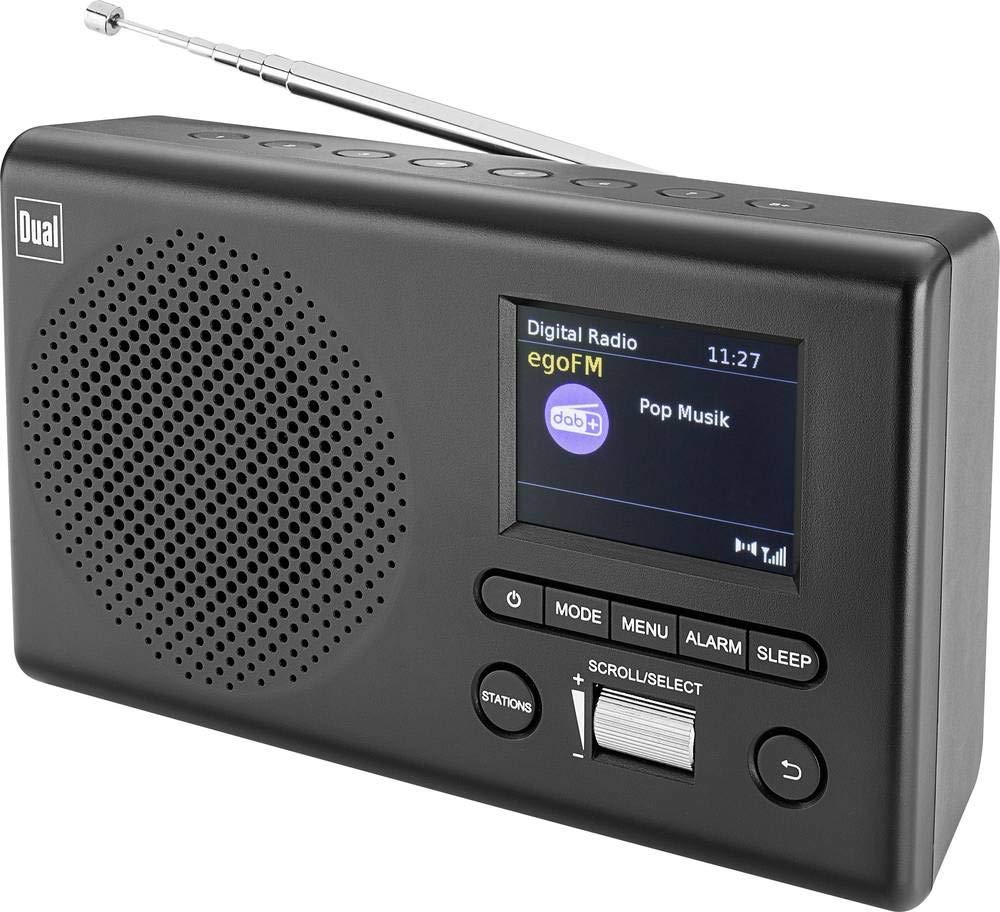
Resim: Ön view of the Dual MCR 4 Portable DAB+/FM Radio, showing the color TFT display, rotary knob, and control buttons. The radio has a black and silver finish.
Kurmak
1. Cihaza Güç Verme
The Dual MCR 4 can be powered by either the included AC power adapter or batteries, offering portability.
- AC Adaptörünü Kullanma: Connect the power adapter to the DC IN port on the back of the radio and plug the other end into a standard wall outlet.
- Pillerin Kullanımı: Open the battery compartment on the bottom/back of the radio and insert the required batteries (type and quantity usually specified inside the compartment or in the full manual). Ensure correct polarity.
2. Anten Ayarı
Extend the telescopic antenna fully for optimal reception of both DAB+ and FM radio signals. Adjust its position for the best signal quality.
3. Initial Power On and Station Scan
After connecting power, switch on the radio using the mechanical ON/OFF switch at the back. The radio will typically perform an automatic station scan upon first use, searching for available digital (DAB+) and analog (FM) radio stations. This process may take a few moments.
Kullanım Talimatları
1. Temel İşlem
- Güç Açma/Kapatma: Use the mechanical switch at the back. For standby, a dedicated button on the front might be available (refer to physical unit).
- Ses Kontrolü: Rotate the main rotary knob to adjust the listening volume.
2. DAB+ Radio Mode
- Selecting DAB+ Mode: Press the MODE button (if available) or navigate through the menu using the rotary knob until DAB+ mode is selected.
- İstasyon Seçimi: After an automatic scan, use the rotary knob to scroll through the list of available DAB+ stations. Press the knob to confirm your selection.
- Ön Ayarların Kaydedilmesi: Tune to your desired station. Press and hold a memory button (e.g., 1-5) until the display confirms the station is saved.
- Ön Ayarların Geri Çağrılması: Briefly press the corresponding memory button to recall a saved station.
- Görüntü Bilgisi: The color TFT display will show station name, program information (DLS), and potentially station logos or slideshows.
3. FM Radyo Modu
- Selecting FM Mode: Press the MODE button or navigate through the menu until FM mode is selected.
- Manuel Ayarlama: Rotate the tuning knob to manually adjust the frequency.
- Otomatik Tarama: Press and hold the tuning knob or a dedicated scan button to automatically search for the next available FM station.
- Ön Ayarların Kaydedilmesi: Tune to your desired FM station. Press and hold a memory button until the display confirms the station is saved.
- Ön Ayarların Geri Çağrılması: Briefly press the corresponding memory button to recall a saved station.
4. Auxiliary Input (AUX-IN)
Connect an external audio device (e.g., smartphone, MP3 player) to the AUX-IN port on the back of the radio using a 3.5mm audio cable. Select AUX mode on the radio to play audio from the connected device.
5. Kulaklık Kullanımı
For private listening, plug standard 3.5mm headphones into the headphone jack located on the back of the unit. The internal speaker will automatically mute.
Bakım
- Temizlik: Radyoyu yumuşak, kuru bir bezle silin. Aşındırıcı temizleyiciler veya çözücüler kullanmayın.
- Depolamak: If storing for an extended period, remove batteries and store the unit in a cool, dry place.
- Anten Bakımı: Hasar görmemesi için teleskopik anteni nazikçe tutun.
Sorun giderme
| Sorun | Olası Çözüm |
|---|---|
| Güç yok |
|
| Zayıf radyo alımı |
|
| Hoparlörlerden ses gelmiyor |
|
Özellikler
| Marka | Çift |
| Model Numarası | 76074 |
| Renk | Siyah, Gümüş |
| Ayarlama Teknolojisi | DAB+, FM |
| Bağlantı Teknolojisi | Auxiliary (AUX-IN) |
| Özel Özellikler | Portable, Color TFT Display |
| Uyumlu Cihazlar | Headphones, External Audio Devices (via AUX-IN) |
| Güç Kaynağı | Mains (AC Adapter), Battery Powered |
| Dahil Bileşenler | Main Unit, Power Adapter, User Manual |
| Önerilen Kullanım | Müzik |
Garanti ve Destek
For warranty information and technical support, please refer to the specific warranty card included with your product or contact Dual customer service. The included user manual provides detailed instructions and contact information.


