1. Giriş
The V7 KW550ESBT Bluetooth Keyboard is designed to enhance your productivity with versatile connectivity options. This compact, ultra-slim keyboard offers a comfortable and quiet typing experience, featuring laser-etched keys for long-lasting durability. It supports connection to multiple devices via Bluetooth or a 2.4 GHz USB dongle.
Temel özellikler şunlardır:
- Seamless switching between up to 2 Bluetooth devices or connection via the included 2.4 GHz USB dongle.
- Scissor-switch keys for comfortable and quiet typing.
- Laser-etched keys for enhanced durability.
- Ultra-slim and compact design.
- Includes two AAA batteries for immediate use.
2. Paket İçeriği
Lütfen paketi aşağıdaki öğeler açısından kontrol edin:
- V7 KW550ESBT Bluetooth Keyboard
- 2.4 GHz USB Receiver (dongle)
- 2 x AAA Pil
- Kullanım Kılavuzu (bu belge)

Image: The V7 KW550ESBT keyboard shown with its accompanying 2.4 GHz USB receiver, ready for connection.
3. Kurulum
3.1. Pil Kurulumu
- Klavyenin alt tarafındaki pil yuvasını bulun.
- Pil bölmesinin kapağını açın.
- İki adet AAA pili, kutupların doğru olmasına dikkat ederek (+/-) takın.
- Pil bölmesi kapağını sıkıca kapatın.
3.2. Connecting via 2.4 GHz USB Dongle
- Remove the 2.4 GHz USB receiver from its storage slot (usually within the battery compartment or a dedicated slot).
- USB alıcısını bilgisayarınızdaki veya cihazınızdaki boş bir USB portuna takın.
- The keyboard should automatically connect. If not, ensure the keyboard is powered on and the connection indicator light (if present) is active.
3.3. Bluetooth ile bağlanma
The V7 KW550ESBT keyboard supports connecting to up to two Bluetooth devices.
- Klavyenin açık olduğundan emin olun.
- Press and hold the Bluetooth pairing key (refer to keyboard layout for specific key, often indicated by a Bluetooth symbol or 'BT1'/'BT2') for a few seconds until the Bluetooth indicator light starts blinking, indicating it's in pairing mode.
- Cihazınızda (bilgisayar, tablet, akıllı telefon) Bluetooth ayarlarına gidin.
- Arama available devices and select "V7 KW550ESBT" (or similar name) from the list.
- Eşleştirme işlemini tamamlamak için ekrandaki yönergeleri izleyin. Ekranda görüntülenen bir kodu klavyeyi kullanarak girmeniz istenebilir.
- Repeat for a second Bluetooth device if desired, using the other Bluetooth pairing key.
3.4. Bağlı Cihazlar Arasında Geçiş Yapma
To switch between connected devices (Bluetooth 1, Bluetooth 2, or 2.4 GHz USB), press the corresponding function key (e.g., Fn + BT1, Fn + BT2, or Fn + 2.4G if available). Refer to your keyboard's specific layout for these keys.
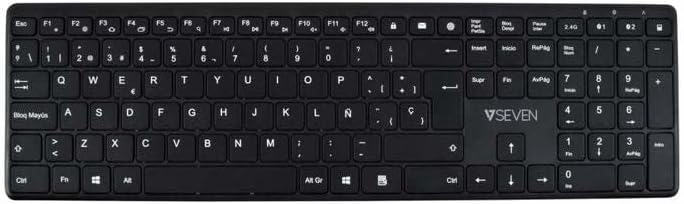
Resim: Yukarıdan aşağıya view of the V7 KW550ESBT keyboard, showing the full QWERTY layout and function keys.
4. Klavyenin Kullanımı
4.1. Standard Key Functions
The keyboard features a standard QWERTY layout with all essential alphanumeric keys, punctuation, and modifier keys (Shift, Ctrl, Alt, Windows/Command).
4.2. Multimedya ve Fonksiyon Tuşları
The top row of keys (F1-F12) often doubles as multimedia or special function keys. These functions are typically accessed by pressing the Fn key simultaneously with the desired F-key. Common functions include:
- Volume control (mute, decrease, increase)
- Medya oynatma (oynat/duraklat, önceki, sonraki)
- Ekran parlaklık ayarı
- Arama fonksiyonu
- Kilit ekranı
Refer to the icons printed on your specific keyboard's F-keys for exact functionality.
4.3. Quiet Typing Experience
The scissor-switch key design minimizes typing noise, making it suitable for quiet environments.

Resim: Yan profile of the V7 KW550ESBT keyboard, highlighting its ultra-slim design.
5. Bakım
5.1. Temizlik
Klavyenizi temizlemek için:
- Turn off the keyboard and disconnect it from your device.
- Yumuşak, tiftiksiz bir bez kullanın ve hafifçe kurulayın.ampsu veya hafif bir temizleme solüsyonu ile sonlandırıldı.
- Tuş kapaklarını ve yüzeyi nazikçe silin. Aşırı nemden kaçının.
- Tuşlar arasındaki toz ve pislikleri temizlemek için basınçlı hava kullanın.
5.2. Pil Değişimi
When the keyboard's performance degrades or the battery indicator (if present) signals low power, replace the AAA batteries as described in Section 3.1.
6. Sorun Giderme
If you encounter issues with your V7 KW550ESBT keyboard, try the following solutions:
| Sorun | Olası Çözüm |
|---|---|
| Klavye yanıt vermiyor |
|
| Tuşlar yapışkan veya tepkisiz |
|
| Bluetooth eşleştirme başarısız oldu |
|
7. Özellikler
| Özellik | Detay |
|---|---|
| Marka | V7 |
| Model Numarası | KW550ESBT |
| Bağlantı Teknolojisi | Bluetooth, 2.4 GHz Wireless (USB Dongle) |
| Klavye Açıklaması | Multimedya |
| Önerilen Kullanım | Ofis |
| Özel Özellik | Bluetooth |
| Renk | Siyah |
| Stil | Klasik |
| Ürün Boyutları | 16.1U x 4.7G x 0.8Y santimetre |
| Malzeme | Plastik |
| Güç Kaynağı | 2 x AAA Pil (dahil) |
8. Garanti ve Destek
For warranty information and technical support, please refer to the documentation provided with your purchase or visit the official V7 webSite. Satın alma belgenizi garanti talepleriniz için saklayın.