1. Giriş
Thank you for choosing the FeinTech LED Desk Lamp LTL00600. This high-quality desk lamp is designed to provide optimal lighting for your workspace while offering convenient features such as a USB charging port, adjustable brightness, and customizable color temperature. Please read this manual thoroughly before use to ensure proper operation and to maximize the lifespan of your product.
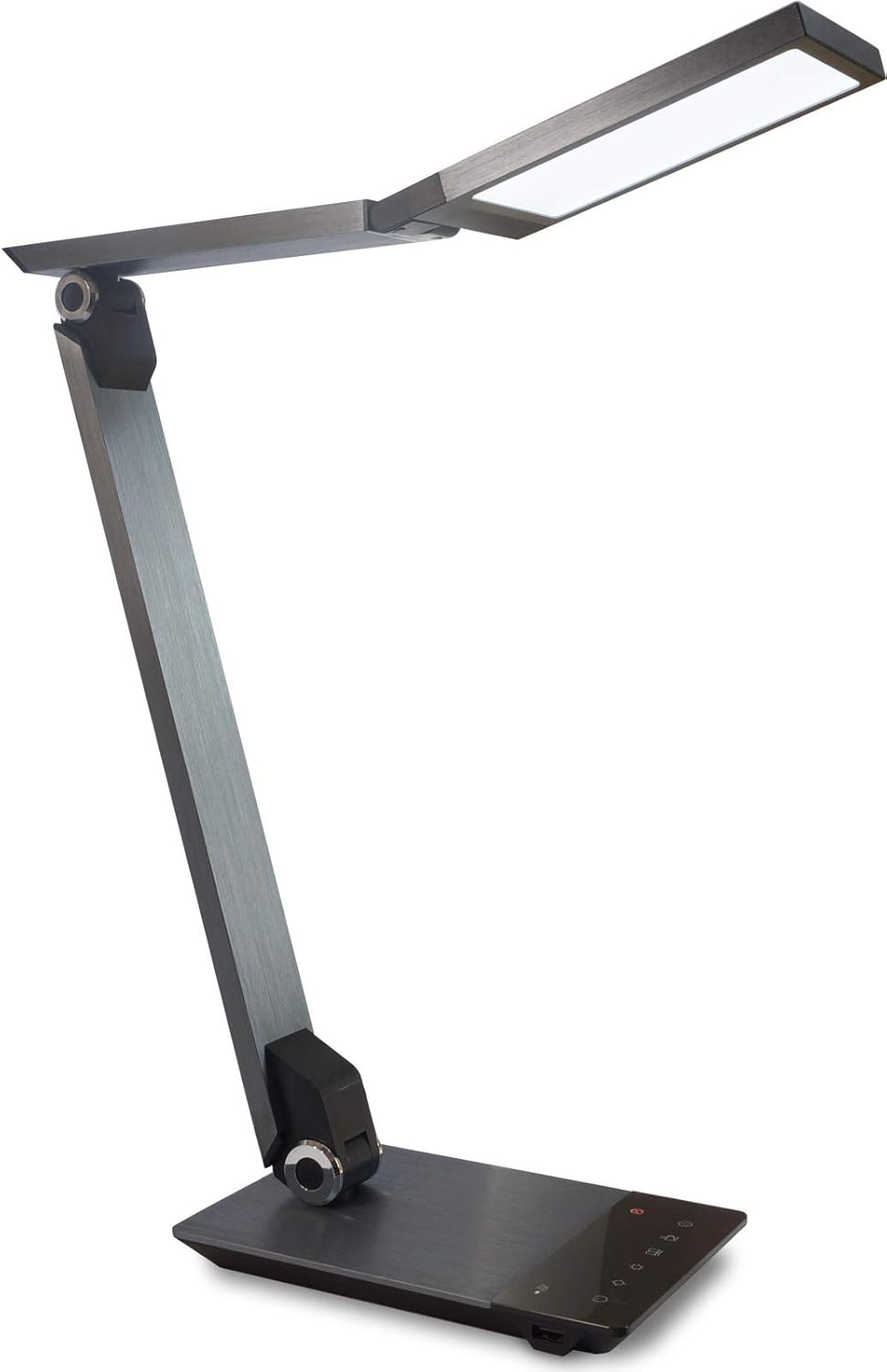
Image 1.1: FeinTech LED Desk Lamp LTL00600. This image displays the lamp dik konumda, gösteriyorasing its brushed aluminum finish and sleek design.
2. Güvenlik Talimatları
Hasar veya yaralanmayı önlemek için lütfen aşağıdaki güvenlik önlemlerine uyun:
- Güç adaptörünün uygun bir elektrik prizine bağlı olduğundan emin olun.
- l'yi açığa çıkarmayınamp aşırı su veya aşırı nemden dolayı.
- Avoid disassembling or modifying the lampOnarım işlemleri yalnızca yetkili personel tarafından yapılmalıdır.
- l'yi tutamp ısı kaynaklarından ve doğrudan güneş ışığından uzak tutun.
- l'yi temizleamp only with a soft, dry cloth. Do not use abrasive cleaners or solvents.
- LED ışık kaynağına uzun süre doğrudan bakmayın.
3. Paket İçeriği
Lütfen paketin içindeki tüm ürünlerin eksiksiz olduğundan emin olun:
- FeinTech LED Masa Lamp (Model: LTL00600)
- Güç Adaptörü (12V/2A)
4. Ürün Bittiview
Familiarize yourself with the components of your FeinTech LED Desk Lamp:
- Lamp KAFA: Contains the LED light source.
- Ayarlanabilir Kollar: Multiple joints for flexible positioning.
- Temel: Provides stability and houses the control panel and USB port.
- Kontrol Paneli: Touch-sensitive buttons for power, brightness, color temperature, and timer.
- USB Şarj Noktası: Located on the side of the base for device charging.

Resim 4.1: Yukarıdan aşağıya view l'ninamp's base and control panel. This image highlights the touch-sensitive buttons for various functions.

Resim 4.2: Yan view l'ninamp's base, showing the integrated USB charging port. This port allows for convenient charging of compatible devices.
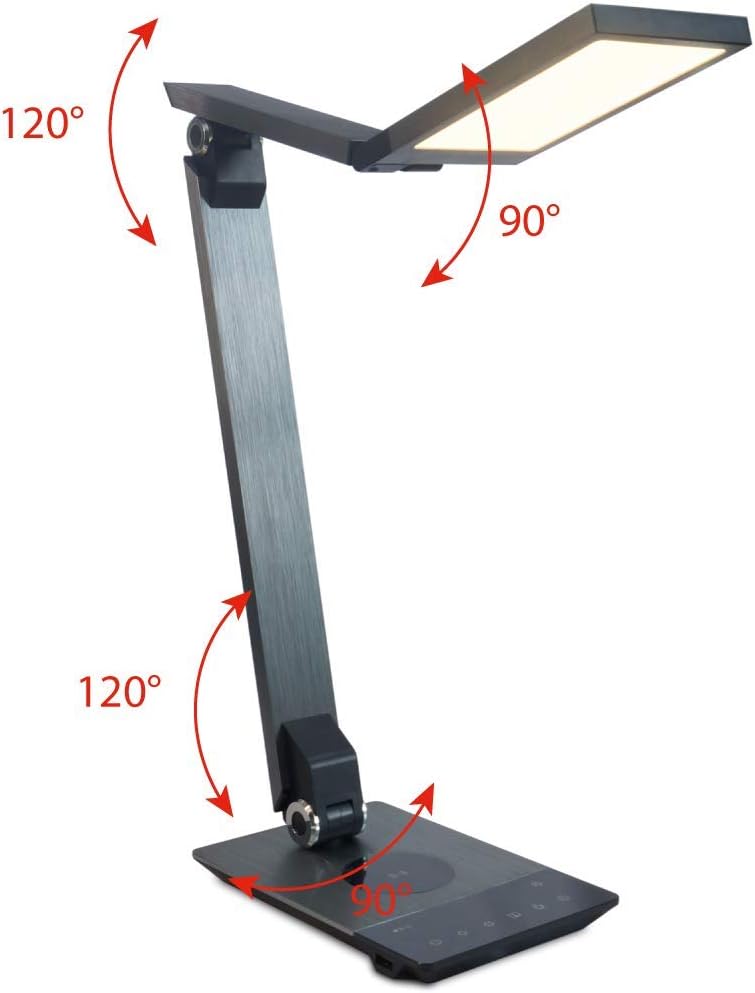
Image 4.3: Diagram illustrating the articulation angles of the lamp's joints. The lamp head can rotate 90 degrees, the upper arm 120 degrees, and the lower arm 120 degrees, allowing for flexible positioning.
5. Kurulum
İlk kurulum için şu adımları izleyin:
- Paketi aç: Tüm bileşenleri dikkatlice ambalajından çıkarın.
- Atama: l'yi yerleştirinamp base on a stable, flat surface. Ensure there is enough space for the lamp to be adjusted without obstruction.
- Gücü bağlayın: Insert the power adapter cable into the DC input port on the back of the lamp base. Plug the power adapter into a standard electrical outlet.
6. Kullanım Talimatları
The FeinTech LED Desk Lamp features intuitive touch controls on its base.
6.1 Güç Açma/Kapatma
- Dokunun Güç düğmesi on the control panel (refer to Image 4.1) to turn the lamp açık veya kapalı.
6.2 Brightness Adjustment (Dimming)
- l ileamp on, touch and hold the Parlaklık Yukarı or Parlaklık Aşağı buttons (refer to Image 4.1) to steplessly adjust the light intensity.
- Lamp base will vibrate slightly when the minimum or maximum brightness level is reached.
6.3 Renk Sıcaklığı Ayarı
- l ileamp on, touch and hold the Color Temperature Up or Color Temperature Down buttons (refer to Image 4.1) to steplessly adjust the light color from warm white (2700K) to cool white (6500K).
- Lamp base will vibrate slightly when the minimum or maximum color temperature is reached.
6.4 Favorite Settings
- Lamp allows you to store and recall 3 favorite light settings (brightness and color temperature).
- To save a setting: Adjust the brightness and color temperature to your desired level. Then, touch and hold one of the Favori düğmeler (refer to Image 4.1) until the lamp flashes briefly, indicating the setting is saved.
- To recall a setting: Simply touch the corresponding Favori düğmesi.
- The last used brightness and color temperature settings are automatically saved even after the lamp kapalı.
6.5 USB Şarj Fonksiyonu
- Connect your smartphone or other compatible device to the USB charging port on the side of the lamp base (refer to Image 4.2) using a suitable USB cable.
- The intelligent USB port delivers up to 2.4A for fast charging.
- An LED indicator will signal ongoing and completed charging status.
6.6 Zamanlayıcı İşlevi
- Dokunun Zamanlayıcı düğmesi (refer to Image 4.1) to activate the timer function.
- The first touch activates a 3-minute timer.
- A second touch activates a 1-hour timer.
- Lamp will automatically turn off after the selected time period.
7. Bakım
L'nizi korumak içinamp's appearance and functionality:
- Her zaman l bağlantısını kesinamp temizlemeden önce güç kaynağından
- l'yi silinamp yumuşak, kuru ve tüy bırakmayan bir bezle silin.
- Do not use liquid or aerosol cleaners, as they may damage the finish or internal components.
- Avoid scratching the brushed aluminum surface.
8. Sorun Giderme
Eğer l ile ilgili sorunlarla karşılaşırsanızamp, aşağıdaki yaygın sorunlara ve çözümlere bakın:
| Sorun | Olası Neden | Çözüm |
|---|---|---|
| Lamp açılmıyor. | Güç kaynağı yok. | Check if the power adapter is securely connected to the lamp and the electrical outlet. Test the outlet with another device. |
| USB şarjı çalışmıyor. | Cihaz uyumlu değil veya kablo arızalı. | Ensure your device is compatible with USB charging. Try a different USB cable. Verify the lamp açık. |
| Dokunmatik kontroller tepkisiz. | Temporary software glitch or power issue. | Disconnect the power adapter for 30 seconds, then reconnect it. Ensure your fingers are clean and dry when operating the touch controls. |
9. Özellikler
| Model Numarası | TL00600 |
| Boyutlar (U x G x Y) | 36 x 13.5 x 44 cm (yaklaşık 14.2 x 5.3 x 17.3 inç) |
| Ağırlık | 1.84 kg (yaklaşık 4.06 lbs) |
| Malzeme | Fırçalanmış alüminyum |
| Işık kaynağı | NEDEN OLMUŞ |
| Max. Light Output | 500 lumens (1000 lux at 40 cm distance) |
| Renk Sıcaklığı (CCT) | 2700 K (Warm White) to 6500 K (Cool White) |
| Power Consumption (Lamp sadece) | Maksimum 10 W |
| Power Consumption (Lamp & Charging) | Maksimum 22 W |
| USB Çıkışı | 2.4 A'ya kadar |
| Giriş Voltage (Adaptör) | 12V / 2A |
| Anahtar Türü | Dokunmak |

Image 9.1: Diagram showing the dimensions of the FeinTech LED Desk Lamp. benamp measures approximately 36 cm in length, 13.5 cm in width, and 44 cm in height.
10. Garanti ve Destek
FeinTech products are designed for reliability and performance. For warranty information or technical support, please refer to the warranty card included with your purchase or visit the official FeinTech webLütfen garanti talepleriniz için satın alma belgenizi saklayın.


