1. Giriş ve Üzeriview
The OSD Audio MX1680 GEN2 is a high-performance, multi-channel amplifier designed for distributed audio systems. This Class D amplifier provides 16 channels across 8 independent zones, delivering 80 Watts per channel into 4 Ohms or 50 Watts per channel into 8 Ohms. It is suitable for both residential and commercial audio installations, serving as a main amplifier for multi-room audio or integrating into home theater systems.
Key features include front-panel on/off buttons for each zone, efficient Class D amplification for low distortion, and built-in protection circuitry against thermal overload and short circuits. Its slim, 2U rack-mountable design (hardware included) allows for flexible installation.

Resim 1.1: Ön ve arka view of the OSD Audio MX1680 GEN2 Multi-Zone Digital Ampcankurtaran.
2. Güvenlik Bilgileri
Lütfen bu cihazı çalıştırmadan önce tüm güvenlik talimatlarını okuyun ve anlayın. Bu kılavuzu ileride başvurmak üzere saklayın.
- Güç Kaynağı: Bağlan ampAmplifikatörü yalnızca ünite üzerinde belirtilen güç kaynağı türüne bağlayın. Ses seviyesinin doğru ayarlandığından emin olun.tage, bölgeniz için doğrudur.
- Havalandırma: Havalandırma açıklıklarını hiçbir şekilde kapatmayın. Üreticinin talimatlarına uygun olarak kurulum yapın. Uygun hava akışı için ünitenin etrafında yeterli boşluk bırakın.
- Su ve Nem: Bu cihazı yağmur veya neme maruz bırakmayın. Üzerine vazo gibi sıvı dolu nesneler koymayın.
- Sıcaklık: Radyatörler, kalorifer ızgaraları, sobalar veya diğer cihazlar (dahil) gibi herhangi bir ısı kaynağının yakınına kurmayın. amp(ısı üreten)
- Topraklama: This appliance must be grounded. Ensure the power cord is connected to a properly grounded outlet.
- Servis: Bu ürüne kendiniz servis vermeye çalışmayın. Tüm servis işlemleri için kalifiye servis personeline başvurun.
- Temizlik: Temizlemeden önce cihazı elektrik prizinden çıkarın. Temizlik için kuru bir bez kullanın.
3. Kurulum ve Kurulum
3.1 Paketin açılması
Dikkatlice çıkarın amplifier from its packaging. Verify that all components listed in the 'What's in the Box' section are present. This includes the MX1680 GEN2 amplifier and the Quick Start Guide.
3.2 Yerleştirme
The MX1680 GEN2 is designed for rack mounting (2U height) or placement on a flat, stable surface. Ensure adequate ventilation around the unit to prevent overheating. Avoid placing it near other heat-generating equipment.
3.3 Bağlantılar
Refer to the rear panel diagram for all input and output connections.
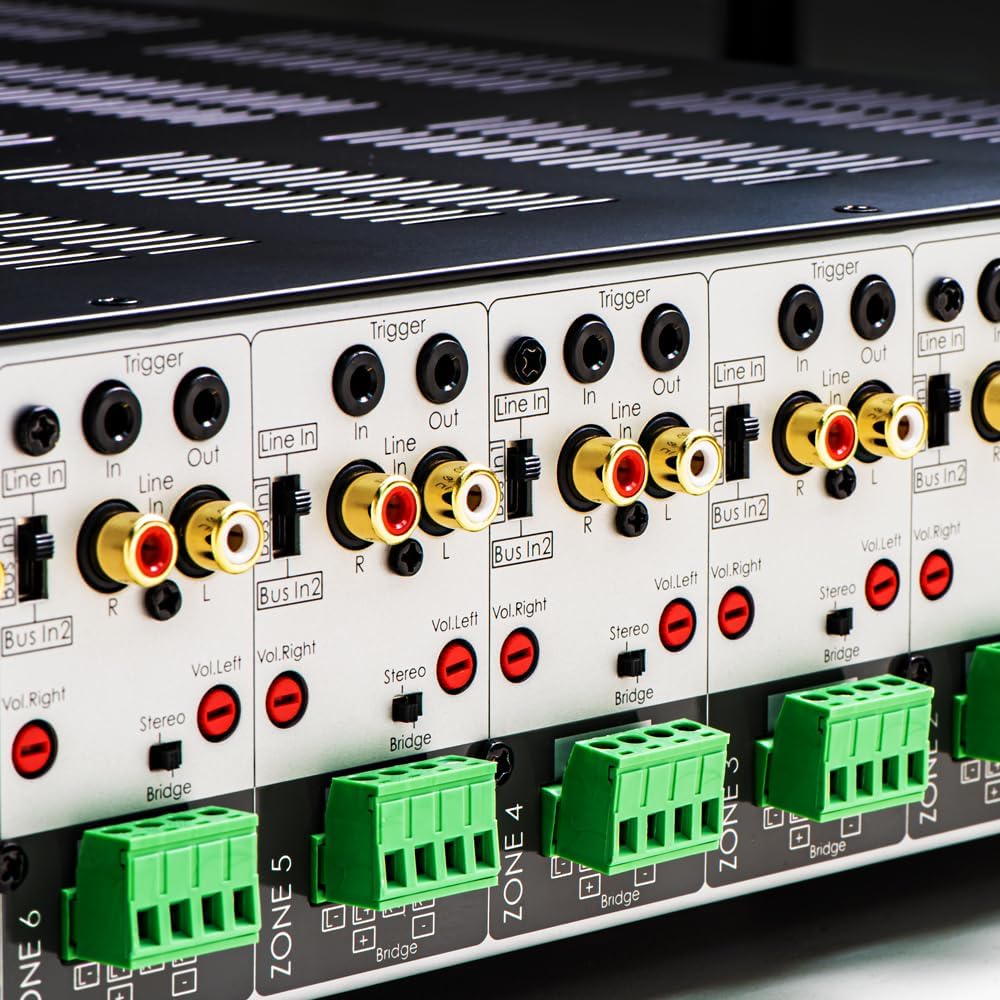
Resim 3.1: Ayrıntılı view of the rear panel input and output connections.
- Hoparlör Çıkışları: Connect your speakers to the corresponding zone terminals. Ensure correct polarity (+ to + and - to -). The amplifier supports both 4-ohm and 8-ohm speakers. For bridged mode operation, refer to section 4.3.
- Line Inputs (RCA): Each zone has a dedicated stereo RCA Line In. Connect your audio sources (e.g., pre-amplifier, media player) to these inputs.
- Bus Inputs (RCA): The amplifier features two stereo Bus Inputs (Bus In 1, Bus In 2). These allow a single audio source to be distributed to multiple zones.
- Hat Çıkışları (RCA): Each zone also has a stereo RCA Line Out, allowing the audio signal from that zone to be passed to another amplifier veya ses cihazı.
- Tetikleyici Giriş/Çıkış: The 12V Trigger In allows the amplifier to be turned on/off by an external device. The 12V Trigger Out can be used to control other devices.
- AC Güç Girişi: Connect the supplied power cord to the AC IN receptacle and then to a suitable wall outlet.

Resim 3.2: Ayrıntılı view of Bus inputs and Trigger connections on the rear panel.
4. Kullanım Talimatları
4.1 Güç Açma/Kapatma
Press the main power button on the front panel to turn the amplifier on or off. A red LED indicator will illuminate when the unit is powered on.

Image 4.1: Front panel power button.
4.2 Bölge Kontrolü
Each of the 8 zones has a dedicated button on the front panel. Pressing a zone button will activate or deactivate that specific audio zone. The corresponding LED will indicate the zone's status.

Image 4.2: Front panel zone selection buttons.
4.3 Input Selection and Volume Adjustment
On the rear panel, each zone features switches for input selection and rotary controls for volume adjustment:
- Giriş Seçici: A slide switch allows you to select the audio input for each zone: Satır içi (dedicated input for that zone), Bus In 1, veya Bus In 2.
- Ses Kontrolleri: Separate rotary controls for Left and Right channels (Vol. Left, Vol. Right) allow for precise volume balancing within each zone.
- Stereo/Köprü Anahtarı: A switch allows you to configure the zone for stereo operation or bridged mono operation. In bridged mode, two amplifier channels combine to deliver higher power to a single speaker. Ensure the speaker impedance is appropriate for bridged mode (typically 8 ohms minimum).
4.4 Audio Sensing
The amplifier incorporates an audio sense feature that automatically activates a zone when an input signal is detected and turns it off after a period of no signal. This helps conserve power and prolong the unit's lifespan.

Resim 4.3: Örn.ample of multi-zone audio distribution with the ampcankurtaran.
5. Bakım
The OSD Audio MX1680 GEN2 amplifier requires minimal maintenance. Follow these guidelines to ensure optimal performance and longevity:
- Temizlik: Periodically wipe the exterior surfaces with a soft, dry cloth. Do not use liquid cleaners or aerosol sprays, as they may damage the finish or internal components.
- Havalandırma: Ensure that the ventilation openings on the top and sides of the unit remain clear of dust and obstructions. Dust accumulation can impede airflow and lead to overheating.
- Bağlantılar: Occasionally check all cable connections to ensure they are secure and free from corrosion. Loose connections can lead to signal loss or degradation.
- Depolamak: Eğer depolanıyorsa ampUzun süre kullanacaksanız, güç kaynağından ayırın ve doğrudan güneş ışığından ve aşırı sıcaklıklardan uzak, serin ve kuru bir yerde saklayın.
6. Sorun Giderme
If you experience issues with your MX1680 GEN2 amplifier, consult the following troubleshooting guide. For problems not resolved here, please contact OSD Audio support.
| Sorun | Olası Neden | Çözüm |
|---|---|---|
| Güç yok | Power cord disconnected; Power outlet faulty; Amplifier fuse blown | Check power cord connection; Test outlet with another device; Contact service for fuse replacement. |
| Bölgeden ses gelmiyor. | Zone not activated; Incorrect input selected; Source device off/muted; Speaker wires loose/incorrectly connected; Volume too low | Press the zone button on the front panel; Verify input selector switch position; Check source device; Inspect speaker connections; Adjust zone volume controls. |
| Bozuk ses | Input signal too high; Speaker impedance mismatch; Faulty speaker cable; Ampaşırı ısınma | Reduce source device output level; Ensure correct speaker impedance (4 or 8 ohms, or 8 ohms for bridged); Check speaker cables; Ensure proper ventilation. |
| Amplifier shuts off unexpectedly | Overheating; Short circuit in speaker wiring; Protection circuit activated | Ensure proper ventilation; Check all speaker wiring for shorts; Allow unit to cool down before restarting. |
7. Özellikler
| Özellik | Şartname |
|---|---|
| Model Numarası | MX1680-GEN2 |
| Kanallar | 16 Channels (8 Zones) |
| Güç Çıkışı (4 Ohm) | 80 Watts per channel (1KHz) |
| Güç Çıkışı (8 Ohm) | 50 Watts per channel (1KHz) |
| Ampkaldırıcı Sınıf | D Sınıfı |
| Ürün Boyutları (U x G x Y) | 16.81 x 16.14 x 3.46 inç |
| Ürün Ağırlığı | 23 pound |
| Rafa monte | Yes (2U, hardware included) |
| Üretici | OSD Ses |
| İlk Mevcut Tarih | 31 Ocak 2020 |
8. Garanti Bilgileri
Warranty information for the OSD Audio MX1680 GEN2 amplifier is typically provided with your purchase documentation or can be found on the official OSD Audio webSite. Garanti kapsamı, şartlar ve koşullar hakkında ayrıntılı bilgi için lütfen bu kaynaklara bakın.
9. Destek
For technical assistance, product inquiries, or service requests, please contact OSD Audio customer support. You can typically find contact information, including phone numbers and email addresses, on the official OSD Audio webalan:
Please have your model number (MX1680-GEN2) and purchase details ready when contacting support.