1. Ürün Bittiview
The Docooler HXSJ H300 is a high-performance USB wired gaming mouse designed for an enhanced gaming experience. It features 7 programmable buttons, adjustable DPI settings, and dynamic breathing lights.

Resim: Ön view of the Docooler HXSJ H300 gaming mouse, showcasing its ergonomic design and vibrant breathing light patterns.
Temel Özellikler:
- Solunum Işığı: Features 7-color breathing light effects for an immersive gaming atmosphere.
- 7 Düğme: Equipped with 7 buttons for versatile control, including a dedicated fire key for rapid triple attacks.
- Dayanıklı Kablo: Woven nylon cable with anti-static electromagnetic ring ensures durability and anti-interference performance.
- Ayarlanabilir DPI: Offers 5 adjustable DPI settings (1000/1600/2400/3200/5500 DPI) for precise control.
- Ergonomik Tasarım: Contoured surface designed for comfortable hand feeling, reducing fatigue during extended use.
2. Kurulum Kılavuzu
Follow these steps to set up your Docooler HXSJ H300 gaming mouse:
- Paketi aç: Fareyi ambalajından dikkatlice çıkarın.
- Bağlamak: Locate an available USB 2.0 port on your computer (PC or Laptop). Insert the USB connector of the mouse firmly into the USB port.
- Sürücü Kurulumu: The mouse is plug-and-play. Your operating system (Windows 7/8/10/2000/XP/Vista, Mac OS or later) will automatically detect and install the necessary drivers. No additional software installation is typically required.
- Doğrulamak: Once connected, the breathing lights on the mouse should illuminate, indicating it is powered on and ready for use.
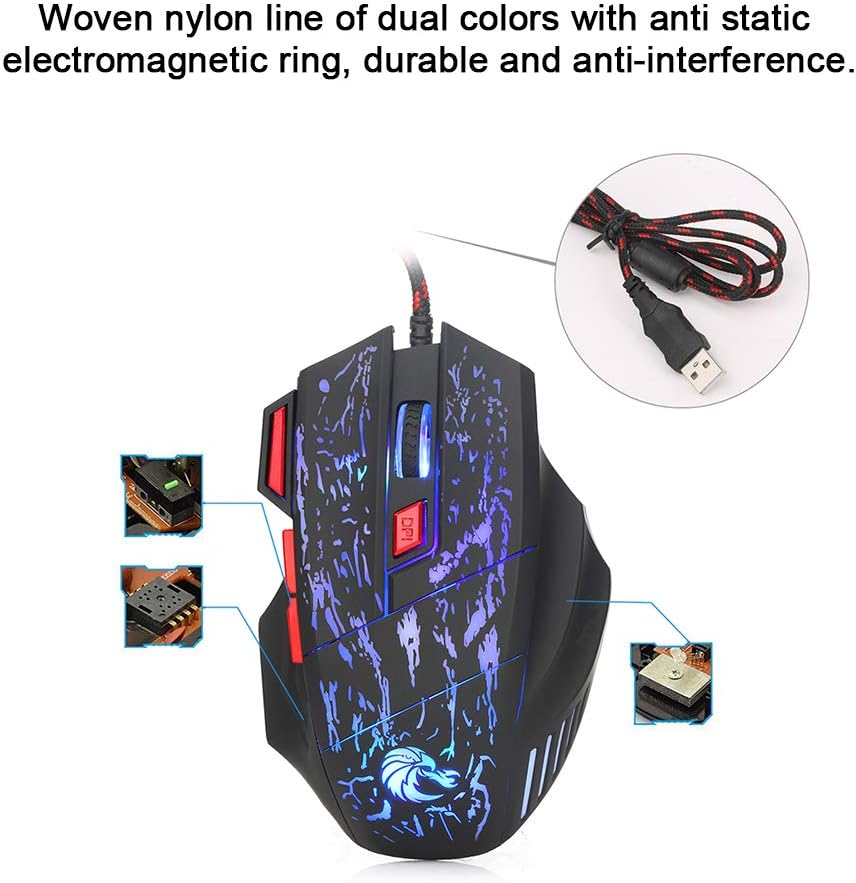
Image: The mouse's durable woven nylon cable with an anti-static electromagnetic ring, designed for reliable connection and reduced interference.
3. Kullanım Talimatları
The HXSJ H300 mouse features 7 buttons for various functions and adjustable sensitivity.
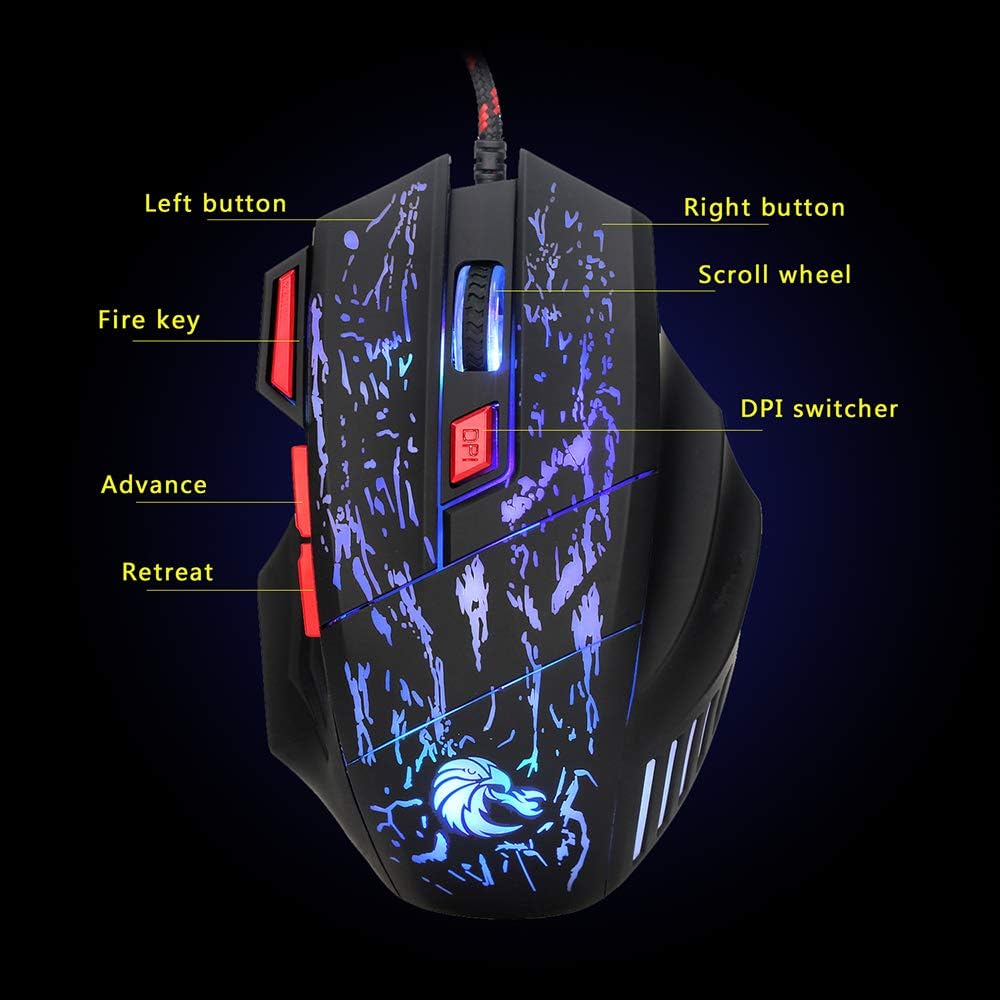
Image: Diagram illustrating the layout and labeling of the seven buttons on the Docooler HXSJ H300 gaming mouse.
Düğme Fonksiyonları:
- Sol Tuş: Standart sol tıklama fonksiyonu.
- Sağ Buton: Standart sağ tıklama fonksiyonu.
- Kaydırma tekerleği: İçeriği yukarı veya aşağı kaydırır. Ayrıca orta tıklama işlevi için basılabilir.
- DPI Değiştirici: Cycles through the 5 adjustable DPI settings (1000/1600/2400/3200/5500 DPI). Press to change sensitivity.
- Ateş Anahtarı: Provides a rapid triple-click action, useful in gaming.
- Advance (Forward): İleriye doğru gezinir web tarayıcılar veya file kaşifler.
- Retreat (Back): Geriye doğru gezinir web tarayıcılar veya file kaşifler.
DPI Ayarı:
The mouse offers 5 levels of DPI (Dots Per Inch) sensitivity. Press the DPI Switcher button, located behind the scroll wheel, to cycle through the available settings. Each press will change the mouse's tracking speed, allowing you to select the optimal sensitivity for your task or game.
Nefes Alan Işık Efekti:
The mouse features a dynamic 7-color breathing light effect that automatically cycles through colors. This provides visual feedback and enhances the aesthetic appeal during use.

Image: The mouse showcasing its vibrant breathing light feature, cycling through multiple colors.
4. Bakım
Doğru bakım, oyun farenizin uzun ömürlü olmasını ve optimum performans göstermesini sağlar.
- Temizlik: Farenin yüzeyini silmek için yumuşak ve kuru bir bez kullanın. İnatçı kirler için hafifçe silin.ampBezi su veya hafif, aşındırıcı olmayan bir temizleyiciyle silin. Sert kimyasallar veya aşındırıcı malzemeler kullanmaktan kaçının.
- Sensör Bakımı: Doğru izlemeyi sağlamak için farenin alt kısmındaki optik sensörü temiz ve tozdan veya kalıntılardan uzak tutun.
- Kablo yönetimi: USB kablosunun hasar görmesini önlemek için keskin bükümlerden veya aşırı çekmelerden kaçının.
- Depolamak: Uzun süre kullanılmadığı zamanlarda fareyi temiz, kuru bir ortamda, doğrudan güneş ışığından ve aşırı sıcaklıklardan uzakta saklayın.
5. Sorun Giderme
If you encounter issues with your Docooler HXSJ H300 gaming mouse, refer to the following common solutions:
| Sorun | Olası Neden | Çözüm |
|---|---|---|
| Mouse not responding / No light | Gevşek USB bağlantısı, arızalı USB portu, sürücü sorunu. |
|
| Yanlış izleme / İmleç düzensiz | Kirli optik sensör, uygun olmayan mousepad yüzeyi. |
|
| DPI ayarı değişmiyor | Button not pressed correctly, temporary software glitch. |
|
6. Özellikler
Detailed technical specifications for the Docooler HXSJ H300 Gaming Mouse:
| Marka | Docooler |
| Örnek | HXSJ H300 |
| Anahtar Miktarı | 7 |
| Çözünürlük (DPI) | 1000, 1600, 2400, 3200, 5500 (Ayarlanabilir) |
| Anahtar Hayat | 10 milyon tıklama |
| Cilttage Rating / Current | DC 5V / 100mA |
| USB Sürümü | 2.0 |
| Düğmeler | Sol, Sağ, Fare Tekerleği, DPI, Ateşleme Tuşu, İleri, Geri |
| Işık Etkisi | Renkli Nefes Alan Işık |
| Uyumluluk | Windows 7 / 8 / 10 / 2000 / XP / Vista, Mac OS veya en yeni sürümler |
| Renk | Black + Red accents |
| Malzeme | ABS |
| Kablo Uzunluğu | 140 cm |
| Ürün Boyutları (U*G*Y) | 13.0 * 8.5 * 4.0 cm |
| Ürün Ağırlığı | 139.0 gr |

Image: Technical drawing of the Docooler HXSJ H300 gaming mouse with key dimensions (length, width, height) indicated.
7. Garanti ve Destek
For warranty information and technical support, please refer to the documentation provided with your purchase or contact Docooler customer service.
While specific warranty details are not provided in this manual, Docooler products typically come with a standard manufacturer's warranty covering defects in materials and workmanship. Please retain your proof of purchase for any warranty claims.
For further assistance, visit the official Docooler websiteyi ziyaret edin veya destek kanallarıyla iletişime geçin.


