1. Ürün Bittiview
The Sigma 18-35mm f/1.8 DC HSM Art Lens for Canon EF is a high-performance lens designed for APS-C format cameras. It features a constant f/1.8 maximum aperture, making it suitable for low-light photography and achieving shallow depth of field. This bundle includes essential accessories to enhance your photography experience.
Temel Özellikler:
- Bright f/1.8 constant maximum aperture for stellar low-light shots.
- Part of Sigma's esteemed Art line, ideal for creative applications.
- Wide-to-normal zoom catering to APS-C Canon EF-mount cameras, with a 28.8-56mm equivalent focal length range.
- Employs Five Special Low Dispersion (SLD) elements for reduced chromatic aberrations.
- Four aspherical elements ensuring limited distortion and heightened sharpness.
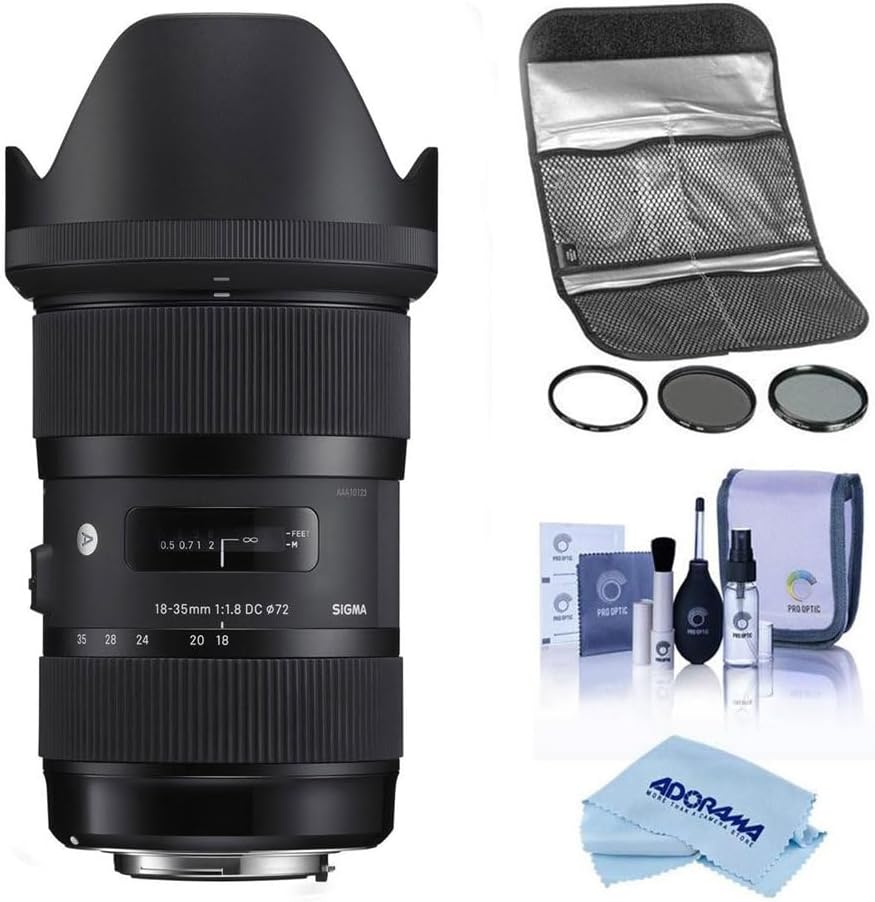
Image 1: The Sigma 18-35mm f/1.8 DC HSM Art Lens bundled with a Hoya 72mm Filter Kit II, a comprehensive cleaning kit, and a microfiber cleaning cloth.
2. Paket İçeriği
Paketinizde tüm öğelerin mevcut olduğundan emin olun:
- Sigma 18-35mm f/1.8 DC HSM Art Lens
- Lens Kapağı
- Ön Lens Kapağı
- Arka Lens Kapağı
- Hoya 72mm Filter Kit II (UV, CPL, ND filters)
- Lens Filter Pouch
- Pro Optic Cleaning Kit (Lens cleaning fluid, lens brush, air blower, lens tissues)
- Mikrofiber Temizlik Bezi
3. Kurulum
3.1 Lensin Takılması
- Kameranızın kapalı olduğundan emin olun.
- Remove the rear lens cap from the Sigma lens and the body cap from your Canon EF-mount camera.
- Align the red index mark on the lens barrel with the red index mark on your camera's lens mount.
- Lensi kamera yuvasına yerleştirin ve yerine oturana kadar saat yönünde çevirin. Lensi zorlamayın.
- Objektif kapağını, üzerindeki işareti objektifin önündeki işaretle hizalayarak ve kilitlenene kadar çevirerek takın.
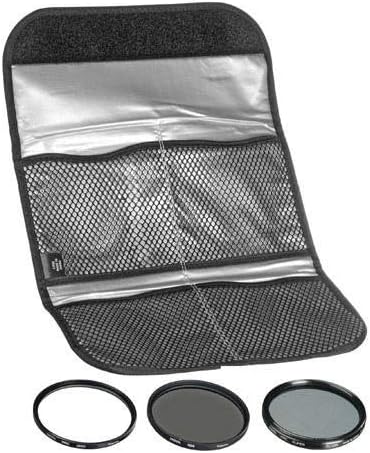
Image 2: The rear of the Sigma 18-35mm lens, showing the Canon EF mount for attachment to the camera body.
3.2 Installing Filters
The Hoya 72mm Filter Kit II includes UV, Circular Polarizer (CPL), and Neutral Density (ND) filters. These can be screwed onto the front of the lens.
- Carefully remove the lens cap.
- Gently screw the desired 72mm filter onto the front thread of the lens until it is secure. Do not overtighten.
- For the CPL filter, rotate the outer ring to adjust the polarization effect.

Image 3: The Hoya 72mm Filter Kit II, including UV, CPL, and ND filters, stored in a protective pouch.
4. Objektifin Kullanımı
4.1 Focus Modes (AF/MF)
The lens features a switch to select between Autofocus (AF) and Manual Focus (MF).
- Anahtarı şuna ayarlayın: AF for automatic focusing. The camera will control the focus.
- Anahtarı şuna ayarlayın: MF for manual focusing. Rotate the focus ring on the lens to adjust focus manually.

Image 4: The side of the Sigma 18-35mm lens, highlighting the AF/MF focus mode switch.
4.2 Yakınlaştırma
Rotate the zoom ring on the lens to adjust the focal length between 18mm (wide-angle) and 35mm (standard).

Image 5: The Sigma 18-35mm lens, showing the zoom and focus rings.
4.3 Diyafram
This lens features a constant f/1.8 maximum aperture across its entire zoom range. This wide aperture allows for excellent performance in low-light conditions and provides significant control over depth of field, enabling subjects to stand out against blurred backgrounds.
Not: This lens does not include built-in image stabilization. For video recording or in very low light conditions, using a tripod is recommended to minimize camera shake.
5. Bakım
5.1 Cleaning the Lens and Accessories
Regular cleaning helps maintain the optical performance and longevity of your lens and filters. Use the included Pro Optic Cleaning Kit and microfiber cloth.
- Use the air blower to remove loose dust and debris from the lens and filter surfaces.
- For stubborn dust or smudges, use the lens brush gently.
- Apply a small amount of lens cleaning fluid to a clean lens tissue or the microfiber cloth, then gently wipe the lens surface in a circular motion. Avoid applying fluid directly to the lens.
- Ensure the lens and filters are dry before reattaching caps or storing.

Image 6: The Pro Optic Cleaning Kit, including lens cleaning fluid, a lens brush, and an air blower.

Image 7: A microfiber cleaning cloth, suitable for delicate lens surfaces.
5.2 Depolama
- Objektifi kullanmadığınız zamanlarda ön ve arka objektif kapaklarını mutlaka takın.
- Lensi serin, kuru, doğrudan güneş ışığından ve aşırı sıcaklıklardan uzak bir yerde saklayın.
- If storing for extended periods, consider using a dehumidifier or desiccant to prevent mold growth.
6. Sorun Giderme
Lensinizle ilgili sorun yaşıyorsanız, aşağıdaki yaygın çözümleri göz önünde bulundurun:
- Bulanık Görüntüler:
- Check if the lens is properly attached to the camera.
- Ensure the focus mode is set correctly (AF for autofocus, MF for manual focus).
- Verify that the camera's autofocus points are correctly selected and focusing on your intended subject.
- In low light, use a tripod or increase ISO to avoid camera shake, as this lens does not have image stabilization.
- Lens Odaklanmıyor:
- Confirm the AF/MF switch on the lens is set to AF.
- Hem objektifin hem de kamera gövdesinin elektrik kontaklarını temiz, kuru bir bezle temizleyin.
- Otomatik odaklama sisteminin etkili bir şekilde çalışması için yeterli ışık olduğundan emin olun.
- Dust or Spots on Images:
- Clean the front and rear elements of the lens using the provided cleaning kit.
- Check your camera's sensor for dust. Refer to your camera's manual for sensor cleaning procedures or consult a professional.
7. Özellikler
| Özellik | Detay |
|---|---|
| Marka | Sigma |
| Model Numarası | 18-35mm F/1.8 |
| Odak Uzaklığı | 18-35 milimetre |
| Maksimum Diyafram | f/1.8 |
| Lens Türü | Standard, Wide Angle |
| Uyumlu Montajlar | CanonEF |
| Ürün Boyutları | 7.1 x 4.8 x 4.7 inç |
| Ürün Ağırlığı | 3.51 pound |
| ASIN | B083B6DF9B |
| İlk Mevcut Tarih | 31 Aralık 2019 |
8. Garanti ve Destek
This Sigma lens is backed by Sigma's full factory warranty and repair services. For specific warranty details and service inquiries, please refer to the official Sigma website or contact an authorized Sigma dealer.
Satın alasing from an authorized dealer ensures you receive genuine Sigma products and access to official support.
Video 1: Information regarding purchasing from an authorized Sigma dealer and warranty details.


