giriiş
This manual provides essential information for setting up, operating, maintaining, and troubleshooting your Acer Aspire XC-886 desktop personal computer. Please read this manual thoroughly before using your new system to ensure proper operation and to maximize its lifespan.
Paket İçeriği
Aşağıda listelenen tüm öğelerin paketinizde bulunduğundan emin olun. Herhangi bir öğe eksik veya hasarlıysa, satıcınızla iletişime geçin.
- Acer Aspire XC-886 Desktop PC
- Kablosuz Klavye
- Kablosuz Fare
- Güç Kablosu
- Belgeler (Hızlı Başlangıç Kılavuzu, Garanti Kartı)
- McAfee Internet Security (3-year physical card)
Kurmak
Follow these steps to set up your Acer Aspire XC-886 desktop PC.
1. Çevre Birimlerini Bağlayın
- Monitörü Bağla: Use an HDMI or D-Sub cable to connect your monitor to the corresponding port on the rear of the desktop. The system has two HDMI ports and one D-Sub port.
- Klavye ve Fareyi Bağlayın: Insert the wireless receiver for your keyboard and mouse into an available USB port. Both USB 2.0 and USB 3.1 Gen 1 ports are available on the front and rear of the system.
- Gücü bağlayın: Plug the power cord into the power connector on the rear of the desktop, then plug the other end into a power outlet.
- Opsiyonel Bağlantılar:
- Ağ: For a wired connection, connect an Ethernet cable to the LAN port on the rear. For wireless, the system supports 802.11ac Wi-Fi and Bluetooth.
- Ses: Connect speakers or headphones to the audio jacks on the front or rear.
- USB Cihazları: Connect other USB devices (e.g., external hard drives, printers) to the available USB ports. The front panel includes one USB 3.1 Gen 1 port and one USB Type-C port. The rear panel has two USB 3.1 Gen 1 ports and four USB 2.0 ports.

Şekil 1: Ön view of the Acer Aspire XC-886 desktop PC, showing the optical drive, card reader, USB ports (including Type-C), and audio jacks.
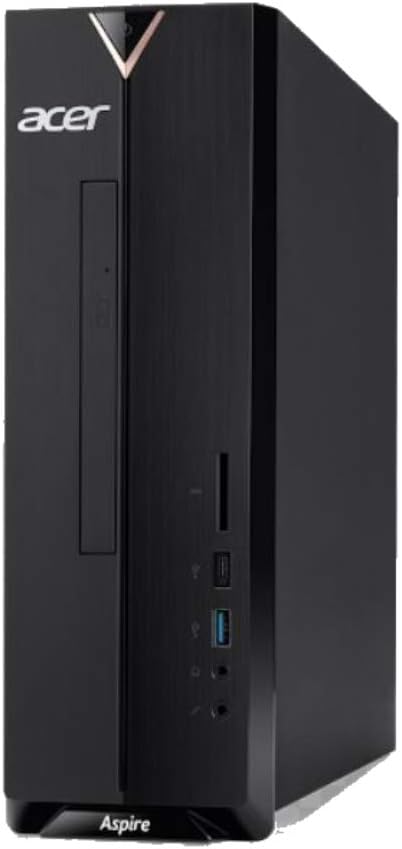
Şekil 2: Sağ taraf view of the Acer Aspire XC-886 desktop PC, illustrating the compact tower form factor and side panel design.
2. Güç Açık
Press the power button located on the top front of the desktop to turn on the system. The power indicator light will illuminate.
3. Initial Operating System Setup
Bilgisayarınız ilk açıldığında, Windows 10 Home kurulum sürecinde size yol gösterilecektir. Dilinizi, bölgenizi, ağ ayarlarınızı ve kullanıcı hesabınızı yapılandırmak için ekrandaki yönergeleri izleyin.
Kullanım Talimatları
This section covers basic operation of your desktop PC.
Gücü Açma/Kapama ve Yeniden Başlatma
- Açmak İçin: Ön paneldeki güç düğmesine basın.
- Kapatmak için: Windows'ta Başlat düğmesine tıklayın, ardından Güç > Kapat'ı seçin.
- Yeniden başlatmak: Windows'ta Başlat düğmesine tıklayın, ardından Güç > Yeniden Başlat'ı seçin.
- Uyumak: Windows'ta Başlat düğmesine tıklayın, ardından Güç > Uyku'yu seçin.
Using the DVD Writer
The integrated DVD writer allows you to read and write CDs and DVDs. Press the eject button on the drive to open the tray, place your disc, and gently push the tray back in.
İnternete bağlanma
- Kablolu Bağlantı: Connect an Ethernet cable from your router or modem to the LAN port on the rear of the desktop.
- Kablosuz Bağlantı: Windows 10 will automatically detect available Wi-Fi networks. Click the network icon in the taskbar, select your desired network, and enter the password if prompted.
Using USB Ports and Card Reader
Connect USB devices such as flash drives, external hard drives, or printers to any available USB port. The integrated card reader on the front panel supports various memory card formats for easy data transfer.
Bakım
Proper maintenance helps ensure the longevity and optimal performance of your desktop PC.
- Temiz Tutun: Regularly clean the exterior of the desktop with a soft, dry cloth. Ensure ventilation openings are free from dust and obstructions to prevent overheating.
- Yazılım Güncellemeleri: Keep your Windows operating system and drivers updated. Windows Update can be accessed via Settings > Update & Security.
- Antivirüs Koruması: Utilize the included McAfee Internet Security to protect your system from malware and viruses. Ensure its definitions are regularly updated.
- Veri Yedekleme: Veri kaybını önlemek için önemli verilerinizi düzenli olarak harici bir sürücüye veya bulut depolama alanına yedekleyin.
- Çevresel Koşullar: Operate the desktop in a well-ventilated area, away from direct sunlight, heat sources, and excessive moisture.
Sorun giderme
If you encounter issues with your desktop, try these basic troubleshooting steps.
- Güç Yok:
- Ensure the power cord is securely connected to both the desktop and the power outlet.
- Başka bir cihazı takarak elektrik prizinin çalışır durumda olduğunu doğrulayın.
- Görüntü yok:
- Check that the monitor is powered on and its video cable is securely connected to the desktop.
- Monitörünüzde doğru giriş kaynağının seçildiğinden emin olun.
- Klavye/Fare Yanıt Vermiyor:
- For wireless devices, check battery levels and ensure the wireless receiver is properly inserted into a USB port.
- Alıcıyı farklı bir USB bağlantı noktasına bağlamayı deneyin.
- İnternet bağlantısı yok:
- Kablolu bağlantılar için Ethernet kablosunun ve yönlendirici/modemin durumunu kontrol edin.
- For wireless connections, ensure Wi-Fi is enabled in Windows and you are connected to the correct network with the correct password.
- Restart your router/modem and the desktop.
- Sistem Yavaşlaması:
- Gereksiz uygulamaları kapatın.
- Virüsten koruma yazılımınızla tam sistem taraması yapın.
- Bekleyen Windows güncelleştirmelerini kontrol edin ve yükleyin.
If these steps do not resolve your issue, please refer to the Acer support website veya müşteri hizmetleriyle iletişime geçin.
Özellikler
Detailed technical specifications for the Acer Aspire XC-886 desktop PC.
| Özellik | Detay |
|---|---|
| Model Numarası | i594MR81TS73 |
| İşlemci | 9th Gen Intel Core i5-9400 (up to 4.1GHz, 9MB cache) |
| İşletim Sistemi | Windows 10 Home (64 bit) |
| Veri deposu | 8GB DDR4 RAM |
| Depolamak | 1TB PCIe NVMe SSD |
| Grafikler | NVIDIA GeForce GT 730, 2GB GDDR3 RAM |
| Optik Sürücü | DVD Yazıcı |
| Kablosuz Bağlantı | Integrated AC Wireless LAN (802.11ac), Bluetooth |
| Front/Side I/O Ports |
|
| Arka G/Ç Bağlantı Noktaları |
|
| Form Faktörü | Kule |
| Ebatlar (Paket) | 49.8x40.8x17.4 cm |
| Ağırlık (Paket) | 5.9 kilo |
| Cilttage | 220 Volt |
Garanti ve Destek
Your Acer Aspire XC-886 desktop PC comes with a 1-year On-site Local Singapore WarrantyBu garanti, normal kullanım koşulları altında üretim hatalarını ve donanım arızalarını kapsar.
For technical support, warranty claims, or service inquiries, please visit the official Acer support website or contact Acer customer service in Singapore. Keep your proof of purchase for warranty validation.
Acer Desteği Webalan: https://www.acer.com/sg-en/support


