giriiş
Thank you for choosing the Tracer Roadster 4 in 1 Steering Wheel. This manual provides detailed instructions for setting up, operating, maintaining, and troubleshooting your new racing wheel. Please read this manual thoroughly before use to ensure optimal performance and longevity of your device.
The Tracer Roadster 4 in 1 Steering Wheel is designed for an immersive gaming experience, compatible with various platforms including PlayStation 4 and Windows PC. It features a responsive steering wheel, integrated shifter, and a pedal set for realistic control.
Paket İçeriği
- Tracer Roadster 4 in 1 Steering Wheel
- Pedal Seti
- Kullanım Kılavuzu (bu belge)
Kurulum Kılavuzu
PlayStation 4'e (PS4) bağlanmak
- Connect the steering wheel's USB cable to an available USB port on your PS4 console.
- Power on your PS4 console. The red LED on the steering wheel will illuminate, indicating power.
- Connect the steering wheel to your PS4 controller using a microUSB cable (not included). This step is crucial for authentication.
- Basın EV button on the steering wheel. The green LED will illuminate, indicating successful connection and readiness for use.
Bilgisayara bağlanma (Windows)
- Connect the steering wheel's USB cable to an available USB port on your Windows PC.
- The system should automatically detect and install the necessary drivers. If not, please refer to the manufacturer's webSürücü indirme sitesi.
- Once drivers are installed, the steering wheel will be ready for use with compatible PC racing games.

Figure 1: The Tracer Roadster 4 in 1 Steering Wheel, including the main wheel unit, integrated shifter, and separate pedal set. This image shows the complete setup ready for connection.
Kullanım Talimatları
Direksiyon Kontrolleri
The steering wheel features a full range of motion for precise control in racing games. It includes various buttons and a D-pad for in-game navigation and actions, mimicking a standard game controller layout.
- Yön Tuş Takımı (D-Pad): For menu navigation and specific in-game controls.
- Action Buttons (X, Circle, Square, Triangle / A, B, X, Y): Standart oyun aksiyon tuşları.
- L1/R1, L2/R2 Buttons: Shoulder buttons, often used for shifting gears or other actions.
- Ana menü tuşu: PS4 system menu access.
- PROG Düğmesi: For programming specific functions (refer to game-specific instructions).
- Dokunmatik yüzey: Integrated touchpad for additional control options, especially on PS4.
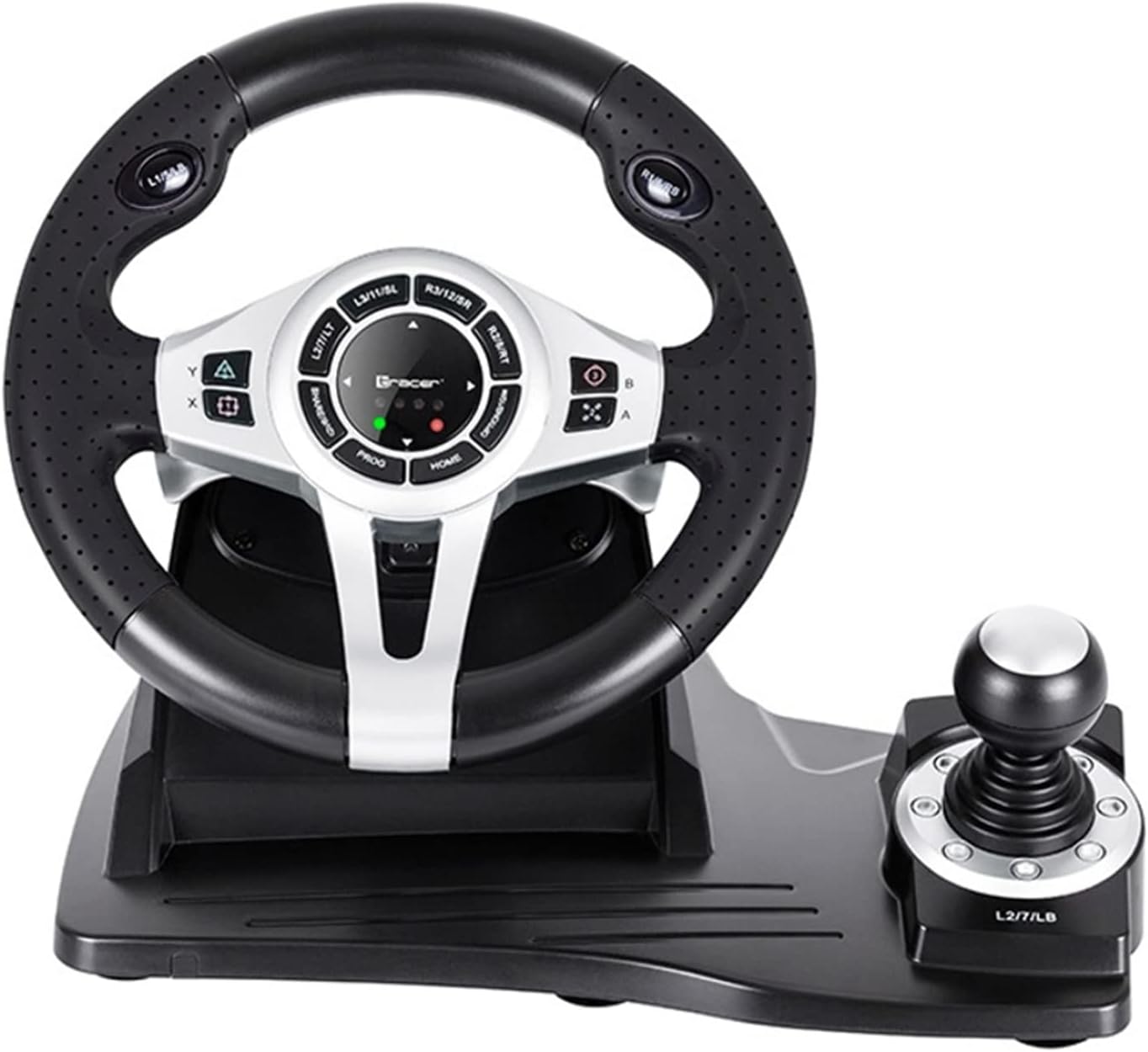
Şekil 2: Ayrıntılı view of the central control panel on the steering wheel, showing the various buttons, D-pad, and indicator lights. The integrated shifter is visible to the right.
Pedal Seti
The separate pedal set includes an accelerator and brake pedal for realistic driving simulation. Ensure the pedal set is placed on a stable surface to prevent slipping during intense gameplay.

Figure 3: The standalone pedal unit, featuring both accelerator and brake pedals. The textured base provides grip to prevent movement during use.
Bakım ve Özen
- Temizlik: Use a soft, dry cloth to clean the surface of the steering wheel and pedals. For stubborn dirt, a slightly damp Bez kullanılabilir, ancak iç bileşenlere nem girmemesine dikkat edin.
- Depolamak: Kullanmadığınız zaman, cihazı doğrudan güneş ışığından ve aşırı sıcaklıklardan uzakta, serin ve kuru bir yerde saklayın.
- Sıvılardan Kaçının: Cihazı suya veya diğer sıvılara maruz bırakmayın.
- Dikkatli Kullanın: Cihazı düşürmekten veya güçlü darbelere maruz bırakmaktan kaçının.
Sorun giderme
| Sorun | Olası Neden | Çözüm |
|---|---|---|
| Steering wheel not recognized by PS4. | Incorrect connection or authentication issue. | Ensure the steering wheel's USB cable is securely connected to the PS4. Verify the microUSB cable connection between the steering wheel and the PS4 controller. Press the EV direksiyon simidindeki düğme. |
| No response from steering wheel on PC. | Drivers not installed or USB port issue. | Try a different USB port. Check Device Manager for driver status. Reinstall drivers if necessary from the manufacturer's webalan. |
| LED göstergeleri yanmıyor. | No power or connection issue. | Ensure the USB cable is firmly connected to the console/PC. Check if the console/PC is powered on. |
| Pedallar tepki vermiyor. | Loose connection to the steering wheel. | Verify that the pedal unit's cable is securely plugged into the steering wheel base. |
Özellikler
| Özellik | Detay |
|---|---|
| Marka | İzleyici |
| Model Adı | Roadster 4 in 1 |
| Model Numarası | TRAJOY46524 |
| Bağlantı Teknolojisi | USB |
| Uyumlu Cihazlar | PlayStation 4, Windows PC |
| Denetleyici Türü | Direksiyon |
| Renk | Siyah |
| Özel Özellik | Dokunmatik yüzey |
| Düğme Sayısı | 8 (excluding D-pad and shifter controls) |
| Ürün Ağırlığı | 2 Kilogram |
| Ürün Boyutları (U x G x Y) | 2.8x24.6x16.5 cm |
Garanti ve Destek
For warranty information and technical support, please refer to the official Tracer webSiteyi ziyaret edin veya perakendecinizle iletişime geçin. Satın alma belgenizi herhangi bir garanti talebi için saklayın.
Daha fazla yardım için şu adresi ziyaret edebilirsiniz: product page on Amazon.com.be.