giriiş
This manual provides detailed instructions for the setup, operation, and maintenance of your LIGE BW0223 Smart Watch. Please read this guide thoroughly to ensure proper use and to maximize the features of your device. The LIGE BW0223 Smart Watch is designed to assist with fitness tracking, health monitoring, and smart notifications, compatible with both iOS and Android devices.
1. Kurulum
1.1 Cihazı Şarj Etme
Before initial use, fully charge your LIGE BW0223 Smart Watch. Connect the magnetic charging cable to the charging contacts on the back of the watch and plug the USB end into a standard USB power adapter (5V/1A recommended). The watch display will indicate charging status. A full charge typically takes approximately 2 hours.

The back of the LIGE Smart Watch features a magnetic charging interface and advanced optical sensors for continuous monitoring of heart rate, blood pressure, and blood oxygen levels.
1.2 Uygulama Kurulumu ve Eşleştirme
- Yardımcı uygulamayı indirin: Scan the QR code provided in the watch packaging or search for the designated companion app (e.g., 'FitPro' or 'LIGE Smart') in your smartphone's app store (App Store for iOS, Google Play Store for Android).
- Bluetooth'u etkinleştir: Akıllı telefonunuzda Bluetooth'un etkinleştirildiğinden emin olun.
- Uygulamayı açın: Launch the installed app and follow the on-screen instructions to create an account or log in.
- Saati eşleştirin: Within the app, navigate to the device management section (often labeled 'Device', 'My Device', or 'Add Device'). The app will search for available Bluetooth devices. Select 'BW0223' or 'LIGE Smart Watch' from the list to initiate pairing. Confirm the pairing request on both your phone and the watch if prompted.
1.3 Başlangıç Ayarları
After successful pairing, complete your personal profile within the app, including gender, age, height, and weight. This information helps improve the accuracy of fitness and health data. You can also set preferences for units of measurement (metric/imperial) and time format (12/24-hour).
2. Kullanım Talimatları
2.1 Görüntüleme ve Gezinme
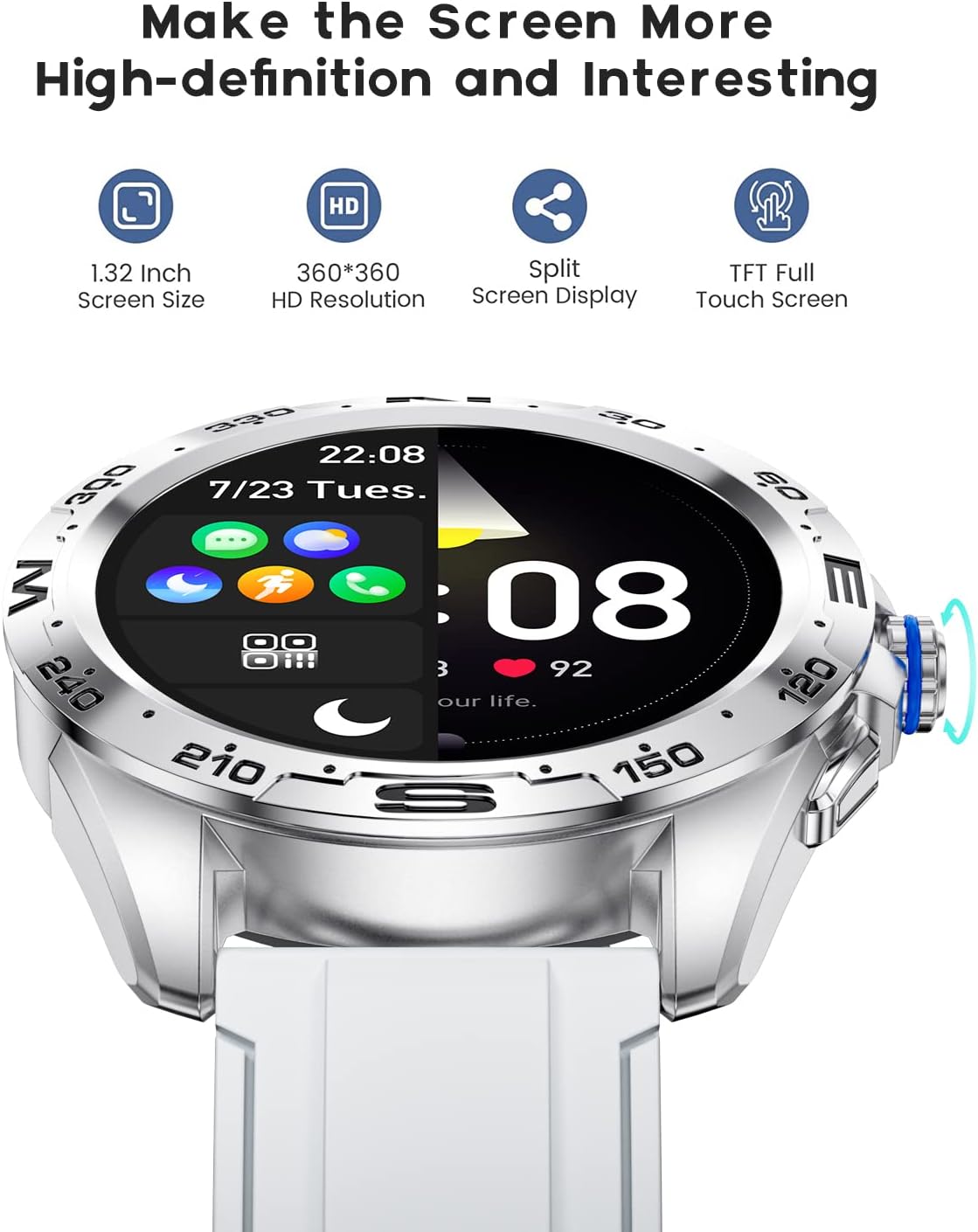
The LIGE BW0223 Smart Watch features a 1.28-inch full touch screen with 360x360 HD resolution. Navigate the watch interface using touch gestures:
- Yukarı/Aşağı Kaydırma: Menüler veya bildirimler arasında gezinin.
- Sola/Sağa Kaydır: Hızlı işlevlere veya farklı veri ekranlarına erişin.
- Musluk: Bir öğeyi seçin veya bir eylemi onaylayın.
- Yan Düğmeye Basın: Ana ekrana dönün veya cihazı açıp kapatın.

The LIGE Smart Watch features a 1.28-inch full touch screen with 360x360 HD resolution, offering clear visuals and responsive interaction. It supports a split-screen display for quick access to functions.
2.2 Spor Modu
The watch supports 7 sports modes, including walking, running, cycling, and climbing. To access:
- Swipe on the watch face to find the 'Sports' or 'Workout' icon.
- Tap to select your desired activity.
- Tap 'Start' to begin tracking. The watch will record duration, steps, calories burned, and distance.
- To end a workout, swipe right or press the side button, then select 'End' or 'Pause'.
2.3 Sağlık İzleme
The LIGE BW0223 Smart Watch provides 24/7 heart rate tracking, blood pressure, and blood oxygen monitoring. These measurements are for reference only and should not be used for medical diagnosis.
- Kalp Atış Hızı: Kalp atış hızı arayüzüne kaydırmak için view your current heart rate. The watch continuously monitors your heart rate throughout the day.
- Kan Basıncı/Kan Oksijen Seviyesi: Swipe to the respective interfaces and tap to initiate a measurement. Ensure the watch is snug on your wrist for accurate readings.
- Uyku İzleme: Wear the watch to bed, and it will automatically track your sleep patterns, including deep sleep, light sleep, and wake-up times. View Eşlik eden uygulamada ayrıntılı uyku verileri.
2.4 Bluetooth Aramaları
After pairing your watch with the app and enabling the Bluetooth call function (usually a separate Bluetooth connection in your phone's settings, e.g., 'BW0223_CALL'), you can make and receive calls directly from your watch.
- Arama Yapma: Access the 'Dialer' or 'Contacts' function on your watch to dial a number or select a contact.
- Çağrı Alma: Bir arama geldiğinde, saatiniz arayan kimliğini görüntüler. Cevaplamak için yeşil simgeye, reddetmek için kırmızı simgeye dokunun.
- Saat, eller serbest iletişim için dahili bir mikrofon ve hoparlöre sahiptir.

With the LIGE Smart Watch, you can make and receive Bluetooth calls directly from your wrist. It includes a built-in microphone and speaker for convenient communication.
2.5 Mesaj Bildirimleri
Enable message notifications through the companion app to receive alerts for SMS, calls, and various social media applications (e.g., Facebook, Twitter, WhatsApp, LinkedIn, Instagram) directly on your watch.
- Ensure the app has necessary permissions to access notifications on your smartphone.
- Configure which apps send notifications to your watch within the companion app settings.
- Saat kadranını aşağı doğru kaydırın view son bildirimler.

The LIGE Smart Watch provides call and message reminders, displaying notifications from SMS, Facebook, Twitter, WhatsApp, LinkedIn, and Instagram directly on your wrist.
ASLA Özelleştirme
Personalize your watch by changing watch faces. Many options are available directly on the watch or through the companion app.
- Nöbette: Long-press the watch face, then swipe left or right to browse available faces. Tap to select.
- Uygulama aracılığıyla: Open the companion app, navigate to 'Dial Market' or 'Watch Faces' to explore and download additional designs.
Personalize your LIGE Smart Watch with a variety of customizable watch faces and a rich user interface. Choose from different styles to match your preference and occasion.
3. Bakım
3.1 Saatin Temizlenmesi
Regularly clean your watch to ensure optimal performance and hygiene. Use a soft, lint-free cloth to wipe the screen and watch body. For stubborn dirt, slightly dampen the cloth with water. Avoid using harsh chemicals, abrasive materials, or strong detergents.
3.2 Suya Dayanıklılık (IP68)
The LIGE BW0223 Smart Watch is IP68 waterproof, meaning it is resistant to dust and can withstand immersion in water up to 1.5 meters for 30 minutes. It is suitable for daily use, such as hand washing, rain, and splashes.
Önemli Sınırlamalar:
- Do not wear the watch in hot showers, saunas, or steam rooms, as steam and hot water can compromise the seals.
- Avoid diving or high-pressure water activities.
- Do not operate buttons or the touchscreen underwater.
- If the watch gets wet, dry it thoroughly before charging or operating.
3.3 Pil Bakımı
Pil ömrünü uzatmak için:
- Aşırı sıcaklıklardan kaçının.
- Saatinizi düzenli olarak şarj edin, ancak uzun süre tamamen boşta bırakmaktan kaçının.
- Reduce screen brightness and disable unnecessary notifications or features if battery life is a concern.
4. Sorun Giderme
4.1 Saat Açılmıyor veya Şarj Olmuyor
- Şarj kablosunun hem saate hem de güç kaynağına güvenli bir şekilde bağlı olduğundan emin olun.
- Verify the power adapter and USB port are functional.
- Saatin ve şarj kablosunun şarj temas noktalarını toz ve kirden arındırmak için temizleyin.
- Allow the watch to charge for at least 30 minutes before attempting to power it on.
4.2 Bluetooth Bağlantı Sorunları
- Akıllı telefonunuzda ve saatinizde Bluetooth'un etkin olduğundan emin olun.
- Keep the watch within the Bluetooth range of your smartphone (typically 10 meters).
- Hem akıllı telefonunuzu hem de saatinizi yeniden başlatın.
- Unpair the watch from your phone's Bluetooth settings and re-pair it through the companion app.
- Ensure the companion app is running in the background and has necessary permissions.
4.3 Bildirimler Çalışmıyor
- Verify the watch is successfully paired with the companion app.
- Check notification settings within the companion app to ensure desired apps are enabled.
- Ensure your smartphone's notification access is granted to the companion app (check phone settings: Apps & notifications > Special app access > Notification access).
- Telefonunuzda ve saatinizde 'Rahatsız Etme' modunu devre dışı bırakın.
4.4 Yanlış Sağlık Ölçümleri
- Saatin bileğinize sıkıca oturduğundan, bilek kemiğinden yaklaşık bir parmak genişliğinde uzaklıkta olduğundan emin olun.
- Sensörü temiz tutun ve ter veya kirden arındırın.
- En iyi sonucu elde etmek için ölçümler sırasında hareketsiz kalın.
- Remember that health data from smartwatches is for reference and not intended for medical use.
5. Özellikler
| Model Numarası | BW0223 |
| Marka | LİGE |
| Ekran Boyutu | 1.28 inç |
| İnsan Arayüzü Girişi | Dokunmatik ekran |
| Bağlantı Teknolojisi | Bluetooth |
| Suya Dayanıklılık Derecesi | IP68 |
| Pil Türü | Lityum Polimer |
| Şekil | Yuvarlak |
| Ürün Ağırlığı | 7 ons |
6. Garanti Bilgileri
The LIGE BW0223 Smart Watch comes with a standard limited warranty against manufacturing defects. The warranty period typically covers 12 months from the date of purchase. This warranty does not cover damage caused by misuse, accidents, unauthorized modifications, or failure to follow the instructions in this manual. Please retain your proof of purchase for warranty claims.
7. Müşteri Desteği
If you encounter any issues or have questions not covered in this manual, please contact LIGE customer support. Refer to the contact information provided with your product packaging or visit the official LIGE webyardım için site.