giriiş
This manual provides essential information for the safe and efficient operation of your Prolink PRO851SFCU 850VA Line Interactive Uninterruptible Power Supply (UPS). This UPS system features PROLiNK’s Super-Fast Charging technology, designed to provide stable backup power for home and small office applications. It includes an integrated 3-Step Automatic Voltage Regulation (AVR) system to protect connected devices from voltage dalgalanmalar.
Güvenlik Bilgileri
Kurulum ve çalıştırmadan önce lütfen tüm güvenlik talimatlarını dikkatlice okuyun. Bu talimatlara uyulmaması elektrik çarpmasına, yangına veya ciddi yaralanmalara neden olabilir.
- UPS kutusunu açmayın.asing. İçeride kullanıcı tarafından onarılabilecek parça bulunmamaktadır. Bakım işlemlerini yetkili servis personeline yaptırın.
- UPS cihazını doğrudan güneş ışığına, ısı kaynaklarının yakınına veya aşırı toz, nem veya aşındırıcı maddelerin bulunduğu ortamlara kurmayın.
- Kesintisiz güç kaynağının topraklı bir AC elektrik prizine bağlı olduğundan emin olun.
- Do not connect appliances that could overload the UPS, such as laser printers, vacuum cleaners, or hair dryers, to the battery backup outlets.
- Yangın durumunda kuru kimyasal yangın söndürücü kullanın. Su elektrik çarpmasına neden olabilir.
- The battery inside the UPS is not user-replaceable. Contact qualified service personnel for battery replacement.
Ürün Bittiview
The Prolink PRO851SFCU UPS provides reliable power protection and backup for your electronic devices. Key features include:
- Super-Fast Charging Technology: Recharges the battery to 90% capacity within 2-4 hours.
- 3-Step Automatic Voltage Yönetmelik (AVR): Features 2 boosts and 1 buck to regulate output voltage, preventing undervoltage brownouts and overvoltage dalgalanmalar.
- Üniversal Prizler: Provides compatibility with a wide range of devices.
- Yazılım İzleme: Includes a USB port for software monitoring and control.

Şekil 1: Ön view of the Prolink PRO851SFCU 850VA UPS, showing the power button and status indicators.
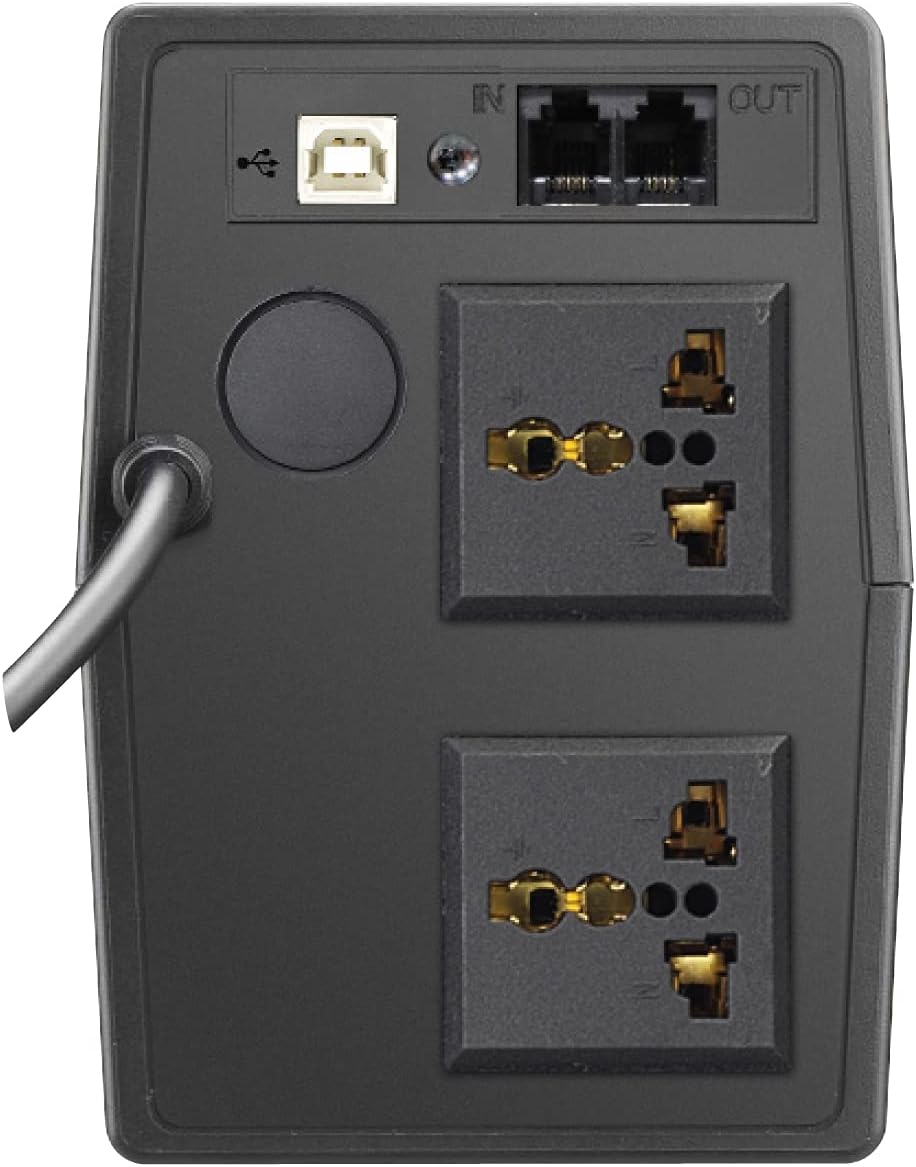
Şekil 2: Arka view of the Prolink PRO851SFCU 850VA UPS, highlighting the USB port, RJ11 ports, and universal output sockets.

Figure 3: Diagram illustrating key features of the Prolink PRO851SFCU 850VA UPS, including Super Fast Charging, Wide Input Voltage, Overload Protection, Over Temperature Protection, Surge Protection, Early Shutdown Warning System, and Universal Socket.

Figure 4: Detailed specifications table for the Prolink PRO851SFCU 850VA UPS, covering capacity, input/output, battery, protection, monitoring, interface, and physical attributes.
Kurmak
- Paketin açılması: Carefully unpack the UPS and inspect it for any shipping damage. Keep the packaging materials for future transport or storage.
- Atama: Place the UPS in a well-ventilated area, away from direct sunlight, heat, dust, and moisture. Ensure adequate clearance around the unit for proper airflow.
- İlk Şarj: Before initial use, connect the UPS to a standard AC power outlet and allow it to charge for at least 8 hours to ensure optimal battery performance. The UPS will charge whether it is turned on or off.
- Bağlantı Cihazları:
- Connect your computer, monitor, and other critical electronic devices to the UPS's battery backup outlets. These outlets provide power during outagee.
- For devices that do not require battery backup but need surge protection, use the surge-only outlets (if available on your model).
- USB Bağlantısı (Opsiyonel): Connect the provided USB cable from the UPS to your computer for software monitoring and automatic shutdown capabilities.
- RJ11 Connection (Optional): Connect your modem/fax line to the RJ11 ports for surge protection of your telephone/network line.
Kullanım Talimatları
UPS'yi Açma
Press and hold the power button for approximately 2 seconds until you hear a beep. The UPS will perform a self-test, and the indicators will light up.
UPS'in Kapatılması
Ensure all connected devices are turned off. Press and hold the power button for approximately 2 seconds until you hear a long beep. The UPS will shut down.
Pil Modu Çalışması
Bir güç kaybı sırasındatage, the UPS will automatically switch to battery mode, providing power to connected devices. An audible alarm will sound to indicate battery operation. The alarm will typically sound every 10 seconds in battery mode and every second when the battery is low.
Otomatik Sestage Yönetmelik (AVR)
The UPS continuously monitors incoming AC power. If the voltage değeri kabul edilebilir sınırların dışına çıktığında, AVR fonksiyonu çıkış ses seviyesini otomatik olarak ayarlayacaktır.tage to a safe level without switching to battery power.
Yazılım İzleme
Install the provided monitoring software (e.g., ViewPower) on your computer. This software allows you to monitor UPS status, battery level, input/output voltage, and configure automatic shutdown settings for your computer during extended power outagee.
Bakım
- Pil Bakım: To maintain optimal battery life, ensure the UPS is connected to AC power at all times. Avoid frequent deep discharges.
- Temizlik: Clean the exterior of the UPS with a soft, dry cloth. Do not use liquid or aerosol cleaners.
- Depolamak: If storing the UPS for an extended period, fully charge it, then disconnect it from AC power. Recharge the UPS every three months to prevent battery degradation.
- Pil Değişimi: The internal battery is not user-serviceable. If the battery needs replacement, contact Prolink customer support or a qualified service technician.
Sorun giderme
| Sorun | Olası Neden | Çözüm |
|---|---|---|
| UPS açılmıyor. | Battery discharged or not connected to AC power. | Ensure the UPS is plugged into a live AC outlet and allow it to charge for several hours. |
| UPS beeps continuously in battery mode. | Düşük pil uyarısı. | Save your work and shut down your computer immediately. The UPS will shut down shortly. |
| UPS aşırı yüklü. | Çok fazla cihaz bağlı veya cihazlar çok fazla güç tüketiyor. | Disconnect non-essential devices from the UPS. Check the total wattage of connected devices against the UPS capacity (850VA). |
| UPS, beklenen yedekleme süresini sağlamaz. | Pil eski veya tam şarjlı değil. | Ensure the UPS is fully charged. If the battery is old, it may need replacement by a qualified technician. |
Özellikler
| Özellik | Detay |
|---|---|
| Kapasite | 850VA |
| Giriş Voltage Aralık | 140 - 300VAC ±5% |
| Çıkış Hacmitage (AC Modu) | 230VAC ±% 10 |
| Çıkış Hacmitage (Pil Modu) | 230VAC ±% 10 |
| Transfer Süresi | 2 ms tipik |
| Pil Türü | 12V/10Ah x 1pc (Lead Acid) |
| Şarj Süresi | 2 - 4 hours to 90% capacity |
| Koruma | Short Circuit, Overload, Over-temperature, Surge Protection |
| Arayüz | USB Connector, RJ11 Ports |
| Boyutlar (D x G x Y) | 27.9D x 10.1G x 14.2Y cm |
| Ağırlık | 4.9 kilo |
Not: Teknik özellikler önceden haber verilmeksizin değiştirilebilir.
Garanti ve Destek
Your Prolink PRO851SFCU UPS comes with a standard manufacturer's warranty. Please refer to the warranty card included with your product for specific terms and conditions. For technical support, service, or warranty claims, please contact Prolink customer service through their official website veya ürün dokümantasyonunuzda sağlanan iletişim bilgileri.
For additional resources and software downloads, visit the official Prolink webalan: www.prolink2u.com


